






About Cube Sort
The first thing to know about Cube Sort is that it is not a drag-and-drop game, even though everything about it says it should be.
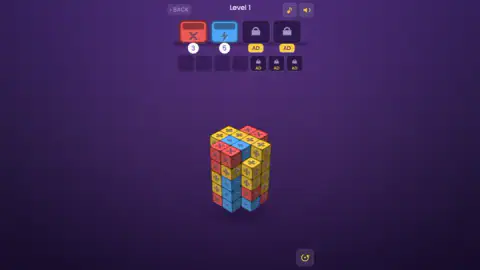
Level 1 floats a tower of patterned tiles in the middle of a purple screen. Above it sit two open buckets: a red one stamped with a cross, a blue one with a lightning bolt, each carrying a small white number. Red wants four tiles, blue wants five. The obvious move is to pick up a red tile and carry it to the red bucket.
We did that, over and over, for ten minutes. The red counter went down once.
Dragging does not carry a tile anywhere. Dragging turns the sculpture, and it turns the sculpture whether you started on empty space or right on top of the tile you were trying to move. Tiles leave the block on a short tap that stays in one place. Until you work that out, you can spin a tower of blocks for a very long time and finish exactly where you started.
The game is credited to sublevelgames. It was published in July 2026.
Our own look was limited and it is fair to say so up front. We played level 1 for ten minutes on a desktop with a mouse, and left without clearing it or failing it. Two tiles came off the block in that time: one into the red bucket, one into the tray. We turned the tower dozens of times and saw it from every side. We never reached level 2. Where this page goes beyond what we saw, it says whose word it is.
What all that turning is for
A flat sorting game shows you everything at once. This one shows you two or three faces of a block and keeps the rest behind. The level 1 tower stands clearly taller than it is wide, so the opening angle is a fraction of what is actually there.
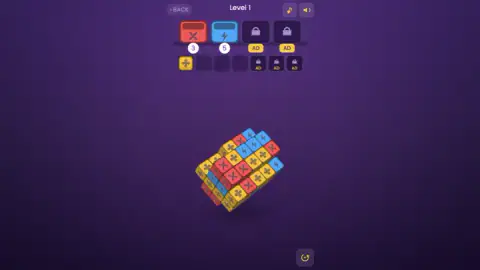
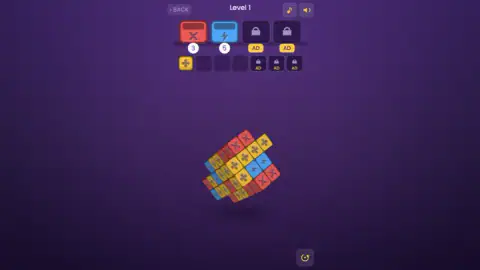
Rotation is therefore not decoration. The buckets ask for a fixed number of tiles and the ones facing you are rarely enough; on our run most of the blue sat low down and round the back. Tilted on a corner is usually the angle that shows the most at once.
The catch is that the gesture you use to look around is the same gesture you instinctively reach for to move a tile, and the game settles that ambiguity in favour of looking. The developer's instructions put it plainly: drag empty space to rotate, tap a tile to send it. In practice "empty space" is generous, because our drags that began on a tile rotated the block just the same.
One thing we expected and did not get: the tower changing shape as tiles came off it. Removing a tile is supposed to uncover the one beneath, and with two tiles gone there was nothing to uncover. The block looked different almost every time we glanced at it, but that was the camera moving, not the puzzle solving.
The buckets are a queue, and you only see the front of it
The two buckets on screen are not the only two in the level. Fill one, the developer's instructions say, and the next in line opens in its place, and any tiles waiting in the tray that match it fly in by themselves.
We have one piece of first-hand evidence for that and it comes with a caveat. On an earlier sitting, the counter under the second bucket read 2 with yellow clovers waiting in the tray; a little later the tray was empty and that counter read 3. A counter that goes up cannot belong to the same bucket. Our reading is that a yellow bucket opened and closed in the gap and took the clovers with it. Nobody watched it happen, and on our longer run we could not repeat it, for the simple reason that we never filled a bucket at all.
What the longer run did show is the other half of the rule. A single yellow clover sat in the first tray square for more than six minutes, with red and blue open above it and no yellow bucket anywhere, and it never budged. The tray does not clear itself and it does not clear on a timer. A slot stays spent until a bucket turns up that wants what is in it.
So the tray is not only a penalty box; it is a waiting room for buckets that have not arrived yet. One yellow tile parked early is fine. Four of them parked early, with red and blue still unfinished, is a lost level.
Symbols as well as colours
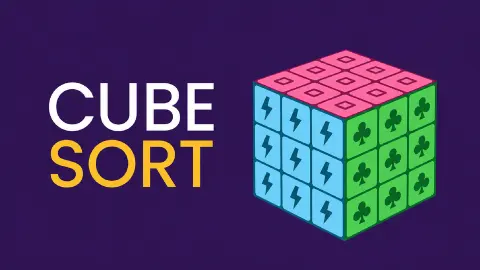
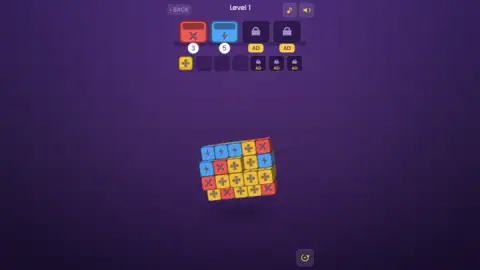
Every tile carries two signals. Red tiles have a cross, blue ones a bolt, yellow ones a four-leaf clover, and each bucket repeats the symbol of its colour above the number. You can ignore colour completely and still sort correctly.
That obviously helps players who confuse certain colours. It helps everyone else too, because of the 3D. Faces turned away from the light are drawn much darker, and on the shaded side of our tower the yellow tiles went a muddy olive that reads almost like the red ones two columns over. The stamped symbol survives the shading. The colour does not always.
The developer counts 14 patterns across the whole game. Level 1 used three.
What we did not reach
The developer's description promises far more than one level can show: 500 of them, each said to be solvable without luck, and shapes beyond a plain tower, including spheres, stairs and arches. It describes two obstacles as well. Grey riveted tiles can never be removed, so you dig around them. Tiles marked with a question mark hide their pattern until you clear a neighbour.
None of that turned up on level 1, which had three patterns, no grey tiles and nothing hidden.
The description also says a level takes a minute or two. Ours ran to ten and stayed unfinished, which says more about the time we spent fighting the controls than about the game.
We left the padlocks alone too. The developer's instructions say a short ad opens an extra bucket or adds a tray slot, and we cannot tell you how long that ad runs or whether the extra slot survives the level. Nothing ever pushed an ad at us unprompted. We also left the round arrow in the bottom right corner untouched, so we cannot confirm it restarts the level, and we did not press the music note or the speaker. No sound of any kind reached us.
Last, the screen. Cube Sort is listed as a portrait game. In a wide desktop window everything sits in a narrow column down the middle with empty purple on both sides. It was fully playable that way. We did not try a phone.
Is it for you, and where to go next
Cube Sort suits people who like to look at a problem from several angles before touching it. There is no hurry and no score to chase: a level is cleared or it is not. It suits less anyone after a run that goes on forever, and it will test anyone who does not find the tap in the first minute.
Arrow Cube 3D is the nearest relative: another block you turn in your hands, where the order of removal is the puzzle. Tap 3D Wood Block Away works on the same turn-and-tap idea with wooden pieces. For a limited tray on a flat board, Blast Jam and Happy Zoo: Mahjong Triple Match both make you ration a few slots. And Nuts Puzzle: Sort By Color is sorting in its plainest form. There are more under puzzle games.
Screenshots
Taken by opening the game ourselves and letting it run — not supplied by the publisher, and not the same picture every other site shows.
How to play Cube Sort
- Turn the block first. Drag and the whole sculpture rotates, in any direction, including tilted on a corner. Turning costs nothing and there is no limit on it.
- Read the two open buckets. Each shows a colour and a symbol, with a number underneath: the tiles it still needs.
- Tap a tile, do not drag it. A short click on a tile on the surface sends it to the bucket with the same pattern, and that bucket's number drops by one.
- Use the tray on purpose. A tile with no open bucket goes to the tray instead. Four of its seven squares are open.
- Fill every bucket. That clears the level, according to the developer's instructions. They also say a full tray fails it.
Things we would tell a friend before their first level:
- Keep the pointer still. This is the whole trick. If your click travels even a little, the game reads a camera move and the tile stays where it is.
- The numbers are a shopping list. Level 1 opens asking for four red and five blue, and it is the same pair of numbers every time: we started that level twice, two weeks apart, and got the same opening both times. Find those tiles on the outside of the tower before you spend anything.
- Rotate before you spend a tray slot. A blue tile hidden round the back costs nothing to reach. A yellow one moved out of the way costs a quarter of your tray.
- Nothing is chasing you. Ten minutes on one level produced no clock, no move counter, no score and no interruption of any kind.
Controls
| Short click on a tile on the surface of the block | Sends it to the open bucket with the same pattern; with no matching bucket open, it goes to the tray |
|---|---|
| Drag with the left mouse button | Turns the whole block in any direction, including tilted on a corner. It turns the block even when the drag starts on a tile, which is why dragging a tile towards a bucket does nothing |
| Mouse wheel | Zooms, according to the developer's instructions; we did not try it |
| Click BACK (top left) | The way out of the level; we did not press it |
| Click the note or the speaker (top right) | The music and sound buttons; we did not press them, and no sound reached us either way |
Features
- A block of patterned tiles that turns freely in 3D, so every face can be inspected before you commit
- Two open buckets at a time, each with a counter of the tiles it still needs: 4 and 5 at the start of level 1
- Level 1 opens with the same two numbers every time: we started it twice, two weeks apart, and got 4 and 5 both times
- A tray with four open slots for tiles that have no bucket yet, and it does not empty on its own
- Three tile kinds on level 1, each with its own colour and its own symbol: red cross, blue bolt, yellow clover
- Two more buckets and three more tray slots behind padlocks marked AD
- Made by sublevelgames
Game details
- Developer
- sublevelgames
- Release date
- July 2026
- Last updated
- July 13, 2026
- Added here
- May 2026
- Technology
- HTML5 (3D)
- Platforms
- Browser (desktop, mouse), Browser (mobile & tablet, touch)
- Saved progress
- Saving, when available, is managed by this game. Mava cannot confirm your level.
FAQ
How do you play Cube Sort?
Each level is a block of patterned tiles floating in the middle of the screen, with buckets above it. Drag anywhere to turn the block, then give a short tap to a tile whose pattern matches an open bucket and it flies in. A tile with no open bucket goes to a small tray instead. The level is cleared when every bucket has been filled.
Why do my tiles not move in Cube Sort?
Because you are dragging them. In Cube Sort a drag is a camera control: it turns the block, and it turns the block even if the drag started on top of a tile. Tiles only move on a short tap that stays in one place. We spent ten minutes dragging tiles towards the buckets and got exactly one of them in.
What do the numbers under the buckets mean in Cube Sort?
Each number is how many tiles that bucket still needs. Level 1 starts with the red bucket on 4 and the blue one on 5, and a number drops by one for every matching tile that goes in. When a bucket is full, the developer's instructions say the next one opens in its place.
How do you lose a level in Cube Sort?
According to the developer's instructions, the level fails when the tray fills up. The tray has four open slots, and every tile you tap that has no open bucket takes one of them. We did not fail a level ourselves: our tray never held more than one tile.
Does the tray empty by itself in Cube Sort?
No. A yellow clover sat in the first tray square of our level for more than six minutes with the red and blue buckets open above it, and it never moved. The developer's instructions say tray tiles fly out on their own only when a bucket matching them opens, which means a tray slot stays spent until that happens.
What does AD mean on the locked slots in Cube Sort?
Two of the four bucket positions and three of the seven tray squares carry a padlock and a yellow AD label. The developer's instructions say you can watch a short ad to open an extra bucket or add a tray slot. We did not use any of them, so we cannot say how long the ad is or whether the extra slot lasts beyond the level. Nothing ever pushed an ad at us on its own.
How many levels does Cube Sort have?
The developer says 500, and that every one of them can be solved. We played level 1 only, on two separate sittings, and did not finish it either time, so we cannot confirm either figure.
Is Cube Sort playable if you are colour-blind?
It is built for that. Every colour has its own symbol stamped on the tile and on its bucket: on level 1, a cross on red, a lightning bolt on blue and a four-leaf clover on yellow. You can sort by symbol alone, which also helps on the shaded faces of the block, where yellow turns a dark olive that is easy to mistake for red. The developer counts 14 patterns in the whole game; we saw those three.