






About 3D Dots
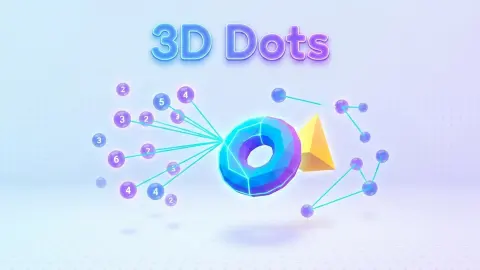
Most connect-the-dots puzzles put the numbers in order and the picture on paper. 3D Dots does neither. Its dots hang in empty space, the number on each one says how many lines it still needs, and from where you sit two of them can sit exactly on top of each other.
The first puzzle has four dots, and every one of them starts at 3. One of them hides behind another until you turn the view, which is why it is easy to count three and wonder why the sums do not work.
The rule is short. Drag from one dot to another and a green line joins them. Each dot's number drops by one for every line that reaches it. Bring every number down to zero and the puzzle is solved.
We spent ten minutes on that first puzzle with a mouse and never finished it. We got half of its lines drawn, lost one of them again, and then wiped the board by pressing the wrong button at the top of the screen. Most of our drags turned the view instead of drawing anything, and that is still the most useful thing the game teaches in its first minute.
The game is credited to Mewton Games. It has been available since July 2026.
The counter counts lines, and the sum of the numbers predicts it
Next to "Level 1" there is a second label, and at the start it read 0 / 6. It is easy to take that for "puzzle 0 of 6". It is not.
It went up by one each time a line appeared, and down again on the one occasion a line vanished. It counts lines drawn against lines needed.
You can work out that second figure before you touch anything. Every line has two ends, and each end uses up one point from a dot. So the total of all the numbers on the screen is always twice the number of lines still missing. Four dots that each need three lines give twelve points, and twelve points make six lines.
That is a piece of real mathematics. Leonhard Euler wrote it down in 1736, in the paper on the bridges of Königsberg that started graph theory, and it is known as the handshaking lemma: count the handshakes at a party from both sides and you always get twice the true number.
It holds on screen, and it gives you a free check whenever you lose the thread. On the view where our counter read three of six, the numbers still showing added up to six, twice the lines we had left to draw, exactly as promised.
One puzzle, seen from every side
Our screenshots all show the same four dots. They never look the same twice.
In one view they make a clean right angle, two lines meeting at the dot in the middle. Turn a little and the same three points squeeze into a narrow V. Turn further and the figure opens into a zig-zag, with the far dot drawn small and the near one large.
That size difference is the only depth cue the game gives you, and you come to rely on it. A pair that looks impossible to join from the front can be easy from the side, and what looks like a tangle is usually two lines passing each other with plenty of room. They only cross because the screen is flat.
Here is a thought for the rest of this puzzle, which we did not finish. If two dots can share only one line, four dots that each need three lines must each be joined to all three of the others. The finished shape would be a pyramid with a triangular base, the simplest solid there is. We never tried a second line between the same two dots, so treat that as arithmetic, not as something we saw.
The four buttons at the top right, and the one to avoid
Four round buttons sit above the board: a speaker, a round arrow, a grid of four squares and a trophy. We pressed two of them.
The round arrow restarts. We hit it with three of the six lines done, and the puzzle came back empty: every dot at 3 again, the counter at 0 / 6, and a card over the board reading "Click to keep playing". Nothing asked whether we meant it. On a puzzle this slow to draw, that is a button worth knowing about before you find it.
The trophy was better news. It opens a panel headed Leaderboard, a list of player names with a score beside each one; the name at the top of ours had 100 points. An X in the corner closes it and the board is exactly where you left it, counter and all. The puzzle itself has no score on screen, so that panel is the only place the game tells you how you are doing against anyone else.
The speaker and the grid of squares we left alone. The listing says finished puzzles reveal a hidden object that goes into a gallery, and a grid of four squares is what a gallery button usually looks like, but we never finished one and we never opened it.
The same rule as Hashi, minus the grid
Numbered points that each need a set number of links are the core of Hashiwokakero, a Japanese logic puzzle from the publisher Nikoli. In English it is sold as Bridges, and The Times runs it as Hashi.
Hashi adds limits that 3D Dots drops. Its bridges run only across and down, never diagonally, and they may not cross. At most two bridges join a pair of islands, and in the end everything has to form one connected group.
In 3D Dots the lines go straight from dot to dot at any angle, and on screen they can cross freely. That makes each move simpler and the reading harder. On paper you see the whole puzzle at once. Here you have to turn it to know what you are looking at.
Who it is for
Anyone who likes a calm number puzzle and does not mind learning to steer. A child who can count to three has all the arithmetic it asks for. The hard part is the hand: the drag must start right on a dot, and that takes practice with a mouse. The game is listed for phones as well, where a finger on a dot may well be the easier instrument, but we only played it on a desktop.
If you want a fast game, this is not it. Our first puzzle had four dots and six lines, and ten minutes later it was still unsolved. We also never saw a dot reach zero, never saw a wrong line turned red, and found no hint button on the screen, so everything after that first puzzle is still ahead of us.
More from Mewton Games, and other puzzles that turn
Arrow Cube 3D is another puzzle you have to turn to read, a see-through cube of arrows. From the same studio, Block Match 3D has you take a pile of cubes apart one tap at a time, Color Hole moves a hole across a board, and Word Solitaire sorts word cards on a solitaire table. The rest are under puzzle games.
Screenshots
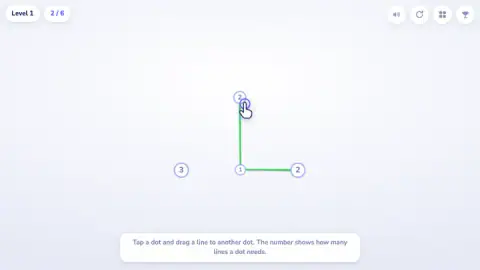
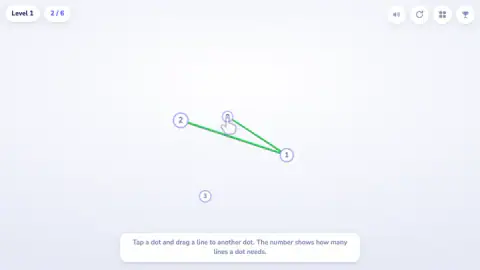
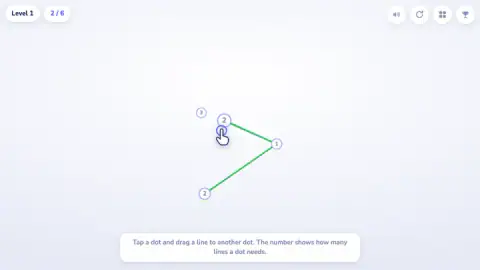
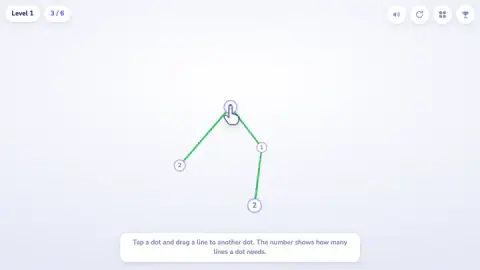
Taken by opening the game ourselves and letting it run — not supplied by the publisher, and not the same picture every other site shows.
How to play 3D Dots
- Start the game. Level 1 opens at once, with a sign at the bottom explaining the rule. That sign has no close button and stays there the whole time.
- Press exactly on a dot, hold, and drag to another dot. Let go and a green line joins them.
- Watch both numbers. Each one goes down by one.
- Drag on empty space to turn the dots and look at them from another side.
- Keep going until every dot reads zero. The counter beside the level name tells you how far along you are.
What our session taught us:
- Start the drag on the dot itself. Out of dozens of drags, only a handful drew a line. The rest began a little off target and turned the view.
- A click is not a line. Clicking a dot, short or long, drew nothing.
- Big means near. The dots are drawn larger when they are closer to you, so size tells you which of two overlapping dots is in front.
- Move the hand off the number you want to read. A drawn hand sits on one of the dots as part of the tutorial, and it covers the number underneath. A small turn of the view puts it somewhere less annoying.
- Do not redraw a line you already have. Once, dragging again across a joined pair took the line away and sent the counter backwards.
- Leave the keyboard alone. The arrow keys, A and Space changed nothing.
Controls
| Drag from one dot to another | Draws a green line between them; the drag has to start exactly on a dot |
|---|---|
| Drag on empty space | Turns the whole set of dots, so hidden ones come into view |
| Single click | Draws nothing; a line needs a drag |
| Round arrow, top right | Puts the puzzle back to the start, with nothing asked first |
| Trophy, top right | Opens a leaderboard of names and scores; the X in its corner closes it |
| Keyboard | The arrow keys, A and Space did nothing we could see |
Features
- Numbered dots floating in space, joined by straight green lines you drag between them
- A number on each dot that drops by one for every line that reaches it
- A counter beside the level name that shows lines drawn against lines needed
- A view you can turn by dragging, with nearer dots drawn larger
- Lines that may cross on screen, because in space they pass each other
- Lines that come off again, and a reset button one place away from the sound
- A leaderboard of scores behind the trophy at the top right
- No timer and no move limit on the first puzzle
Game details
- Developer
- Mewton Games
- Release date
- July 2026
- Added here
- June 2026
- Technology
- HTML5 (WebGL, 3D)
- Platforms
- Browser (desktop)
- Saved progress
- Saving, when available, is managed by this game. Mava cannot confirm your level.
FAQ
How do you play 3D Dots?
Press on a dot and drag to another dot to join them with a green line. The number on a dot is how many more lines it needs, and it drops by one each time a line reaches it. The puzzle is done when every dot is down to zero.
What does the counter at the top of 3D Dots mean?
In our session the counter next to "Level 1" read 0 / 6 at the start and went up by one for each line we drew. It counts lines drawn against lines needed, not puzzles. The total is always half the sum of the numbers on the dots, since every line uses two of them.
How do you turn the view in 3D Dots?
Drag on an empty part of the screen. The dots swing round together, and one that was hidden behind another moves into the open. Nearer dots are drawn larger, which helps you judge which of two dots is in front.
Why does my line not appear in 3D Dots?
The drag has to begin on a dot. If it starts even a little to the side, the game reads it as a request to turn the view and draws nothing. A plain click does not draw a line either. In our session most missed lines had this cause.
How do you restart a puzzle in 3D Dots?
The round arrow, second of the four buttons at the top right. We pressed it by accident with three of six lines drawn and the board came back empty, every dot at 3 and the counter at 0 / 6. Nothing asked us to confirm, so treat that corner with care.
Can you remove a line in 3D Dots?
Lines do come off. Once, after we dragged across a pair we had already joined, our counter fell from 3 / 6 back to 2 / 6 and the line was gone. We only saw this happen the one time, so we cannot promise it is the only way to undo a line.
Does 3D Dots have a leaderboard?
Yes. The trophy at the end of the row of buttons opens a panel headed Leaderboard, a list of player names with scores beside them; the name at the top of ours had 100 points. An X in the corner closes it, and the puzzle is still where you left it.
Is 3D Dots like Bridges or Hashi?
It uses the same rule as the Japanese logic puzzle Hashiwokakero, also sold as Bridges or Hashi, where each numbered island needs that many bridges. Hashi keeps its bridges on a flat grid and forbids crossings; 3D Dots lets lines run at any angle through space.