





About Find Match 3D
The first level of Find Match 3D is so tidy that it tells you nothing. Nine fruits sit in three neat rows, a card says to tap three identical items, and the clock does not even start until the card has gone. Then level 2 opens, and the game shows what it actually is: a heap of carrots, rabbits and bears tipped onto the table, a clock already running, and a list that asks for the carrots only.
The idea is simple to state. Click an object and it leaves the heap for a tray at the bottom of the screen. Put three identical objects in the tray and they vanish. The tray has seven slots, and that small number is the whole game: every click that is not part of a set of three costs you room.
The game is credited to nukebox studios. It was published on 4 March 2025.
A word on how far we got, because it matters for everything below. We played for about four minutes. We finished level 1 and started level 2, and we did not see level 2 end. So this page describes the opening of the game closely and leaves the rest marked as unknown.
Level 1 is nine fruits in rows; level 2 is a heap
The tutorial board holds apples, bananas and bunches of grapes, three of each, every kind in its own row. The apples are ringed in light blue, so you cannot miss the first set. Nothing overlaps and nothing hides. When the hint card went, the clock showed a little under ten minutes, and we needed less than one of them.
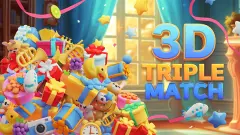
Level 2 has no rows. The objects lie on top of each other at every angle: carrots, pale grey rabbits and beige bears. Some carrots point straight at you, so all you see is an orange disc with a green tuft. A few rabbits have fallen on their backs. This is where the 3D in the name earns its place, because the same object looks different from each side and part of the job is recognising it anyway.
The clock is shorter too. Ours showed about five minutes at the start of level 2, half of what the tutorial gave us for a board several times as crowded.
Only the carrots are on the list
On level 1 every object on the board had a card. On level 2 there is a single card, and it shows a carrot. It read 17 with a single carrot in our tray, so the level starts with 18 of them, enough for six sets.
The rabbits and bears have no card. Our reading is that they are there to get in the way: they cover the carrots, and a careless click on one of them fills a slot with something the list never asked for. We cannot confirm that, because we did not finish the level. The game's own instructions speak of clearing the board, which would mean the rabbits and bears have to go as well. Either way, the carrots are the safe place to begin, since they are the one thing the level certainly wants.
Here is the honest account of our attempt. Two carrots reached the tray early on. The third never joined them: the clock kept running, and the card was still at 16 when we stopped, with about four minutes left. We did not fill the tray and we did not let the clock run out, so we cannot tell you what either of those looks like.
Hearts, coins and six boosters we never touched
The home screen is a toy shop, with rubber ducks on the shelves. Along the top it shows 5 hearts and 300 coins, each with a green plus sign beside it. We lost no heart in our session. The coin count read 300 before level 1 and still read 300 when we were back at the crate afterwards.
Around the edges there are four more buttons: a stack of coins with a film strip tagged AD, a shopping cart, a small house and a gear. We opened none of them. The AD tag suggests coins in exchange for watching an ad, which is the usual arrangement.
Boosters come in two groups. The card before each level offers a stopwatch and a lightning bolt. During a level a panel on the right holds four more: a magnet, a red curled shape, a fan and a snowflake. All six showed five uses at the start. We used none, so we will not guess at what each one does, beyond noting that the game's instructions call them help for tricky levels.
We heard no sound at any point, so we cannot describe the music or the effects.
Seven slots, and a famous paper about the number seven
In 1956 the American psychologist George Miller published a paper with a memorable title: The Magical Number Seven, Plus or Minus Two. He had noticed that young adults could repeat back a list of about seven items, and that it hardly mattered whether the items were digits, letters or words.
His real point was about chunks. People do not remember raw items; they remember meaningful units. A phone number is hard as ten separate digits and easy as three groups. Miller himself said there was nothing magical about seven, and later researchers have argued that the true limit is nearer four chunks.
We do not know why this tray has seven slots, and we will not pretend the studio had Miller in mind. But his idea is the best advice we can give for playing. Do not read the tray as seven separate objects. Read it as sets in progress: "two carrots, waiting for one". Seen that way, a tray holds two or three things to remember, which is comfortable. Seen as loose items scattered among a heap of rabbits, it is at the edge of what anyone can keep track of while a clock runs.
Is Find Match 3D for you?
It is if you like looking more than planning. The skill here is spotting a familiar shape at an odd angle, quickly, and there is a clock to make that matter. The objects are large and friendly, and the rule fits in one sentence.
It is less suited to anyone who wants to think without pressure. The countdown starts with the level and we found no way to turn it off. And if you want a puzzle with one clean solution, a heap of toys will not give you that.
More triple-match puzzles
The nearest thing we have is Fresh Drop: Triple Match, which uses the same sets of three with groceries. Happy Zoo: Mahjong Triple Match and Master of 3 Tiles lay flat tiles in layers, so the challenge is what you can reach, not what you can recognise. For searching without a tray, try Find The Dog. The rest are under puzzle games.
Screenshots
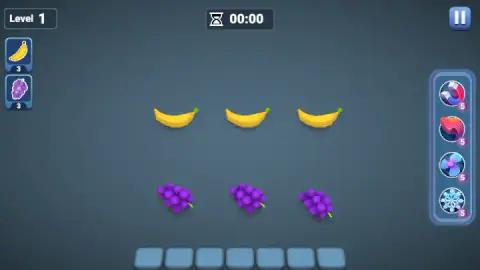
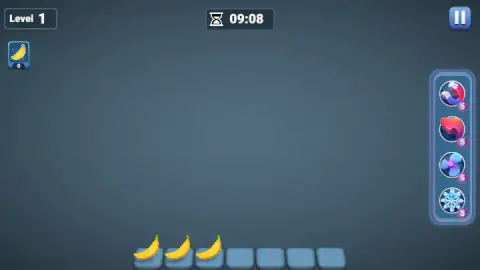
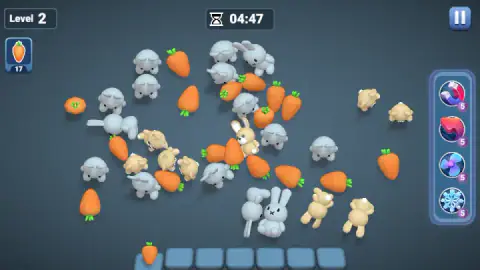
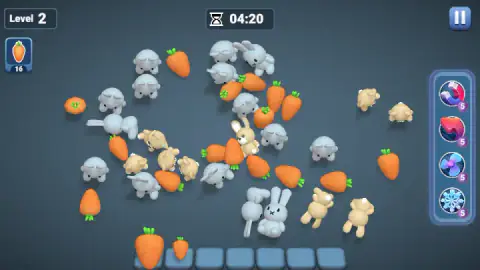
Taken by opening the game ourselves and letting it run — not supplied by the publisher, and not the same picture every other site shows.
How to play Find Match 3D
- Press PLAY twice. The first is the green button on the home screen, under a wooden crate. The second is on a card called Select Boosters, where you may pick a stopwatch or a lightning bolt before you start. You can ignore both.
- Read the cards on the left. Each one shows an object and a number. That is what the level wants, and how many are still on the board.
- Click an object. It moves to the next free slot of the tray. The number on its card drops by one straight away.
- Click two more of the same kind. Three identical objects in the tray clear themselves and give the slots back.
- Empty the cards before the clock does. The hourglass at the top counts down from the moment the level begins.
What our session taught us:
- The card counts objects, not sets. With two apples in the tray, the apple card already read 1. Do not take a low number as proof that a set is finished. Look at the tray.
- Finish what you started. A lone object in the tray is a slot you cannot use. Pick a kind, find all three, then move on.
- A click on the tray does nothing. On level 2 we clicked a carrot that was already in the tray, several times, and it stayed put. Nothing we tried sent an object back to the heap.
- The tutorial clock is kind; the next one is not. On level 1 the clock read 00:00 for as long as the hint card was on screen. On level 2 there is no card and no pause before it starts.
Controls
| Click an object | Sends it from the board to the next free slot of the tray; the third identical one clears the set |
|---|---|
| Booster buttons (right-hand panel) | Four helpers with five uses each; we did not use any of them |
| Pause button (top right) | Pauses the level; we did not open it |
| PLAY (home screen, then the booster card) | Two presses start a level; the card in between lets you pick a stopwatch or a lightning bolt first |
Features
- A tray of seven slots at the bottom of the screen, where every object you click goes
- Goal cards on the left that count down one object at a time, not one set at a time
- A tutorial level of nine fruits in tidy rows, with a clock that waits until the hint card is gone
- A second level that tips the objects into a heap and cuts the clock to about five minutes
- Six kinds of booster, two picked before a level and four used during it, five of each to start
- Five hearts and 300 coins on the home screen from the first minute
- Made by nukebox studios
Game details
- Developer
- nukebox studios
- Release date
- March 2025
- Last updated
- August 10, 2026
- Added here
- May 2025
- Technology
- HTML5 (Unity WebGL)
- Platforms
- Browser (desktop, mouse)
- Saved progress
- Saving, when available, is managed by this game. Mava cannot confirm your level.
FAQ
How do you play Find Match 3D?
Click an object and it drops into the tray at the bottom of the screen. Click two more of the same kind and the three disappear. The cards on the left show what the level wants and how many of each are still to collect.
How many slots does the tray have in Find Match 3D?
Seven. Every object you click takes one slot, and a slot is only freed when three identical objects meet in the tray. We clicked a carrot that was already in the tray several times and it did not go back to the board.
Is there a time limit in Find Match 3D?
Yes. A clock at the top of the screen counts down. It started at about ten minutes on level 1 and about five minutes on level 2, and on level 1 it did not start until the tutorial card had gone.
What do the boosters do in Find Match 3D?
We did not use them, so we can only describe them. A stopwatch and a lightning bolt can be picked on the card before a level, and a magnet, a red curled shape, a fan and a snowflake sit in a panel during it. Each one showed five uses at the start.
How many levels does Find Match 3D have?
We do not know. We finished level 1, which is a tutorial with nine fruits, and started level 2, which asks for 18 carrots. Neither the game nor its description gave a total.
Who made Find Match 3D?
It is credited to nukebox studios. It was published on 4 March 2025 and last updated on 10 August 2026.
Can you play Find Match 3D on a phone?
The game is listed for desktop, and that is where we played it, with a mouse in a wide window. We did not test it on a phone or a tablet.