










About Tile Stack
Most stacking games in a browser are about height and timing: something swings, you drop it, and you hope it lands straight. Tile Stack has nothing that swings and nothing that falls. The tiles are already on the floor, laid out in a short path, and the only question is which one to push first.
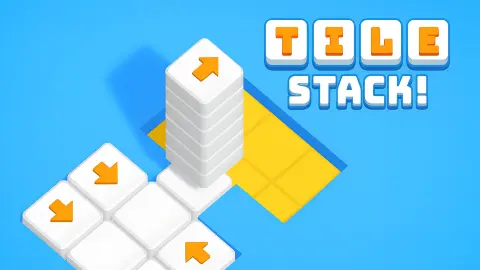
Each level gives you a few white tiles on a plain blue background. One or two of them carry an orange arrow. Tap a tile with an arrow and it slides the way the arrow points, running over the tiles in front of it and gathering them into a pile. Your job is to finish with every tile in one stack.
That sounds like it should take one tap, and at the start it nearly does — the game even puts a pointing hand on the first tile with TAP ON BLOCK written underneath. It gets quieter and meaner after that. The arrows stop pointing where you want them, a tile that has moved leaves behind a yellow square that nothing can use again, and a level can be lost outright.
Tile Stack is made by Drivix Games.
We have now played it twice. The second sitting ran about ten minutes: three levels finished, the fourth reached and not solved. This page sticks to what we saw on screen.
What a tile stack game asks of you
The idea is simple to state: every tile on the board has to end in the same place. What makes it a puzzle is that you do not choose the direction. The arrows do.
On level 1 the four tiles form a straight diagonal line, and the arrow on the first one points along it. Our opening tap sent that tile up the line: it picked up its neighbour, landed on the tile beyond and left a three-layer pile with the arrow riding on top and yellow squares behind it. One more tap carried the pile onto the last tile, and the level was done.
That first level also teaches the rule you need later: the arrow travels with the pile. You are not moving single tiles around the board. You are moving a growing stack, and its direction is set by whichever arrow ended up on top.
The counter under the level name shows two numbers, and the second one is simply how many tiles are on the board. When the first catches up with it, the level is over. The totals do not climb steadily — the fourth level is back to four tiles, the same as the first — so a low number is no promise of an easy board. In both our sessions the counter sometimes fell behind what the tiles were doing, so trust the pile on the board more than the figure above it.
Levels 2, 3 and 4: the same shape, different arrows
The second and third levels use the same layout: five tiles in an upside-down V, two on each arm and one at the corner. Put the two screens side by side and only the arrows have moved.
On level 2 the arrows sit on the two ends of the V and both point at the corner. Tap the left one and it slides up the arm, collects its neighbour and lands on the corner tile, which gives you a pile of three from a single move. Tap the right end and the rest come up to meet it. The counter fills and the banner drops.
On level 3 one arrow is still on the left end, pointing up towards the corner, but the other has moved onto the corner tile itself, and it points down the right arm, away from the left. Move the corner first and it stacks on the tile below it, the corner square turns yellow, and the left arm is suddenly aiming at nothing. We did get all five tiles into one pile at the right-hand end — but we also lost the level once on the way there.
Level 4 drops back to four tiles and is the hardest thing we have seen in the game. The tiles sit in a tight cluster rather than a line, the arrows point down, left and right instead of funnelling one way, and the pile grows upwards on a yellow base. We got three tiles together and then spent the rest of the session hunting for the move that would collect the last one, without finding it. By then Tile Stack had stopped being a tap-the-arrow exercise: this is a board you solve before you touch it.
Losing a level, and the retry button
The first time we played this game nothing went wrong, and we wrote on this page that there seemed to be no way to fail. There is. Midway through level 3, with two tiles still loose, the board was replaced by a red FAILED! banner, the same round face as the victory screen but in tears, and an orange RETRY button under it.
We cannot tell you what set it off. Nothing warned us, no counter ran down, and the screen simply changed. What we can tell you is what happens next: RETRY puts the level back exactly as it began, the counter at zero and every tile white again. Nothing is lost but the time.
It changes how the game is worth playing, though. A move that strands tiles cannot always be tidied up afterwards, so the restart arrow in the top right earns its place: use it the moment a pile heads somewhere useless.
What the game does not do
The game's own instructions describe tiles that fall from the top of the screen and stacks that disappear for points. Four levels in, none of that has happened. The tiles were already laid out, nothing dropped in, no score ever appeared, and a finished pile simply stayed on the board under the banner.
There are no lives either, and no limit on attempts: you repeat a level until it works.
Before any of it you get the title in block letters with three loading dots, then a start screen with a purple Let's Play! button. On the board, next to the restart arrow in the top right, sits a fast-forward button with a small AD badge and a video icon. That reads as a skip: watch an ad, jump the level. We never pressed it, so we cannot confirm what it does. After a completed level a card with a "Continue playing" button appears before the next board, which is where an ad can sit. And if you leave a board alone to think for long enough, a grey "Click to keep playing" card covers it; one click anywhere brings the tiles back.
The look stays minimal on purpose: white tiles, yellow floor where they have been, a blue background, orange arrows, and a round face that smiles or cries. Nothing on screen competes with the path you are trying to read.
More games by Drivix Games
Connect Line asks you to turn pipe pieces until two ends join, and The Fill has you draw one line through every square on the board. Stack Master is the studio's other stacking game, the classic tower kind where timing decides how high you go. The rest are filed under puzzle games.
Screenshots


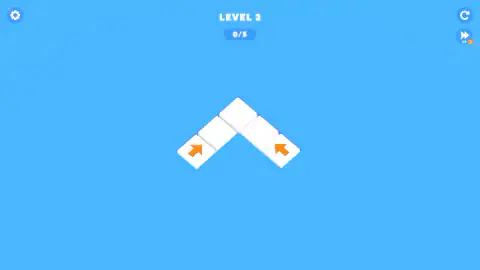
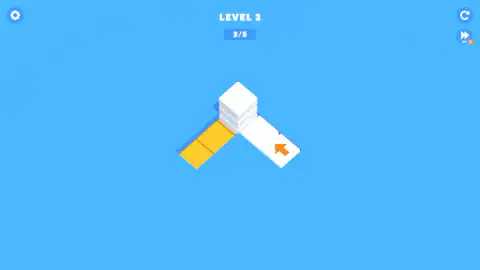

Taken by opening the game ourselves and letting it run — not supplied by the publisher, and not the same picture every other site shows.
How to play Tile Stack
- Look at the board and find the tiles with an orange arrow. Those are the only ones you can move.
- Click or tap one of them. It slides in the direction of its arrow and lands on top of the tiles ahead. One click is the whole move; dragging the tile does nothing.
- Watch the arrow. It now sits on top of the new pile, ready to send the whole pile on its next move.
- Keep tapping until every tile is in a single pile. The counter under the level name reaches its total and a green LEVEL COMPLETED banner appears.
- Press NEXT to go on. If the red FAILED! banner comes up instead, press RETRY and the level starts again from the beginning.
Tips from our runs:
- Read the whole board before the first tap. The levels are tiny, four or five tiles, so you can see every arrow at once. Trace where each one would carry its pile before you touch anything.
- Yellow means gone. Once a tile leaves its square, that square turns yellow and stays empty. A pile that later slides onto it has nothing to pick up there.
- Two arrows aimed at one corner is a gift. On the second level both ends of the path point at the same corner, so it makes no difference which side you start from.
- Arrows that disagree are the real puzzle. When one arrow would send its pile away from the tiles the other still needs, the order of your taps is the level.
- Reach for restart early. There is no clock, no move counter and no score anywhere on screen, so resetting a board you have spoiled costs you nothing but a few seconds.
- Mouse or finger only. We tried the arrow keys, Enter and dragging, and none of them moved a tile. On the victory screen, clicking anywhere except NEXT does nothing either.
Controls
| Click or tap a tile with an arrow | The tile slides the way the arrow points and lands on top of the tiles in front of it |
|---|---|
| NEXT (green button) | Goes to the next level after the LEVEL COMPLETED banner; clicking anywhere else on that screen does nothing |
| RETRY (orange button) | Restarts the level after the red FAILED! banner, with the counter back at zero |
| Circular arrow (top right) | Restarts the level at any time |
| Fast-forward button with an AD badge (top right) | Appears to skip the level in exchange for an ad; we did not use it |
| Gear (top left) | Opens the settings |
| Keyboard and dragging | Nothing we could find. Arrow keys, Enter and dragging a tile all left the board as it was |
Features
- Every level is a short arrangement of white tiles on a plain blue background, and the goal is to end with all of them in a single pile
- Orange arrows mark the only tiles you can move; the rest wait to be picked up
- A tile that moves carries the tiles in its path along with it, and the arrow rides on top of the new pile
- The spot a tile leaves behind turns yellow, so you can always see which part of the path is used up
- The counter under the level name ends at the number of tiles on the board, and the totals do not climb steadily
- A level can be lost outright: a red FAILED! banner appears with a RETRY button that puts the board back as it started
- No timer, no move limit and no score; made by Drivix Games, who also made Stack Master, Connect Line and The Fill
Game details
- Developer
- Drivix Games
- Release date
- August 2025
- Last updated
- August 10, 2026
- Added here
- July 2025
- Technology
- HTML5 (3D)
- Platforms
- Browser (desktop, mouse), Browser (mobile & tablet, touch)
- Saved progress
- Saving, when available, is managed by this game. Mava cannot confirm your level.
FAQ
How do you play Tile Stack?
Click or tap a tile that has an orange arrow on it. It slides the way the arrow points, lands on the tiles in front of it and stacks them up. One click is the whole move, and dragging does nothing. Keep going until every tile on the board sits in one pile, and the level is completed.
How do you win a level in Tile Stack?
A level is won when all its tiles end up in a single pile. The counter under the level name shows the total: four tiles on the first level, five on the next two. When it fills, a green LEVEL COMPLETED banner appears with a NEXT button, and nothing else on that screen advances you.
Can you lose a level in Tile Stack?
Yes. A red FAILED! banner can replace the board, with the same round face as the victory screen but in tears, and an orange RETRY button. It happened to us in the middle of level 3, with two tiles still loose. We could not work out what triggered it; nothing warned us and no counter ran out. RETRY restarts the level from zero.
Why do some tiles turn yellow in Tile Stack?
Yellow marks a square that a tile has left. Once a tile slides off its spot, that part of the path is empty floor, so a later pile cannot land there and pick anything up. It is the game's way of showing what is already used.
Does the order of moves matter in Tile Stack?
On the first two levels it hardly does, because both arrows point towards the same corner. From level 3 on it decides everything: one arrow sits on the corner tile and sends it away from the other, so moving it first can leave tiles stranded. There is no clock and no move limit, so you can study the board for as long as you like before tapping.
Do tiles fall from the top in Tile Stack?
The game's own instructions describe tiles falling from the top and disappearing for points, but that is not what we saw. Across four levels and two sittings, the tiles were already laid out on the board, nothing fell, no score ever appeared, and the finished pile stayed where it was.
Who made Tile Stack?
Tile Stack is by Drivix Games. It was published in August 2025.
Can you play Tile Stack on a phone?
It is listed for phones and tablets, and the game's instructions say you can click or tap. Each move is a single tap on a tile, so it suits a touch screen. We played it on a computer with a mouse and did not test it on a phone ourselves.