






About Tile Harvest 3D
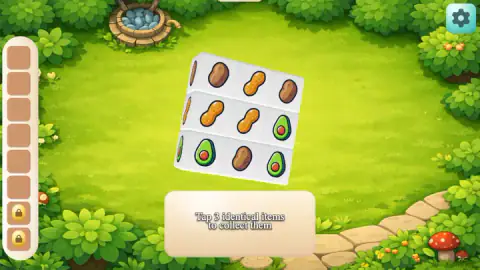
The listing for Tile Harvest 3D talks about a towering stack of tiles. The first board is nine cubes. Three potatoes, three peanuts and three avocados hang in one flat layer over a garden lawn, and you can see all of them without turning anything.
Here is how far we got, because it decides how much this page can tell you. We played for about ten minutes on a computer with the mouse, in two stretches split by a page reload. Each stretch cleared one trio, avocados the first time and peanuts the second, and each ended with the tutorial's ZOOM card on screen. We never finished the first board. We saw no second level, no win and no loss, so anything here about later levels comes from the listing, and we say so where it does.
What we can give you is a close look at the first few minutes, which is where a new player gets stuck. We got stuck there too.
Tap a cube and it leaves the board for a tray down the left of the screen. When the third matching cube lands, the set vanishes and the slots are free again. Six slots are open and two more sit below them behind gold padlocks.
The game is credited to John Hany. Its listing dates from June 2026, with a refresh in late October, and at the time of our visit the score.
The first board is nine cubes, and they never move
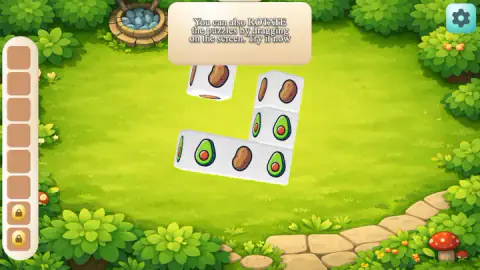
Most of what makes this board unusual shows up when the cubes leave. Take the three peanuts out and you can see grass straight through the holes, which is how we know the board is one cube thick. The remaining cubes do not drop or close up. A single potato stayed hanging at the top left with nothing touching it.
That matters for how you think. Nothing falls, so nothing shuffles. The cube you noticed a moment ago is still where you saw it, and removing a set will not change what the others show.
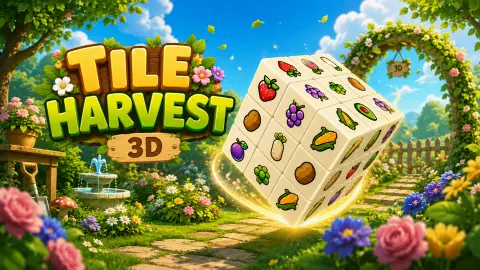
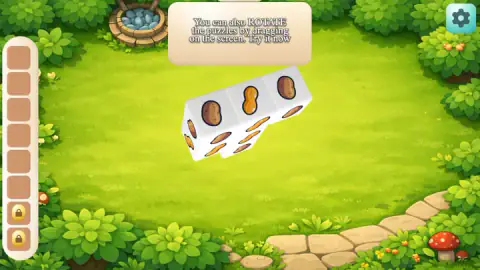
Turning the board tells you less than you might expect, at least here. Each cube showed the same food on every face we brought into view, so a potato stays a potato from the top and from the side. On a single layer, rotation reveals nothing new. We take it as a lesson for bigger boards, where cubes could sit behind other cubes. The title art hints at those: a much larger block with strawberries, grapes and corn, none of which reached our screen.
The tutorial picks your first trio, unless you pick first
Our two stretches began on the same board and went differently, and the difference is the most useful thing we learned.
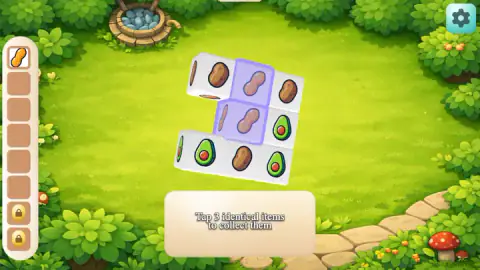
In the first, the three avocados lit up purple with the tray still empty. Taps elsewhere did nothing. Only the lit cubes moved, and the set cleared when the third one landed.
In the second, nothing was lit yet when we tapped a peanut. The game accepted it, dropped it in the top slot and lit the other two peanuts. So our reading is that the game lights a trio if you wait and follows your first tap if you are quicker. That is one case each, so treat it as a likely pattern and not a rule.
Either way, the tutorial never lit the potatoes while we played it. Whichever foods you leave, you are looking at six cubes and a ROTATE card.
The ZOOM card is where we stopped
Both stretches ended the same way. The card reads ZOOM in and out using the mouse wheel or pinch gesture, and it sits at the top of the screen with the board still visible below it. It looks as if you could ignore it.
We could not. We tapped whole cubes about ten times under it, avocados and potatoes alike, and the tray stayed empty. Clicking the card itself did nothing, and neither did the arrow keys. Six cubes were still floating there when we finished.
The obvious next step is the one we did not take, which was to roll the wheel. The ROTATE card gave way once we had dragged enough, so we expect this one to go the same way once you zoom. We have not seen it happen. If you get stuck on a board that looks perfectly playable, that card is the likely reason.
What the listing promises, and what we saw
The instructions describe more than we reached. Here is how each claim stands.
| Listing says | What we saw |
|---|---|
| Clear every tile to win | Not reached: at most three of nine cubes gone |
| A Factory Belt of slots at the bottom | A tray down the left, on our landscape screen, with no name on it |
| Three alike in the belt merge into a higher-tier item | After each trio, an empty tray and nothing new |
| A full belt loses the level | Never filled it |
| Four boosters: Throwback, Whirlwind, Magnifier, Hammer | No booster button during the tutorial |
| Unlimited levels | No level past the first |
None of that means the listing is wrong. It may all begin on the next board. It does mean we cannot tell you how the merging feels, or whether the game gets hard.
Six open slots is not much room
The padlocks aside, the arithmetic is short. Two each of three foods fills the tray with no set in it, so three half-finished foods are the danger, if the listing is right about what a full tray does.
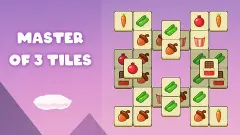
That is on the tight side for this kind of puzzle. Find Match 3D and Master of 3 Tiles give you seven places, and the extra one is worth more than it sounds. Cube Sort, at the other end, works with four, though it plays by different rules.
The closest relative we have played is Mahjong 3D Match: a solid block you turn with the mouse, three of a kind, and a six-slot tray at the side. It shows where a board like this one can go once the cubes start hiding each other. Whether Tile Harvest 3D goes there, we cannot say.
What we did not reach
- The rest of the first board, and every board after it.
- A win screen, a loss screen or a full tray.
- The two padlocked slots. No price or condition appeared on them.
- Zoom, by wheel or by pinch.
- Touch screens. The opening card says tap and the ZOOM card mentions a pinch, and the game's listing flags touch support. Everything we did was with a mouse at a desk.
Who it is for, and more to play
On what we saw, it suits someone who wants a slow, gentle start: short cards, big pictures, no clock in sight, and a music slider and a sound slider behind the gear. Younger players can follow the foods without reading much. We cannot vouch for how hard it gets, so if you want pressure from the opening minutes, look elsewhere first. Find Match 3D puts a clock on you by its second level.
More in our puzzle games.
Screenshots
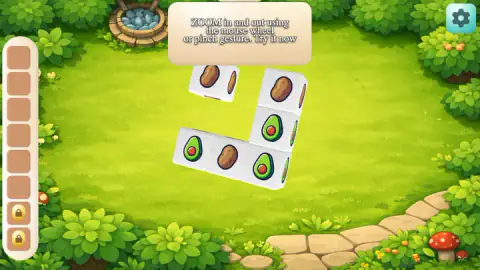
Taken by opening the game ourselves and letting it run — not supplied by the publisher, and not the same picture every other site shows.
How to play Tile Harvest 3D
- Get past the two opening screens. TAP TO PLAY starts the game, and the yellow button on the Welcome card starts the lesson.
- Tap three cubes with the same food. While the first card is up, a purple glow may mark the ones the game wants.
- Drag to turn the board when the ROTATE card appears. Keep going: it stayed up through our first drags and gave way after three in one stretch and four in the other.
- Roll the mouse wheel or pinch when the ZOOM card appears. We did neither, and our session ended behind that card.
- Clear the board. The listing's instructions say that is how a level is won. We did not get that far.
Tips from our run:
- Tap what glows. While the three avocados were lit, our taps on a potato and a peanut collected nothing.
- Do not use the gear to dismiss a card. It opens Settings, and the red X brings you back to the same card. We tried that more than once, so you need not.
- Drag without fear. Drags that started on a cube turned the board and left the cube where it was, with nothing added to the tray.
- Do not reload to escape the lesson. The page came back at the Welcome card with the same nine cubes, and the ZOOM card arrived again soon after.
Controls
| Click the yellow button | Leaves the Welcome card and starts the tutorial board |
|---|---|
| Click a cube | Sends it to the tray on the left; the third matching cube clears the set |
| Drag on the board | Turns the whole board, including when the drag starts on a cube |
| Mouse wheel or pinch | Zoom, according to the game's own card; we did not try either |
| Click the gear | Opens Settings, with a music slider and a sound slider |
| Click the red X | Closes Settings and brings back the same card you left |
Features
- A first board of nine cubes in one flat layer: three potatoes, three peanuts, three avocados
- A tray down the left side with six open slots and two padlocked ones
- Cubes that hold their place in the air when their neighbours go
- One food on each cube, repeated on every face we turned into view
- A drag that turns the board without collecting the cube under it
- A tutorial that can light a trio for you and ignore taps on anything else
- No clock, score or move counter on any screen we could read
Game details
- Developer
- John Hany
- Release date
- June 2026
- Last updated
- October 30, 2026
- Added here
- May 2026
- Technology
- HTML5
- Platforms
- Browser (desktop), Browser (mobile & tablet, touch)
- Saved progress
- Saving, when available, is managed by this game. Mava cannot confirm your level.
FAQ
How do you play Tile Harvest 3D?
You tap cubes that carry the same food. Each one leaves the board for a tray on the left of the screen, and when the third arrives the set disappears. Dragging turns the board. That is everything we saw, because we played only the tutorial board.
How do you win Tile Harvest 3D?
The listing's instructions say you win a level by clearing every tile from the board. We cannot confirm it from play: we cleared one trio out of nine cubes on each of our two tries and never saw a win screen.
Why won't the ZOOM card go away in Tile Harvest 3D?
The card asks you to zoom with the mouse wheel or a pinch. We tried clicks, drags and keys instead, and it stayed up for the rest of our session, with no tap of ours putting a cube in the tray. Our reading is that it waits for the gesture it names, though we never tried that gesture.
What are the padlocked slots in Tile Harvest 3D?
The tray has six open slots and two more below them marked with gold padlocks. No price or condition appeared on them in our session, and we did not tap them. We do not know how they open.
Does Tile Harvest 3D have merges and boosters?
The game's listing says trios merge into higher-tier items and names four boosters: Throwback, Whirlwind, Magnifier and Hammer. We saw neither. After each trio we cleared, the tray was simply empty, and no booster button was on screen during the tutorial.
Is there a time limit in Tile Harvest 3D?
We saw no clock, score or move counter on any screen we could read. That covers the tutorial board only, so we cannot say whether later levels add one.
Does Tile Harvest 3D save your progress?
We reloaded the page once in the middle of the tutorial, and it started again from the Welcome card with the same nine cubes in the same places. We do not know what happens after a finished level, because we never finished one.
Who made Tile Harvest 3D?
The game is credited to John Hany. The game went up on the portal on 29 June 2026 and its entry was updated on 30 October 2026.