



About ColorTrail 3D
Most games that put a cube on a narrow track over water ask you to steer it. ColorTrail 3D takes the steering away. The track bends, the cube follows the bend by itself, and the only thing left in your hands is whether it is moving or not.
That one decision is the game. Hold the mouse button and a yellow cube slides forward along a white track, turning the grey lane down its middle yellow as it goes. Let go and it stops dead. Somewhere ahead, a grey propeller is spinning on that same lane, and the cube has to go through the space its blades keep sweeping.
We should say up front how far we got, because it is not far. Our session lasted a little over four minutes and stayed inside Level 1 the whole time. We painted about a quarter of the track, met the first propeller and were sent back to the start. Everything below comes from that stretch.
ColorTrail 3D is credited to 4friends, and it was published in September 2026.
A racing line you paint, and a propeller standing on it
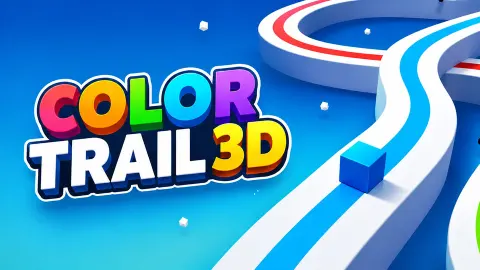
The look of ColorTrail 3D is spare. The track is a white ribbon with rounded corners, floating over flat blue water, with a darker lane down its centre. There is no scenery and no opponent. The colour comes from you: behind the cube the lane is yellow, ahead of it the lane is still grey.
The bar at the top tells you what the paint is for. It runs from a badge with a 1 to a badge with a 2, and it fills in green as the yellow trail gets longer. Painting the track and finishing the level are the same thing.
The propeller is what stops this from being a matter of holding the button down. It has three long grey blades on a short post, and it stands right on the lane rather than beside it. The first one in Level 1 sits just past a corner. We reached it with roughly a quarter of the bar filled, and the next time we looked, the bar was back at the beginning and the lane was grey again. We read that as a hit: it costs you the attempt, and the level starts over.
What we did not reach
We did not finish Level 1, so we never saw what a completed level looks like, what Level 2 adds, or how many levels there are.
The game's description says the levels get faster and harder and mentions traps as well as obstacles. The spinning propeller is the only hazard we met. It also says you fill every path. We travelled one straight and one corner of Level 1, so we cannot say how the rest of the track is laid out.
The coin counter in the top right corner read 100 when we started and 100 when we stopped. We saw no coins lying on the track and nothing to spend them on, so we cannot tell you what they buy.
Who it is for
ColorTrail 3D suits anyone who wants a game that needs one finger and no instructions. A young child can play it, because there is nothing to aim and nothing to read. The skill is patience and a sense of rhythm.
It is not a racing game, despite the track, and it is not a colouring game, despite the name. You never choose a colour or a direction. If you want to steer, this will feel like too little to do.
More games like ColorTrail 3D
For another game about getting colour past moving barriers, Paint Race is the closest we have. If you would rather steer than wait, Roll Sky Ball 3D puts a ball on a track full of obstacles and lets you slide it from side to side, and Rolling Balls Sea Race has the same narrow tracks over deep water with other players to beat. There is more of this kind in the 3D games category.
Screenshots
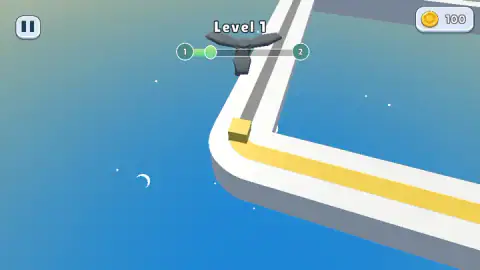
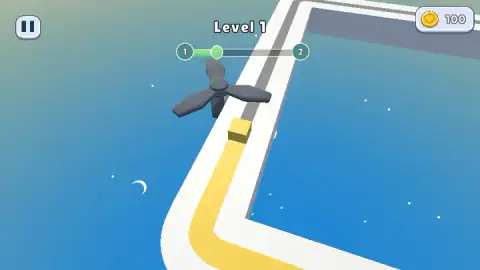
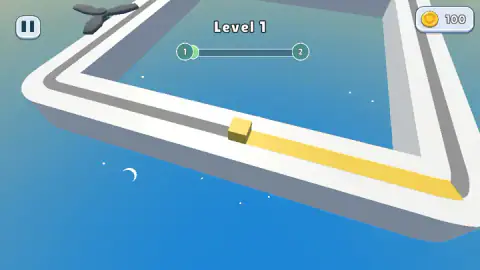
Taken by opening the game ourselves and letting it run — not supplied by the publisher, and not the same picture every other site shows.
How to play ColorTrail 3D
- Start the game. After a couple of clicks ours was on Level 1, with the cube already on the track and no menu in between.
- Hold the left mouse button, or hold a finger on the screen. The cube moves forward and leaves a yellow trail.
- Release to stop. The cube waits exactly where you left it.
- Watch the propeller ahead, and move through when the blades are clear of the lane.
- Keep painting until the bar at the top is full.
Tips from our session:
- Stopping costs nothing. In what we played there was no timer on screen, and the cube sat still for long stretches without anything happening to it. If you are unsure about a propeller, let go and look.
- Read the propeller before you reach it. It is visible from well back down the track, before the corner that leads to it, so you can watch a full turn of the blades before you commit.
- The grey lane is your to-do list. Painted track is yellow and unpainted track is grey, so a glance ahead shows exactly how much is left.
- Leave the pause button alone unless you mean it. It sits in the top left corner and opens a panel that covers the track. Close it with the X in the corner of the panel. It also has green Restart and Mainmenu buttons, which we did not press.
Controls
| Hold left mouse button (or touch and hold) | The cube moves forward along the track and paints the lane behind it |
|---|---|
| Release | The cube stops where it is |
| Pause button (top left) | Opens a panel with music and sound switches, Restart and Mainmenu |
Features
- One input for the whole game, hold to move and let go to stop
- A yellow cube that turns the grey lane of a white track yellow as it passes
- Grey three-bladed propellers that spin on the lane and have to be timed
- A track over open water with rounded corners, which the cube follows without any steering from you
- A bar at the top that fills as you paint, running from the level you are on to the next one
- A coin counter that starts at 100
- Music and sound effects can be switched off separately from the pause panel
Game details
- Developer
- 4friends
- Release date
- September 2026
- Last updated
- September 11, 2026
- Added here
- August 2026
- Technology
- HTML5 (3D)
- Platforms
- Browser (desktop, mouse), Browser (mobile & tablet, touch)
- Saved progress
- Saving, when available, is managed by this game. Mava cannot confirm your level.
FAQ
How do you play ColorTrail 3D?
You hold the left mouse button, or hold a finger on the screen, and a yellow cube slides forward along a track, painting the lane behind it yellow. Let go and the cube stops. The track steers the cube around the corners for you, so the whole game is choosing when to move and when to wait for a spinning propeller to pass.
How do you win a level in ColorTrail 3D?
A bar at the top of the screen runs from the number of your level to the next one and fills as the cube paints more of the track. The game's description says the goal is to fill every path while avoiding obstacles. In our session we got about a quarter of the way through Level 1 and did not finish it, so we cannot describe the end of a level.
What are the obstacles in ColorTrail 3D?
In the part of Level 1 we played, the only obstacle was a grey propeller with three blades, mounted on a post and spinning right on the lane the cube has to paint. The game's description also mentions traps and faster levels later on, which we did not reach.
What happens when you hit a propeller in ColorTrail 3D?
In our session the cube reached the first propeller with about a quarter of the level bar filled, and the next thing we saw was Level 1 again with the bar back at the start. You lose the progress of that attempt, not the game.
What are the coins for in ColorTrail 3D?
We do not know yet. A coin counter sits in the top right corner and read 100 from the first second to the last of our session. We saw no coins on the track and no shop, and we did not finish a level to see whether one pays out.
Who made ColorTrail 3D?
The game is credited to ColorTrail 3D to a developer called 4friends. It was published in September 2026.
Can you play ColorTrail 3D on a phone?
It is listed for phones and tablets as well as computers, and it runs in the browser with no download. The game's instructions give a single touch control, touch and hold to move, which matches the single mouse control on a computer.