




About Colors&Forms
The tutorial card is headed Education, and the sentence underneath it is the only instruction the game ever gives you: Move the shapes to the bottom of the screen. Pass their locations to match the falling objects. Read it twice. We did, and we still lost the next four attempts.
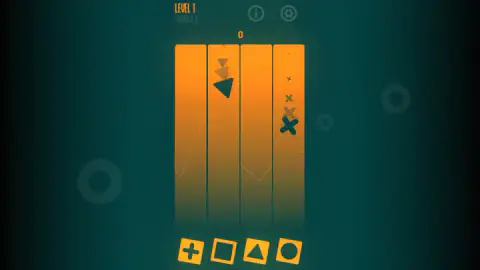
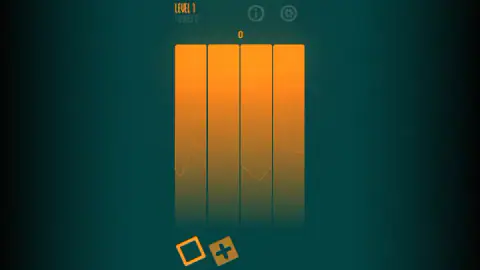
What is actually on screen is far simpler than that sentence. Four orange lanes stand on a dark blue-green background. Shapes come down them — a triangle, a square, a circle, a cross, and nothing else — starting as a faint speck at the top of a lane and arriving at the bottom solid, dark and several times the size. Underneath the lanes sits a row of rounded tiles, one per lane, each with a shape cut out of its middle like a biscuit cutter. The tile and the lane above it have to agree.
That is the whole game, and getting it wrong is quiet. Nothing explodes. The counter in the corner simply does not move. In one of our attempts, triangles were coming down the second lane while the triangle tile sat under the third, and crosses were coming down the fourth while the cross tile sat under the first — two moves short, and the reading stayed at FIGURES 0 until the card with the crossed-out face arrived.
A panel states the mission before every attempt: Collect 10 matching figures. Our best run reached three. We played for about four minutes on a desktop, lost several times, and we did not finish level 1 — so everything below is what the first level of this game looks like from the inside, and nothing at all about what comes after it.
The row of tiles is a form board, and the form board is nearly two hundred years old
Look at the tiles rather than the lanes and you will recognise them immediately. They are not pictures of shapes; they are holes in the shape of a circle, a square, a triangle and a cross. That object has a name and a history. It is a form board, and it is probably the single most widely owned teaching tool on earth.
The modern version traces back to Édouard Séguin, a French teacher who spent the middle of the nineteenth century working with children that the schools of the day had given up on. Instead of talking at them, he built things for their hands: boards with shapes cut into them, pieces that fitted and pieces that did not. Maria Montessori read him, credited him by name, and carried the same materials into her classrooms a generation later. From there the idea escaped into the toy trade, and it has never left. The plastic bucket with a circle, a square and a triangle punched in the lid is Séguin's board with a handle on it.
In a nursery that board sits still. Here it does not. Turn the thing on its side, make the holes queue up along the bottom of a screen, and send the pieces towards them under their own power — now the board has to be rearranged before the shape lands, not after. The game's tutorial even keeps the nursery vocabulary: it calls the screen Education and asks you to match objects by location. What it does not mention is that the objects are on a schedule.
That is the trick, and it is why a game assembled out of a two-year-old's toy can beat an adult. Knowing which hole the triangle goes in is not the test. Knowing it in the second and a half you have left is.
Why the shapes get bigger on the way down
The clearest thing in this game is also the easiest to miss: a lane never shows you one shape. It shows you the same shape several times over, each one larger than the one above it. In one of our captures the left-hand lane held a cross four times — a faint mark near the top, then bigger, then bigger again, then solid and dark near the bottom.
Growth is how a flat picture says this is coming towards you. Your eyes have no depth to work with on a screen, so size does the job instead: anything swelling in your field of view is closing in, and anything shrinking is leaving. Psychologists call it looming, and it is one of the first things a human being reacts to, long before learning the names of shapes. This game leans on it entirely. There is no shadow, no perspective, no third dimension anywhere in the artwork — just a figure getting bigger, which is quite enough.
The useful consequence is that a lane is a timetable, not a snapshot. The top of a lane tells you what will be arriving shortly; the bottom tells you what is arriving now. Play by looking at the bottom and you are always a move late. Play by looking at the top and the row below starts to feel less like a reaction test and more like a sorting job with a deadline, which is what it is.
Where we stopped, and what we are not claiming
Four minutes, several attempts, FIGURES 3 at best, and level 1 still unfinished. We chose Easy every time and never touched Normal or Hard, so what those two change is theirs to know. We never opened the i or the gear in the top right. We never saw a score, a coin balance, a shop or a level above the first one.
The listing for this game also advertises a button with a castle on it that switches the type of game, and objects appearing on screen that have to be clicked. We looked and never found either. That does not mean they are not in there — it means four minutes of level 1 is not where they live, and we are not going to describe something we have not seen.
What we can tell you is that the first level is honest about itself. It states its goal before you start, it shows you everything it is going to throw at you while it is still small, and when you lose it says so with a round face and a pair of crossed-out eyes, then puts you back in front of the same question. Ten matching figures. The board is right there. The only thing you are short of is time.
More games that ask you to line something up
Cube Drop Puzzle is the nearest relative in the catalogue and runs the same idea in reverse: there the holes are what you drag and the targets stand still. Sky Blocks Falling keeps the falling half and drops the matching, with a row of slots that simply catches whatever comes. ExitBlocks: Color Match Puzzle swaps shapes for colours and gives you a five-minute clock to beat. And Cute Shapes is the same subject with the hurry taken out — shapes, a question and no timer at all, which is the version to hand a small child. The rest are in puzzle games.
Screenshots
How to play Colors&Forms
- Click the middle of the opening screen to get in. It took us a couple of clicks before anything changed.
- The Mission panel comes up: the goal in white, the words Game mode in orange, and Easy, Normal and Hard underneath, one of them ringed. There is no button marked Start anywhere on it — choosing the mode is how you begin.
- Read the lanes before you touch anything. The small faint shapes near the top are the ones you still have time to prepare for.
- Move the tiles along the bottom row so that each lane has its own shape waiting beneath it.
- When Game over appears, the circular arrow runs it back — but it returns you to the Mission panel, not straight into the lanes.
What we only found out by being there:
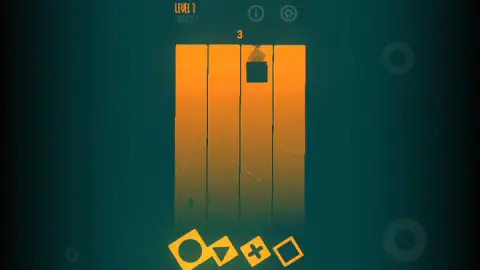
- The big number above the lanes is not a separate score. It is the same figure as the FIGURES counter in the corner, printed large. When ours read three, both read three.
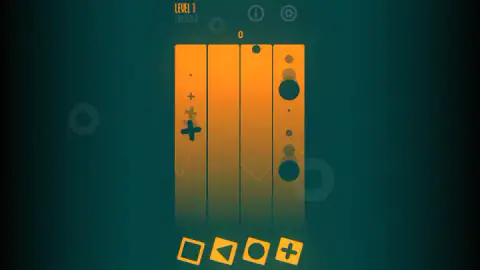
- The row is never in the same order twice. Cross, square, triangle, circle in one attempt; circle, triangle, cross, square in the next. The opening move has to be worked out fresh each time.
- The row is not always four tiles long. One of our captures shows it down to two, and one of the two dimmed to brown while the other stayed bright. We never got far enough to learn the rule behind that.
- A lane can be running two waves at once. In one attempt the right-hand lane took a set of circles all the way to full size and then started again small, while the first lane was still working through its crosses.
- We left the second round button on the Game over card alone. Beside the circular arrow there is a smaller one carrying a coin-like badge. We never pressed it, so we are not going to tell you what it does.
Controls
| Mouse or finger on the row of tiles | The whole game. The tiles below the lanes are what you move; everything else on screen is a readout |
|---|---|
| Easy / Normal / Hard | The three words on the Mission panel that comes up before every attempt. One of them is always ringed, and picking one is how the attempt starts |
| The circular arrow on the Game over card | Starts again. It does not drop you back into the lanes, it drops you back onto the Mission panel |
| The round i and the round gear, top right | The game's own help and its settings. We never opened either, so what is behind them is the game's business and not ours to describe |
| Keyboard | Nothing we needed. We played the whole session with the pointer |
Features
- Four lanes, four shapes — triangle, square, circle, cross — and a row of cut-out tiles below that has to be lined up with what is coming down
- The mission is stated before every attempt and never changes at level 1: collect ten matching figures
- Shapes grow on the way down, from a faint speck at the top of a lane to a solid dark figure at the bottom, so a lane doubles as a timetable
- A lane can run more than one wave: in one of our attempts the right-hand lane finished a set of circles and immediately began another
- The row of tiles is never in the same order twice, so the opening move has to be worked out fresh every attempt
- The row is not always four tiles long either — one of our captures shows it down to two, one of them greyed out
- Difficulty is not buried in a settings menu: Easy, Normal and Hard are offered again before every single attempt
Game details
- Developer
- Partner studio
- Release date
- October 2024
- Last updated
- October 23, 2026
- Added here
- March 2025
- Technology
- HTML5 (Godot)
- Platforms
- Browser (desktop), Browser (mobile & tablet, touch)
- Saved progress
- Saving, when available, is managed by this game. Mava cannot confirm your level.
FAQ
What is Colors&Forms?
It is a free browser matching game built out of four vertical lanes. Shapes fall down the lanes and a row of tiles with shapes cut out of them sits underneath, one tile per lane. Your job is to get the right cut-out under the right lane before the shape arrives. The level-one mission is to collect ten matching figures.
How do you play Colors&Forms?
With the pointer, and only with the pointer. Read which shape is coming down which lane, then move the tiles in the bottom row so that each lane has its match waiting beneath it. The game's own tutorial puts it as moving the shapes to the bottom of the screen and passing their locations to match the falling objects.
What is the mission in Colors&Forms?
A panel before every attempt states it: collect ten matching figures. A counter reading FIGURES sits under the words LEVEL 1 while you play, and the same number is repeated large above the lanes. Reach ten and the level is done. We never got there; our best attempt stopped at three.
What do Easy, Normal and Hard change in Colors&Forms?
The game offers all three under the heading Game mode on the panel that appears before every attempt, with one of them ringed. We chose Easy every time and never tried the other two, so we cannot tell you what they alter. What is worth knowing is that the choice is offered again every single time, not set once and forgotten.
Why do the shapes get bigger as they fall in Colors&Forms?
Because growing in size is how a flat screen says that something is coming towards you. The same figure is drawn several times down a lane, faint and tiny at the top and solid and dark at the bottom. The practical effect is that the top of a lane is a preview: it tells you what to prepare for while you still have time to move a tile.
Is Colors&Forms free, and does it work on a phone?
It is free and it runs in the browser on this page with nothing to install. It is listed for desktop, mobile and tablet, and a game whose only input is dragging four tiles around is obviously built with a thumb in mind. We played it with a mouse on a desktop, so the phone part is the listing's claim rather than ours.
Who made Colors&Forms?
We cannot tell you, and we would rather say so than guess. The game's listing names no studio, and the author field on its page holds a placeholder rather than a developer name. No studio site turned up to point at. The listing went live in October 2024 and was last updated in August 2026.
Is Colors&Forms good for young children?
The shapes and the idea come straight from a toddler's shape sorter, and the game's own tutorial card is headed Education. But it is a reaction game underneath: shapes land whether you are ready or not, and a Game over card with a crossed-out face ends the attempt. Small children will recognise the pieces; the timing is what will beat them.