







About Four Colors Card Game
Most card games in a browser hand you a pile and a hand and leave the rest to guesswork: whose turn it is, which colour is live after someone plays a wild, why your card will not go down. Four Colors answers each of those on the table itself. We spent four minutes at it in our latest session, and almost everything we needed to know was somewhere on screen.
The game is the family shedding game most people learned at a kitchen table. You start with a hand of cards and take turns matching the top of the pile by colour or by number. Skip, Reverse and Draw Two cards slow the others down, wild cards change the colour, and the first hand to empty wins. The one twist is that you do not shout when you are down to one card. You tap a button with a 1 on it.
Four Colors was made by Code This Lab, an Italian studio based near Naples. Its own notes date the first version to February 2017. We have played it twice: a handful of full matches in September, and a fresh session on 30 September 2026, at a table of two.
What the tutorial tells you, and what it leaves out
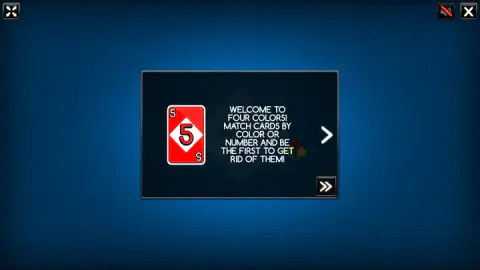
The tutorial is short and worth reading once, because it carries the only rules text in the game. It names each action card and what it does. A Draw Two forces the next player to pick up two cards and forfeit the turn. The Wild Draw Four changes the colour and makes the next player pick up four, and the tutorial adds a condition: you may only use it when you have no other card to play. The last page is a warning about the 1 button.
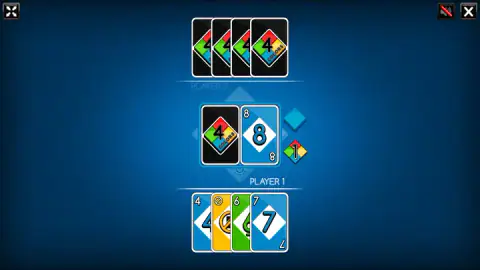
What it does not tell you is how the table looks once play starts, so here is what we saw. Your hand is spread along the bottom under PLAYER 1. The other hands sit face down at the edges, every card back showing the 4 Colors logo. The deck and the pile are in the middle, and the little four-coloured diamond with the 1 floats just to the right of them, waiting for you. After every wild, a second diamond joins it in the colour that was chosen.
A family card game with its name filed off
The game Four Colors resembles began, by the usual account, with an argument about Crazy Eights. In 1971 Merle Robbins, a barber in Reading, Ohio, drew up his own deck to settle his family's dispute over the rules and sold the first copies from his shop. The name he gave it now belongs to Mattel, which is why every browser version of the idea needs a name of its own. Four Colors has no link with Mattel. It kept the rules, which no one can own, and drew its own cards, its own logo and its own 1 button.
Two of the rules it kept are the stricter readings, and both make a match faster:
- No challenge. In the printed game, a Wild Draw Four can be challenged if you suspect it was played illegally. Here the condition is part of the rules from the start, so there is nothing to argue about.
- No stacking. A Draw Two is paid at once and the turn is lost. Mattel has said publicly that stacking one on another was never an official rule.
Playing against the computer, not against friends
The feed files Four Colors under two-player games, and the menu asks for two, three or four players, so this needs saying plainly. Only one of them is you. Every other seat is the computer, and there is no online mode and no way to share one screen. Code This Lab makes a separate Four Colors Multiplayer edition; that is a different game from the one on this page.
The size of the table changes the feel more than you might expect. At two, every action card you play lands on the same opponent, and the turn comes back to you quickly. At four, a Draw Two can arrive from either side once someone reverses the direction. In our September matches, a game against one computer player took under a minute, and a full table not much longer.
Is it right for you?
It is a gentle choice for anyone who already knows this family card game, and a fair way to learn it for anyone who does not. There is no timer on your turn. The only text is the tutorial, the panels and the end screen, all in English and all short, and the cards themselves use numbers and symbols, so younger players can follow along.
Be clear about what it is not. There is no one else at the table, nothing to unlock and no long campaign; each match is a single hand played to the end. If you lose, the score on the end screen is zero, so the number only means something when you win.
More card and board games
If you want a real opponent sitting next to you, Carrom Pro has a pass-and-play mode, and English Checkers is the classic board game against a friend or the computer. Domino Legend is another turn-by-turn game of matching what is on the table, and Mini Dice Chess adds a roll of the dice to chess. More games like these are in our puzzle category.
Screenshots
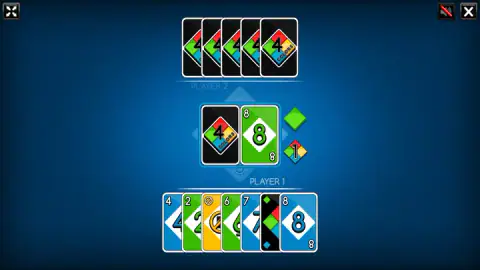
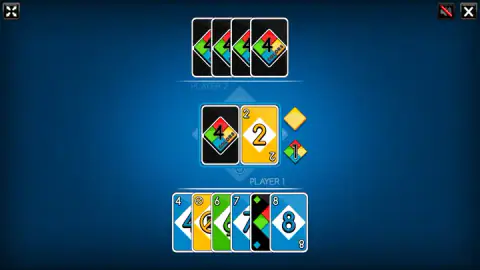
Taken by opening the game ourselves and letting it run — not supplied by the publisher, and not the same picture every other site shows.
How to play Four Colors Card Game
- Press play and pick the table. A panel reads SELECT THE NUMBER OF PLAYERS, with a green, a yellow and a red diamond for two, three and four. You are always Player 1, at the bottom; every other seat is the computer.
- Read or skip the tutorial. It opens with "Welcome to Four Colors" and walks through the action cards one page at a time. The single arrow turns the page, the double arrow skips to the table.
- Match the pile. On your turn, tap a card with the same colour or the same number or symbol as the top card. Wild cards go on anything.
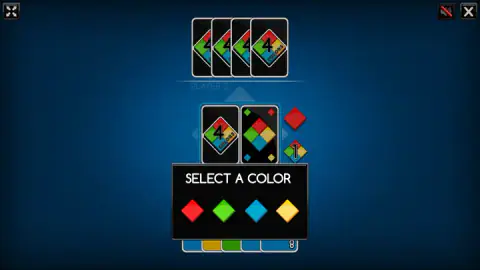
- Pick the colour after a wild. A black SELECT A COLOR panel shows four diamonds. Tap one, and a small diamond in that colour appears beside the pile.
- Draw when stuck, and call your last card. If nothing fits, tap the face-down deck. When you are down to one card, tap the 1 button, then play that card to win.
Tips from our sessions:
- A card that does not fit simply stays put. There is no buzz and no message. We tapped the same unplayable card several times in a row before noticing nothing was happening. If a tap does nothing, look at the pile and the colour diamond again.
- Read the diamond, not the card. After a wild, the top card is black and tells you nothing. The colour that counts is the small diamond next to it. We chose red, and a red diamond sat there until the colour changed again.
- Number or colour, either one. A green 8 on the pile takes any green card or any 8, so a hand with several colours of the same number can switch the colour without spending a wild.
- Watch the hand at the top. You cannot see your opponent's cards, only their backs, but you can count them. When that row gets short, it is time to hold on to your wild cards.
- Keep the 1 button in mind before you play. The moment your second-to-last card lands is when the call matters, not your next turn.
Controls
| Click / tap a card in your hand | Play it, if it matches the colour or number on the pile, or if it is a wild card |
|---|---|
| Click / tap the face-down deck | Draw a card when nothing in your hand fits |
| Click / tap the 1 button | Call your last card; the small four-coloured diamond with a 1 sits beside the pile |
| Click / tap a coloured diamond | Choose the new colour on the SELECT A COLOR panel after a wild card |
| Click / tap the double arrow | Skip the tutorial before the first match |
Features
- Two, three or four seats at the table, and every seat except yours is played by the computer
- Number cards plus Skip, Reverse, Draw Two, Wild and Wild Draw Four, each explained in a short tutorial
- A 1 button instead of a spoken call, with two penalty cards if you forget it
- A SELECT A COLOR panel with four diamonds after every wild card you play
- A small diamond beside the pile that always shows the colour in force after a wild
- No timer on your turn and no keyboard controls; mouse or touch only
- No account, no online mode and nothing to unlock
Game details
- Developer
- Code This Lab
- Release date
- February 2017
- Last updated
- November 12, 2021
- Added here
- April 2019
- Technology
- HTML5 (Canvas 2D)
- Platforms
- Browser (desktop), Browser (mobile & tablet, touch)
- Classification
- Puzzle
- Download size
- 3.4 MB
- Ad requests
- 2 (few)
- Has a save
- Yes
- Saved progress
- Saving, when available, is managed by this game. Mava cannot confirm your level.
Measured by opening the game ourselves on 2026-09-11, not taken from the feed. Twelve seconds on a phone-sized screen, with ad requests counted and blocked rather than loaded.
FAQ
What is Four Colors?
Four Colors is a free browser card game made by Code This Lab, an Italian studio. You and one to three computer players take turns matching the top card of the pile by colour or by number, and action cards skip, reverse or punish the next player. The first to empty their hand wins.
Is Four Colors the same as UNO?
It plays by very similar rules, but it is not UNO and has no link with Mattel, which owns that name. The cards, the logo and the 1 button are Code This Lab's own design. The family of games it belongs to goes back to Crazy Eights, which anyone can play.
Can you play Four Colors with friends?
Not in this version. The menu offers two, three or four players, but only one of them is a person; the rest are the computer. There is no online mode and no way to pass one screen around. Code This Lab makes a separate Four Colors Multiplayer edition, which is not the one on this page.
What is the 1 button in Four Colors?
It is the small diamond with a 1 on it, in the four card colours, next to the pile. You tap it when you are down to your last card, in place of saying it out loud. The tutorial warns that forgetting it costs you two penalty cards, so tap it as soon as your second-to-last card lands.
How do you change the colour in Four Colors?
Play a Wild or a Wild Draw Four. A black panel reading SELECT A COLOR appears with four diamonds, red, green, blue and yellow, and you tap the one you want. A small diamond in that colour then stays beside the pile so everyone can see what must be played next.
When can you play a Wild Draw Four in Four Colors?
Only when you have no other card you could play. The tutorial says so in plain words, and that is why there is no challenge rule as in the printed card game. The next player picks up four cards and you choose the colour.
Can you stack Draw Two cards in Four Colors?
No. The tutorial says a Draw Two forces the next player to pick up two cards and forfeit the turn, so there is no chance to answer with another Draw Two. Mattel has also said that stacking was never part of its official rules.
Does Four Colors work on a phone?
Yes. It is played entirely with taps and it is listed as mobile ready. It is laid out for a wide screen, so turn your phone sideways. In our tests the menu, the table picker and the tutorial all answered to touch.