




About Color Brawls
Most arena shooters keep score for you. Color Brawls keeps score against you. The number that changes at the top of the screen is not your kills but how many players are still standing, and in our round it fell from four to one without any help from us.
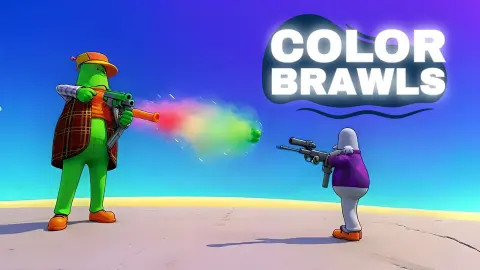
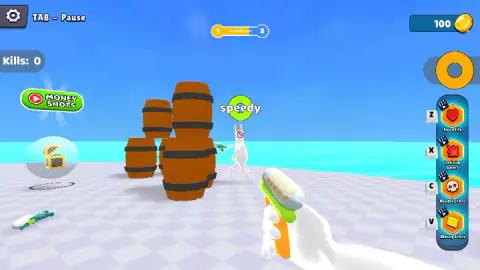
The arena is about as plain as one can be: a white chequered platform over a flat turquoise sea, with a few stacks of wooden barrels on it. You see it in first person. Your hands are white, and so is every figure in the game until someone buys a skin. The gun is green and orange, with a clear case of little balls sitting on top of it.
The game is credited to DOAL.dev and was published on 25 September 2024.
A word on what this page rests on. We played one round for about two and a half minutes at a desktop, and we did not get a single kill. The round was still going when we stopped. So we can describe the menu, the screen and how a round unfolds, but not what winning looks like or what the first level-up brings.
The round goes on without you
When we arrived the bar at the top read «4 PLAYERS LEFT». A little later it read 2, then 1. Our own tally, a grey tag on the left that says «Kills: 0», never moved. The other players had been shooting each other.
The count does not seem to include you. It said 1 when the last opponent, Speedy, was standing in front of us beside the barrels.
The bar those words sit on runs from a yellow 1 to a white 2 and fills as the count falls. It was empty at four players and about three-quarters full at one. Since the weapons in the menu unlock by level, we take the 1 and the 2 to be your level and the next. We did not see the bar reach the end.
Two things lay on the floor near the barrels: a treasure chest inside a bubble and a gun. We did not walk over either, so we cannot say what they give.
Four boosts and three locked weapons
During the round a column on the right edge lists the boosts. It began with two and grew to four: Extra Life on Z, Infinite Ammo on X, Headshot Pro on C and Money Shots on V. Each has a small clapperboard on its corner, the usual sign of a short video in exchange. Now and then one of them also pops up as a green button elsewhere on the screen, with a red play icon. We left them all alone.
The weapon panel in the menu has four slots. The gun is yours. The shotgun wants level 5, the rifle level 10 and the minigun level 30. The first two have a Try button underneath, with the same clapperboard on it.
The coins sat at 100 from the daily reward to the end of our round. The only place we saw to spend them is the Skins button in the menu, which we did not open.
Who it suits
It suits players who want a shooter with no setup: one button from the menu to a round, a small arena and a round that is over in minutes. The toy gun and the blank white figures keep it mild enough for younger players.
It suits less anyone who wants maps, modes or teams. We saw one arena and one way to play. And if you dislike video offers, there are several of them on screen for most of a round.
More shooters on the site
For a first-person shooter against other players online, with several modes, there is Hazmob FPS: Online Shooter. Winter Clash 3D keeps the light tone and swaps the sea for snow and elves, and Warfare Area is a solo mission for players who would rather not share the arena. Armed Forces.io is another one to try in the same vein. The rest are in shooting games.
Screenshots
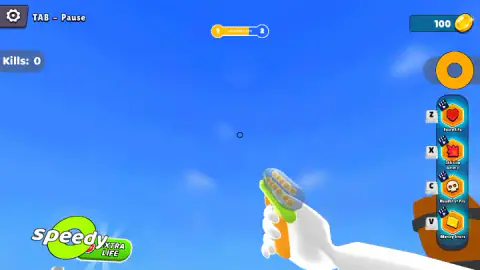
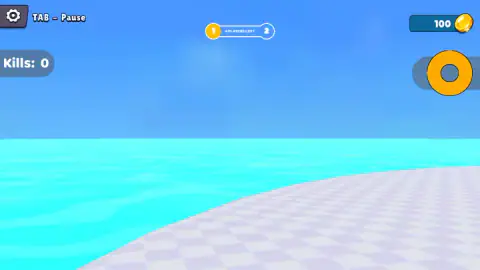
Taken by opening the game ourselves and letting it run — not supplied by the publisher, and not the same picture every other site shows.
How to play Color Brawls
- Collect the daily reward if it is offered. Ours paid 100 coins before we had done anything.
- Choose a name and a weapon. There is a box for the name above the Play button. At the start only the first weapon, the gun, is open.
- Press Play. The round starts straight away, on the platform, with the counter at the top showing the players left.
- Move with WASD or the arrow keys and aim with the mouse. The aiming mark is a small dark ring in the middle of the screen.
- Left click to shoot. Tab pauses.
What we picked up while playing:
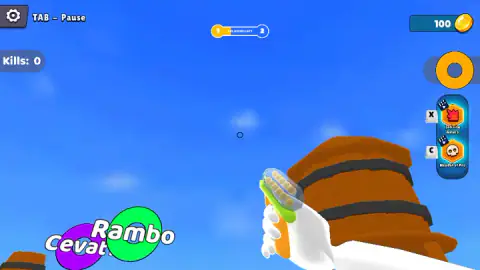
- Keep the ring on the horizon. The view goes wherever the mouse goes, up and down as well as sideways. We spent a good part of our round with the gun pointed at empty sky, walking forward and seeing nothing. If all you can see is blue, pull the view down first and move second.
- Read the name tags, not the bodies. A white figure on a white floor is hard to spot. The names are not: each one sits on a bright ring, green for Rambo and Speedy, purple for Cevat. We noticed the tags at the edge of the screen before we noticed anyone.
- Barrels block your view too. At one point we walked into a stack and the whole screen turned brown. They are cover, and the only cover there is, but hug them and you are blind.
Controls
| W A S D / Arrow keys | Move |
|---|---|
| Mouse | Look around and aim the small ring in the middle of the screen |
| Left click | Shoot |
| Tab | Pause |
| Z / X / C / V | Extra Life, Infinite Ammo, Headshot Pro and Money Shots, the four boosts listed down the right edge |
Features
- First-person rounds on a white chequered platform over a turquoise sea, with wooden barrels as the only cover
- A counter at the top that says how many players are left, on a bar that fills as they drop out
- Four weapons in the menu: the gun from the start, the shotgun at level 5, the rifle at level 10, the minigun at level 30
- A Try button under the shotgun and the rifle while they are still locked
- Four boosts on the Z, X, C and V keys: Extra Life, Infinite Ammo, Headshot Pro and Money Shots
- Opponents carry their names on coloured rings, so you can tell them apart at a distance
- A skins shop and a daily reward that paid 100 coins on our first visit
Game details
- Developer
- DOAL.dev
- Release date
- September 2024
- Last updated
- August 10, 2026
- Added here
- March 2025
- Technology
- HTML5 (3D)
- Platforms
- Browser (desktop, keyboard and mouse), Browser (mobile & tablet, touch)
- Classification
- Fighting , Multiplayer , Shooting
- Saved progress
- Saving, when available, is managed by this game. Mava cannot confirm your level.
FAQ
How do you play Color Brawls?
You type a name, pick a weapon and press Play. The round is a first-person shootout on a platform over the sea: move with WASD or the arrow keys, aim with the mouse and shoot with the left button. A counter at the top shows how many players are left.
What are the controls in Color Brawls on a computer?
WASD or the arrow keys move, the mouse aims and the left button shoots. Tab pauses, and the game keeps that reminder in the top left corner. The Z, X, C and V keys belong to the four boosts listed on the right edge of the screen.
How do you unlock the shotgun, rifle and minigun in Color Brawls?
By level. The weapon panel in the menu marks the shotgun with level 5, the rifle with level 10 and the minigun with level 30, each under a padlock. The shotgun and the rifle also have a Try button for a go before you reach the level.
What do Extra Life, Infinite Ammo, Headshot Pro and Money Shots do in Color Brawls?
They are four boosts on the Z, X, C and V keys, listed down the right edge during a round. Each carries a small clapperboard icon, the usual sign that it is paid for by watching a video. We did not use any of them, so we can only give you their names.
Is Color Brawls multiplayer?
Each opponent has a name, such as Rambo, Cevat or Speedy, and the round counts players left. Nothing we saw says whether those names belong to people online or are run by the game. We opened it alone and a round started within seconds, with no waiting room.
Who made Color Brawls?
The game is credited to DOAL.dev and added it to its catalogue on 25 September 2024.
Can you play Color Brawls on a phone?
The game is listed for phones and tablets as well as computers, and its instructions describe a joystick to move, a swipe to look and a button to shoot. We played it at a desktop with a keyboard and mouse only.