


About Armed Forces.io
Two things catch new players out in Armed Forces.io. The first room you join may already be over. And the 35 bullets in your gun run out fast. This guide shows the sign for each one and what to press next.
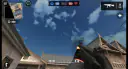
You look through your soldier's eyes and fight in one of five modes. You start with a small sub-machine gun called the MP5, a pistol, a knife and basic armour. The game first came out at the start of 2022.
We played it twice, once in September and again in November. Both times the game put us in a room that was just ending. So that is where this guide starts.
When the room is already over
Confirm and Play does not wait for a new match. It drops you into a room that has space, and that room may be ending.
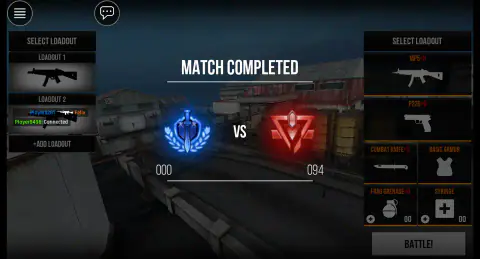
In November we picked Team Deathmatch. The first thing we saw was Match Completed, with the red team on 94 and the blue team on 0. Then came the Top Players podium and a short countdown back to the main menu.
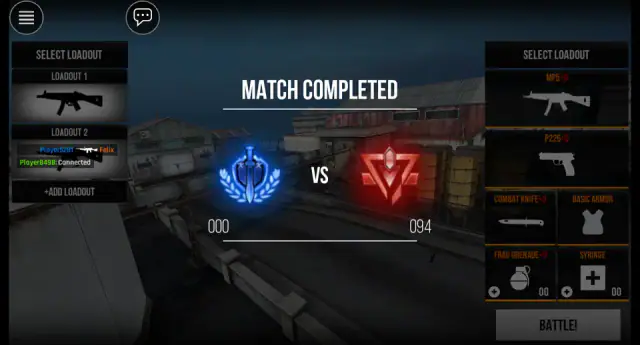
You do not need to press anything. The game takes you back to the lobby by itself. That visit paid us 40 cash. Press BATTLE! again for a new room, or play offline.
Playing offline against bots
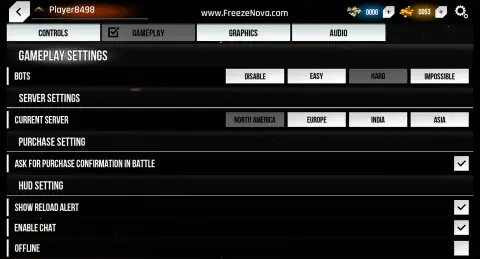
Open the gear at the top right and choose Gameplay. This page holds the switches that matter most:
- BOTS: Disable, Easy, Hard or Impossible. Hard is set when you start.
- Current server: North America, Europe, India or Asia.
- Enable Chat: a tick box, ticked at the start.
- Offline: tick it to play against bots only.
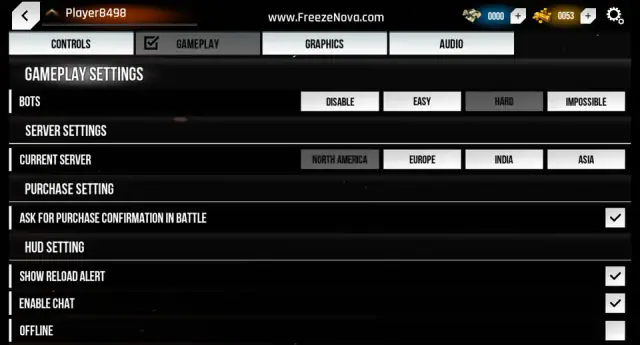
With Offline ticked, the lobby says "You are playing offline." and shows a Play Online button to switch back. Our offline round started from a full 10:00, after a "Round starts in 02" countdown.
With bots on Easy, the fight went on around us. We stood in one corner from 07:12 to 00:25 on the clock, and no bot came for us. That makes Easy a calm place to learn the keys and the map.
Your 35 bullets go fast
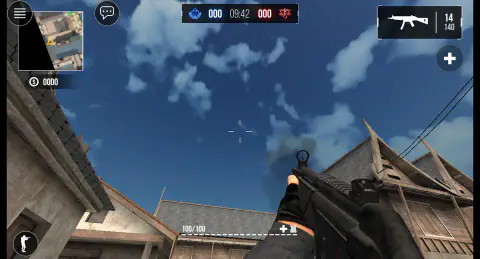
The MP5 holds 35 rounds, with 140 spare. We held the fire button for one and a half seconds. The counter fell to 14.
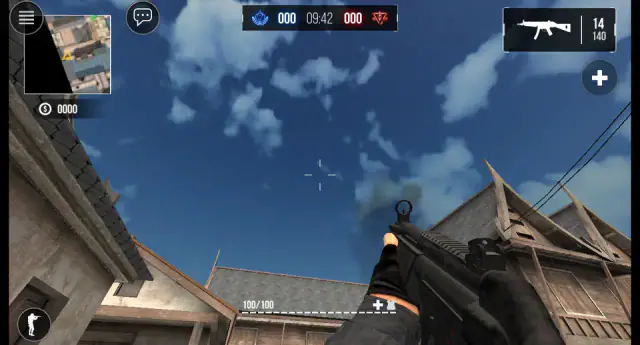
Pressing R filled it back to 35. The spare count fell to 119, because a reload only takes the bullets you used. Pressing 2 gave us the P226 pistol, with 12 rounds and 60 spare. It was out in under a second.
So here is the choice. Out in the open, with an enemy close, press 2 and keep shooting. Behind a wall, press R. If you are knocked out, you come back with a full 35 and 140.
Real people or bots
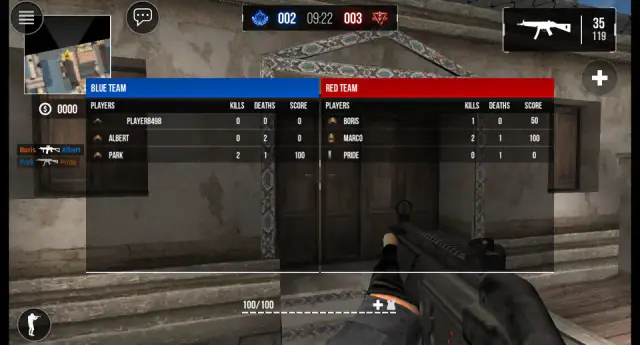
Hold N and read the names. The game does not say who is a bot, but the names give you clues.
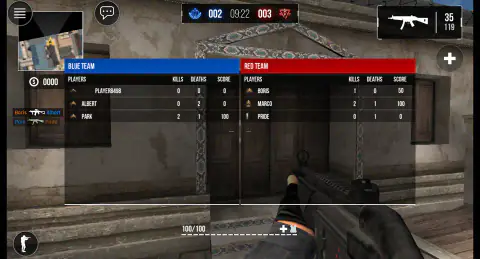
In our offline round the bots had plain first names: Albert and Park on our side, Boris, Marco and Pride on the other. Our own name was Player8498. The game gave us that name, Player and four numbers, without asking.
Online rooms looked different. The November podium showed Player8666, Player5281 and a player called Flame. We cannot tell you if those were people or bots. The game never tags a bot, so a name alone is not proof.
What to buy with your first cash
Cash comes from playing. The sooner you finish a whole round, the sooner you can shop. Our full offline round took us from 40 cash to 2,820, and we never hit anyone. The next full round added 3,030 more.
That buys exactly one main gun. Here are the prices we saw in the weapon list:
| Gun | Cash |
|---|---|
| SG554 rifle | 2,800 |
| Minimi machine gun | 3,100 |
| AKM rifle | 3,300 |
| M40A3 sniper rifle | 4,200 |
We bought the SG554 and had 20 cash left. Its stats card shows more damage than the MP5 (27 against 23) and a faster fire rate (65 against 50). It is a little less accurate (65 against 70). It holds the same 35 rounds. In the next round it was in our hands from the start.
The M40A3 is the slow, careful choice. The real one is a bolt-action rifle, which means the shooter works a handle by hand between shots. The game keeps that idea. Its card shows top damage and range, but a fire rate of 20 and only 10 rounds.
Gold is the other currency. It climbs while the lobby is open: ours went from 26 to 502 in about five minutes. Gold buys supply drops for 500, 1,000 or 2,000. The plus buttons next to cash and gold open optional reward videos. We did not use them.
Armed Forces.io unblocked, and when the servers say no
There is nothing to download. The game runs in the browser tab. The part that can fail is the link to the match servers, which some school and office networks block. You may see Failed to connect even when the menus work. Press Play Offline there, or tick Offline in Settings. You lose the online rooms, but you still get a full round.
More shooters like it
Masked Forces comes from the same studio, with online rooms and team matches. Hazmob FPS is another online shooter in the first person. Warfare Area is the single-player opposite: one rifle and a map of enemies to clear before the clock runs out. There are more in our shooting games category.
Screenshots
How to play Armed Forces.io
- In the lobby, press BATTLE!, pick a mode on the left and press Confirm and Play. All joins any room with space.
- On the Select Loadout screen, check your kit and press BATTLE! again to spawn.
- Click the game once so it holds the mouse. Move with W, A, S and D. Look with the mouse. Fire with the left button.
- Watch the number at the top right. It shows the bullets in your gun and the spare ones. Press R to reload.
- Hold N for the scoreboard. Press Esc to get your cursor back.
Tips
- Switch before you reload. The loading screen says it: switching your gun is faster than reloading. Press 2 for the pistol, then 1 to go back.
- You start with no grenades and no syringes. The loadout shows 00 for both. So G and H do nothing at first. A grenade costs 200 cash.
- Lower the bots while you learn. The BOTS row under Settings, then Gameplay, starts on Hard. Easy is one click away.
Controls
| W A S D or arrow keys | Move |
|---|---|
| Mouse | Look around and aim |
| Left click | Fire |
| Right click | Aim down the sights |
| R | Reload |
| 1, 2 | Main gun, pistol |
| C | Crouch (press again to stand) |
| Hold N | Show the scoreboard |
| Left Shift | Sprint |
| Space while moving | Slide |
| E or F | Pick up a weapon or interact |
| G | Throw a grenade (you start with none) |
| H | Heal (you start with no syringes) |
| Esc | Free the mouse |
Features
- Five modes: Team Deathmatch, Free for All, Capture the Flag, Bomb Defuse and Gun Game, plus All
- An offline round starts from 10:00 on the clock, after a two-second countdown
- An Offline box and a BOTS setting with Disable, Easy, Hard and Impossible, set to Hard at first
- You start with an MP5 (35 rounds, 140 spare), a P226 pistol, a knife, basic armour and no grenades or syringes
- Eight main guns to buy with cash, from the SG554 at 2,800 to the M40A3 sniper rifle at 4,200
- Two currencies: cash from matches and gold that builds up while the lobby is open
Game details
- Developer
- FreezeNova
- Release date
- January 2022
- Last updated
- July 4, 2022
- Added here
- December 2017
- Technology
- HTML5 (Unity WebGL)
- Platforms
- Browser (desktop, keyboard and mouse)
- Classification
- 3D , .io , Multiplayer , Shooting
- Download size
- 53.4 MB
- Ad requests
- 2 (few)
- Has a save
- Yes
- Saved progress
- Saving, when available, is managed by this game. Mava cannot confirm your level.
Measured by opening the game ourselves on 2026-09-11, not taken from the feed. Twelve seconds on a phone-sized screen, with ad requests counted and blocked rather than loaded.
FAQ
Can you play Armed Forces.io offline?
Yes. Press the gear, open Gameplay and tick Offline. The lobby then says You are playing offline, and every round is against bots from a full ten-minute clock. The Play Online button takes you back to online rooms.
Why does Armed Forces.io show Match Completed as soon as I join?
The game can put you in a room that is about to end, even when you pick one mode. We joined a Team Deathmatch room that was already over, 0 to 94. After the Top Players podium, the game sends you back to the lobby by itself, and you can try again or play offline.
How can I spot the bots in Armed Forces.io?
Hold N to see the scoreboard. In our offline round the bots were called Albert, Park, Boris, Marco and Pride. Online rooms showed names like Player5281, the same kind of name the game gave us. The game does not tag bots, so a name alone does not tell you who is a bot.
How do you reload and switch weapons in Armed Forces.io?
R reloads, 2 takes out the P226 pistol and 1 brings back your main gun. The pistol was in our hands in under a second. The game's own loading screen says switching is faster than reloading, so use 2 when you run dry close to an enemy.
What gun should I buy first in Armed Forces.io?
After one full offline round our cash went from 40 to 2,820. The only gun in reach was the SG554 at 2,800. It hits a bit harder and fires faster than the MP5 on its stats card, with a little less accuracy. The AKM costs 3,300 and the M40A3 sniper rifle 4,200.
Does Armed Forces.io have in-app purchases?
We found no way to pay real money. Cash comes from playing, and gold builds up while the lobby is open. The plus buttons next to them open optional reward videos, which we did not use.
Is Armed Forces.io unblocked, and can I play it at school?
It runs in the browser with nothing to install. Online rooms need a connection to the game's own servers, which some networks block. If you see Failed to connect, press Play Offline and you still get a full round against bots. We played it with a keyboard and mouse.
Is it Armed Forces io, ArmedForces.io or Armsforce io?
They are all the same game. The loading screen spells it ArmedForces.io as one word, and most sites write Armed Forces.io. Searches such as armsforce io or armed forces i.o are typing slips for the same title.