


About Shoot & Sprint: Warfare
Most shooters hand you two jobs: move and aim. Shoot & Sprint: Warfare takes one of them away. Your soldier runs down a sandy road on his own, from the first second, and nothing you press changes his path. You get the other job only. The enemies are already in the windows, and you click on them.
That is the oldest idea in arcade shooting, and it changes what the game asks of you. You cannot dodge or take cover. The road decides where you are, so the only skill left is choosing who to shoot first, and doing it fast.
We have to be straight about how far we got. We played two sessions of about four minutes each, at a desk, with a mouse. We started level 1 more than fifteen times, and our soldier went down early on every run. This page covers that first stretch of road in detail, and says plainly what we never saw.
The game is by 3S Games. It was published in April 2025.
The first stretch of road
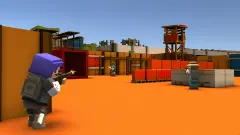
Level 1 looks like a training ground built in a Japanese garden. The road is pale sand, edged with low wooden fences. Grey walls made of concrete blocks stand at either side, each with a square window cut into it, and that is where the enemies wait. Beyond them the scenery opens up: green hills drawn in big flat facets, trees with red blossom, a white pagoda on the left, and a tall red gate straight ahead.
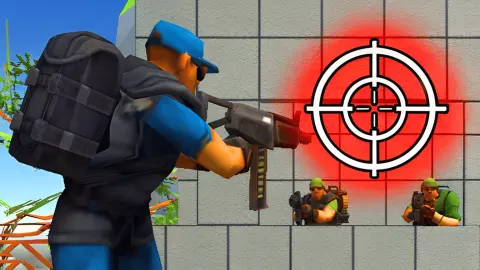
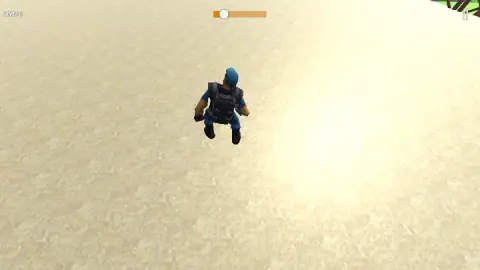
The view sits just behind your soldier's shoulders. He wears a blue cap, a dark tactical vest and a large black backpack, and carries a rifle. The camera follows him at running height, so the walls slide towards you on both sides.
The screen is kept almost empty. LEVEL: 1 sits in small letters at the top left, the progress bar at the top centre and a pause button at the top right. We saw no ammo count, no health bar and no score at any point on level 1.
What happens when you go down
This is the part we saw most often, so it is the part we can describe best.
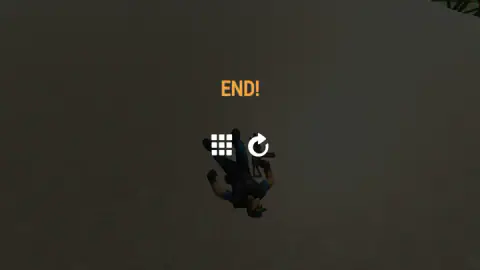
When your soldier is hit, the camera leaves his shoulder and swings to look straight down at him from above. In one of our runs red splashes appeared on the sand around him at this moment. Then the screen dims, he ends up lying on the sand, and orange letters spell out END!.
Two white icons float over him: a grid of nine squares and a circular arrow. The arrow restarts level 1. The game does not say you lost, and it shows no score or tally of enemies hit, so END! is the only feedback you get.
At that moment the progress bar told us the rest of the story. Every time we checked, the orange fill had covered only about a tenth of it. Whatever lies further down the road, we did not reach it.
On rails, like the arcade light-gun games
Games where you aim but do not walk have a name: on-rails shooters. The idea is that the camera moves along a fixed track, like a train on rails, and the player handles the gun. It made its name in arcades in the 1990s, with Sega's Virtua Cop in 1994 and The House of the Dead a few years later, both played with a plastic gun pointed at the screen.
The design works because it removes every decision except one. In an arcade cabinet, the rails meant the game could put each enemy exactly where it wanted you to look. Shoot & Sprint: Warfare does the same with its walls. The windows are framed, the enemies stand in them, and the road brings you to them on a timetable you cannot change. Your mouse plays the part of the light gun.
The red gate at the end of the road
The red gate is a torii, the traditional gateway that marks the way into a Shinto shrine in Japan. Torii are often painted vermilion, and the shape is easy to spot: two upright posts with two crossbeams on top, the upper one curving slightly upwards.
In the game it is the fixed point at the far end of the road, framed between the walls from the very first second of the run. It gives you a sense of where you are heading, which the progress bar then confirms in numbers. We never got close enough to find out whether the level ends there.
What we did not see
We did not finish level 1, so we never saw a victory screen, level 2 or any of the nine locked tiles. We cannot tell you whether any of our shots hit an enemy: the game showed us no score, and no sound marked a hit or a kill.
The game's own description mentions first-aid kits, ammunition, temporary weapon upgrades and new weapons to unlock after each level. None of that appeared on the stretch of road we played. We also played only with a mouse, in a wide window; the game is listed for phones and tablets too, held upright.
Who it is for
Shoot & Sprint: Warfare suits players who want a shooter with no movement to learn: one button, one road, one idea. The pace of the first wall makes it a reflex test rather than a slow one. It is filed under action and war games for boys; the fighting is cartoon-styled, with soldiers made of chunky shapes, and the only blood we saw was a few small red splashes when our soldier went down.
If you want to explore, pick your route or manage a squad, this is not that game. It is the arcade light-gun idea, in a browser, with a mouse.
More from 3S Games and other running shooters
The same studio made Far Island: Tactical Warfare, a third-person shooter on a tropical island where you capture and hold enemy bases, and Strategy of War: Tanks and Helicopters, where you send tanks and helicopters against enemy strongholds. For another soldier on a forward-running track, try Soldiers Runner. Browse the rest of the shooting games.
Screenshots
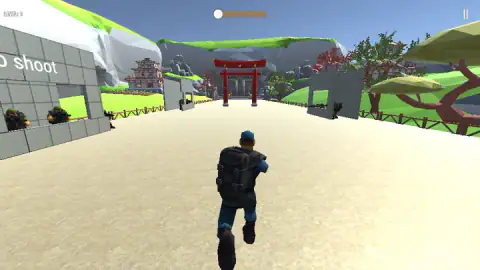
Taken by opening the game ourselves and letting it run — not supplied by the publisher, and not the same picture every other site shows.
How to play Shoot & Sprint: Warfare
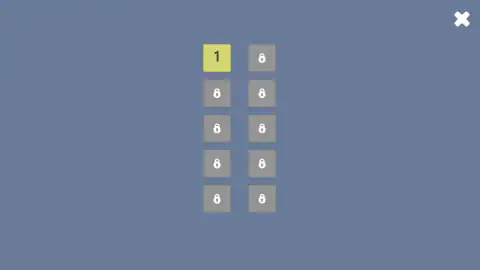
- On the level select, click the yellow tile marked 1. The other nine tiles are grey and locked.
- Your soldier appears on a sandy road, seen from behind. He starts running towards a red gate at the far end. You do not steer.
- Click on the enemy riflemen in the windows of the grey walls at each side of the road. The words Click to shoot are painted on the first wall, in case you were not sure.
- Watch the progress bar at the top centre. The white knob moves along it as you run, and the orange fill behind it shows how much of the level you have covered.
- If your soldier goes down, the screen reads END!. Click the circular arrow to start the level again from the beginning.
Tips from our runs
- The first wall is the test. Two riflemen in green helmets stand at the window of the left wall as soon as the run begins, and a third waits at the wall on the right. They are close and in plain view. That is where every one of our runs was decided.
- Do not click the middle of the road. Clicking the empty sand ahead of the soldier is what we tried first. Aim at the windows themselves, where the helmets are.
- Restarting is quick. The circular arrow puts you back at the start of the road in a moment. Nothing is lost by trying a different order of targets.
- Ignore the grid button. On the END! screen it sits next to the restart arrow. Clicking it got us nowhere.
Controls
| Left click (tap on a touch screen) | Shoots; the words Click to shoot are painted on the first wall of level 1 |
|---|---|
| Pause button, top right | Pauses the run; we did not use it |
| Circular arrow on the END! screen | Restarts the level from the beginning of the road |
| Grid button on the END! screen | A menu button; it did nothing useful for us |
Features
- A level select of 10 tiles in two columns, with only level 1 open at the start
- A soldier who runs forward on his own, seen from behind, so your only job is to aim and shoot
- Riflemen in green helmets waiting at the windows of grey block walls on both sides of the road
- A Japanese-style backdrop on level 1, with a red torii gate, a pagoda and red-blossom trees
- A progress bar at the top that shows how far down the road you are
- An END! screen with two buttons, restart and a grid, whenever your soldier goes down
Game details
- Developer
- 3S Games
- Release date
- April 2025
- Last updated
- August 10, 2026
- Added here
- May 2025
- Technology
- HTML5 (3D, Unity)
- Platforms
- Browser (desktop), Browser (mobile & tablet, touch)
- Saved progress
- Saving, when available, is managed by this game. Mava cannot confirm your level.
FAQ
How do you play Shoot & Sprint: Warfare?
Your soldier runs down the road by himself, so you never steer him. You click, or tap on a phone, to shoot at the enemy riflemen who appear at the windows of the walls on both sides. The bar at the top of the screen shows how far along the level you are.
Do you control the movement in Shoot & Sprint: Warfare?
No. The soldier runs forward on his own along a fixed road, which makes it an on-rails shooter. We pressed the arrow keys and heard no response. All you decide is where and when to shoot.
How many levels does Shoot & Sprint: Warfare have?
The level select shows 10 tiles in two columns. Only level 1 is open at the start; the other nine show a padlock. We only played level 1, so we cannot say what the later levels look like.
What does END! mean in Shoot & Sprint: Warfare?
END! is the screen you get when your soldier goes down. The camera looks straight down at him lying on the sand, and two buttons appear: a circular arrow that restarts the level and a grid icon. The game does not say game over or show a score.
Why do I keep dying at the start of Shoot & Sprint: Warfare?
The first wall stands right at the start of the road, with riflemen already in the windows on both sides. In our runs the soldier fell after covering about a tenth of the progress bar every time. Shooting the windows on the left first, where the first enemies stand, is the obvious place to start.
Who made Shoot & Sprint: Warfare?
It is credited to 3S Games. It was published in April 2025 and was last updated in August 2026.
Can you play Shoot & Sprint: Warfare on a phone?
It is listed for PC, Android and iOS, and shooting works with a tap as well as a click. We played it only on a desktop computer with a mouse, so we have not checked it on a touch screen ourselves.