

About Frontline Commando Shooting: Gun Games
Most browser shooters let you start firing the second the level loads. Frontline Commando Shooting: Gun Games first asks you to do something with your keyboard. A grey banner across the top of the opening shot reads "USE TAB BUTTON TO LOCK/UNLOCK CURSOR", and until you understand it, the mouse is not yours until you press Tab.
That is the one thing worth knowing before anything else. A first-person shooter on a computer has to take over your mouse, so that pushing it left turns your head left instead of sliding a pointer off the edge of the screen. This game does that with Tab. Locked, the mouse aims. Unlocked, it clicks buttons. Mix the two up and you will spend your first minute clicking a menu that cannot hear you, or looking at the sky while someone shoots you.
We played it on a desktop with a mouse and keyboard, through the menus and into the first campaign level, for about four minutes. We should be honest about how it went: we killed nobody. The objective counter stayed at 0/2 the whole time, and our health fell from 99 to 67 without a single enemy appearing in front of us. What follows is limited to that run.
The game is credited to FINGERNIC, the same studio as Modern Sniper Gun Game Sniper 3D. It came out in spring 2026.
What you see before the mission
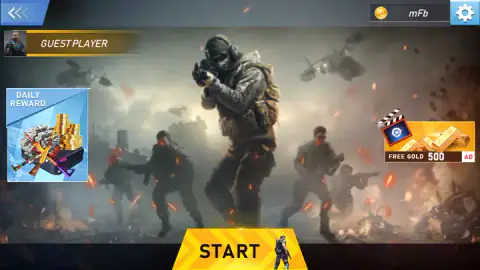
The game opens on a loading screen, "Downloading Resources...", with two soldiers in balaclavas behind the bar. Then the main menu: a guest player badge in the top-left corner, a coin counter beside a settings gear, a DAILY REWARD tile on the left and a "FREE GOLD 500" tile on the right. That second tile carries an AD tag, so the gold is paid for with a video advert.
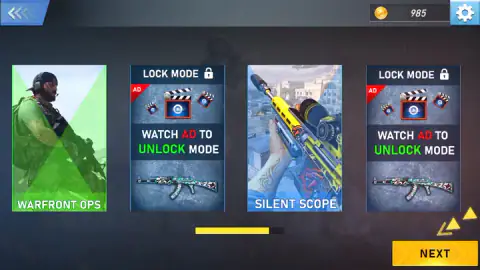
START leads to the mode screen, which has four cards. WARFRONT OPS, highlighted in green, is the one we played. SILENT SCOPE, with a scoped rifle on its card, is the other open one. The two remaining cards say "LOCK MODE" and "WATCH AD TO UNLOCK MODE". We do not recommend them: the only way in is an advert, and the two free modes are enough to tell you whether the game is for you.
After that comes a level map where only the first level was open to us, then a weapon screen, then a second loading screen with a bullet racing along the bar. Then you are in.
Inside the first level
The mission opens on a still shot: a stack of white papers glowing on a table between brick walls. The caption underneath reads "Kill All The Enemies And Get The Confidential Documents..". Those papers are the second half of your job, and you see where they are before you see anything else.
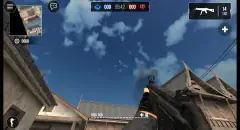
Then the view switches to first person, with a rifle held on the right side of the screen. The screen fills up quickly:
- Top left: a pause button, a green health bar with a number beside it, and a skull with the enemy count, 0/2.
- Under that: a box marked AUTO with a red tick. It was ticked in every screenshot we kept. The game did not tell us what it does, and we did not untick it.
- Top right: the minimap, with "CAMPAIGN LEVEL : 1" written under it.
- Bottom left: a blue on-screen joystick, shown even on a computer.
- Right side: a round button with a rifle and a circling arrow, and a small red number by the gun.
The level itself is a dusty town square: pastel houses with balconies, a yellow skip, crates and low walls. There is plenty to hide behind, which is also true for the people shooting at you.
Two enemies we never saw
When we first looked up, two red skulls sat at the top of the screen, one for each enemy on the counter. Later a single red skull appeared on the right edge instead. A red arc also showed up at the top of the screen in several frames, around the moments our health dropped. We read both as the game pointing towards the threat, but nothing on screen explained them, so take that as our guess.
What is certain is the health number. It started at 99 and slid down a few points at a time to 67, and in none of our frames was an enemy in front of the crosshair. Two enemies were enough to take a third of our health while we were still looking at the floor. The lesson is simple: in this game, being shot is the first sign that someone is there, and the answer is to turn and move, not to wait.
We stopped at 67 health with the counter still at 0/2. We did not find either enemy, pick up the documents or see what happens when the level ends, in victory or defeat.
What we did not see
We did not finish a level, open a second one, try SILENT SCOPE, or see how coins are spent. We did not confirm the movement keys by sound, and the phone versions the game's listing gives stayed untried. The listing promises a large collection of pistols, rifles, shotguns and sniper rifles; in our session we used one gun.
Who it is for
This suits players who already know how a computer shooter works: mouse to aim, keys to move, and a key to free the cursor. If that is you, the Tab banner will make sense at once, and a two-enemy first level is a short, readable start.
If you have never played a first-person game, expect a rough first minute. The game tells you about Tab in one line and leaves the rest to you. The setting is soldiers and gunfire without much else, so it is a game for teenagers and adults rather than young children.
More first-person shooters
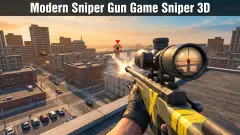
Modern Sniper Gun Game Sniper 3D is by the same studio, FINGERNIC, and puts you on a rooftop with a scoped rifle and the same Tab prompt. FPS Gun Shooting Game 3D also sends you after two enemies, against a countdown. Special Ops: GO gives you a long single-player map to work through. More are in the shooting category.
Screenshots
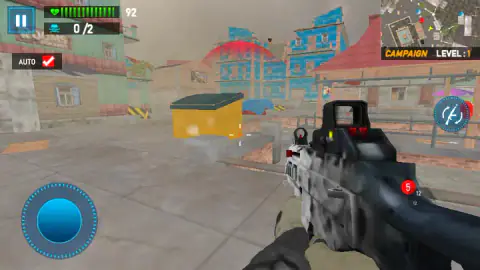
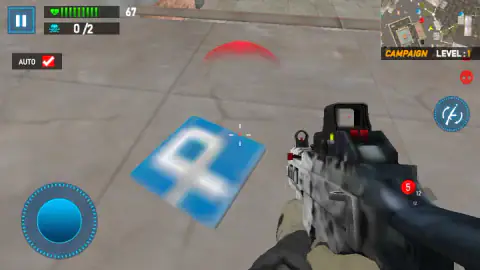
Taken by opening the game ourselves and letting it run — not supplied by the publisher, and not the same picture every other site shows.
How to play Frontline Commando Shooting: Gun Games
- Press START on the main menu. On the next three screens, pick a mode, a level and a gun, and press the yellow NEXT button on each.
- Read the order at the bottom of the opening shot. On level 1 it is to kill every enemy and take the confidential documents.
- Press Tab to lock the mouse. Now the mouse turns your view and aims at whatever is under the cross in the middle of the screen.
- Move with W, A, S and D or the arrow keys, as the game's instructions list them, or drag the blue joystick in the bottom-left corner.
- Bring the counter under the health bar up to the total, 0/2 on the first level, and collect the documents.
What our session taught us:
- Press Tab before you do anything else. The banner is not decoration. Our earlier attempts at this game went wrong because the mouse was released at the wrong moment.
- Do not reach for Escape. In an earlier session, Escape freed the mouse and dropped us into a PAUSE menu. Clicking its yellow RESUME button did nothing for us. Press Tab first, then click it.
- Do not stand still. Our health dropped in small steps, a few points at a time, while the view in front of us was empty.
- Use the minimap. The square map in the top-right corner shows red dots around you. That is where the shots are coming from, even when the screen does not show who is firing.
Controls
| Tab | Locks the mouse to the game so it aims, or releases it so you can click buttons |
|---|---|
| Mouse | Looks around and aims; clicks the menu buttons when the cursor is unlocked |
| W A S D or arrow keys | Move forward, back, left and right, according to the game's own instructions |
| Pause button, top left | Opens the pause menu with HOME, RESTART and RESUME |
| On-screen joystick, bottom left | Moves your soldier with a finger or the mouse |
Features
- Campaign missions in first person, each with one written order; level 1 reads "Kill All The Enemies And Get The Confidential Documents"
- An objective counter under the health bar, 0/2 on the first level, so you always know how many enemies are left
- A minimap in the top-right corner with red dots, next to the campaign level number
- A Tab key that locks and unlocks the mouse, announced on a banner when the mission starts
- Two free modes on the mode screen, WARFRONT OPS and SILENT SCOPE, plus two more that ask for a video ad
- A daily reward panel and a coin counter on the main menu
Game details
- Developer
- FINGERNIC
- Release date
- May 2026
- Last updated
- September 24, 2026
- Added here
- March 2026
- Technology
- HTML5 (3D)
- Platforms
- Browser (desktop)
- Saved progress
- Saving, when available, is managed by this game. Mava cannot confirm your level.
FAQ
How do you play Frontline Commando Shooting Gun Games?
Press START, pick a mode, a level and a gun with the NEXT button, and the mission begins. The order appears at the bottom of the screen, and on level 1 it is to kill all the enemies and take the confidential documents. Press Tab to lock the mouse to the game, then aim with the mouse and move with the keys or the on-screen joystick.
What does "Use Tab button to lock/unlock cursor" mean?
The game captures your mouse so that moving it turns your view, the way a first-person shooter on a computer needs to. Tab switches between that and a normal cursor you can use to click buttons. If your view does not turn when you move the mouse, press Tab.
How do you win a level in Frontline Commando Shooting Gun Games?
Level 1 asks you to kill all the enemies and get the confidential documents. A counter under the health bar shows how many enemies you have killed out of the total, 0/2 on that level. We did not complete it, so we cannot describe the victory screen.
Why do I keep losing health when no enemy is on screen?
The enemies can hit you from outside your view. In our session, health fell from 99 to 67 while we never saw an enemy in front of us. Turn around, watch the red dots on the minimap and keep moving instead of standing still.
Which modes are free in Frontline Commando Shooting Gun Games?
On the mode screen, WARFRONT OPS and SILENT SCOPE have no lock on them. The other two cards say "Watch ad to unlock mode", which means watching a video advert. We played WARFRONT OPS.
Is this the Frontline Commando game by Glu?
No. Frontline Commando is also the name of a mobile shooter that Glu released in 2011. This browser game is credited to FINGERNIC, and nothing we saw in it refers to the Glu series.
Who made Frontline Commando Shooting Gun Games?
The game's listing credits FINGERNIC, the studio behind Modern Sniper Gun Game Sniper 3D. It was released in May 2026, updated in September 2026.