

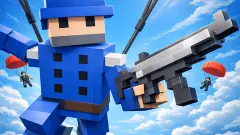


About Special Ops: GO
Most browser shooters sell themselves on their online rooms and treat the solo mode as a waiting area. Special Ops: GO does it the other way round on its own menu: the SINGLEPLAYER button sits above the online one, and behind it is a map of 27 numbered stops. It is also the part of the game you can understand in a few minutes, which is about what we gave it.
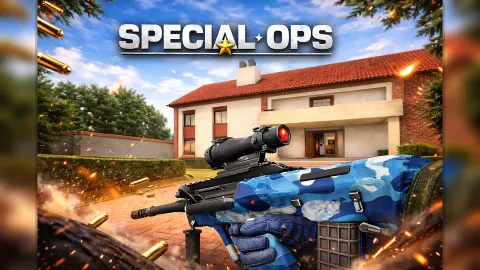
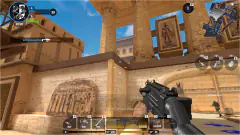
You are a soldier in a first-person view with a submachine gun, dropped into a desert with palm trees, a pond and a pyramid. You walk, you aim, you fire, and something among the ruins hits harder than the scenery suggests. Our first round ended at those ruins, with most of our health gone.
The game is by Hazmob, the studio whose logo sits on the main menu. It has been available since February 2026. There is no sign-up: the game logs you in as a guest, gives you a name made of letters and numbers, and puts you at level 1.
The solo campaign is a map with 27 stops
Press SINGLEPLAYER and the hangar gives way to a drawn island. The map has 27 numbered stops joined by a dotted trail, and they cross four kinds of ground: yellow sand, green fields with a river, brown rock and a patch of snow. Stop 1 is in the sand, lit in red, and it is the only one we played.
Above the map a line reads Difficulty, with a star, a zero and an empty bar beside it. We did not get far enough to see that bar move, so we cannot say what fills it. What the map does tell you is the size of the job: one stop took us out in under two minutes, and there are 26 more after it.
Stop 1 itself is an open desert. You start by a bright blue pond ringed with palms and bushes. Ahead, across the dunes, stands a pyramid with a low stone complex of columns and blocks in front of it, and beside the path sits a giant statue of a long-eared animal, several times the height of the palms. It is a stranger place than the soldier on the loading screen prepares you for.
One MAC 10, and a rental desk before every round
Your whole arsenal at the start is one gun. The weapon selection screen shows a wide empty panel with a single box in it, the MAC 10, and that emptiness is the game telling you how much there is to unlock. The game's description speaks of more than 20 weapons. We owned one.
To the right of that panel is the offer. A second gun appears on a card with a blue RENT button and the words "For 2 Times", meaning two uses. When we saw it, the gun was a G3 rifle. The button carries a small film clapper, the usual sign in browser games that the price is a video. We did not rent it, so we cannot confirm what it costs or how it shoots.
The MAC 10 is enough to learn with. It holds 30 rounds in the magazine with 210 in reserve, which is seven more magazines. Keys 1, 2 and 3 are listed for primary, secondary and melee weapons, though we stayed on the first.
What the numbers at the bottom of the screen mean
Three groups of numbers matter during a round, and none of them is labelled.
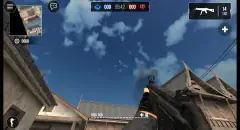
Bottom right is your ammunition: rounds in the magazine, a bar, and rounds in reserve. Ours went from 30 to 28 over the two shots we fired, and the reserve stayed put.
Bottom centre is a green number and a yellow number over a bar cut into ten segments. They start at 1000. By the ruins ours read 382 and 0, with four segments left. Our reading is that green is health, yellow is armour, and the armour goes first; the game does not say so in words.
Top right is a cash counter, at zero for the whole of our run. The main menu has its own cash and gold counters, both at zero too, next to buttons marked FREE CASH and FREE GOLD.
When that first round ended, the game sent us back to weapon selection and then into the same desert, with everything refilled.
Online battles are the headline, and the part we did not enter
We played for about four minutes: the menu, the map, and two rounds on stop 1, the second barely begun when we stopped. We fired two bullets and finished nothing.
Everything online stayed closed to us. The BATTLE button on the main menu is marked ONLINE, and the game's description says it holds matches of up to 5v5, with Deathmatch, Team Deathmatch, Ranked and Custom Rooms. We did not join one, so we cannot tell you how quickly a room fills or how the other players behave.
The menu has more that we only saw from outside: a WEAPONS shop with a "New" label, a QUEST button, a prize wheel on a countdown, a COLLECT button with a cash amount on it, and a leaderboard. A counter at the top reads WINS: 0/1, which looks like a first target to hit.
A shooter for keyboard and mouse
Special Ops: GO suits players who want a military first-person shooter in a browser tab without making an account, and who like having a solo route to follow as well as online matches. The low-detail look, with flat-shaded palms and simple sand, should be kind to older computers.
It is a desktop game. Every control the game shows is a key or a mouse button, and it is listed for PC only. We did not try it on a touch screen. It is also a game with a shop, two currencies and rentals, so expect to be offered things between rounds.
More from Hazmob and other shooters
The same studio made Hazmob FPS: Online Shooter, which is built around online matches. Warfare Area is a solo shooter where you retake a base on your own. Winter Clash 3D moves the gunfight to a snowy village, and Rise of the Dead swaps soldiers for zombies. The rest are in our shooting games.
Screenshots
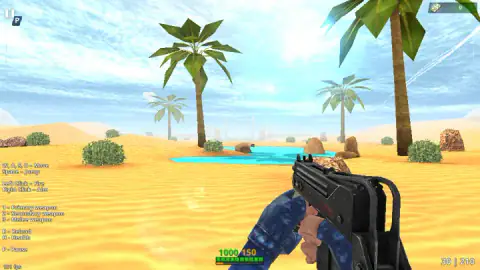
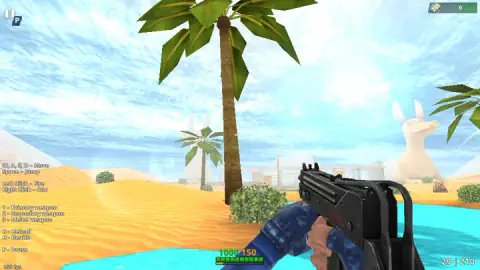
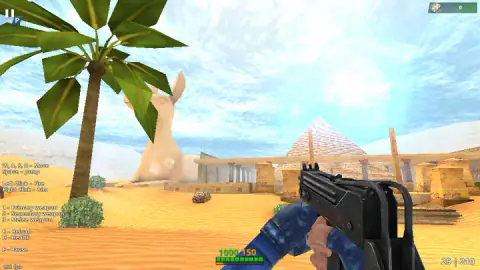
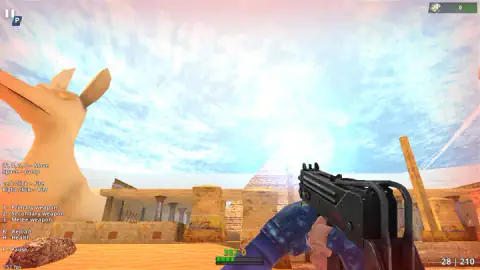
Taken by opening the game ourselves and letting it run — not supplied by the publisher, and not the same picture every other site shows.
How to play Special Ops: GO
- Wait for the loading bar and the "Logging in" message. You arrive in a hangar with your soldier in the middle and the menu around him.
- Press SINGLEPLAYER for the map, or BATTLE for an online match.
- On the map, press BATTLE again. The game creates a room and takes you to weapon selection.
- Keep the MAC 10 and press CONTINUE, or let the countdown do it for you.
- Move with W, A, S and D, fire with the left mouse button, aim with the right one, and reload with R.
Tips from our run
- Weapon selection does not wait. A countdown under the screen reads "Auto-next" and sends you into the round by itself in a few seconds, so decide quickly.
- The first seconds are quiet. We started beside a pond with nothing in sight, and that calm is misleading. The trouble began when we reached the stone ruins in front of the pyramid.
- Do not walk into the ruins in a straight line, as we did. Our health was full at the pond and down to roughly a third by the columns.
- The key list on the left of the screen never goes away. If you forget which key reloads, it is there: R.
- H is listed as Health. The game's instructions call it a health kit. We did not press it when it mattered, and we should have.
Controls
| W, A, S, D | Move |
|---|---|
| Space | Jump |
| Left click | Fire |
| Right click | Aim |
| 1, 2, 3 | Primary weapon, secondary weapon and melee weapon |
| R | Reload |
| H | Health (a health kit, according to the game's instructions) |
| P | Pause |
| Tab | Leaderboard, according to the game's instructions |
Features
- A single-player map with 27 numbered stops across sand, grass, rock and snow, starting in a desert with a pyramid
- An online mode behind the BATTLE button, which the game's description says runs up to 5v5
- You start with one gun, a MAC 10 with 30 rounds in the magazine and 210 in reserve
- A weapon selection screen before every round, with one gun offered for rent for two uses
- Guest play from the first second, with no sign-up and a name the game gives you
- The full key list stays on screen while you play, so you never have to look for it
- Made by Hazmob
Game details
- Developer
- Hazmob
- Release date
- February 2026
- Last updated
- September 7, 2026
- Added here
- December 2025
- Technology
- HTML5 (WebGL)
- Platforms
- Browser (desktop, keyboard & mouse)
- Classification
- 3D , Action , Multiplayer , Shooting
- Saved progress
- Saving, when available, is managed by this game. Mava cannot confirm your level.
FAQ
How do you play Special Ops: GO?
Special Ops: GO is a first-person shooter played with keyboard and mouse. You move with W, A, S and D, jump with Space, fire with the left mouse button and aim with the right one. From the main menu you pick SINGLEPLAYER for the 27-stop map or BATTLE for online matches.
Can you play Special Ops: GO offline or alone?
You can play alone, but not offline. The SINGLEPLAYER button opens a map of 27 numbered stops that you play on your own, and it was the mode we played. The game still logs you in as a guest and shows a room being created before the round, so it needs a connection.
Do you need an account to play Special Ops: GO?
No. The game logged us in as a guest with a name it made up, at level 1, and let us play straight away. We were never asked for an email or a password.
What weapons are in Special Ops: GO?
You start with a MAC 10 submachine gun, with 30 rounds in the magazine and 210 in reserve. Before each round a second gun is offered for rent for two uses; in our run it was a G3 rifle. The game's description says there are more than 20 weapons, including pistols, SMGs, rifles and sniper rifles, but we only fired the MAC 10.
Is Special Ops: GO multiplayer?
Yes, according to the game. The main menu has a BATTLE button marked ONLINE, and the game's description lists up to 5v5 matches with Deathmatch, Team Deathmatch, Ranked and Custom Rooms. We only played the single-player map, so we cannot tell you how full the online rooms are.
Who made Special Ops: GO?
It was made by Hazmob, whose logo sits on the main menu. It has been available since February 2026, shows its last update in September 2026.
Can you play Special Ops: GO on a phone?
It is listed for PC only, and the help shown during a round names only keys and mouse buttons. We played it with keyboard and mouse and did not test it on a touch screen.
Is Special Ops: GO the same game as Special Ops: FPS PvP War?
It appears to be. The loading screen reads Special OPS, the listing calls it Special Ops: GO, and the game's own description uses the name Special Ops: FPS PvP War. All three belong to the same Hazmob shooter.