



About Gun Baron
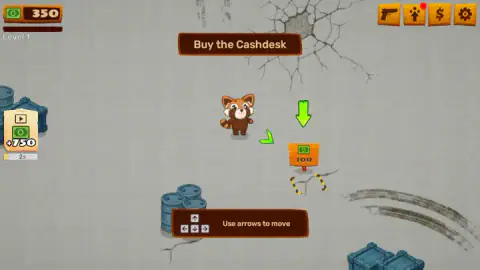
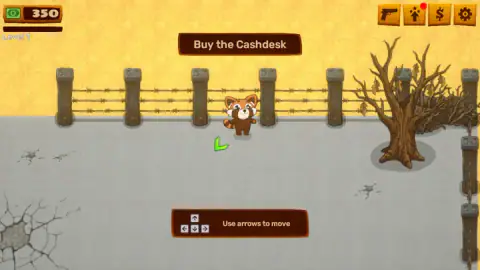
Most games with a gun in the title hand you one in the first ten seconds. Gun Baron opens on a red panda standing alone in a cracked concrete yard, and the only instruction on screen is a brown banner reading Buy the Cashdesk. Not a rifle. A till.
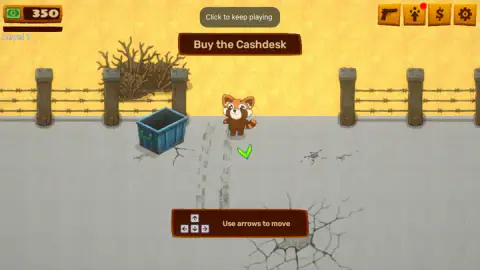
The yard is as plain as the instruction. There is a barbed-wire fence of stone posts with yellow sand on the far side, a bare dead tree, some blue barrels and a skip. A wooden plaque in the top corner reads 350, which is your money, with Level 1 on a bar underneath. Four orange buttons sit in the opposite corner — a pistol, a little figure with a star, a dollar sign and a cog — and a panel at the bottom of the screen spells out the controls in four arrow keys and four words: Use arrows to move.
What the game has instead of a buy button is paint. A thick green arrow appears on the ground, pointing at a small orange stand marked with a banknote and the number 100. Walk the panda there and that is the transaction. When you are in the right place a green tick lands at your feet; when you drift, the arrow turns and points you back. The whole tutorial is conducted in floor markings, without a single menu.
Tip-Top Studio made it, a developer with a long shelf of browser titles. This one was published in May 2026, was last touched there in September.
Here is the honest shape of our session: four minutes, 34 moves, and we never got out of the tutorial. The counter read 350 when we started and 350 when we stopped. Everything below that we did not see ourselves is labelled as the game's claim rather than ours.
Why a business game sells you the till before the guns
Putting a cash desk ahead of a weapon looks like a joke about commerce. It is really the only order that works. Until something on your property converts goods into money, nothing else you build has anywhere to send its output: the factory makes pistols that sit there. The till is the piece that closes the loop, so the loop cannot start without it.
That is also why the till becomes the thing that limits you. One counter can only serve people so fast, and the maths of that is more than a century old. Agner Krarup Erlang, an engineer at the Copenhagen telephone exchange, published the first paper on queues in 1909 while working out how many lines a town actually needed. His basic result for a single server is blunt: it holds up only while customers arrive more slowly than it can deal with them. Let those two rates drift towards each other and the queue does not grow a little, it grows without limit.
A shop game is that equation with a cartoon on top. The first till opens the business; the second one, or a faster one, is what the business then has to buy, because the bottleneck moves to the counter the moment your output climbs. Gun Baron prices its first till at 100 against a starting purse of 350, which tells you roughly how many of those steps it expects you to take before anything interesting happens.
The hero is a red panda, and his enemies used to be family
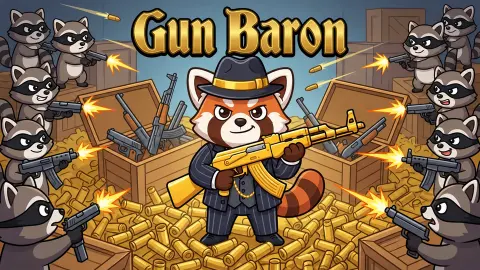
The animal in the yard is a red panda, Ailurus fulgens — rust coat, white face markings, ringed tail — and the bandits the game says raid you are raccoons. That pairing is a better joke than it looks.
Frédéric Cuvier described and named the red panda in 1825, and for much of the twentieth century it was filed with the raccoons, in the family Procyonidae. A study of its skull in 1982 pulled it out and gave it a family of its own, Ailuridae. Genetic work since has settled it in the wider group that holds raccoons, weasels and skunks, which makes the two animals distant cousins rather than relatives. It is not a close relation of the giant panda either; that one is a bear, and the grasping "false thumb" both of them use on bamboo evolved twice, separately.
The real animal is in trouble, too: it lives in the eastern Himalayas and southwestern China, and the IUCN Red List classes it as Endangered. A cartoon one running an arms yard is not conservation work, but it is at least the correct animal, drawn correctly, which is more than most browser games manage.
What four minutes actually showed, and what they did not
This is the part other pages will not tell you. Our panda walked the fence line, stood by the dead tree, went over to the blue skip and came back to the middle, and the money never moved off 350. Not one sound played in the whole session.
So everything the game advertises about itself — the machines, the shelves, the customers who arrive on their own, the raccoon raids fought in real time, the upgrades to the panda's health and damage, the rocket you are saving for — is its description, repeated here as a promise and nothing more. We did not see a machine. We did not see a customer. We did not see a raccoon.
What we can tell you is what the opening feels like, and the opening is slow and very heavily led. The game will not let you wander off to look at the shop; it names one task, paints an arrow, and waits. If you like a tutorial that trusts you, this is not it. If you want to know whether the factory underneath is worth reaching, that is still an open question, and we would rather say so than guess.
More games like this one
Clickdom is another Tip-Top Studio game in our catalogue, and a much faster way to watch a counter climb. Idle Airport Tycoon is the business half of this idea with the shooting taken out, growing an airstrip into a hub. Sneaker Factory is the production line itself: orders in, boxes out, warehouse in the middle. Grow Empire is the defensive half, with waves coming at walls you have paid to improve. The rest are in shooting games.
Screenshots
How to play Gun Baron
- Read the banner across the middle of the screen. It names the one thing the game wants from you, and in level 1 that is the cash desk.
- Walk with the arrow keys. They are the only input the game names and the only one that moved our panda; clicking on the ground did nothing at all.
- Follow the paint. The green arrow points at your target and a green tick marks the spot where you are meant to be standing.
- Reach the stand marked 100 and the purchase happens by arrival. There is nothing to confirm and nothing to press.
- If the screen dims and a grey pill reads Click to keep playing, click back into the game. That is its own pause, and it comes back every time the window loses focus.
Things worth knowing before you start:
- The price is on the object, not in a shop. The 100 is printed on the stand itself, so you can always see what the next step costs against what you are carrying.
- Nothing in the yard is a button. We spent a fair part of our run clicking barrels, the ground and the panda himself, and none of it registered.
- The green plus 750 button on the left has a countdown, not a price. It carries a small play triangle, which usually means a video in games like this, and the timer under it was still ticking when we stopped. We left it alone.
- The four corner buttons stay shut during the tutorial. A pistol, a character, a dollar and a cog: the whole of the interface, and the game does not explain any of them before it has your till open.
Controls
| The four arrow keys | Walk the red panda around the yard. This is the only input that moved him for us, and it is the one the game writes on screen |
|---|---|
| Walk into the thing you want | There is no buy button on screen. The objective banner names a target and a green arrow points at it; you go to it |
| Click back into the game | Dismiss the grey Click to keep playing pill, which is the game's own pause when the window loses focus |
| The four buttons in the top right | A pistol, a character icon, a dollar sign and a cog. We did not open any of them, so what they hold is the game's business, not ours |
| The green plus 750 button on the left | A banknote button with a play triangle and a countdown under it. Untouched in our run, so we cannot say what it pays or what it asks for |
Features
- A red panda as the player character, alone in a fenced concrete yard, with no second character on screen in the whole of level 1
- The first objective is not a weapon: a brown banner reads Buy the Cashdesk and a green arrow points at a stand priced at 100
- You start level 1 holding 350, so the opening purchase costs under a third of what you already have
- No buy button anywhere: the game moves you with painted arrows and ticks on the ground instead of a menu
- Four unopened buttons in the top right corner — a pistol, a character, a dollar sign and a cog — are the whole of the interface
- The game pauses itself the moment the window loses focus, and a grey Click to keep playing pill waits at the top until you come back
- It describes itself as a weapons factory with customers, raccoon raids and a rocket to escape in; none of that appears in the opening minutes
Game details
- Developer
- Tip-Top Studio
- Release date
- May 2026
- Last updated
- October 23, 2026
- Added here
- March 2026
- Technology
- HTML5 (2D)
- Platforms
- Browser (desktop), Browser (mobile & tablet, touch)
- Saved progress
- Saving, when available, is managed by this game. Mava cannot confirm your level.
FAQ
How do you play Gun Baron?
You walk a red panda around a fenced yard with the four arrow keys, which is the only control the game puts on screen. There is no buy button: a banner names the current objective, a green arrow or a tick appears on the ground, and you complete the task by walking into the thing it is pointing at. The first objective of level 1 is to buy a cash desk, priced at 100 against the 350 you start with.
What is the Cashdesk in Gun Baron?
It is the small orange stand marked with a banknote and the number 100 that the opening objective points you at. In a business game the till is the object that turns goods into money, which is why it is normally the first thing you are sold rather than an afterthought. We did not buy ours, so what it unlocks is the game's claim and not something we watched happen.
Is the character in Gun Baron a raccoon?
No. The player character is a red panda, with the rust-coloured coat, white face markings and ringed tail; the raccoons in this game are the bandits it says attack you later. The two animals are easy to confuse, and science confused them too for most of the twentieth century, when red pandas were filed in the raccoon family.
Does Gun Baron have ads?
Nothing interrupted us in roughly four minutes of play. There is a green banknote button on the left marked plus 750 with a small play triangle and a countdown beneath it, which in games of this kind usually means a rewarded video, but we never pressed it and cannot confirm what it does. The grey Click to keep playing message at the top of the screen is not an advert: it is the game pausing itself when the window loses focus.
Who made Gun Baron?
Tip-Top Studio. The game was published in May 2026 and was last updated in September 2026. We found no studio website and no listing on any other portal, so every one of those figures comes from a single source.
Can you play Gun Baron on a phone?
Its listing says desktop, mobile and tablet, but the same page's own FAQ says desktop browser only, so the sources disagree. The only control the game showed us was a panel naming the four arrow keys, which is a keyboard instruction. We played on a desktop and did not test it on a phone.
What is the goal of Gun Baron?
By the game's own account you build a weapons factory, sell to customers who arrive on their own, fight off raccoon raids in real time and save up for a rocket to leave the planet. That is the game describing itself. In our session we stayed inside the level 1 tutorial and saw none of it, so we are repeating the promise rather than confirming it.
Is Gun Baron free to play?
Yes. It runs in the browser with nothing to install and nothing to pay up front, and its listing gives the price as zero. Whether anything inside asks for money later we cannot say, because we never got past the opening objective.