




About Sneaker Factory!
Most factory games in a browser pay you for waiting. A number climbs, you buy a machine, the number climbs faster. Sneaker Factory pays you for copying a shoe exactly, and in our run we did not manage it once. The game said so each time with the same three words: "ORDER NOT COMPLETED".
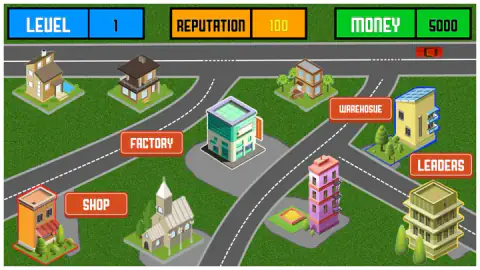
The job is small and strict. A buyer's order arrives as a picture of a finished sneaker with a price on it. You get a plain white shoe of the same shape and a panel of tools, and you have to turn the white one into the picture, part by part, before you press SUBMIT. Around that desk sits a town map with a factory, a shop and a warehouse, under counters for level, reputation and money.
The game's listing credits Noob Developer Game.
This page rests on about four minutes at a desktop with a mouse: one order, opened, handed in wrong more than once and never finished. Read it as a close look at the order desk and not as a tour of the factory.
One order is six colours and a word
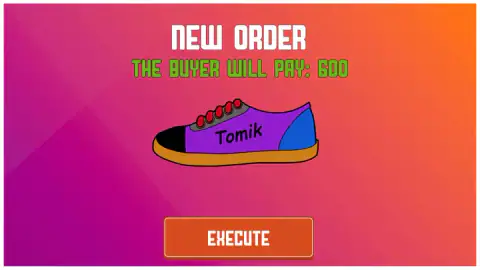
The only order we saw was a low lace-up with a purple body, a blue heel, a black toe cap and orange sole. The strip that holds the lace holes was grey and the laces were red. On the side, in black handwriting, was the word "Tomik". The card priced it at 600, against the 5000 the money counter showed when we started.
Shoemakers have names for those areas, and the game draws each one as its own outlined piece. The toe cap is the patch over the toes. The upper is the body of the shoe. The heel counter is the stiff piece that cups the back of the foot, the eyestay is the strip the laces run through, and the outsole is what touches the ground.
That is why an order here is not one decision. It is seven: six areas to colour and one word to write. A shoe that is nearly right is still a different shoe from the picture.
What we handed in, and why it came back
The first shoe we submitted was the blank one, untouched: white all over, with the filler word still on its side. The game answered "ORDER NOT COMPLETED".
We went back and clicked green in the palette. The sole turned green on the spot. The order's sole is orange, so that was a change and not a correction, and we submitted it anyway. Same card. We handed the same shoe in again after that, as if the game might change its mind. It did not.
By then our shoe differed from the order in every area you can name. It was white where purple was wanted, green underneath where orange was wanted, and it did not say "Tomik". The card never told us which of those mattered. With everything wrong at once, we cannot tell you whether the game wants a perfect copy or lets a small slip through. We can tell you a wrong sole and a wrong word are not enough.
We saw no fine on screen for a rejected shoe. But money and reputation are shown on the map, and we never went back to the map to look.
The inscription row writes whatever is in the field
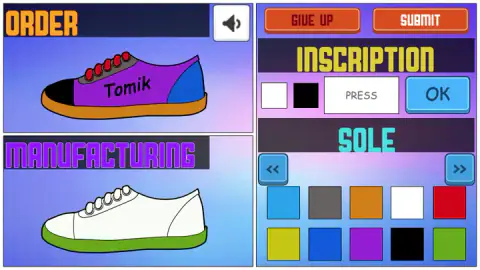
The row has four things in it. Two small squares, one white and one black, sit on the left. The order's word is written in black, so we take them for the colour of the lettering, and we did not prove it. Then comes a white field with the grey word "PRESS" in it, and a blue OK button.
We clicked the field several times and never got a letter into it. Then we pressed OK with the field still empty, and the next time we looked, the filler word was gone from our shoe. Its side was blank.
So OK seems to copy the field onto the shoe, even when the field holds nothing. Clearing the wrong word takes one click. Writing the right one is the step we did not reach, and we cannot say whether the field takes typing straight from the keyboard.
The palette shows one part at a time
Under the inscription row is a heading, SOLE, with ten colour squares in two rows below it. Every colour in our order is among the ten: purple, blue, black, orange, grey and red are all there.
What is not there is any sign of the other parts. In four minutes the heading only ever read SOLE, which explains why the only thing we managed to paint was the sole. On each side of the heading is a button with a double arrow. Our guess is that those turn the palette to the next part of the shoe. It is a guess, because we never pressed them. If you play, press them before anything else.
The town around the order desk
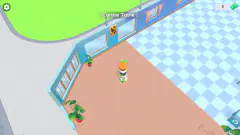
The map is eight buildings on grass between grey roads. Four carry a sign: FACTORY, SHOP, LEADERS, and a warehouse whose sign is spelled "WAREHOSUE". We only got an order out of the factory.
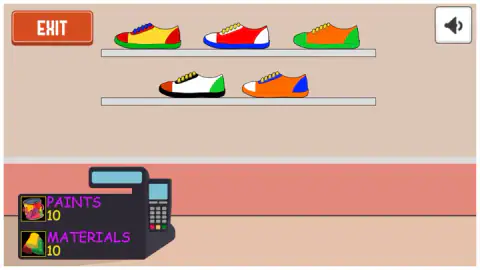
On the way to it we passed through a room with a shop counter: a till, five finished sneakers on two shelves, and two stock counters, PAINTS and MATERIALS, each at 10. They look like what a sneaker is made from. We did not see either number move.
What four minutes did not show us
An accepted order, and the money that comes with it. The warehouse and the leaders building from inside. How reputation is earned and what raises the level above 1. Whether paints and materials run out, and what happens when they do. What GIVE UP costs.
We cannot describe the sound either: we noticed one as the game opened and none we could tie to a click, a colour or a rejection. The arrow keys and the space bar did nothing we could make out on the screens where we tried them. And every press here was a mouse click.
Who should take these orders
Players who like a matching job with a clear right answer, and who do not mind that the game will not point at the mistake. It asks for attention more than speed: we saw no timer on the order.
If you want a factory that runs by itself while the totals grow, this is the opposite. Nothing here moved until we clicked it.
More shops and factories
Marble Factory is another job of matching colours, with marbles going to the box of their own colour. Juice Tycoon takes fruit from harvest to the customer's glass, and Idle Supermarket Tycoon grows a mall one shop at a time. Shop Cashier Simulator 3D puts you behind the till. The rest are under strategy games.
Screenshots
Taken by opening the game ourselves and letting it run — not supplied by the publisher, and not the same picture every other site shows.
How to play Sneaker Factory!
- On the town map, click FACTORY. That is the route that led us to a buyer's order.
- Read the "NEW ORDER" card. It shows the sneaker the buyer wants and what they will pay. Press EXECUTE.
- In the editor, look at the two shoes on the left. ORDER, on top, is the target. MANUFACTURING, below, is yours.
- Change yours with the panel on the right: the INSCRIPTION row for the text on the side, and the colour squares for the part named above them.
- Press SUBMIT when the two match. If the answer is "ORDER NOT COMPLETED", BACK returns you to the editor.
Four things the order desk made clear:
- Check the text first. The blank shoe comes with a filler word already printed on its side, and it is not the word the order asks for.
- A colour square acts at once. One click on green and our sole was green. There is nothing to confirm and no undo button that we saw, only another click on another colour.
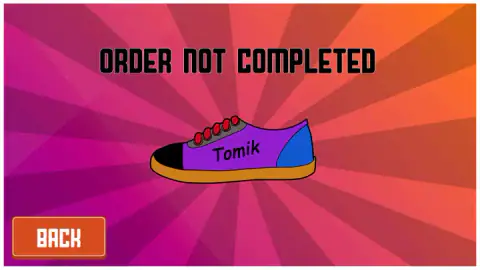
- The rejection card gives no reason. It shows the ordered shoe again and nothing of yours. Do the comparing before SUBMIT, in the editor, where both shoes are on screen.
- A rejection kept our work. After BACK, the green sole was still there. We did not have to start from white.
Controls
| Click FACTORY (town map) | The way we reached a buyer's order |
|---|---|
| EXECUTE (order card) | Accepts the order and opens the editor |
| Click a colour square | Paints the part named above the palette at once; one click on green turned our sole green |
| OK (inscription row) | Puts what is in the text field on the side of the shoe; pressed with the field empty, it left the side blank |
| SUBMIT | Hands the shoe in; ours came back as ORDER NOT COMPLETED every time |
| BACK (rejection card) | Returns to the editor with your shoe as you left it |
| GIVE UP | Next to SUBMIT in the editor; we did not press it |
| Double arrows beside SOLE | One on each side of the palette heading; we did not press them |
Features
- Orders that arrive as a picture of the finished sneaker with its price, 600 for the one we were given
- An editor that keeps the ordered shoe and yours on screen together, one above the other
- A palette of ten colours that paints a part with a single click and no confirm step
- A line of text on the side of the shoe that has to be replaced with the buyer's own word
- A rejection card that sends you back to the editor with your work kept
- A town map with a factory, a shop, a warehouse and a leaders building, under counters for level, reputation and money
Game details
- Developer
- Noob Developer Game
- Release date
- July 2025
- Last updated
- August 10, 2026
- Added here
- June 2025
- Technology
- HTML5 (2D)
- Platforms
- Browser (desktop, mouse), Browser (mobile & tablet)
- Classification
- Strategy
- Saved progress
- Saving, when available, is managed by this game. Mava cannot confirm your level.
FAQ
How do you play Sneaker Factory?
Click FACTORY on the town map and take a buyer's order. The order card shows the sneaker they want and the price, and EXECUTE opens an editor with that shoe on top and a blank white one below. You change the blank one with the panel on the right, the text in the INSCRIPTION row and the colours in the palette, and press SUBMIT when the two match.
Why does Sneaker Factory say ORDER NOT COMPLETED?
Because the shoe you handed in is not the shoe on the order. Ours was white with a green sole and no buyer's word on it, against an order for a purple shoe with an orange sole and the word Tomik. The card does not say which part is wrong, it only shows the ordered shoe again, so compare the two in the editor before you submit.
How do you change the text on the sneaker?
The blank shoe starts with a filler word on its side that does not match the order. The INSCRIPTION row has a text field and a blue OK button, and OK puts whatever is in the field on the shoe. We pressed OK with the field empty and the side of the shoe went blank. We never got a word into the field ourselves, so that last step is untested.
How much does an order pay in Sneaker Factory?
The one order we were given was priced at 600, shown on the card as THE BUYER WILL PAY. The money counter on the map stood at 5000 at the start. We never completed the order, so we did not see the payment arrive.
What are PAINTS and MATERIALS for?
We do not know for certain. Both are counters in the room with the shop counter, and both read 10 when we passed through. They look like the stock a sneaker is made from, but we did not see either number move.
Can you play Sneaker Factory on a phone?
It is listed for PC, Android and iOS, in landscape. What we used was all single presses on buttons and colour squares. Our own time with it was on a desktop with a mouse, so the phone side is the listing's word and not ours.
Who made Sneaker Factory?
The game's listing names Noob Developer Game as the developer. The game was published in July 2025 and its last update is dated August 2026.