







About Mine Blogger Simulator 3D
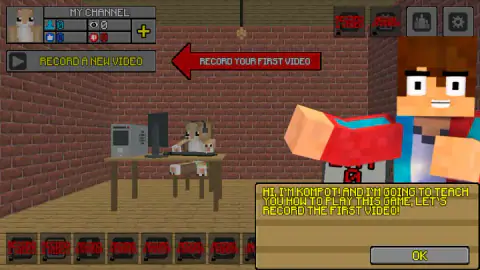
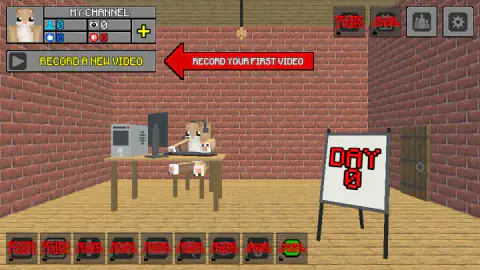
One button works in that bedroom: the one that says record. Everything else on the shelf and on the walls wears a padlock and a line of red text saying what it costs, and the price is never in coins. It is in videos. The cheapest thing in the room opens after you have made one; the screen hanging above the desk is holding out for fifteen.
That shelf is the game explaining itself before you press anything. Mine Blogger Simulator 3D is about running a video channel from one blocky bedroom, and it never once asks you to film. Press RECORD A NEW VIDEO and what opens is a form, five numbered stages long: name the video, pick a theme and the mood you will record in, pick how big it is, look at what it costs, choose which of your own qualities to lean on, and decide whether you can afford to let somebody else edit it. Then a bar fills, a day of game time passes, and the video exists.
The channel panel in the corner is the scoreboard, and at the start every number in it is a zero: subscribers, views, likes, dislikes. Beside them sits a purse with 100 coins in it. The second video size on the list costs 25,000.
The game is credited to C4S.WAG. It went up on 3 August 2026. It runs in English or Russian, which is the first choice it makes you make.
Here is what this page is. It is an account of one session on a desktop, four minutes of it, which got as far as the fifth stage of the very first video. We set up the channel, sat through the tutorial, sent a recording off for a day and picked what to emphasise.
We never published anything, never gained a subscriber, and the whiteboard by the door still read DAY 0 when we stopped. What we can tell you in detail is the shape of the machine you are feeding.
Five stages, and not one of them is filming
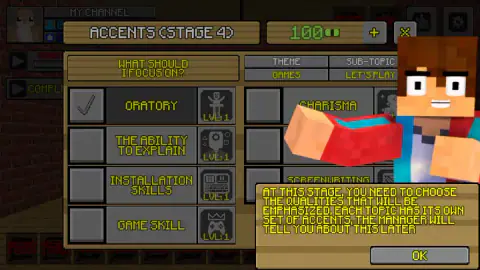
The interesting thing about that form is where the decisions sit. You choose the mood before the video exists. You choose the theme, and the game picks a sub-topic to go with it — ours came out as Let's Play under Games — and then tells you, in stage four, that each topic has its own set of accents to emphasise.
Those accents are your character: oratory, the ability to explain, installation skills, game skill, each sitting at level one, with a second column of personal qualities like charisma beside them. The game says the manager will explain later. We never got to later.
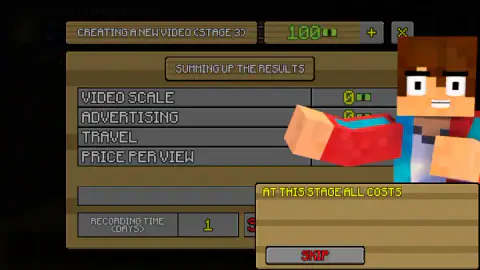
Stage three is the one worth reading slowly. It is a bill with four rows: video scale, advertising, travel and price per view. For a free first video they do not add up to much. But that third row is the only evidence on screen that the game's promise of filming away from home is real, and the fourth is where any money would have come from. The recording time is right underneath, in days.
Subscribers are the key, and the locks are expensive
Nothing in this game is unlocked by being good at it in the moment. It is unlocked by the subscriber counter, and the gaps are deliberate.
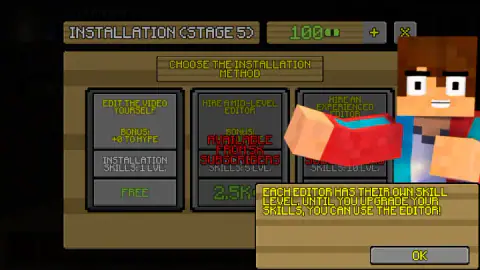
The mid-level editor appears at 5K subscribers. The medium video wants 50K. The large one wants a hundred thousand. And subscribers are the one number you cannot buy, so the only lever you have is making more videos, which is exactly what the padlocked shelf has been telling you since the first screen.
Real channels work the same way, which is probably why the design reads as familiar. On YouTube, nothing you upload earns ad money until the channel clears the partner programme's bar — a thousand subscribers and four thousand valid public watch hours in a year — and sponsorship deals above that are quoted per thousand views. The game compresses that into a shop window: a number you have not got yet, printed in red across the thing you want. Even its bill says price per view.
The room is the progress bar
The best piece of design here costs nothing and never says a word. Count the padlocked objects: nine on the shelf running along the floor and two more up on the wall, including a screen that wants fifteen videos.
Each one carries its requirement in red, and read along the shelf they climb in a steady curve: one video, one again, then two, four, six, eight, eight, ten, ten.
You can see from the very first screen roughly how long this game intends to be and what pace it expects of you. Most management games hide that behind a menu of upgrades. This one leaves it lying around the bedroom, which also means that every time something pops open, the room you are looking at changes.
What the blurb promises and our screen did not show
The game's own description talks about meeting other bloggers, making friends with them and competing for a championship, and about recording outdoors as well as at home. None of that reached our screen. We saw one room, one character, one animal on the desk and a podium button we never pressed.
That is not a contradiction, just a boundary: four minutes buys you the first video, and this is a game that gates almost everything behind the subscriber counter. We would rather say where our knowledge stops than repeat a sales page.
One thing we can settle: the blocky look is a style and nothing more. There is no licence here, no connection to Mojang or Microsoft, and the game never pretends there is — the studio simply builds everything it makes out of the same square bricks.
More businesses to run
Idle Game Dev Simulator is the same fantasy pointed at games instead of videos: a garage, a studio, and hires you cannot afford yet. Burger Restaurant Simulator 3D swaps the editing suite for a griddle and makes the pressure immediate rather than administrative. Supermarket Management Simulator and Idle Dairy Tycoon both run on the same loop of unlocking the next thing with the last thing's profits. The rest are in strategy games.
Screenshots
How to play Mine Blogger Simulator 3D
- Choose a flag and name the channel. The opening card offers Russian or English and a text box for the channel name, three to twenty-five characters. The game adds that you can rename it later by clicking the name.
- Press RECORD A NEW VIDEO, top left. A character called Kompot turns up first to explain the idea; his card, like every tutorial card after it, has an OK in the corner and a red SKIP.
- Fill in stage one. A title of five to fifty characters that cannot repeat an earlier one, a theme — Games, Discussion or Real Life — and one of six moods to record in: sad, calm, anxious, cheerful, evil or funny.
- Pick the scale, check the bill, start recording. The small video is free and adds one day. Stage three lists what the video is costing you and the button underneath says START RECORDING. The record button then turns into a progress bar.
- Finish the job. When the bar reads complete, COMPLETE THE CREATION opens stage four, the accents, and stage five, where you choose who edits.
What the session taught us:
- Close the card before you click anything. The tutorial points a red arrow at a button and then blocks it. We lost a good minute pressing exactly where the arrow said, with the card still open. OK first, then the button.
- Text boxes need a click inside them. Clicking near the grey strip does nothing; the channel name sat empty through our whole setup because of it.
- The keyboard is otherwise unused. Arrow keys and the space bar did nothing we could detect.
- Red text means locked, and it names the price. Every card that you cannot have yet says what it is waiting for, in subscribers.
- At the start there is only one legal path: small video, edit it yourself. Everything else on those panels is greyed out, which makes the first video quick.
Controls
| Mouse click | Everything. The record button, the stage panels, the tickboxes, the cards. There is no character to steer |
|---|---|
| Click a text box, then type | The only two places the keyboard matters: the channel name and the video title. Click inside the grey box first, or nothing goes in |
| OK, bottom right of a tutorial card | Closes the card. Until you do, the button the red arrow is pointing at will not answer |
| SKIP, in red, on the same cards | Dismisses the tutorial step instead of reading it |
| RESUME or CONTINUE, bottom right of a stage panel | Accepts what you have picked and moves to the next stage |
| Podium and cog, top right | Rankings and settings. We never opened either |
| Arrow keys, Space | Nothing we could detect. This is a game of clicks and two text fields |
Features
- Five numbered stages per video: title and theme, scale, a costs summary, the accents you emphasise, and who edits it
- Three themes — Games, Discussion, Real Life — each with its own sub-topic and its own set of accents; ours came out as Let's Play
- Six moods to record in, from Calm to Evil, chosen before a single frame exists
- A small video is free and takes one day; the medium one wants 50K subscribers, two days and 25,000 coins
- Four channel counters — subscribers, views, likes and dislikes — that all start at zero, next to a purse holding 100
- Eleven padlocked objects around the room, each labelled with the number of videos that unlocks it, the last one asking for fifteen
- Made by C4S.WAG
Game details
- Developer
- C4S.WAG
- Release date
- August 2026
- Last updated
- August 4, 2026
- Added here
- June 2026
- Technology
- HTML5 (WebGL)
- Platforms
- Browser (desktop, mouse), Browser (mobile & tablet, touch)
- Classification
- 3D , Simulation , Strategy
- Saved progress
- Saving, when available, is managed by this game. Mava cannot confirm your level.
FAQ
How do you play Mine Blogger Simulator 3D?
You run a video channel from one blocky room. Press RECORD A NEW VIDEO and the game opens a form in five numbered stages: name the video and pick a theme and a mood, pick how big it is, check the costs, start recording, then choose which of your skills to emphasise and who edits the footage. Recording takes game days, and you spend those days setting up the next one.
What are the five stages in Mine Blogger Simulator 3D?
Stage 1 is the title, the theme (Games, Discussion or Real Life) and your mood during recording. Stage 2 is the scale of the video. Stage 3 sums up the costs — video scale, advertising, travel and price per view — and holds the START RECORDING button. Stage 4, called Accents, is where you tick the qualities to lean on. Stage 5, called Installation, is where you edit the video yourself or pay someone to do it.
How do you unlock the medium and large videos?
With subscribers, not money. The medium video says it is available from 50K subscribers and the large one from 100K. Even once they open they are not cheap: the medium one costs 25,000 coins and adds two days to the recording, while the small video is free and takes one. You start the game with a purse of 100.
Should you edit the video yourself or hire an editor?
At the start you have no choice. Editing it yourself is free and your installation skill is at level one, which the card scores as a bonus of zero to hype. The mid-level editor costs 2.5K and only appears once you have 5K subscribers, and there is an experienced one above him. The game's own note says you use editors until you have upgraded your own skills.
Is Mine Blogger Simulator 3D a Minecraft game?
No. It copies the blocky look — square bricks, a cube-headed character — but it is an independent browser game by C4S.WAG, with no licence from or connection to Mojang or Microsoft, and it never claims one.
Can you play Mine Blogger Simulator 3D on a phone?
It is listed for PC, Android and iOS in landscape, and everything in it is a click on a panel, which translates to a tap. Two moments need a keyboard: naming your channel and naming each video. We played it on a desktop with a mouse, so we cannot tell you how those two text fields behave with an on-screen keyboard.
Who made Mine Blogger Simulator 3D and when?
The game was published on 3 August 2026 and the page was updated the next day.
Is there any competition in Mine Blogger Simulator 3D?
The game's own goal is to become the number one blogger, there is a podium button in the top right corner, and the distributor keeps a daily leaderboard for it — 35 players were listed the day we checked, with 540 points at the top. We never opened the in-game rankings, so we cannot tell you what they count.