

About Mine Miner 3D: Mayor of Dream Island
Most browser mining games put you on a patch of grass, hand you a tool and leave you to work out where the value is. Mine Miner 3D does the opposite before you have taken a step. It opens on a level called TRAINING, pins a wooden sign to the corner of the screen, and tells you exactly two things: reach the mine, follow the arrows. Then it paints the arrows on the floor, flat and red and the size of a car.
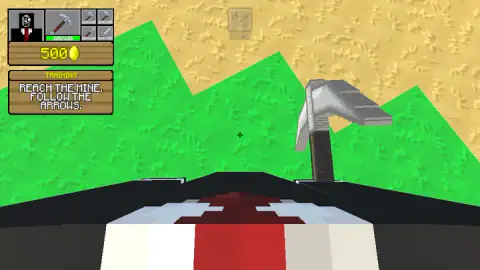
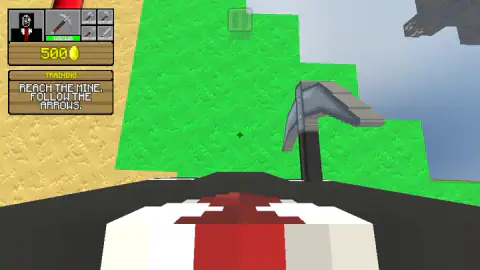
Look at who is holding the pickaxe and the title stops being decoration. The portrait in the corner is not a miner in a hard hat. It is a figure in a black jacket, a white shirt and a dark red tie, and when the camera dips while you are walking, those same shoulders fill the bottom of the screen. You are the mayor, sent down the hill with a pickaxe, because the town does not pay for itself.
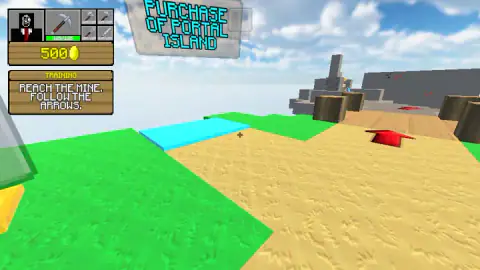
What the mine is for comes from the studio rather than from us: you dig blocks, sell what you gather, and spend the coins on buildings, on the villagers and on the island itself. One piece of that we did see. Hanging over the sand, in cyan capitals big enough to read across half a map, is a sign offering the purchase of a Portal Island. New ground is bought, not stumbled upon.
It is by C4S.WAG, a studio with a long shelf of block games. It was published in May 2026 and was updated that August.
Now the part that matters most for trusting the rest of this page. We played for about four minutes on a desktop, and we never reached the mine. The coin counter read 500 when we arrived and 500 when we stopped. So what follows keeps two things apart: what the training level actually did in front of us, and what the studio says is waiting past it.
The same studio's other mining game had no arrows at all
We have been here before, and the comparison is the most useful thing we can offer.
Earlier this month we played Mine Mining Islands: Skyblock Village, also by C4S.WAG. It shares a great deal with this one: the same corner panel, the same portrait in the black suit and red tie, the same floating islands, the same promise of digging, selling and growing a village. What we wrote about it then was that the game does not take your hand in the first minutes, and that no arrow pointed us at a first block.
Mine Miner 3D looks like the answer to that complaint. The tutorial has a name on screen. The instruction is two lines long. The route is painted on the floor in a colour that exists nowhere else in the landscape. Even the starting purse is bigger: 500 coins here against 250 in the village game, which is a designer saying go on, spend something.
And here is the honest finding. We still did not get in. Four minutes of following arrows across grass, sand and grey stone, and the sign in the corner still said reach the mine when we stopped. Signposting is not the same thing as a short walk. If you are coming to this from the village game expecting to be mining within a minute, give it longer than that.
A town is downstream of the hole in the ground
The word in the title is mayor, and that is a stranger choice than it looks. Mining games usually make you a miner. This one makes you the person who has to spend what the miner brings up, which is a real job, and real places have lived and died by how well it was done.
Potosí is the clearest case there is. A mountain in the Andes, in what is now Bolivia, turned out to be made largely of silver, and a city grew at its foot for no other reason. By the early 1600s Potosí was one of the largest cities on earth, bigger than most European capitals, sitting at an altitude where little grows and everything has to be carried in. The silver paid for all of it. Spanish still keeps the phrase vale un Potosí for something worth an unreasonable fortune, which is what happens when a town becomes a synonym for the rock underneath it.
The other half of the lesson is Kolmanskop. In 1908 a railway worker in the Namibian desert picked a diamond out of the sand, and a German town went up on the dunes: houses, a hospital, a ballroom, ice delivered to the door in a place with no water. Then richer stones were found further south, the mining moved, and by the 1950s the town was empty. The dunes have been coming in through the windows ever since.
That is the shape the game has quietly built its title on. The town is downstream of the hole. Every building a mayor upgrades is paid for by what came out of the rock that week, and when the rock stops, the ballroom fills with sand. It also explains why the tutorial only asks for one thing: you cannot do the mayor's job at all until you have found the mine.
The corner panel: five tools and a float of 500
Everything the game tells you while you walk sits in one block in the top left, and it is worth reading properly before you set off.
On the left is the portrait. Next to it, a wide slot holding the pickaxe you currently have in hand, with a green bar under it. Beside that, four smaller slots: a hammer, an axe, a four-pronged fork and a sword. Every one of the five carries the same figure, 125 out of 125.
Two readings, and we will mark both as readings. A full green bar with a number over a maximum almost always means wear, which would make every swing cost you something and turn tool repair into a running expense. And a sword in the toolbar of a mining game is usually a promise that something turns up which needs hitting; the listing's page mentions monster raids and an arena. We met nothing at all, so neither is ours to confirm.
Under the tools is the plank with 500 on it and a gold coin, and under that the wooden sign headed TRAINING. That is the entire interface. No map, no quest list, no compass, no timer. For a game whose one instruction is to go somewhere, the missing map is a slightly cruel joke, and it is why the red arrows matter as much as they do.
More digging and block games on Mava Games
Mine Mining Islands: Skyblock Village is the one to play next, because it is the same studio's take on the same loop without the tutorial, and Mine Block Party: World of Minigames is C4S.WAG in a completely different mood: eight elimination modes and a lobby of fifteen. +1 Pickaxe: Break Blocks 3D strips mining back until the only decision left is which block to stand next to, Miner, Dig It All puts a fuel gauge on it and makes every run a race, and Mine Master keeps the shovels and turns the whole thing into a grid puzzle. The rest are in action games.
Screenshots
How to play Mine Miner 3D: Mayor of Dream Island
- Click into the frame first. The game takes hold of your mouse pointer so it can turn the camera, and any click outside the picture lets it go. When that happens a bubble reading "Click to keep playing" appears over the view. Click back in and it carries on.
- Find the red arrow before you walk anywhere. They lie flat on the ground, and smaller ones are painted on the stone walls. The sign in the corner is not being poetic: the arrows are the only route marking the level gives you.
- Walk with W, A, S and D, and look with the mouse. Holding a key moves the view, so you can see straight away whether you are going anywhere. The small white crosshair in the centre marks whatever you are pointing at.
- Point at a block and press the left mouse button to break it. That is the studio's instruction and the whole reason for the toolbar. We did not get far enough to see a block come apart.
What our session taught us:
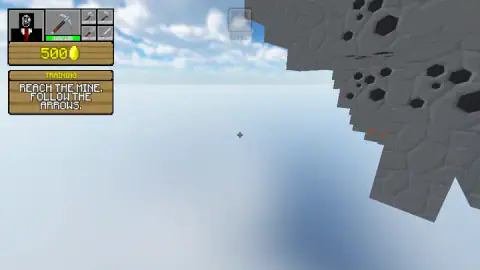
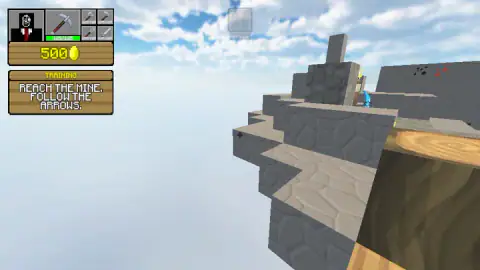
- Look over the edge before you trust an arrow. These islands have no bottom. The grey rock steps down a few ledges and then stops, with sky underneath. An arrow pointing at the horizon may be pointing across a gap rather than along a path.
- The dark patches in the grey rock are the point. The stone is not evenly coloured: it is speckled with near-black blotches. On a rock face, that is where a digging game puts the value.
- Your own shoulders tell you where the camera is. If black cloth and a red tie creep into the bottom of the frame, you are looking at your feet, not at the route.
- Nothing is chasing you. No clock, no health bar, and no sound at all during play in our session. You can stand still and read the landscape for as long as you like.
Controls
| W, A, S, D or the arrow keys | Walk. This is what we used, and the view moved when we held a key down |
|---|---|
| Mouse | Turns the camera. A small white crosshair in the middle of the screen marks what you are pointing at |
| Left mouse button | Breaks the block you are pointing at, according to the game's instructions. We never saw one break |
| Space | Jump, according to the game's instructions |
| A bubble reading "Click to keep playing" | Click back inside the frame. It showed up twice for us, and our reading is that the game had lost its hold on the mouse pointer |
| Touch, on a phone or tablet | A joystick on the left to walk, a tool button to break blocks, a jump button on the right and swipes on the right to look around, according to the game's listing. Not tested by us |
Features
- A first-person view with a crosshair, and when the camera dips you see your own shoulders: a black jacket, a white shirt and a red tie
- A tutorial level called TRAINING whose whole instruction is two lines long: reach the mine, follow the arrows
- The arrows are real objects, painted flat and red on the ground and on the stone walls
- Five tools in the corner panel, a pickaxe selected and a hammer, an axe, a fork and a sword beside it, each marked 125 out of 125
- A starting purse of 500 coins, twice what the studio's other mining game hands you
- Floating islands of grass, sand and grey rock that stop dead over open sky, so the route to the mine runs across gaps
- Grey rock faces speckled with dark, almost black patches, which is where the digging is meant to pay
- It was published in May 2026 and updated that August
Game details
- Developer
- C4S.WAG
- Release date
- May 2026
- Last updated
- August 10, 2026
- Added here
- March 2026
- Technology
- HTML5 (3D)
- Platforms
- Browser (desktop, keyboard and mouse), Browser (mobile & tablet, touch)
- Saved progress
- Saving, when available, is managed by this game. Mava cannot confirm your level.
FAQ
How do you play Mine Miner 3D: Mayor of Dream Island?
You walk a set of floating block islands in first person with W, A, S and D, turn the camera with the mouse, and break blocks with the left mouse button to gather materials. The studio's loop is that you sell those materials for coins and spend the coins on the city you are mayor of. The game opens on a tutorial level called TRAINING that asks you to do one thing first: reach the mine by following the red arrows painted on the ground.
Where is the mine in Mine Miner 3D?
We cannot tell you, and that is the honest answer. We spent about four minutes walking the training level on a desktop and never got there. The route is marked by flat red arrows on the sand and on the stone, but the islands float with open sky between them, so following an arrow can mean working out how to cross a gap rather than simply walking forward.
Why am I the mayor in a mining game?
Because the city is the point and the mine only pays for it. The portrait in the corner panel is not a miner in a helmet: it is a figure in a black jacket, a white shirt and a red tie, and when the camera dips while you walk those same shoulders fill the bottom of the screen. The studio says the goal is to expand the territory, upgrade buildings and help the villagers, all of it funded by what you dig out.
What are the controls in Mine Miner 3D: Mayor of Dream Island?
On a computer: W, A, S, D or the arrow keys to move, the mouse to turn the camera, the space bar to jump and the left mouse button to break blocks. On a phone or tablet the game's listing gives a joystick on the left for walking, a tool button for breaking blocks, a jump button on the right and swipes on the right side to look around. We played with a keyboard and mouse and did not test the touch controls.
What do the five tools in the corner mean?
The large slot holds the pickaxe you have selected, and four smaller slots beside it hold a hammer, an axe, a four-pronged fork and a sword. Every one of them carries the number 125 out of 125 on a green bar. A full bar like that normally means wear, and a sword sitting in a mining game's toolbar normally means something turns up that needs hitting, but we never broke a block or met an enemy, so both of those stay readings rather than facts.
Are there things to buy in Mine Miner 3D?
Yes, at least land. The one sign we were close enough to read was a large panel hanging over the sand in cyan capitals offering the purchase of a Portal Island, which tells you that new ground is something you pay for rather than simply find. Our own counter sat on 500 coins from the first capture to the last, so we never bought anything and never saw a price list. The studio says coins also go on upgrading buildings and your character.
Who made Mine Miner 3D: Mayor of Dream Island and when?
A studio publishing as C4S.WAG. The game was published on 8 May 2026 and was updated that August. That listing date is when it was published, which is not necessarily when the game was first released anywhere.
Can you play Mine Miner 3D on a phone?
It is listed for PC, Android and iOS, in landscape, with a full touch scheme of joystick, tool button, jump button and swipes to look. Our session was on a desktop, so we cannot tell you how a first-person game with gaps to cross feels under a thumb. It is rated E10+ there and runs in English and Russian.