






About Dream Home
Most house games hand you a finished building and ask you to choose the sofa. Dream Home hands you a lawn. There is a fence line, a few trees, the neighbours' green roofs at the edge of the view, and one glowing square of grass. The first thing this dream home game asks you to do is drag your finger across that square, and what rises out of it is four grey walls and a wooden floor.
That is the idea the rest hangs on: the room comes first, and you draw it. Doors, windows, beds and paint all go onto a shape you set yourself, so no two players start from the same floor plan. A level bar in the corner counts what you place, and it moves fast early on. We reached level 2 with our second action.
The game is credited to Flagwin Studio. It was published at the end of July 2026.
Now the honest part. We played for about ten minutes on a desktop computer with the mouse, and all of it was the building tutorial. We built one room, gave it a door and a window, put a single bed in it and repainted a wall. This page covers that first room in detail. It does not cover the orders, the walk-through mode or anything above the ground floor, because we did not get there.
What the tutorial builds, and what it pays
The tutorial is a card at the top of the screen that counts its steps out of six. The first five are the ones above: room, door, window, bed, colour. Each card names the piece to use and the catalogue rings it in orange, so you are never hunting.
The bar in the top left corner is the score. It began empty, with 100 points to fill. Drawing the room brought an achievement called Green thumb, worth 30 points by itself, and left the bar at 93.
The door finished the job. A banner announced the second level and the bar reset with a longer road ahead, 125 points this time. From there the pace is steady: the window, the bed and the coat of paint added 8 points apiece, and we stopped at 25.
So the first level takes about a minute and the second will take a good deal more furniture. That is a common shape for this kind of game, and it tells you where the points are: in placing many things, not in placing one thing well. Nothing we did was graded.
Thirteen tabs, and the two we opened
The catalogue is where the size of the game shows. Its tabs run Walls, Floors, Stairs, Roofs, then five rooms of the house (living room, kitchen, bedroom, bathroom, office), then Lighting, Decor, Outdoor and Holiday.
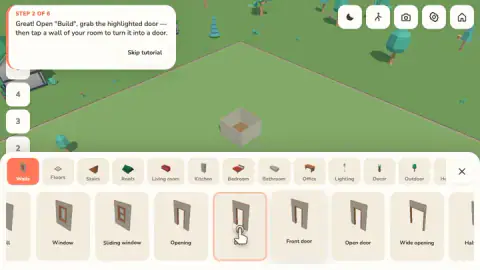
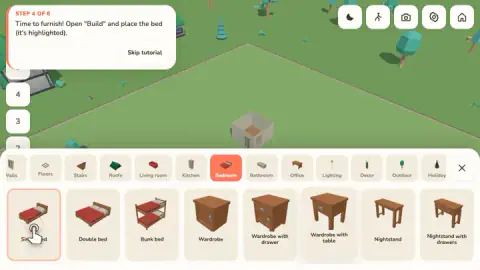
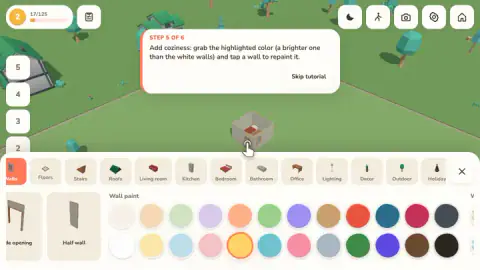
Under Walls we could see a plain window and a sliding one, a door, a front door and an open door, two widths of doorless opening and a half wall. Under Bedroom there were single, double and bunk beds, three wardrobes and two nightstands, all in the same warm wood. The paint palette has 24 colours in two rows, pastels on the left and strong tones on the right.
Two more things on the screen point upwards. A column of buttons on the left runs from B at the bottom to 5 at the top, with 1 lit while we worked on the ground floor. And the catalogue has tabs for stairs and roofs. We did not press any of them, so we can tell you the buttons are there and not how a second storey is put up.
The same goes for the five icons in the top right corner, a moon and a walking figure among them, and for the tools named Select, Remove and Cutaway beside the Room button. They sat untouched through our session.
Why your house has no roof
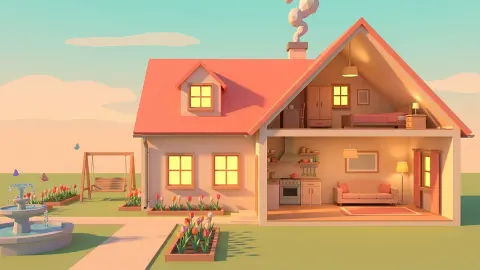
Every room we built stood as an open box. The walls go up, the top stays off, and you look down into it at an angle, onto the floorboards and the bed. It is easy to stop noticing, and it is the oldest trick this game uses.
Draughtsmen call it a cutaway. Wikipedia defines a cutaway drawing as one in which parts of the surface of an object are removed so the inside can be seen, without losing the outside entirely. It traces the method to the notebooks of the Renaissance engineer Mariano Taccola, and to Georgius Agricola, who used it throughout his 1556 book on mining to show what went on inside pumps and furnaces.
Architects do the same thing flat. A floor plan, in Wikipedia's description, is drawn as if the building had been sliced through about 1.2 metres above the floor and the upper part lifted away. That is why doors and windows show on a plan as breaks in a line.
Dream Home borrows both habits. You draw the outline first, as on a plan, and then you work inside a model with its lid off. Doors and windows here are breaks in a wall too: you do not add them to the room, you swap a length of wall for them. The toolbar even has a button with the word Cutaway on it, which we left alone.
What a reload did to our house
After the fifth step, and before we had seen the sixth, we reloaded the page. The good news is that the house survived. The room came back with its door, its bed and one wall in yellow, and the level and points were as we had left them.
The tutorial did not survive in the same way. Its card went back to the first step and asked us again to drag across the glowing pad, and this time there was no glowing pad on the lawn, only the room we had already built. We spent the rest of the session failing to satisfy it. A Skip tutorial button sits on every card; we did not manage to try it, so we cannot tell you where it leaves you.
Who it is for
It suits players who would rather lay out a house than be handed one, and who are happy without a clock or a rival. The opening minutes are gentle and clearly signposted, and a child who can drag and click can follow them.
If you want decorating as a reward for solving puzzles, this is a different kind of game: here the building is the whole activity. And if you want to judge it by its orders and its walk-through mode, know that the developer lists both and that we cannot vouch for either yet.
More games to try next
Home Design: Decorate House comes at the same subject from the other side, with match-3 boards that pay for each renovation. My Town Home: Family Playhouse is a dollhouse with the rooms already built, made for moving characters around them. Toybox: Pixel World Sandbox is a sandbox in two dimensions where what you place starts to move. Game Factory swaps the house for a game of your own making. More planning and building is under strategy games.
Screenshots
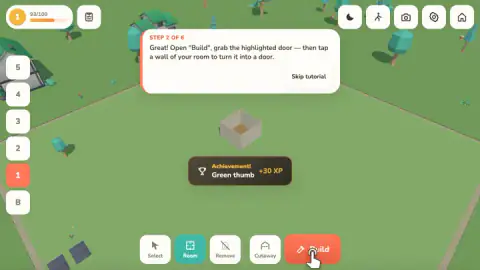
Taken by opening the game ourselves and letting it run — not supplied by the publisher, and not the same picture every other site shows.
How to play Dream Home
- Press Room and drag. A rectangle stretches across the lawn under the pointer. Let go and it becomes a room.
- Open Build. The red button at the bottom right brings up the catalogue. It opens on the Walls tab.
- Turn a wall into a door. Click the door in the catalogue, then click a wall of your room. Do the same with a window on another wall.
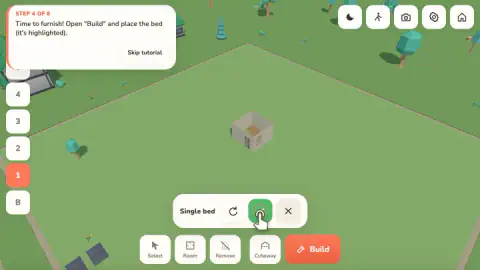
- Furnish. Switch to a room tab, pick a piece and set it down. A small bar appears with the piece's name, a round arrow to turn it and a green tick to confirm.
- Paint. Back on the Walls tab, scroll to the paint swatches, pick one and click a wall.
What our session taught us:
- The catalogue hides the room. When Build is open it covers the lower half of the screen, and the view shifts so your house sits in the strip that is left. Pick the piece first, then look for the wall.
- Paint lives under Walls, at the far end. There is no paint tab. The swatches sit to the right of the last wall piece, after the openings and the half wall.
- A small room makes small targets. Ours was a little box in the middle of a large plot, and it took us several clicks to land the colour on a wall. Draw the first room generously.
- Do not reload in the middle of the tutorial. We did, and the house was kept but the lessons started again from the first one. More on that below.
Controls
| Room (toolbar), then drag on the lawn | Stretches out a rectangle that becomes a room with four walls and a floor |
|---|---|
| Build (red button) | Opens the catalogue, sorted in tabs from Walls and Floors to Outdoor and Holiday |
| Click a catalogue item, then a wall or the floor | Turns that wall into a door or a window, or sets furniture down; a green tick confirms and a round arrow turns the piece |
| Click a paint swatch, then a wall | Repaints that wall |
| Right mouse button and wheel | Rotate and zoom the camera, according to the developer's instructions; we did not use them |
| WASD or arrow keys, R, Delete | Move the camera, rotate an item and sell it, according to the developer's instructions; we did not use them in play |
| Touch | Tap to build and select and two fingers for the camera, according to the developer's instructions; we did not play on a phone |
Features
- A six-step tutorial that has you build, open up, furnish and paint one small room before it lets go
- Rooms drawn by dragging a rectangle on the lawn, at whatever size you stretch them to
- Thirteen catalogue tabs, from Walls, Floors, Stairs and Roofs to Kitchen, Office, Lighting and Outdoor
- Wall pieces that include a sliding window, a front door, two widths of opening and a half wall
- A wall-paint palette of 24 colours
- Experience points for what you place, with a second level reached before the tutorial is over
- A column of floor buttons running from B up to 5
- Made by Flagwin Studio
Game details
- Developer
- Flagwin Studio
- Release date
- July 2026
- Last updated
- July 29, 2026
- Added here
- June 2026
- Technology
- HTML5 (3D)
- Platforms
- Browser (desktop, mouse), Browser (mobile & tablet, touch)
- Classification
- 3D , Casual , Fashion & Beauty , Simulation
- Saved progress
- Saving, when available, is managed by this game. Mava cannot confirm your level.
FAQ
How do you play Dream Home?
You start on an empty lawn. Press Room and drag across the ground to stretch out a rectangle, which becomes a room. Then open Build, pick a door, a window or a piece of furniture from the catalogue and click where it should go. Everything you place adds experience points towards the next level.
How do you add a door or a window in Dream Home?
Doors and windows are not separate objects you squeeze into a gap. Open Build, stay on the Walls tab, pick the door or window you want and click a wall of your room. That stretch of wall is replaced by the piece you picked.
What can you build with in the Dream Home game?
The catalogue has thirteen tabs: Walls, Floors, Stairs, Roofs, Living room, Kitchen, Bedroom, Bathroom, Office, Lighting, Decor, Outdoor and Holiday. We opened two of them. Walls held doors, windows, openings, a half wall and a palette of 24 paint colours, and Bedroom held three beds, three wardrobes and two nightstands.
How do you level up in Dream Home?
By building. A bar in the top left corner fills as you place things, and the first level takes 100 points. Our first room and the achievement that came with it brought the bar to 93, and the door that followed tipped us into the second level, which asks for 125.
Does Dream Home save your house?
It did for us. We reloaded the page twice and each time the room came back with its door, its bed, its painted wall and our level. The tutorial did not come back where we left it, though: it restarted from its first step.
Is Dream Home a sandbox or does it have goals?
The part we played is a guided sandbox: a tutorial tells you what to place, and nothing is timed or scored beyond experience points. The developer also describes orders from clients that are graded, a daily order, a walk-through mode on foot and extra plots at higher levels. Our session ended inside the tutorial, so we did not reach any of those.
Who made Dream Home?
It is credited to Flagwin Studio. It was published on 28 July 2026. It is listed for PC, Android and iOS; we played it on a desktop computer with a mouse.