











About Coloring by Numbers. Pixel Room
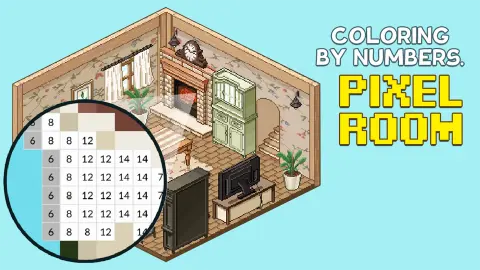
Most colour-by-number games hand you a picture and keep the result in a list of finished pictures. Coloring by Numbers. Pixel Room gives each picture a job. Every drawing in its gallery is a piece of furniture: a sofa, a fireplace, a mantel clock, a rug. According to the game's description, the pieces you finish go into a room that you put together yourself.
The colouring itself is the kind you know. A picture is cut into squares, each square carries a number, and each number belongs to one colour in a palette. What this game adds is a habit worth learning in the first minute: it does not show you the numbers until you zoom in. From far away you see the picture. Up close you see the work.
The game is credited to Mirra Games. It was published on 22 December 2025.
We should be plain about how far we got. We played for four minutes, opened one drawing and painted three of its 143 squares. Most of that time went on working out the zoom and the highlight. So this page is about how the game is laid out and how painting works, and it says clearly where our knowledge stops.
The first drawing: 143 squares and six shades of brown
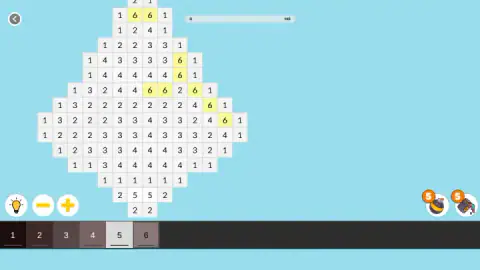
The drawing we opened was small. Its bar read 0 on the left and 143 on the right, and that was the whole job: 143 squares.
Its palette surprised us. There was no red, green or blue in it. The six swatches ran from near black through dark brown and taupe to a light grey. Seen from far away, the picture was a rounded body under a narrow neck, with a hooked piece at the top. We did not paint enough of it to tell you what it turns out to be.
Zoomed in, the numbers tell you how the picture is built. When we selected colour 1, the near black, the yellow highlight ran right round the edge of the shape. Colour 1 is the outline. The 2s, 3s and 4s fill the middle in bands, and the 6s make a short diagonal streak near the top, which reads as a glint of light on a curved surface.
That gives you a sensible order of work, and it is our suggestion, not something the game asks for. Start with the colour that has the fewest squares, such as the 6s or the pair of 5s at the bottom, and clear it completely. Leave the outline for last, when the long run of 1s is the only thing left to click.
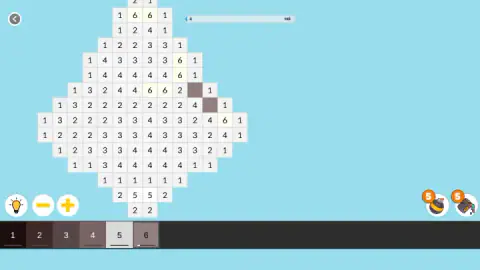
Our own tally was modest: two squares of colour 6, then one of colour 1. The bar read 3 when we stopped.
What sits around the picture
The screen stays quiet. A back arrow is in the top left corner and the progress bar is at the top. Everything else is along the bottom edge.
On the left are three round buttons: a lightbulb, a minus and a plus. The last two are the zoom. The lightbulb is the hint. We pressed it three times and could not tell what it had changed, so we will not guess.
On the right are two boosters, each with an orange 5 on it. The last tutorial card says they are for colouring faster. We did not spend any, so we cannot tell you how many squares one of them fills. With five of each and 143 squares in the smallest drawing we saw, they are clearly meant as a help and not as the way to play.
The gallery has its own small economy. A counter at the top showed 40 coins. One drawing carried a price tag of 100, and three others had a film clapperboard on the corner, the usual sign of a piece that opens after an ad. The cards we could see without a badge had no lock on them. We did not see how coins are earned.
The game's description mentions calm music and a music player. We heard no sound in our session, so that part is the developer's word and not ours.
Painting by number began as a kit from Detroit
The idea of a picture you finish by matching numbers is older than pixels. The first patent for the technique was filed in 1923. It became a craze in the early 1950s, when Max Klein, who owned a paint company in Detroit, and Dan Robbins, a commercial artist who worked for him, put it in a box: a printed board divided into numbered shapes, and a row of small numbered pots of paint.
The kits went on sale in 1951 and sold more than 12 million. Critics were unkind about the results. Buyers did not mind, because the kit promised something no art lesson could: a finished picture on the first try.
A pixel version changes one thing. In the kit, each numbered shape was drawn to follow the picture, a petal here, a patch of sky there. On a grid every shape is the same square, so the picture only exists at a distance. That is why this game hides the numbers until you zoom in: far away is where you look, and close up is where you work. The brown and grey palette follows the same old logic. A kit never gave you one brown. It gave you several, because shading is what makes a flat shape look round.
A slow game, and it means to be
This is a game for people who like to finish things at their own speed. Nothing rushed us, nothing punished a wrong click, and a drawing of 143 squares is a few minutes of work once you know where to click. A child who can read numbers up to six can play it.
It will not suit you if you want a puzzle to solve. There is no deduction here: the numbers tell you everything. And be ready for a short stretch of confusion at the start, on a computer at least, where the zoom is the first thing to learn.
More colouring and decorating games
The closest relative we have is Pixel Art - Color by Numbers, the same idea without the room. Nonogram also fills squares on a grid, and there the numbers are clues you have to reason from. Ancient Aztec Coloring swaps the grid for whole pictures, and Home Design: Decorate House furnishes a house through match-three boards. The rest are under puzzle games.
Screenshots

Taken by opening the game ourselves and letting it run — not supplied by the publisher, and not the same picture every other site shows.
How to play Coloring by Numbers. Pixel Room
- Open the gallery and pick a drawing. The cards show each piece in grey. A counter at the bottom keeps the tally; ours read Done 0 / Left 18.
- Zoom in until the numbers appear. Use the mouse wheel, or the minus and plus buttons at the bottom left. The drawing opens small, and at that size the squares are blank.
- Choose a colour. The palette runs along the bottom. Our drawing had six swatches, numbered 1 to 6. Click one and every square with that number turns yellow.
- Paint the yellow squares. Click a square whose number matches the selected colour. It takes the colour, the number vanishes, and the bar at the top moves up by one.
- Change colour and repeat until the bar is full.
What our session taught us:
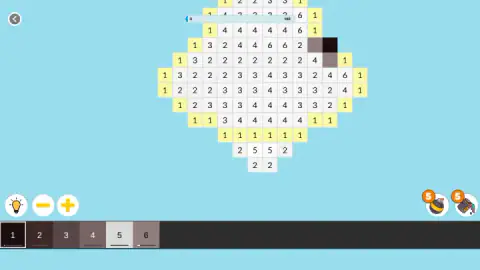
- Yellow means "here", not "done". We lost time on this. The yellow squares look finished, and they are the opposite: they are the ones still waiting for the colour you hold. A painted square is the colour of its swatch.
- Zoom first, always. Clicking on the small grey preview got us nowhere. The game's own first tutorial card says the same thing: zoom until the boxes with numbers appear.
- Watch the bar, not the picture. In a drawing made of browns and greys, one painted square is easy to miss. The count at the top is the proof that a click landed.
- A wrong click is free. Many of our clicks hit squares of another number. Nothing was painted and nothing was taken away.
Controls
| Mouse wheel, or the minus and plus buttons | Zooms the picture; the numbers only appear once you are close enough |
|---|---|
| Click a swatch in the palette | Selects that colour and tints every square with its number yellow |
| Click a numbered square | Paints it, if its number matches the selected colour |
| Lightbulb (bottom left) | Hint button; we pressed it three times and could not tell what it changed |
| Two round buttons marked 5 (bottom right) | Colour boosters, five uses of each; we did not use them |
| Arrow (top left) | Back to the gallery |
Features
- A gallery of 18 grey pixel drawings, each one a piece of furniture for the room
- A first drawing of 143 squares and six colours, with a bar that counts every square you paint
- A yellow highlight that shows every square of the colour you have selected
- Numbers that stay hidden until you zoom in, so the far view is always the picture and never the grid
- Two boosters with five uses each and a hint button on every drawing
- No timer, no lives and no penalty that we saw
- Made by Mirra Games
Game details
- Developer
- Mirra Games
- Release date
- December 2025
- Last updated
- August 10, 2026
- Added here
- October 2025
- Technology
- HTML5 (2D)
- Platforms
- Browser (desktop, mouse), Browser (mobile & tablet)
- Classification
- Casual , Fashion & Beauty , Kids
- Saved progress
- Saving, when available, is managed by this game. Mava cannot confirm your level.
FAQ
How do you play Coloring by Numbers. Pixel Room?
Pick a drawing from the gallery and zoom in until numbers appear in the squares. Click a colour in the palette at the bottom, and every square with that number turns yellow. Click those squares to paint them. A bar at the top counts painted squares against the total.
Why can't I see any numbers on the picture?
You are zoomed out too far. A drawing opens as a small grey preview with no numbers on it. Roll the mouse wheel or press the plus button at the bottom left, and the numbers appear once the squares are large enough to read.
Are the yellow squares already painted?
No. Yellow is the game's marker for the colour you have selected: it shows where that colour goes. A painted square takes the colour of its swatch and loses its number, and the bar at the top goes up by one.
How many pictures are there in Coloring by Numbers. Pixel Room?
The gallery we opened held 18 drawings, all furniture and decoration for one room, with a counter reading Done 0 / Left 18. The game's description speaks of rooms in the plural. We did not finish a drawing, so we cannot say what opens after the first room.
What are the coins for?
We started with 40 coins, and one drawing in the gallery carried a price of 100. Three other drawings showed a film clapperboard badge, which usually means an ad opens them. We did not buy or unlock anything, and we did not earn a coin in our session.
Is there a timer, or can you lose?
We saw no clock, no lives and no move limit. Clicks on the wrong squares painted nothing and cost nothing. The only number that moves is the count of painted squares.
Who made Coloring by Numbers. Pixel Room?
It is credited to Mirra Games. It was published on 22 December 2025 and last updated on 10 August 2026.
Can you play it on a phone?
It is listed for PC, Android and iOS and described as a portrait game with touch controls. We played on a computer with a mouse, where zooming is done with the wheel, and did not test a phone ourselves.