



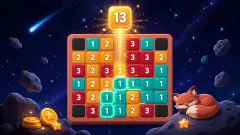




About Diamond Painting by Number
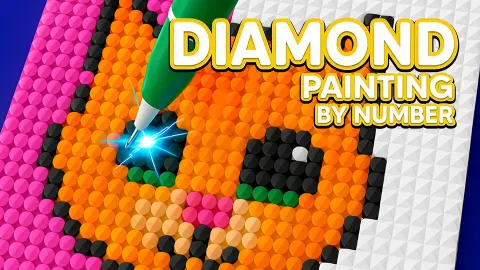
The real craft takes a weekend. A diamond painting kit is a printed canvas covered in glue, a bag of tiny resin stones sorted by colour, and a pen with a dab of wax on the tip that picks them up one at a time. People spend hours on a single picture, and the satisfaction is in watching a grey grid of symbols turn into something that catches the light.
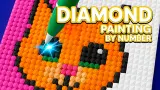
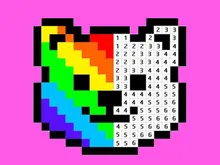
Diamond Painting by Number keeps the idea and drops the glue. Each picture starts in greyscale, a grid of small squares each carrying a number. You choose a colour from the bar at the bottom, and every square with that number lights up yellow. You lay stones on the lit squares, the colour comes back, and you move to the next number.
What turns it into a habit rather than a single picture is the calendar. The main screen is headed Everyday: October, with a counter reading 0/31, and only the current day's card is open. The rest of the month waits behind question marks.
We should be clear about how far we got. We played one session of about ten minutes with a mouse. We opened the day's picture, picked colours and watched the squares light up, but we never managed to lay a single stone, so the picture stayed at 0 percent. This page tells you what the game shows and where it trips up a new player.
A picture a day: the Everyday calendar
The calendar is the spine of the game. When we opened it, the card for the day was a dark greyscale scene of trees with an animal in a clearing, still at 0%. The cards for the next days were question marks, and the counter at the top read 0/31.
That tells you two things. There is one picture per day, so the month is a set of 31 to collect. And you cannot run ahead: tomorrow's picture is locked until tomorrow. If you want to colour for an hour straight, the calendar alone will not give you that.
Under the calendar a second row starts with a heart icon, cut off at the bottom of the screen. We did not open it, and the Gallery button next to Custom, which probably holds your finished pictures, did not show us anything we could report.
The pens, and what the ad button does
Custom opens a collection called Pens. It is a grid of at least 15 slots, almost all question marks. We started with one: a plain blue pen. A pink button marked FREE unlocked a second, a striped pen built like a stack of coloured cubes. After that the same button read AD, which means the next pens cost an ad each.
The pens are the game's only collectible we found. The tool hanging over the board did change: a grey pen with pink rings in the tutorial, a red and green striped one in the daily picture after we had unlocked the second pen. We saw nothing to suggest a pen paints faster or better, so treat them as decoration.
The one time we pressed AD, a message said no ad was available and offered to continue. An ad break did appear later, between tapping the day's card and the picture opening.
Diamond painting by number, and the 1950s craze it borrows from
Painting by numbers is older than any screen. The kits were designed in the late 1940s by Dan Robbins, a package designer at the Palmer Paint Company in Detroit. His boss had asked him for a children's colouring book. Robbins said he took the idea from a story about Leonardo da Vinci giving his students numbered patterns to fill.
The kits went on sale in 1951: a board with an outline, numbered pots of paint, and two brushes. By 1954, according to a Smithsonian exhibition on the craze, more than 12 million had been sold. Critics called it a sign of a conformist decade. Robbins never claimed it was art; he said it gave people the experience of making some.
Diamond painting is the same promise with a different material. Instead of paint, the canvas is sticky and the numbers are replaced by symbols, each matching a bag of resin stones. The stones go down one by one with a waxed pen, and multi-stone pens exist to lay a short row at once.
The browser game keeps all three ideas: the numbered grid, the colour key along the bottom, and the pen. What it changes is the hunting. On a real canvas you scan for every square marked with the right symbol. Here, choosing a colour lights them all up in yellow, which is the single most useful thing the game does for you.
Who it is for
This is a quiet game. There is no timer, no score and no way to lose that we found, just a picture getting its colour back. It suits anyone who likes colouring books and wants something to open once a day. Younger players can manage it as soon as someone shows them the sweep gesture, which the game does not make obvious.
It is not a puzzle. The numbers tell you everything, so the pleasure is in the filling, not in working anything out. And if you came here looking for a diamond painting kit to buy, this is not one: it is a free game that borrows the look.
Similar games
The game's listing gives the same developer for Coloring by Numbers. Pixel Room, where each finished pixel picture becomes a piece of furniture for a room. Color by Numbers. Anti-stress Drawings. fills numbered zones in mandalas, and Sticker Art Book Puzzle swaps the stones for numbered stickers. For pictures you have to work out instead of being told, Nonogram paints squares from number clues. More calm games are in casual games.
Screenshots
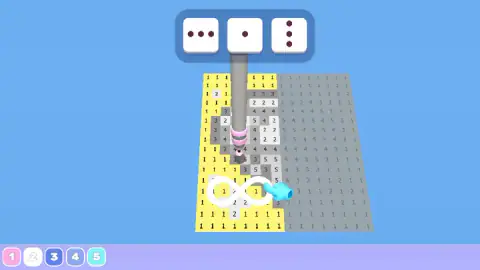
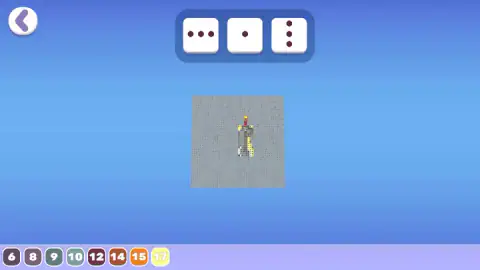
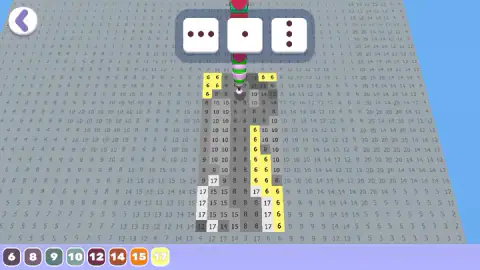
Taken by opening the game ourselves and letting it run — not supplied by the publisher, and not the same picture every other site shows.
How to play Diamond Painting by Number
- On the main screen, tap the open card in the Everyday row. In our session it was the only one not hidden behind a question mark.
- Wait for the picture to load. A short screen reads Click to keep playing; click and the numbered board appears, tilted slightly like a canvas on a table.
- Pick a colour chip at the bottom. Every square carrying that number turns yellow.
- Move the pen across the yellow squares to lay the stones. The tutorial shows a hand drawing a loop over them rather than tapping each one.
- Change colour and repeat until no grey is left. The back arrow at the top left takes you out; the percentage on the calendar card shows how far you got.
Tips from our session:
- Do not tap squares one by one. We did it several times on the tutorial board and nothing changed. The tutorial hand never taps: it draws a figure eight.
- Read the number before you paint. On the first daily picture the board carried numbers up to 20, but only eight colour chips were in the bar, so the colour you need may not be the one on screen.
- Use the yellow glow as your check. When we picked 17, the yellow moved straight off the 6s and onto the 17s. If nothing glows near where you are looking, you have the wrong colour.
- The three dice above the board are buttons. They show three dots in a row, one dot, and three dots in a column. They look like pen heads that lay one stone or three at once, as real multi-stone pens do, but we did not confirm what they change.
Controls
| Click a colour chip (bottom bar) | Selects that number. Every square carrying it lights up yellow on the board |
|---|---|
| Move the pen over the yellow squares | How the tutorial shows stones being laid, with a hand drawing a loop. We did not manage to place one, so treat this as the game's hint |
| Back arrow (top left) | Leaves the picture |
| Custom and Gallery (bottom of the main screen) | Custom opens the Pens collection. We did not see what Gallery holds |
| Touch | The same actions with a finger, per the game's instructions. We played with a mouse |
Features
- A calendar picture for every day of the month: the October screen counts 0/31 and only today's card is open, the rest show question marks
- Pictures start in greyscale and get their colour back square by square, like a diamond art canvas
- Choosing a colour lights up every square with that number in yellow, so you never hunt for them
- The daily picture we opened used numbers up to 20, with eight colour chips on screen at a time
- A Pens collection of at least 15 slots: the first extra pen was free, the next ones are offered for an ad
- No timer and no score on screen, and no way to lose that we met
Game details
- Developer
- Partner studio
- Release date
- December 2025
- Last updated
- August 10, 2026
- Added here
- October 2025
- Technology
- HTML5
- Platforms
- Browser (desktop), Browser (mobile & tablet, touch)
- Classification
- Casual
- Saved progress
- Saving, when available, is managed by this game. Mava cannot confirm your level.
FAQ
How do you play Diamond Painting by Number?
Open a picture, pick a numbered colour from the bar at the bottom, and every square with that number lights up yellow. You then lay stones of that colour on the lit squares until the picture is full. The tutorial shows the pen being moved across the squares in a loop rather than tapped one by one.
Is Diamond Painting by Number a real diamond painting kit?
No. It is a free browser game that copies the look of the diamond art craft, where you press small resin stones onto a numbered, sticky canvas. Nothing is shipped or bought: the canvas, the stones and the pens are all on screen.
What is the Everyday calendar in Diamond Painting by Number?
The main screen is a calendar of pictures for the month, headed Everyday: October with a counter of 0/31 when we played. Only the current day's card was open, in greyscale at 0 percent, and the following days were question marks.
How do you get new pens in Diamond Painting by Number?
Press Custom on the main screen to open the Pens collection. We started with one blue pen, a FREE gift button unlocked a second, striped pen, and after that the button changed to AD, meaning the next pens are offered for watching an ad.
Can you lose in Diamond Painting by Number?
We met no timer, no lives and no score on screen, and heard no failure sound in ten minutes of play. It is a calm colouring game: a picture simply waits at whatever percentage you left it.
Why does nothing happen when I click a square?
In our session single clicks on squares did not lay a stone. The tutorial hand draws a loop over the lit squares instead, which suggests you sweep the pen across them. Make sure the colour you picked matches the number on the squares that are glowing yellow.
Who made Diamond Painting by Number?
The listing's page lists the developer as Mirra Games, the same name it gives for Coloring by Numbers. Pixel Room. We found no second source to confirm it. The game has been available since December 2025.
Does Diamond Painting by Number have ads?
Yes. In our session an ad break came between tapping the day's picture and the picture opening, and new pens are offered in exchange for an ad. The one time we pressed the AD button, the game said no ad was available and let us carry on.