

About Tracoria: Draw, Color & Match
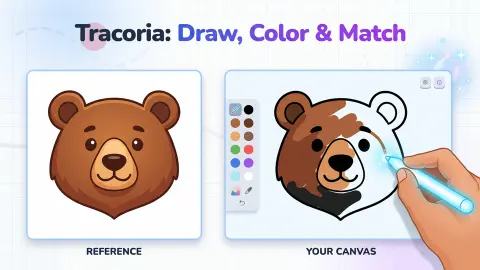
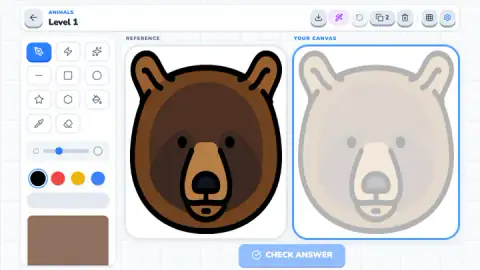
Most colouring games online are colour-by-number: every area carries a number, every number has a colour, and the picture fills itself in as long as you can match digits. Tracoria: Draw, Color & Match removes the numbers. You get a finished drawing on one side, a faint copy of it on the other, and a button that tells you, in percent, how close you came.
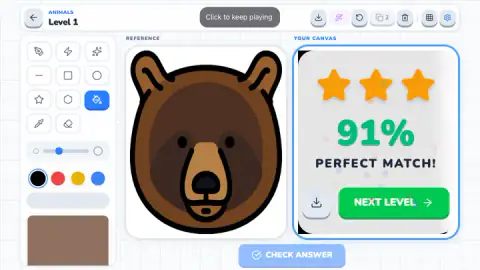
That score is what makes it a game. There is no wrong colour that the game refuses and no area that locks once it is done. You paint however you like, press CHECK ANSWER, and get a number and up to three stars. Our first level scored 91% with three stars, a result the game labels a PERFECT MATCH.
The game is by Bouraoui Game, according to the game's listing, and it was published in May 2026. We played the first two levels of the ANIMALS group. This page explains how scoring works, which tool to reach for, and what surprised us.
Why one click can paint the whole picture
The paint bucket is one of the oldest tools in computer drawing. MacPaint, the program that came with the first Apple Macintosh in 1984, already had one, and Microsoft Paint has kept a fill tool since the 1980s. Underneath sits an idea called flood fill: start at the pixel you clicked, then spread to every neighbouring pixel of the same colour, and keep going until you hit a different colour.
That last part is the catch. A flood fill only stops at a border. In a classic colouring page, the thick black outlines are those borders, so a click inside the bear's ear fills the ear and nothing else.
In Tracoria the guide on your canvas is a faint grey ghost, not a hard black line. When we clicked the bear's face with black selected, the fill did not stop at the face. It spread over nearly the whole canvas, leaving only a thin strip at the right edge.
So the tool behaves like a flood fill and works fastest where the drawing has clear, closed areas. Treat each click as a decision about the whole region it can reach, not just the spot under the cursor. The undo arrow in the top bar is there for the click that goes too far.
What 91% means, and what it does not
The score compares your canvas with the reference and returns a percentage. Ours read 91% PERFECT MATCH with three stars, after a canvas that was mostly solid black.
That says something about how forgiving the first level is. The reference bear has thick black outlines and a very dark brown face, so a black canvas already shares a lot with it. A canvas that copied every shade would presumably score higher, but we did not test that.
What we can say: three stars arrived at 91%. We never scored lower, so we cannot tell you where two stars or one star begin. If you are chasing three stars on every level, the result card has a download button beside NEXT LEVEL, so you can keep a copy of your canvas.
The tools, and the ones we did not need
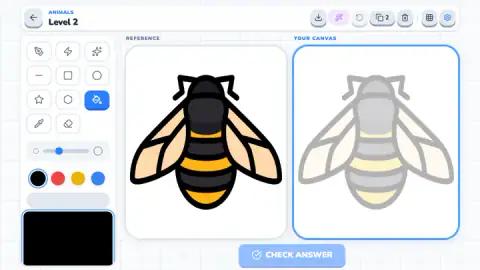
The left column holds eleven buttons. The first row has a pen, a lightning bolt and a sparkle. The second row has a line, a square and a circle, and the third a star, a hexagon and the paint bucket. Last come an eyedropper and an eraser.
The top bar adds more: a download button, a purple magic wand, an undo arrow, a button marked 2, a bin, a grid and settings. We used the bucket, the pen and the colours. The rest we left alone, so we will not guess what the wand or the 2 does.
The second level is a bee with black and yellow stripes and beige wings, more areas and smaller ones than the bear. We left it unpainted. It is the kind of picture where the bucket matters most: each stripe is a closed band, exactly the shape a flood fill handles well.
Who Tracoria is for
It suits anyone who likes colouring but wants a target, from children who can click a mouse to adults who like a quiet, precise task. There is no timer, the pictures are simple flat illustrations, and nothing punishes a messy canvas except a lower number.
It is not a free-hand drawing course, at least not in the scored levels. The faint guide does the drawing for you, and the bucket does most of the painting. Players who want to draw from nothing have the FREE DRAW button on the menu, which we did not open.
The ad breaks are worth a mention. After our first CHECK ANSWER, an ad screen dimmed the result card for a moment before we could carry on.
More colouring games
Coloring by Numbers. Pixel Room is the numbered approach Tracoria leaves out. Sticker Art Book Puzzle fills an outline with numbered stickers, and Art Master Puzzle colours a sketch with cut-out pieces. More are in casual games.
Screenshots
How to play Tracoria: Draw, Color & Match
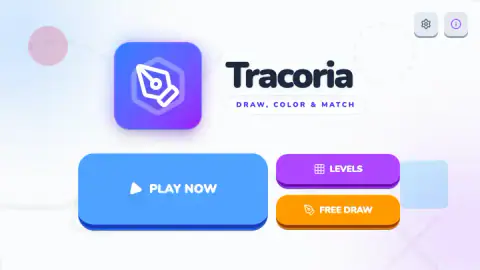
- Press PLAY NOW. The menu also offers LEVELS and FREE DRAW. Our first level was ANIMALS, Level 1, a bear head. After a page reload, PLAY NOW took us straight back to Level 2, so your progress is kept.
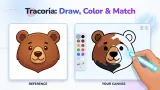
- Read both pictures. REFERENCE on the left is the finished drawing. YOUR CANVAS on the right holds a pale ghost of the same drawing, so you can see where each area goes.
- Pick a tool, then a colour. The tools sit in a column on the left: pen, shapes, paint bucket, eyedropper, eraser. Under them are a size slider, four colour circles and a large swatch.
- Paint the canvas. With the bucket, one click fills an area. With the pen, you drag to draw a line.
- Press CHECK ANSWER. A card covers the canvas with your percentage, your stars and a NEXT LEVEL button.
Tips from our session:
- Use the bucket, not the pen. This is the one thing the first level does not tell you. Our early drags with the pen each left a single thin line running across the bear, which would take dozens of strokes to turn into a face. The bucket (third row, third tool) fills an area in one click.
- Choose the colour first. The bucket uses whatever is selected at the moment you click. We clicked the face with black still active and the canvas turned black almost from edge to edge.
- Look at the large swatch. It is not decoration. On the bear level it held a brown close to the fur, and a pen stroke made with it came out brown. The four circles alone do not include brown.
- CHECK ANSWER waits for you. It stays pale on an empty canvas and turns solid blue once you have painted something.
Controls
| Click a tool in the left column | Picks it. The paint bucket is in the third row, on the right |
|---|---|
| Click a colour circle or the large swatch below them | Sets the colour for the next stroke or fill |
| Click inside an area of the canvas (bucket) | Floods the area with the chosen colour in one click |
| Click and drag on the canvas (pen) | Draws a thin line in the chosen colour; the slider above the colours sets its thickness |
| CHECK ANSWER | Scores your canvas against the reference. It stays pale until you have painted something |
Features
- Two pictures side by side: the finished REFERENCE on the left and YOUR CANVAS on the right, with a faint ghost of the same drawing to work over
- A score in percent plus up to three stars every time you press CHECK ANSWER
- Eleven tools in the left column, among them a pen, a paint bucket, an eyedropper, an eraser and five shapes
- Four colour circles (black, red, yellow, blue) and a large swatch that can hold a fifth colour
- Levels grouped by theme: the first two in the ANIMALS group are a bear head and a bee
- PLAY NOW, LEVELS and FREE DRAW on the main menu
Game details
- Developer
- Bouraoui Game
- Release date
- May 2026
- Last updated
- August 10, 2026
- Added here
- March 2026
- Technology
- HTML5 (2D)
- Platforms
- Browser (desktop, mouse), Browser (mobile & tablet, touch)
- Saved progress
- Saving, when available, is managed by this game. Mava cannot confirm your level.
FAQ
How do you play Tracoria: Draw, Color & Match?
Each level shows a finished drawing on the left and a faint copy of it on your canvas on the right. Pick a tool and a colour from the column on the left, paint the canvas to look like the reference, and press CHECK ANSWER. The game gives you a percentage and up to three stars, and a NEXT LEVEL button to move on.
How are stars and the percentage worked out in Tracoria?
When you press CHECK ANSWER, the game compares your canvas with the reference and shows how close it is as a percentage, with up to three stars. Our first level scored 91%, which the game called a PERFECT MATCH and rewarded with all three stars. We did not see the cut-off for one or two stars.
What is the fastest way to colour in Tracoria?
Use the paint bucket, not the pen. The bucket is the third tool in the third row, and one click fills a whole area with the chosen colour. Dragging the pen only leaves a thin line, so filling a face that way takes dozens of strokes.
Why did my whole canvas turn one colour in Tracoria?
The paint bucket floods everything connected to the spot you click. In our first level, one click on the bear's face spread black across almost the entire canvas, past the pale guide lines. Pick the colour before you click, and use the undo arrow at the top if a fill goes too far.
What colours can you use in Tracoria?
There are four circles, black, red, yellow and blue, plus a large swatch underneath that holds another colour. On the bear level the swatch was a brown close to the bear's fur, and a stroke made with it came out brown. The eyedropper tool is also in the column, for taking a colour from somewhere else.
Who made Tracoria: Draw, Color & Match?
The developer is listed as Bouraoui Game. The game was published in May 2026 and was last updated in August 2026. It is free to play in the browser.
Does Tracoria have a free drawing mode?
Yes, the main menu has a FREE DRAW button next to PLAY NOW and LEVELS. We spent our session in the scored levels and did not open it, so we cannot say what it includes.
Is Tracoria good for kids?
It suits children who can use a mouse or a touch screen. There is no timer and nothing to read beyond a few labels, and the first pictures are simple animal faces. The hard part is learning which tool to use, which an adult can show in a minute.