





About Color by Numbers. Anti-stress Drawings.
A colouring book on paper leaves the hard part to you: which colour goes where. Color by Numbers. Anti-stress Drawings. takes that decision away. Every zone of every picture carries a number, every colour in the palette carries one too, and the only job left is to bring the two together.
That sounds like nothing to do. In practice the work moves somewhere else, to finding things. A mandala has dozens of zones, some of them smaller than the number printed inside. The game knows this, and its most useful feature is aimed at exactly that problem.
The game is credited to 3S Games. It was published in February 2026.
Our time with it was short, and you should know how short. We played for about four minutes on a desktop, with the mouse. We opened one picture, a mandala, and filled four of its petals. We did not finish a colour, let alone a picture. So this page explains the screens we saw and how painting works, and says plainly where our knowledge ends.
The checkerboard does the searching for you
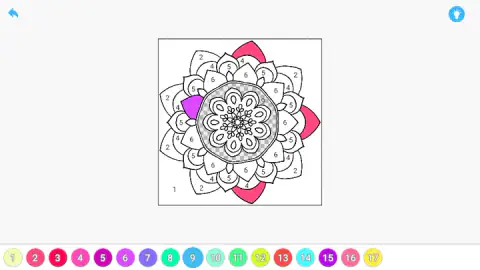
The mandala we opened sits in a white square in the middle of the screen. Around the outside it has large petals marked 2, with smaller zones marked 4, 5 and 6 tucked between them. The whole background is a single zone, marked with a small 1 in one corner.
Select a colour and the picture answers. With colour 1 selected, the whole background turned to checkerboard. With colour 3, a set of small wedges between the outer petals lit up, places we had not even read as separate zones. With colour 9, it was a ring around the centre.
This is what makes the game comfortable on a detailed drawing. You never scan the picture for a number. You ask the palette where a colour goes and it shows you every place at once.
We painted three of the large outer petals with colour 2, a pink-red, and one smaller petal with colour 6, a purple. Each lost its number as it filled. That is all the painting we did.
Seventeen colours, and the centre you cannot read at full size
The palette under this mandala runs from 1 to 17. Seen from a distance, the middle of the drawing is a knot of tiny flowers with no visible numbers at all.
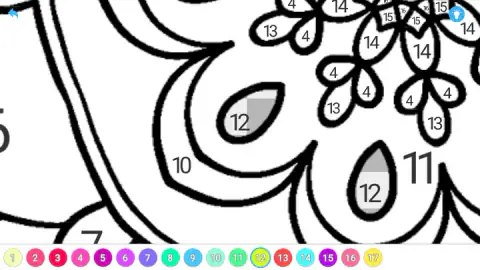
They are there. At one point our view of the picture was magnified, and the centre opened up: teardrop shapes marked 12, and rings of small flowers whose petals carry numbers all the way up to 16. We are not certain which input brought the close view up, so we will not give you a recipe for it. What we can say is that the drawing has more detail than the full view suggests, and that the checkerboard marker works in the close view too.
The library keeps your half-finished pictures
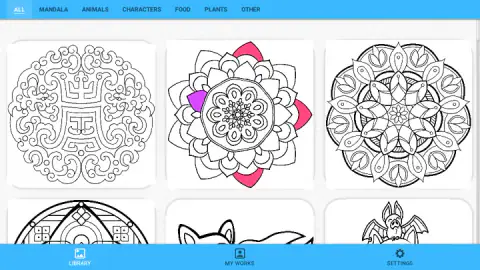
The library has a row of tabs along the top: All, Mandala, Animals, Characters, Food, Plants and Other. We stayed on the first. Its top row held three mandalas, and the row below showed a cartoon bat and an animal with pointed ears, cut off by the edge of the window.
When we went back to the library, the card of our mandala had changed. It showed the three pink petals and the purple one. Opening it again brought the picture back as we had left it. By our notes, a started picture first offers three choices: continue, delete the progress or restart.
A bar at the bottom has two more sections, My Works and Settings. We did not open either.
Why numbers, and why mandalas
Painting by numbers is older than any screen. Kits with a printed canvas and numbered pots of paint became a craze in the United States in the early 1950s. The promise was the one this game makes: you do not need to know how to paint, only how to match.
Mandalas fit the idea well. The word is Sanskrit for circle, and the designs repeat the same shapes around a centre. That repetition is why one colour here lights up a whole ring of zones at once, and why filling them one after another settles into a rhythm.
What we did not see
We did not press the light-bulb button, so we cannot tell you what help it gives. We did not finish a picture, so we do not know what the game shows at the end. The developer says finished pictures can be saved and shared, and that the collection includes pixel art and landscapes; we saw neither.
The game is listed as a portrait title for phones as well as computers. We played in a wide desktop window, where the picture sits small in the centre and the palette fits in a single row.
Who it is for
It suits anyone who wants something calm for their hands while their head rests. There is no clock and no score, and a session can be two petals long. Children who know their numbers can play it without reading a word.
It suits less anyone who wants to choose their own colours. The palette is fixed and so is every zone.
More games to try next
If you would rather pick the colours yourself, Mandala Meadow lets you choose every colour of its mandalas. For the same matching idea in squares, there are Pixel Art - Color by Numbers and Coloring by Numbers. Pixel Room, which builds rooms out of the pictures you fill. Cozy Jigsaw Puzzles is another quiet way to put an image together. The rest are under puzzle games.
Screenshots
Taken by opening the game ourselves and letting it run — not supplied by the publisher, and not the same picture every other site shows.
How to play Color by Numbers. Anti-stress Drawings.
- Choose a picture. The library opens on a grid of line drawings. Click one.
- Pick a colour. A row of numbered circles sits under the picture. Click one and it gets a blue ring.
- Find its zones. Every zone that takes the selected colour turns into a grey checkerboard.
- Click a marked zone. It fills with the colour and its number disappears.
- Change colour and repeat. The blue arrow in the top corner takes you back to the library whenever you want.
What four petals taught us:
- Trust the number, not your eye. The mandala's palette has several pinks and several purples that are hard to tell apart side by side.
- Use the checkerboard as a map. Clicking through the palette without painting shows you where each colour lives before you commit to an order.
- The grey is not paint. We took it for a filled zone at first. Pick another colour and it is gone.
- Not every click took. One petal marked 2 stayed white after we clicked it with colour 2 selected. We cannot say whether that was our aim or the game.
- You can stop at any point. Nothing is lost by going back to the library mid-picture.
Controls
| Click a numbered circle in the palette (bottom of the screen) | Selects that colour and marks every zone that takes it with a grey checkerboard |
|---|---|
| Click a zone that carries the selected number | Fills the zone with that colour; the number disappears |
| Click the blue arrow (top left) | Leaves the picture and goes back to the library; what you painted is kept |
| Click a tab or a card in the library | Filters the pictures by theme, or opens one |
Features
- A library sorted into six themes: mandalas, animals, characters, food, plants and other
- A numbered palette under every picture: the mandala we opened uses 17 colours
- Every zone of the selected colour is marked on the picture, so you do not hunt for numbers
- Progress is kept: a picture you leave half done shows its colours on its library card
- No clock, no score and no lives anywhere on the screens we saw
- Made by 3S Games
Game details
- Developer
- 3S Games
- Release date
- February 2026
- Last updated
- August 10, 2026
- Added here
- December 2025
- Technology
- HTML5
- Platforms
- Browser (desktop, mouse), Browser (mobile & tablet, touch)
- Classification
- Casual
- Saved progress
- Saving, when available, is managed by this game. Mava cannot confirm your level.
FAQ
How do you play Color by Numbers. Anti-stress Drawings.?
Pick a picture from the library. A row of numbered colours appears under it. Click a colour, then click the zones of the drawing that carry the same number, and each one fills in. The picture is done when no numbered zone is left.
How do you find the zones for one colour in Color by Numbers. Anti-stress Drawings.?
Select the colour. Every zone that takes it is shown with a grey checkerboard pattern until you pick another colour. The pattern is a marker and not paint: it goes away when you change colour, and the zones are still empty.
Does Color by Numbers. Anti-stress Drawings. save your progress?
It did in our session. We left a mandala with four petals painted, saw those petals on its card in the library, and found them still painted when we opened it again. By our notes, a started picture offers to continue, delete the progress or restart.
What pictures are in Color by Numbers. Anti-stress Drawings.?
The library has tabs for mandalas, animals, characters, food, plants and other, plus a tab that shows everything. We saw three mandalas in the first row and a cartoon bat below them. We opened one mandala only, so we cannot say how many pictures there are in total.
How many colours does a picture use in Color by Numbers. Anti-stress Drawings.?
The mandala we opened has a palette of 17 numbered colours. Several of them are close shades of pink and purple, so the number on the zone is what tells them apart. We did not open other pictures, and their palettes may be longer or shorter.
Is there a timer or a score in Color by Numbers. Anti-stress Drawings.?
We saw neither. The painting screen shows the picture, the palette, a back arrow and a light-bulb button, and nothing that counts time, points or mistakes. You can leave a picture at any moment and come back to it.
Who made Color by Numbers. Anti-stress Drawings.?
It is credited to 3S Games. It was published in February 2026. It is listed for PC, Android and iOS as a portrait game; we played it on a desktop computer with the mouse.