








About Mandala Meadow
Most coloring games decide something for you. They number the areas, or they set a photo beside the page to copy, or they drop a clock in the corner. Mandala Meadow checks one thing: whether a section holds paint. Which paint is your business.
That makes it a coloring page rather than a puzzle. You pick a round design from a gallery, fill its petals, rings and dots one at a time, and a counter above the canvas climbs toward the total. When every section has color in it the mandala is done, and the game offers the next one. No clock, no score, no wrong shade.
The game is credited to Varya Games. It was published in June 2026. The loading screen gives the game a three-word description of its own, "paint · breathe · bloom", and that is a fair account of the pace.
We spent ten more minutes with it this week: part of Petal Pond, the eleven-section flower that opens the gallery, and the start of First Bloom, one of the thirteen-section designs. Two things are worth knowing before you click anything, and the game announces neither of them.
The brush is what you get, and the bucket is what you want
Our first sittings with this game ended with a mandala as blank as it started. We picked colors and clicked on petals, on the centre, on the small circles around them, and the counter never moved. Nothing on screen said why.
The answer is in the corner of the right-hand panel. The brush is lit when a canvas opens, and single clicks with it filled nothing for us; the paint bucket next to it is the tool that floods a shape. Rest the pointer on it and a small label appears, "Tap to fill", which is the plainest statement of the rule anywhere in the game.
There is a visible tell for which tool you have. With the brush selected, three dots of different sizes appear beside it, and those are the brush widths. Select the bucket and they vanish, because a fill has no width. The game's own instructions say the brush is for clicking and dragging, painting freely inside the lines. We never dragged it, so we cannot tell you how well it holds the line.
The gallery keeps your half-painted mandalas
This is the part worth coming back for. Leave a design unfinished, press the back arrow, and its card in the gallery is no longer an outline: the thumbnail wears the colors you put in it, and under the name and the section count there is a small badge reading in progress with your number.
We can say it holds, because the game stalled on us twice and we reloaded it. Both times the gallery came back with Petal Pond at eight of eleven and Dewdrop Ring at two of thirteen, the exact counts we had left, each thumbnail painted as we had painted it.
Honesty about the limit of that: this is a browser's memory, not an album. Petal Pond was finished in an earlier sitting of ours and opened at four of eleven this week, so do not count on a design surviving for weeks or following you to another machine. Within an afternoon it is reliable.
The canvas has a companion for this, too. A small cloud with a face sits at the left edge and speaks up when a fill lands, a ring of sparkles around the shape you just flooded. "Bucket magic!" it said over one of them. "That was a glorious plop," it said over the next.
The panel is small, and one button on it wants an ad
Everything else lives in two strips. Along the top: a back arrow, a gradient progress bar with the counter in the middle, an undo arrow, a reset arrow, a light bulb that presumably hands out hints, and a question mark for help. Along the right, under the swatches: a slider with a minus and a plus, which the game's own instructions call a zoom, and a volume slider below it. We moved neither, and we heard nothing at all while painting.
The one button that costs something sits in that top strip and reads Watch ad · Bonus Palette: extra colors in exchange for a video. We never pressed it, and sixteen swatches were plenty. An ad slot can also interrupt on its own; once a panel slid over our canvas to announce it had skipped the ad that time, and a Continue playing button put the half-painted flower back exactly as it was.
A mandala is a circle built in matching sets, which is why people color them to concentrate
Mandala is Sanskrit for circle, and the word names the round diagrams used in Hinduism, Buddhism and Jainism. The best known are the Tibetan sand mandalas: colored sand laid through narrow tubes, section by section, from the middle outwards, over weeks. When the picture is complete it is dismantled in a ceremony and the sand is carried to running water, as an image of how little lasts.
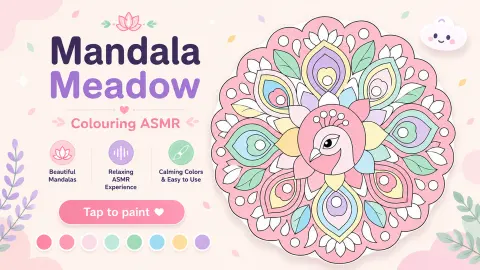
What every mandala shares is radial symmetry. The shapes repeat around the centre in matched sets, and that changes what a color choice is. First Bloom has one circle in the middle, six pointed petals around it and six round dots outside them. Choose a shade for one petal and you have really chosen it for six, because the drawing will not look right until its five partners agree.
Mandala Meadow makes you spend that choice by hand. It does not mirror a fill around the circle for you, so one decision becomes six clicks, and the pattern arrives slowly while your hands stay busy with something that cannot be done wrong. That bounded, repetitive, failure-free shape of task is exactly why mandala coloring sheets turn up in classrooms and waiting rooms as a focus exercise. We are not going to promise you it mends a bad week. What we can tell you is what the game asks of you, which is nothing: no timer, no target, no way to lose.
It ends the opposite way to the sand, too. Where the monks give their picture to a river, this one offers a Save Image button.
Is Mandala Meadow for you?
It is if you want something with no failure state. There is no clock, no lives, no score beyond the count of sections and no wrong color, and the first designs are simple enough for a small child once someone has clicked the bucket for them.
It is not for anyone who wants a challenge. Nothing we played asked for a decision harder than which color comes next, and the tool mix-up is the only obstacle in it.
More coloring games
If you would rather the game chose the colors for you, Coloring by Numbers. Pixel Room, Pixel Art - Color by Numbers and Color by Numbers. Anti-stress Drawings. all work that way. Ancient Aztec Coloring is free coloring on patterned pictures, and Drawing Christmas For Kids aims younger. The rest are under kids games.
Screenshots

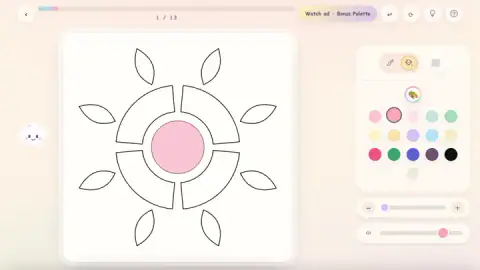

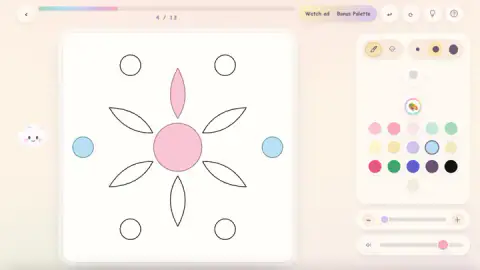
Taken by opening the game ourselves and letting it run — not supplied by the publisher, and not the same picture every other site shows.
How to play Mandala Meadow
- Pick a card on the "Choose a Mandala" screen. Each card carries the outline, a name and the number of sections in it. Petal Pond has eleven; Dewdrop Ring and First Bloom, the two beside it, have thirteen each, and more cards sit below the edge of the screen.
- Click the bucket icon before anything else. Two small tools sit at the top of the panel on the right, a brush and a paint bucket, and the brush is the one selected when a canvas opens.
- Pick a color. Sixteen round swatches sit in three rows under a circular palette button: pale pinks, mints, yellows and a lilac first, then a strong red, a green, a blue, a dark purple and a black.
- Click inside a shape. With the bucket, the whole section floods at once and the counter goes up by one.
- Keep going until the counter reads the total. A card then names the mandala as all painted in, drops confetti and offers Next Mandala and Save Image.
What our sessions taught us:
- The white around the shapes is not a section. Clicks there did nothing for us. Aim for the belly of a petal, not its tip.
- Repainting costs nothing and gains nothing. Click a filled section with another color and it changes, and the counter stays where it was.
- Trust the counter over your eyes. The cream swatch on a white canvas is almost invisible, and we have hunted for a bare section with the number insisting one was left.
- Check the tool every time a canvas opens. It was the brush again on the new design this week, right after we had finished another one with the bucket.
- You can stop in the middle. Go back to the gallery and the card holds your count.
Controls
| Click a mandala card | Opens that design on the canvas, with whatever you had already painted in it |
|---|---|
| Bucket icon (top of the right-hand panel) | Switches to fill mode; after that, one click inside a section paints all of it |
| Brush icon (next to the bucket) | The tool selected when a mandala opens; the game's own instructions say you click and drag to paint with it, which we did not try |
| Click a color swatch | Picks the color for the next section |
| Click a painted section again | Repaints it in the current color, without moving the counter |
| Back arrow (top left) | Returns to the gallery; the card keeps your progress and your colors |
Features
- Free coloring with no right answer; any swatch counts on any section
- A paint bucket that fills a whole section with one click, and a brush with three widths
- A counter and a progress bar that show how many sections hold paint
- A gallery that remembers half-painted designs and shows each one's count on its card
- Small designs to begin with; the first three have 11, 13 and 13 sections
- A cloud at the edge of the canvas that reacts to fills with lines such as "Bucket magic!"
- A Save Image button on the finished mandala, and a Bonus Palette button that asks for an ad
- Made by Varya Games
Game details
- Developer
- Varya Games
- Release date
- June 2026
- Last updated
- August 8, 2026
- Added here
- May 2026
- Technology
- HTML5 (2D)
- Platforms
- Browser (desktop, mouse), Browser (mobile & tablet, touch)
- Saved progress
- Saving, when available, is managed by this game. Mava cannot confirm your level.
FAQ
How do you play Mandala Meadow?
Choose a mandala from the gallery, click the bucket icon at the top of the right-hand panel, pick a color and click inside a section to fill it. A counter above the canvas shows how many sections are painted. When it reaches the total, the mandala is finished and the game offers the next one.
Why is nothing getting painted when I click in Mandala Meadow?
Most likely the brush is selected. It is the tool the game chooses when a canvas opens, and in our sessions single clicks with it left the counter where it was. Click the bucket icon beside the brush and one click then floods a whole section.
Does Mandala Meadow save your progress?
Within a sitting, yes. Go back to the gallery and each card keeps its name, its number of sections and a badge reading in progress with your count, and the thumbnail shows the colors you chose. We reloaded the game mid-session and found two designs exactly as we had left them, at 8 of 11 and 2 of 13.
Do you have to use specific colors in Mandala Meadow?
No. It is not color by number. We filled one mandala in yellow, lilac, pink and cream with no plan and the game accepted it as complete. Every section only needs to hold some color.
Can you change the color of a section you already painted in Mandala Meadow?
Yes. With the bucket selected, clicking a painted section again repaints it in the current color. The counter does not go up when you do that, because it counts painted sections and not clicks.
What is the Bonus Palette button in Mandala Meadow?
A button in the top bar reading Watch ad · Bonus Palette. By its name it trades a video for extra colors. We never pressed it, and the sixteen swatches on the panel were enough to finish a mandala.
How many mandalas does Mandala Meadow have?
The game's own description speaks of dozens. We cannot confirm a number: the gallery showed three cards in its first row, named Petal Pond, Dewdrop Ring and First Bloom, with a second row cut off below.
Who made Mandala Meadow, and can you play it on a phone?
It is credited to Varya Games and lists it for PC, Android and iOS. The game's own instructions describe tapping and pinching, but we played it on a desktop with a mouse and did not test a phone.