









About Dream Room
Most room-decorating games hand you a full catalogue and a blank floor and let you fill it. The Dream Room game hands you a blank floor and 300 coins, and almost everything in the catalogue wears a padlock. Decorating here is shopping first, and the shopping is where the decisions are.
The room is drawn from the side, like a stage: a pink wall, a strip of wooden floor, and nothing else. You fill it from a strip of tabs along the bottom (Walls, Floors, Windows, Beds, Kid Beds, Stands, Wardrobes, Sofas and more), and each tab opens a row of items with prices on them. There is no score, no timer and no way to lose. What moves you forward is coins, and the rooms they unlock.
The game is credited to Flagwin Studio and has been available since March 2026. We spent our session in the Bedroom with a mouse, buying, placing and saving, and the notes below say which parts we did not reach.
What kind of game Dream Room is
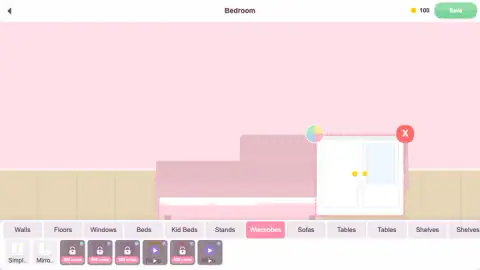
It is a decorating sandbox with a slow economy wrapped around it. When you take an item it appears inside a dashed pink box with a red X at one corner and a small circle split into four colours at the other. That circle looks like the colour picker the listing describes, though we did not try it.
The money is the real game. You start with 300 coins, and in the tabs we opened prices ran from 80 to 500. Even the cheapest window costs more than a quarter of what you begin with.
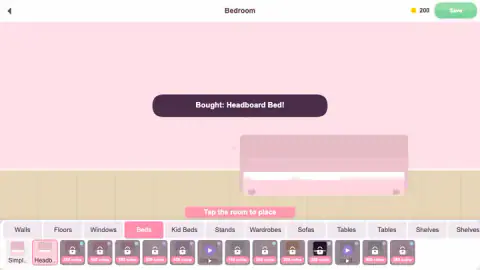
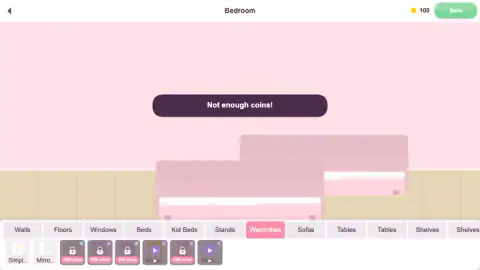
In our session the 100-coin Headboard Bed and a 150-coin mirrored wardrobe used up most of the starting balance, and the next wardrobe we tried, at 300 coins, got a flat "Not enough coins!".
That makes every purchase a trade. A grand bed means a bare window for a while. Players who like planning a budget will enjoy that; players who want to fill a room at once will find the padlocks in the way.
Six rooms, and what opens them
The Choose a room screen shows six cards. Two are pink and open; four are grey, each with a padlock, a coin price and a level:
| Room | To unlock |
|---|---|
| Bedroom | open |
| Living Room | open |
| Kids Room | 200 coins, level 2 |
| Kitchen | 300 coins, level 3 |
| Balcony | 400 coins, level 3 |
| Cafe | 500 coins, level 4 |
The level sits on the main menu, next to the coin counter, with a bar under it. We were level 1 for the whole session, so we cannot tell you what fills that bar. The menu's other two buttons, Challenges and Shop, are the likely places, and we did not open either.
One useful thing we did see: when the game reloaded mid-session, the Bedroom came back with both beds where we had left them and our 100 coins intact. A saved room survived that reload, at least in our session.
The oldest version of this game is in a museum
A room seen with its front wall missing, furnished one piece at a time, is a dollhouse, and the most famous one is in Amsterdam. Petronella Oortman, a wealthy widow, had hers built and filled between 1686 and 1710. It has nine rooms, and it now stands in the Rijksmuseum.
Her daughter later claimed it had cost about 30,000 guilders, enough at the time to buy a house on one of the city's canals. And it was not bought in one go: she kept filling it for close to a quarter of a century.
Dream Room keeps both halves of that idea. The view is the dollhouse view, flat and front-on, so you arrange things the way a child arranges a doll's bedroom. And the furnishing is paced by what you can afford, so the room grows a piece at a time, as Oortman's did.
Ads, and what we could not try
Several items carry a purple play symbol instead of a price. Tapping one showed "Watch ad to unlock", and in our session the game followed it with "Oops! No ads available right now" and a Continue playing button. So those items stayed locked for us, and we cannot say how often an ad does appear.
We also did not open the Walls or Floors tabs, the Living Room or the Shop, and we never changed an item's colour. The listing talks about wallpapers, floors, windows with views and a catalogue of more than 250 items. We saw part of that catalogue, not all of it.
Who it is for
Dream Room suits players who enjoy arranging things and are happy to build a room slowly. There is almost nothing to read beyond item names and short banners, and nothing can go wrong apart from spending coins.
Parents of young players should know that a single tap spends coins with no confirmation, and that early coins are scarce. One wrong tap on a 100-coin bed is a third of the starting balance.
More decorating games
If you want a full house rather than one room at a time, Dream Home lets you raise walls and floors in 3D before you furnish them. Home Design: Decorate House earns its makeovers through match-3 puzzles, and Home Decor Clicker pays for decorations by tapping. For more, browse our girls games.
Screenshots
Taken by opening the game ourselves and letting it run — not supplied by the publisher, and not the same picture every other site shows.
How to play Dream Room
- From the main menu press Rooms and pick an open room. Bedroom and Living Room are open from the start.
- Choose a tab at the bottom. The first item in each one, called Simple, is free.
- Tap an item. A free one is yours; a priced one is bought on the spot, and a dark banner confirms it.
- Tap the room to place it, following the pink hint, "Tap the room to place".
- Press the green Save at the top right when you like what you see.
What our session taught us:
- There is no "are you sure". Tapping the Headboard Bed took the counter from 300 to 200 in one go. Look at the price label before you touch anything.
- Use the free items first. Every tab we opened started with a free Simple version. A room furnished with those costs nothing, and you can save it like any other.
- Save early. Our first save paid 50 coins. A second save later on left the counter where it was, so do not count on saving as a coin machine.
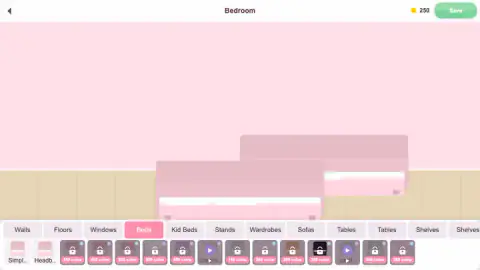
- Pieces do not snap. Our second bed landed half on top of the first, and the wardrobe overlapped the bed. Nothing stops two items sharing the same spot, so place with care.
- Watch the play symbol. A purple play button on an item means it unlocks with an ad rather than coins.
Controls
| Tap or click a category tab | Shows that category's items in the strip at the bottom (Walls, Floors, Windows, Beds, Wardrobes and more) |
|---|---|
| Tap or click an item | Takes it if it is free, or buys it straight away if you have the coins |
| Tap or click the room | Places the item you just took or bought |
| Red X (next to a selected item) | Appears at the corner of the dashed box around the item you are handling; we did not confirm what it does |
| Save (top right) | Saves the room; our first save paid 50 coins |
| Back arrow (top left) | Leaves the room |
Features
- Six rooms on the Choose a room screen, two open from the start and four locked behind coins and a level
- A side-on view of each room, one wall and one floor, like a dollhouse with the front taken off
- One free item, called Simple, at the start of every category we opened
- Prices from 80 to 500 coins in the tabs we opened, paid the moment you tap an item
- A 50-coin reward on our first save, the only income we found
- Some items unlocked by watching an ad instead of paying coins
- Furniture that can overlap freely, with no grid and no snapping
- Available since March 2026
Game details
- Developer
- Flagwin Studio
- Release date
- March 2026
- Last updated
- August 10, 2026
- Added here
- January 2026
- Technology
- HTML5
- Platforms
- Browser (desktop, mouse), Browser (mobile & tablet, touch)
- Classification
- Casual , Fashion & Beauty
- Saved progress
- Saving, when available, is managed by this game. Mava cannot confirm your level.
FAQ
What is the Dream Room game?
Dream Room is a browser decorating game by Flagwin Studio. You pick a room, buy furniture and decor with coins, tap each piece into place and save the result. There is no score, timer or way to lose; the progress is the coins you earn and the rooms you unlock with them.
How do you get coins in Dream Room?
You start with 300. In our session the Save button paid 50 coins the first time we used it, and a later save added nothing. The menu also has Challenges, which the listing says give rewards, but we did not open them.
How do you unlock rooms in Dream Room?
Bedroom and Living Room are open from the start. Kids Room needs 200 coins and level 2, Kitchen 300 and level 3, Balcony 400 and level 3, and Cafe 500 and level 4. Both conditions are shown on the room card under a padlock.
Why does Dream Room say "Not enough coins"?
Tapping a priced item buys it at once, so the game checks your balance right then. We saw the message with 100 coins left while trying a 300-coin wardrobe. Every category also has a free Simple item you can use while you save up.
Is Dream Room free to play?
Yes, it runs free in the browser. Coins are earned in the game, and a few items carry a play symbol that means they unlock by watching an ad. When we tried one, no ad was available, the game said so and offered a Continue playing button.
Is Dream Room good for kids?
It is a calm game with nothing to fail and very little to read, and it is filed under Decoration and For Girls. The catch for young players is that a tap spends coins with no confirmation, and early coins are scarce, so one wrong tap can use up a third of the starting balance.
Who made Dream Room?
The game is credited to Flagwin Studio. The game has been available since March 2026 and was last updated in August 2026. It is listed for PC, Android and iOS, in landscape.