








About Color the Room
Most colouring games hand you a flat picture and a box of crayons. Color the Room hands you a whole building. The Witch's Hut arrives as a white 3D model, walls, floor, beams, a broom, a round rug, a box and shelves of little bottles, and every one of those pieces is waiting for paint. You are not filling in lines. You are deciding what the room is made of.
That last part is what turns it from a picture into a small game. Besides plain colour, the paint bucket can lay down brick, wood or tiles, and the score in the top bar climbs as more of the hut comes to life. There is no clock and nothing to lose, so the only pressure is the white you have not covered yet.
It is made by Enrik. Color the Room was published in August 2026.
What makes the score go up
The counter already read 50 when we first saw the hut, before a single drop of paint, so that is the starting line rather than a reward. After that it rose in even steps of 25, and a small +25 floated up beside the panel each time.
Not every click counts. Several times in a row we clicked shelves and the number did not move, and it also stood still while we opened My Looks. Each step came when something in the room changed from white to colour. The game's own description puts it the same way: points for every newly coloured object, and a bonus for a finished room.
That changes how you should paint. Repainting the floor five times to find the right red is free, but it is not progress. The way up is to hunt down every white piece, the rug, the box, each shelf and beam, and give it colour once. In ten minutes we went from 50 to 425 and still had white shelves left, so a full hut is worth a good deal more.
The paint bucket, in three dimensions
The fill tool, the tipping paint pot, is older than most of the people who use it. It was one of the tools in MacPaint, the drawing program that came with the first Apple Macintosh in 1984. On a flat picture it pours colour into a region and lets it spread until it meets a line. That is why a gap in an outline can flood your whole page.
Color the Room keeps the idea and removes the risk. Here there are no outlines to leak through: the edges are the edges of real objects. One click with Fill paints the floor and stops at the walls. Another paints the back wall and stops at the floor. The rug is its own piece, so it can be wood while the floor around it stays red.
Textures make the bucket more interesting still. Brick, Wood and Tiles are not fixed pictures; they are patterns drawn in your current colour. With a bright red picked, the Brick swatch showed red bricks. With a dark brown, the same swatch turned brown and the rug became dark boards. So the texture row is really a second choice on top of the colour, and the two together are what make a room look built rather than coloured in.
My Looks: ten slots, and why they matter
The Looks button opens a panel called My Looks with a grid of ten empty slots and a counter reading 0 / 10. It is the game's sketchbook. A room can be red brick one day and pale tiles the next, and the slots let you keep a version you like before you start over.
Ours stayed empty. We spent the session painting rather than saving, so we cannot tell you how a look gets into a slot or whether a saved one can be loaded back into the room.
What we played, and what we did not
We played one session of about ten minutes on a computer, all of it in the Witch's Hut. We painted the floor red, then wood, laid brick on the back wall and wood on the rug, and used Brush, Fill, colour and textures throughout.
We did not finish the room, so we never saw the full-room bonus or any end screen. We did not press Reset or Settings, and never went back to the menu. The game's description lists other rooms, a castle, a space station, an underwater scene, a garden and a graffiti loft, but we only saw the hut. One texture swatch sat past the edge of the panel and we did not scroll to it. The instructions also mention turning and zooming the camera with the mouse, and a two-finger version on phones; we tried neither.
Who it is for
It suits anyone who likes colouring but wants something to show for it: younger players can understand it after one click, and adults get the slow pleasure of choosing materials. If you want a goal with a deadline, or a way to win against someone, this is the wrong game.
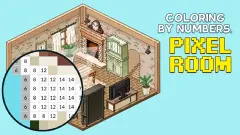
Enrik's other games are a different kind of thing, from the jumping platforms of Sky Islands Obby to the animals of Sunny Farm: Animal Simulator. For a room built from colouring, try Coloring by Numbers. Pixel Room, and in Hidden Paint 3D a grey 3D model takes colour piece by piece as you find things in it. There are more calm games in our casual games.
Screenshots
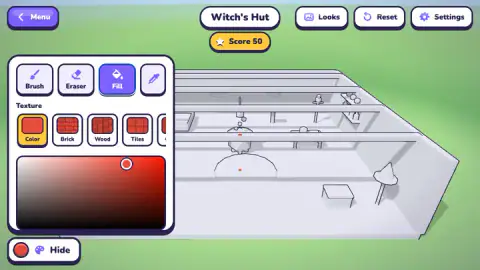
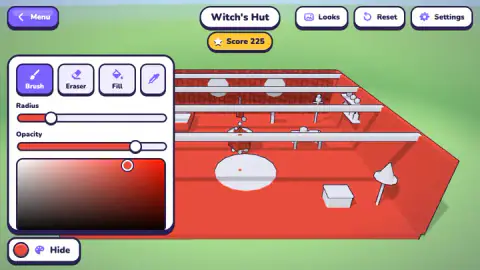
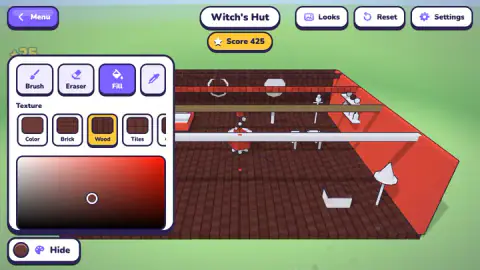
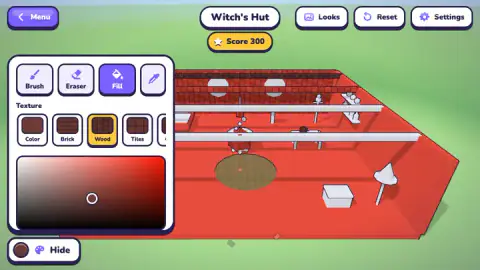
Taken by opening the game ourselves and letting it run — not supplied by the publisher, and not the same picture every other site shows.
How to play Color the Room
- Open the Palette. The round button in the bottom-left corner opens the tool panel. While it is open, the same button reads Hide.
- Choose a tool. Brush paints where you click or drag, Eraser takes paint off, Fill covers a whole surface at once, and the dropper picks up a colour already in the room.
- Pick a colour, and with Fill, a texture. Slide the marker around the colour square. With Fill selected, a row of swatches appears: Color, Brick, Wood, Tiles and more.
- Click a surface. The floor, a wall, the rug or a box turns that colour or pattern, and the score goes up.
- Save the result. Looks opens My Looks, where up to ten designs can be kept.
Tips from our session. Start with Fill, not Brush. One click turned the whole floor red, while the brush would have taken dozens of strokes. Hide the panel now and then: open, it covers the left third of the room, including the broom and part of the shelves, and you will forget those pieces are still white. Choose the colour before the texture, because the pattern takes whatever shade is active. Leave Brush for the thin things, the beams and bottle shelves, which are easy to miss with a fill click.
Controls
| Click or tap a surface | Paints it with the current tool, colour and texture |
|---|---|
| Palette button (bottom left) | Opens the tool panel; the same button reads Hide while the panel is open and folds it away |
| Brush, Eraser, Fill | Brush paints by hand with Radius and Opacity sliders, Eraser takes paint off, Fill covers a whole surface in one click |
| Eyedropper (fourth tool) | Picks up a colour from the room |
| Looks, Reset, Settings (top right) | Looks opens your ten saved-look slots; we did not press Reset or Settings |
Features
- One room at a time in full 3D: the Witch's Hut starts completely white, from the floor to the bottles on the shelves
- Three ways to paint: a brush with adjustable size and opacity, an eraser, and a fill that covers a whole surface at once
- Fill can lay down flat colour or a pattern, Brick, Wood or Tiles among them, and every pattern is tinted with the colour you picked
- A score that climbs 25 points at a time as new parts of the room take colour
- My Looks keeps up to ten finished versions of a room
- No timer, no lives and no way to lose: the room waits for you
Game details
- Developer
- Enrik
- Release date
- August 2026
- Last updated
- October 25, 2026
- Added here
- August 2026
- Technology
- HTML5 (WebGL 3D)
- Platforms
- Browser (desktop, mouse), Browser (mobile & tablet, touch)
- Saved progress
- Saving, when available, is managed by this game. Mava cannot confirm your level.
FAQ
How do you play Color the Room?
You get a 3D room with everything in it painted white. Open the Palette, choose Brush, Eraser or Fill, pick a colour and click a surface to paint it. Fill covers a whole wall, floor or object in one click, and can also lay down patterns such as brick, wood or tiles.
How does the score work in Color the Room?
The score goes up in steps of 25, with a small +25 popping up each time. In our session the steps came when a part of the room took paint for the first time; clicking the same spot again, or opening menus, left it where it was. It went from 50 to 425 in about ten minutes.
Can you lose in Color the Room?
No. There is no timer, no lives and no wrong colour, so nothing ends your game. The only goal is to bring the whole room into colour, and the game's own description promises a bonus for a fully coloured room.
What is the difference between Brush and Fill in Color the Room?
Brush paints where you click or drag, with sliders for its size and opacity, which is good for small details. Fill paints a whole surface in one click and is the only tool that shows the texture row. Use Fill for floors and walls, and Brush for the small things.
What textures does Color the Room have?
The Fill tool offers Color, Brick, Wood and Tiles, plus at least one more swatch hidden past the edge of the panel. Each texture is drawn in the colour you have picked, so the same brick pattern can be red, brown or any other shade.
What are Looks in Color the Room?
Looks opens a panel called My Looks with ten slots for saved versions of a room. Ours stayed at 0 of 10 because we never saved one, so we cannot say how many ways of saving there are. It is there so you can keep a finished design before trying another.
Who made Color the Room?
It is by Enrik. Color the Room was published on 26 August 2026.