







About Home Design: Decorate House
Most home makeover games make you earn the first sofa. You sit down, play a dozen puzzle levels, and only then are you allowed near the room you came for. Home Design: Decorate House does it the other way round. It opens on an empty bedroom, white brick on three sides, bare planks underfoot, and hands you the brush before it has shown you a single sweet.
That order matters, because it tells you what the puzzles are for. By the time the match-3 board appears, you have already chosen a floor, watched a bed drop into the room and repainted a wall. The board is not the game with a decorating skin on top. It is how you pay for the next job.
The game is made by Fun Games World and has been available since September 2025. We played one short session: the whole decorating tutorial, then the first level of the board. We did not finish that level, and we say below exactly where we stopped.
The bedroom you start in, and what changes in it
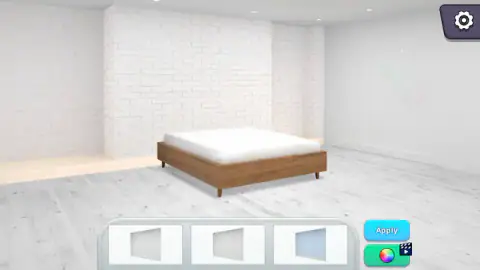
The tutorial room is plain on purpose. Everything is white or grey, so every choice you make shows. There were three decorating jobs in it before the board appeared, all free, with nothing hidden behind a level.
| Job | What we saw |
|---|---|
| Floor | Three finishes: whitewashed planks, honey-coloured boards, dark red-brown strips |
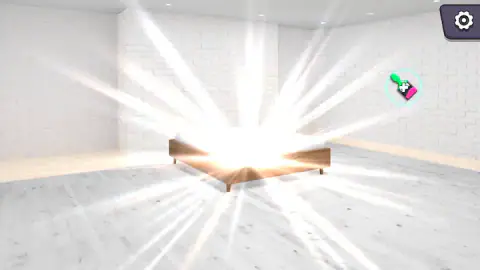
| Bed | The one we applied, a low wooden frame with a white mattress, arrived in a flash of light |
| Walls | Three finishes: plain white, a speckled grey texture, a pale blue |
The wall job is a good example of how much one tap changes. Before it, the right-hand wall was the same white brick as the rest. After it, that wall was smooth and flat, and the room suddenly looked like two rooms joined together. Next to Apply there is always a green button with a colour wheel on it. It carries a small clapperboard badge, which normally means a video ad plays before it opens. We stayed with the three finishes in the tray.
How the match-3 board works on level 1
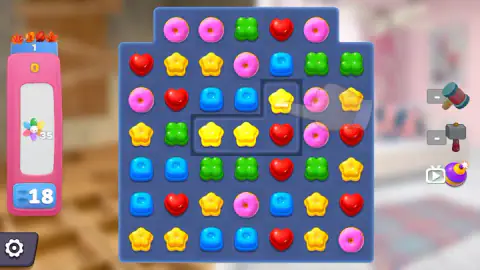
The board is seven sweets wide and seven tall, with the two top corners cut off, so the top row holds five. There are five kinds of sweet: pink donuts, red hearts, yellow flower jellies, green clovers and blue jelly cubes. Behind the board, out of focus, you can still see a room.
The pink panel on the left holds everything that matters. At the top sits the level number under a row of autumn leaves. Below it come your score, the target with its little rainbow flower, and a blue button with your moves. Level 1 starts with a target of 35 and 18 moves.
Our first match was three blue cubes. Each of them flashed a 60, the score went to 180, and the target dropped to 32.
After our second swap the score read 540 and the target 26. Those numbers line up: nine sweets cleared, nine taken off the target, 60 points each. So on this level the flower appears to count every sweet you clear, of any colour. That changes how you play. You are not hunting a particular piece, you are hunting volume, and a move that sets up a second drop is worth more than a neat match at the top of the board.
Boosters, and the part we did not reach
To the right of the board sit three boosters: a mallet, a sledgehammer and a purple bomb. On level 1 both hammers showed an empty counter, so they are not something you start with. The bomb has a little TV badge, the usual sign that it unlocks after watching an ad. We did not use any of them.
This is where our session ended. We had 16 moves left and a target of 26, which on paper was enough pace to finish, but we did not see the result screen, how many brushes it pays or what the second room is. The game's description promises a mansion with a library, a kitchen, a garden, a tennis court and a swimming pool. We saw one bedroom.
Who it suits
If you want to design a room freely, piece by piece, this is not that game. Every job is a choice of three, in the order the game sets, and the board stands between you and the next one. If you like match-3 and want each level to leave something behind, it fits well. A level is short, there is no clock, only moves, and you get to watch a room change because of it. It is also gentle enough for younger players: the tutorial teaches with a hand that shows you what to drag.
More games like this one
For the same mix of puzzle and renovation with merging instead of swapping, try Dream Home: Merge Story. If you only want the decorating part, Dream Room is decorating with no board in the way. And for match-3 sweets with nothing to furnish, Candy Pop Mania is all board. More of the same kind are in our puzzle games.
Screenshots
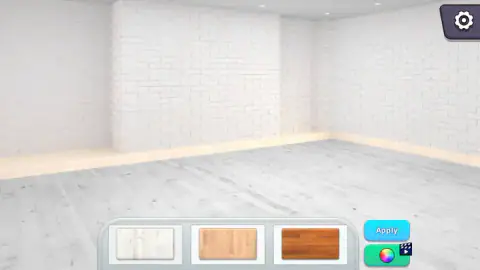
Taken by opening the game ourselves and letting it run — not supplied by the publisher, and not the same picture every other site shows.
How to play Home Design: Decorate House
- Find the glowing ring in the room. Inside it sits a faded brush outline, and nearby floats a round bubble with a pink-and-green brush in it.
- Drag the bubble onto the outline. A tray with three finishes slides up from the bottom of the screen.
- Click a finish to see it in the room, then press Apply to keep it.
- When the free jobs run out, press Play. Swap two neighbouring sweets to make a line of three or more of the same kind.
- Bring the rainbow-flower counter on the left down to zero before the move counter gets there. The game's description says each finished level pays out brushes, and brushes are what start new jobs in the house.
Tips from our run
- Drag, never tap. During the left-wall job we clicked the brush bubble over and over and nothing moved. The moment we pulled it onto the marker, the tutorial carried on.
- Previewing is free. Clicking a finish in the tray changes the room straight away, so try all three before you commit with Apply.
- On the board, the counter by the flower looks like a total of sweets, not a colour. Bigger chains bring it down faster.
- Look for swaps that clear more than three. Our second swap scored twice as much as our first, which takes either two lines at once or sweets that fall into place and clear by themselves.
- The arrow keys and Space did nothing when we tried them. Everything happens with the mouse or a finger.
Controls
| Drag the brush bubble onto a glowing marker | Starts a decorating job in the room; a plain click on the bubble did nothing for us |
|---|---|
| Click an option in the tray, then Apply | Tries a floor, bed or wall finish and then keeps it |
| Click and drag a sweet onto its neighbour | Swaps the two on the match-3 board; three or more in a line clear |
| Mallet, sledgehammer and bomb (right of the board) | Boosters; the two hammers started empty and the bomb carries a video badge. We did not use them |
| Gear button | Opens settings; top right in the room, bottom left on the board |
Features
- Two halves: a match-3 board of sweets and a bedroom you refit job by job
- The first jobs are free and taught by a hand on screen, before any board appears
- The floor and wall jobs each offer three finishes, such as whitewashed, honey or dark red-brown planks
- Level 1 gives you 18 moves and a rainbow-flower target of 35
- In our run each sweet cleared was worth 60 points
- Mouse or touch only; the arrow keys and Space did nothing for us
- Made by Fun Games World
Game details
- Developer
- Fun Games World
- Release date
- September 2025
- Added here
- July 2025
- Technology
- HTML5
- Platforms
- Browser (desktop, mouse), Browser (mobile & tablet, touch)
- Classification
- Fashion & Beauty , Puzzle
- Saved progress
- Saving, when available, is managed by this game. Mava cannot confirm your level.
FAQ
How do you play Home Design Decorate House?
The game has two parts. In the room you drag a brush onto a glowing marker, pick a finish from a tray and press Apply. On the match-3 board you swap neighbouring sweets to line up three or more of a kind before your moves run out. The game's description says that finishing levels is what earns more brushes.
Why does nothing happen when I tap the brush in Home Design Decorate House?
The brush has to be dragged, not tapped. Hold it and pull it onto the faded brush outline inside the glowing ring that the tutorial hand points at. We clicked the bubble several times in a row with no effect, and the job only started once we dragged it.
How do you win a level in Home Design Decorate House?
Bring the rainbow-flower counter on the left panel down to zero before the move counter does. On level 1 it starts at 35 with 18 moves. In our run it dropped by one for every sweet we cleared, whatever its colour, so long chains count for more than a careful single match.
What are the hammers and the bomb for in Home Design Decorate House?
They are boosters, shown to the right of the board. On level 1 the mallet and the sledgehammer both had empty counters, and the bomb carries a small TV badge, the usual sign that it is unlocked by watching an ad. We did not use any of them, so we cannot say exactly what each one breaks.
Can you change the colours in Home Design Decorate House?
Each decorating tray has a green colour-wheel button next to Apply. It carries a clapperboard badge, which usually means a video ad comes first. We kept to the three finishes in the tray and never opened it.
How many rooms are in Home Design Decorate House?
The game's description talks about a mansion with a library, a kitchen, a garden, a tennis court and a swimming pool. We only reached the first room, a bedroom with white brick walls, so we cannot confirm how many areas there are or in what order they open.
Who made Home Design Decorate House?
It is made by Fun Games World and has been available since September 2025 with an update in August 2026.
Can I play Home Design Decorate House on a phone?
It is listed for Android and iOS as well as PC, and every action is a tap or a drag, so nothing needs a keyboard. The screen is landscape, so a phone works best turned sideways. We played on a computer with a mouse and did not test touch ourselves.