










About Home Decor Clicker
Most decorating games hand you a catalogue and let you put a sofa down in the first minute. Home Decor Clicker makes you earn the sofa. The room starts as bare wooden floorboards under a curtain rail, and every piece of furniture has to be paid for in gold that you make yourself, one click at a time.
That is the whole loop, and it is a choice between two tabs. The Click Market sells ways to make gold faster: a stronger click, and helpers that keep earning while your hands are off the mouse. The Home Market sells the room itself: a small table, a rug in front of the entrance door, a sofa set and more further down the list. Every coin spent in one shop is a coin not spent in the other.
We played Home Decor Clicker on a desktop computer for about four minutes, and we should be clear about how far that got us. We went through the tutorial, bought two helpers and one click upgrade, and watched our income go from nothing to a steady trickle. We never got a single piece of furniture onto the floor. The room in our last screenshot is as empty as in our first. We describe what that empty room taught us, and we say plainly where our run ended.
The game is credited to a developer listed as Abdurrahman. It went up in February 2026 and was last updated in August.
Why every Home Robot costs 7% more than the last
Our first Home Robot cost 10 gold. The second was 10.70, and the third was priced at 11.45.
That is a rise of 7% each time, and it compounds: every new price is worked out from the one before it, not from the first. If it carries on the same way, our arithmetic says a robot reaches twice its original price by about the twelfth purchase, while what each robot earns never changes.
This is the oldest rule in clicker games. In Cookie Clicker, the browser game the French developer Julien Thiennot, known as Orteil, released in 2013, every building costs 15% more than the last one of its kind. Most clickers since have copied the idea, because it does one job well. It stops any single purchase from being the answer forever. Sooner or later the cheap helper stops being cheap, and the next one up the list becomes the better buy.
Home Decor Clicker's version is gentle by that standard. In practice, robots stay worth buying for a long time. By our sums, the Decor Assistant only gives more gold per coin spent once a robot costs over 300 gold, which, if the rise holds, is somewhere around the fiftieth robot. Until then, more robots is the faster road to the sofa.
Two shops, one purse
The Click Market opens with the per-click upgrade, drawn as a metal gauntlet set with coloured gems. Below it come the helpers, each with a level and the gold per second it adds:
| Helper | Adds per second | Price we saw |
|---|---|---|
| Home Robot | 0.5 | 10.00, rising 7% each time |
| Decor Assistant | 0.8 | 500.00 |
| Construction Master | 1 | below the edge of the panel |
The Home Market works differently. Its cards are purple, each with a pile of coins, a price and a green Buy button. The small table was the cheapest thing we saw at 10 gold, the rug by the entrance door cost 50, and the sofa set's price was cut off at the bottom of the panel. Both lists carry on below what we scrolled to.
One difference is worth noticing before you spend. Every helper card states what it earns. No furniture card does. That suggests furniture is the reward and the helpers are the engine, but we placed nothing, so we cannot confirm whether a table or a rug adds anything to your income.
What we did not see
We stayed in the first room the whole time. The pink Rooms button with a map on it, at the top left, suggests there are more, and there is a Music button just below it. We opened neither.
We did not see the room change. We do not know how furniture appears once bought, whether pieces can be moved, or what the finished room looks like. We also did not find an end to the game, a target to reach or a way to lose. In four minutes nothing on screen hurried us, and nothing told us we had failed.
We only played with a mouse on a computer. The game is also listed for phones and tablets, but we cannot say how it plays on a touch screen.
Who it is for
Home Decor Clicker suits players who like a slow, calm climb. There is no timer and nothing to dodge, and the only skill involved is deciding what to buy next. It works for younger players too, as long as someone can read the three short tutorial cards, which are in English.
If you want to start arranging furniture right away, the opening will feel slow. Our four minutes were spent almost entirely on the income side, and the room stayed bare. The decorating comes after the clicking, not instead of it.
More clicker games
Idle Hotel Empire Tycoon also has you furnish rooms one piece at a time, with a hotel's power and water bills to watch. Cozy Idle Village swaps the room for a small pixel-art village whose villagers work on their own. Click Kitty Idle is the opposite pace: a short race against the clock to click enough coins for a kitten's meal. Abdurrahman's other game in our catalogue, Underground Heroes, is a strategy game rather than a clicker. For more games built on the click, browse the clicker games.
Screenshots
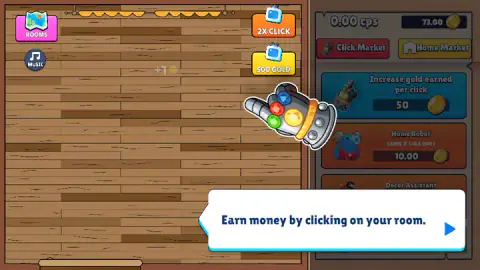
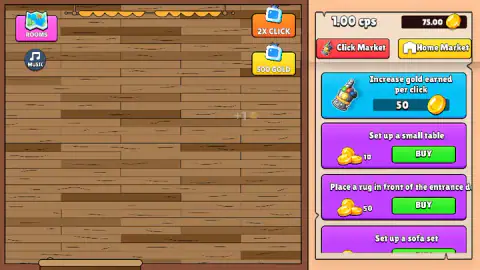
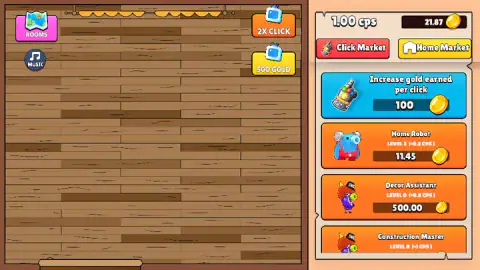
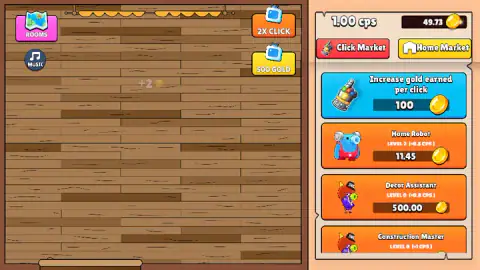
Taken by opening the game ourselves and letting it run — not supplied by the publisher, and not the same picture every other site shows.
How to play Home Decor Clicker
- Click the blue arrow on each tutorial card. There are three: one for clicking the room, one for the Click Market, one for the Home Market.
- Click anywhere on the wooden floor. Each click adds gold, shown as a small floating coin with the amount next to it.
- Open the Click Market, the red tab at the top right, and buy a Home Robot as soon as you can afford one. It earns gold every second without you.
- Buy Increase gold earned per click once a couple of robots are working, then switch to the yellow Home Market tab and start on the furniture.
- Watch the two numbers at the top of the shop: your gold on the right, and your gold per second, shown as cps, on the left.
Tips from our session
- The first robot is the best deal in the shop. It cost us 10 gold and adds half a coin every second, so it pays for itself in about 20 seconds.
- The click upgrade doubles your click, then doubles its price. Ours cost 50 gold and doubled what each click earns. The next level was priced at 100.
- The Decor Assistant is a long-term buy. At 500 gold for 0.8 a second, it needs more than ten minutes to earn its price back. Robots first.
- Gold arrives in fractions. With helpers running, the counter shows two decimal places and moves on its own between clicks, so a price that looks out of reach can be a few seconds away.
Controls
| Click on the wooden floor | Earns gold, shown as a small floating coin with the amount |
|---|---|
| Click Market (red tab) | Opens the shop for the per-click upgrade and the helpers that earn gold every second |
| Home Market (yellow tab) | Opens the furniture shop, with a Buy button on each item |
| Blue arrow on a tutorial card | Moves the tutorial on to its next card |
Features
- An empty room of wooden floorboards that you fill with furniture paid for by your own clicking
- Two shops side by side, the Click Market for income and the Home Market for furniture
- Helpers that earn on their own: the Home Robot, the Decor Assistant and the Construction Master
- A per-click upgrade that doubled our click from one coin to two, then doubled in price
- Helper prices that rise by 7% with every purchase, as we measured on the Home Robot
- Furniture such as a small table, a rug in front of the entrance door and a sofa set
- Rooms and Music buttons at the top left of the room
Game details
- Developer
- Abdurrahman
- Release date
- February 2026
- Last updated
- August 10, 2026
- Added here
- December 2025
- Technology
- HTML5 (2D)
- Platforms
- Browser (desktop)
- Classification
- Casual , Clicker , Simulation
- Saved progress
- Saving, when available, is managed by this game. Mava cannot confirm your level.
FAQ
How do you play Home Decor Clicker?
You click the empty wooden floor of a room to earn gold, then spend it in two shops. The Click Market sells a bigger click and helpers that earn gold every second without you, and the Home Market sells furniture for the room. Three short tutorial cards explain this at the start.
What should you buy first in Home Decor Clicker?
The Home Robot. Our first one cost 10 gold and adds half a coin of gold every second, so it pays for itself in about 20 seconds. The per-click upgrade is the next best buy; ours cost 50 gold and doubled what each click earns.
How much does the Home Robot cost in Home Decor Clicker?
Our first Home Robot cost 10.00 gold, the second 10.70 and the third 11.45. That is a rise of 7% each time, worked out from the previous price. If the rise holds, a robot costs twice the original price by about the twelfth purchase.
Does furniture earn gold in Home Decor Clicker?
We could not confirm it. The helpers in the Click Market show how much gold per second they add, but the furniture cards in the Home Market show only a price and a Buy button. We did not place any furniture in our session, so we cannot say what it does beyond decorating the room.
How many rooms are there in Home Decor Clicker?
There is a pink Rooms button with a map icon at the top left of the screen, which suggests more than one. We did not open it and stayed in the first room, so we cannot give a number.
Can you play Home Decor Clicker on a phone?
It is listed for phone and tablet browsers as well as Android and iOS. We only played it on a desktop computer with a mouse, where everything is done by clicking, so we cannot confirm how it handles a touch screen.
Who made Home Decor Clicker?
The game is credited to a developer listed as Abdurrahman. Home Decor Clicker was listed in February 2026 and last updated in August 2026.