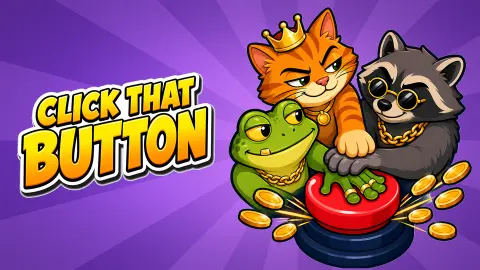










About Click That Button
The first ten dollars in Click That Button cost ten clicks, and the game counts them for you. A white label over the red button reads «TAP THE BUTTON!» with a number beside it, and the number drops by one with every tap. When it runs out you have exactly enough for the first upgrade, and the label moves over to the price you are supposed to press.
That is the whole game in small. You tap, the tap pays, and what you earn goes straight back into making the next tap pay more. There is no way to lose and nothing to dodge. The only question the game ever asks is what to buy next, and for the first few minutes it answers that for you as well.
The game is credited to Yilmaz Kiymaz. It was published in September 2026.
Our session was short, and that limits this page. We played for about four minutes on a desktop computer, with the mouse. We went from level 1 to level 2, bought one upgrade and hired one hand, and stopped with $23. The developer lists a good deal more than that, and further down we say which parts we saw and which we are only passing on.
What one upgrade bought us: twenty cents a tap
The first Income level turned a $1 tap into a $1.2 tap. We know because the next three taps took the total from $0 to $3.6. That is a fifth more per click, for ten clicks' worth of cash.
The second level is where the game shows its hand. It asked $39 for the next step, which at $1.2 a tap is 33 clicks. So the price nearly quadrupled while the first gain was twenty cents. Tapping alone gets slow very quickly, and that is on purpose: the game wants you to stop relying on your own finger.
A hired hand is worth half a tap every second
Level 2 arrived a few taps after that first upgrade, and with it a row called Hire a Hand. The first hand cost $11. The moment we bought it, the small figure under the cash total changed from 0 to 0.6 a second, and a cartoon hand appeared at the foot of the button, tapping away with coins flying off it.
Put that next to the price of our own tap. At $1.2 a click, one hand earns what you would by clicking once every two seconds, and it does not stop when you do. That is our own sum, not a figure the game displays. The second hand was priced at $26, and the row read 1/22, so there is room for many more.
For comparison, the second Income level cost $39 and would have added, at best, a similar twenty cents to each click we made ourselves. On those numbers the hand looked like the better buy, and it is the one the hints steered us to first.
The second button costs 2K, and we stopped at $23
When our session began, the button in view was not the red one. It was dark, with a star on top, a padlock on its base, a red «2 K» across it and a greyed-out UNLOCK underneath. With that button in view the Income row was priced at 225, not 10. Our reading is that every button has its own upgrades and its own prices, and that the game was showing us where the money is meant to go.
We never got near it. Nor did we reach level 3, which the bar announces as «COMBO CHAINS!». The developer lists eleven buttons to collect, six tiers of hands that merge in threes, golden buttons that drift across the screen, guardians to beat by tapping fast, and hands that go on earning while the game is closed. We saw none of that working in four minutes, so take it as the developer's list and not as our report.
What we can say is who the opening suits. It is a game for someone who likes watching a number grow and choosing where to put it, and who is happy for the first minutes to be led by the hand. If you want something to react to, or a way to fail, this is the wrong button.
Other clickers that start with a single tap
If the tap-and-upgrade loop is what you came for, Stickman Clicker runs on the same idea with a character to dress as the money comes in. The MachinEGG swaps the button for a chicken farm that you slowly automate, and Deep Drill goes further still: the drill runs by itself and your only job is deciding what to spend the ore on. The rest are in our clicker games category.
Screenshots
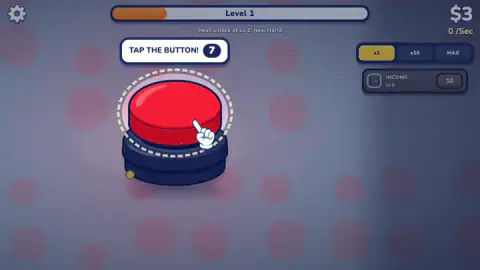
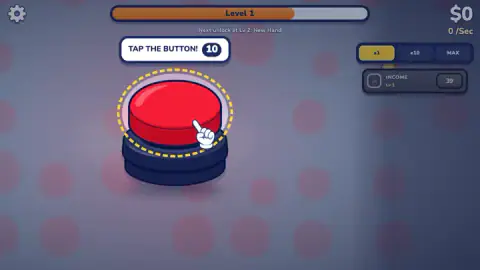
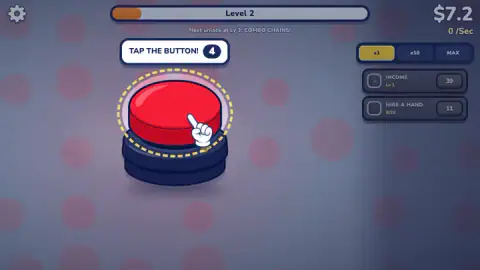
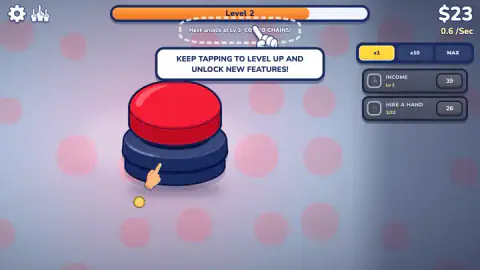
Taken by opening the game ourselves and letting it run — not supplied by the publisher, and not the same picture every other site shows.
How to play Click That Button
- Tap the red button. Each click pays at once, and the total is at the top right. At the start a tap is worth $1.
- Follow the countdown. The hint over the button counts the taps left until you can afford the next purchase.
- Buy Income. The rows sit at the right edge of the screen, each with its price at the end. Income raises what one tap pays.
- Fill the level bar. It runs across the top and fills as you tap. The line under it names what the next level unlocks.
- Hire a hand at level 2. A second row appears. A hand taps by itself, and the figure under your cash shows what your hands earn each second.
A few things we would tell a friend before the first click:
- The price on a row is the price of the next level, not of the row. Income cost $10 the first time and $39 the second. Check the number again after every purchase.
- An upgrade empties you. Our first purchase took us from $10 to $0. Nothing breaks, but the countdown starts again from ten.
- If the button is dark and padlocked, it is not yours yet. That is the next button, shown with its price. The one that pays is the red one.
- We left the x1, x10 and MAX switches alone. They sit above the rows and x1 was lit from the start. With one row priced at $39 and $23 in hand, there was nothing for a bigger setting to do.
Controls
| Left click on the big button | One tap, one payment into the cash total at the top right |
|---|---|
| Left click on the price at the end of an upgrade row (right side) | Buys that upgrade if you have the cash; the price is taken at once |
| Click x1, x10 or MAX (above the upgrade rows) | Three switches for the upgrade rows; we left it on x1 |
| Spacebar | Listed by the developer as a second way to tap; we played with the mouse |
Features
- One button in the middle of the screen and a cash total in the corner: every tap is paid at once
- An Income upgrade that raised our tap from $1 to $1.2 for $10, and then asked $39 for the next step
- A level bar filled by tapping, with the next unlock named under it before you reach it
- Hired hands from level 2: the first cost $11, paid $0.6 a second and showed 22 places to fill
- A second, darker button in view from the start, padlocked behind a 2K price
- On-screen hints that count your taps down and point at the next thing to buy
- Made by Yilmaz Kiymaz
Game details
- Developer
- Yilmaz Kiymaz
- Release date
- September 2026
- Last updated
- September 18, 2026
- Added here
- September 2026
- Technology
- HTML5
- Platforms
- Browser (desktop, mouse), Browser (mobile & tablet, touch)
- Saved progress
- Saving, when available, is managed by this game. Mava cannot confirm your level.
FAQ
How do you play Click That Button?
Click the big red button to earn cash, which is counted at the top right. Spend it on the rows at the right edge: Income makes each tap pay more, and from level 2 Hire a Hand adds a hand that taps by itself. Tapping also fills the level bar at the top, and each new level unlocks a feature.
How much does the first upgrade cost in Click That Button?
On the red button the first Income upgrade cost us $10, which is ten taps at $1 each. It raised a tap to $1.2. The next Income level was priced at $39, so the second step costs almost four times as much for the same kind of gain.
What do the hands do in Click That Button?
A hired hand taps the button for you. The row appears at level 2. Our first hand cost $11 and the counter at the top right changed from 0 to 0.6 a second, which is half of one of our taps at that point. The second hand was priced at $26, and the row showed 1 of 22.
What is the dark button with a padlock in Click That Button?
It is a button you do not own yet. In our session the game showed it first: dark, with a star on top, a padlock, a red 2K and a greyed-out UNLOCK underneath. We ended our session with $23, a long way short of that price, so we cannot say what it pays.
What unlocks at level 3 in Click That Button?
The line under the level bar reads «Next unlock at Lv 3: COMBO CHAINS!». We stopped on level 2 and did not see them working. The developer describes them as a meter that fast tapping fills for critical hits.
How many buttons are there in Click That Button?
The developer lists eleven collectable buttons. We saw two: the red one we tapped and a dark one locked behind a 2K price. We cannot confirm the other nine from our own session.
Does Click That Button keep earning while it is closed?
The developer says hired hands keep earning while the game is closed. We did not test it: we played one sitting of about four minutes and did not come back to check the total.
Who made Click That Button?
It is credited to Yilmaz Kiymaz. It was published in September 2026. It is listed for PC, Android and iOS; we played it on a desktop computer with the mouse.