










About Arrows Idle
The word idle promises a game that earns while you look away. In our ten minutes, Arrows Idle did nothing of the kind. Its arrows sat on their dots until we clicked them, and the coin counter stood still whenever we stopped. What it does have is a surprisingly lopsided economy: a click pays one coin, and a single button on the left pays over a hundred.
The screen is almost bare. A 3x3 grid of grey dots on white, one black arrow, two skill buttons on the left and a panel of upgrades on the right. The title card promises something louder, with a blue round character, coloured cubes and bombs, and the game's listing talks of merging and chain reactions. We saw none of that in four levels, and it may simply lie further on.
Here is how far we got. Everything below comes from one ten-minute session on a computer with a mouse, with one reload about halfway through. We reached Level 4 and bought three upgrades, and we spent too long trying to close a panel that does not close.
The game is credited to Crazyhead Games. It was published on 5 April 2026 and last updated in late October.
The panel never closes, and it is not in your way
This is the mistake that cost us the most time, so it comes first. Four big buttons under the word UPGRADES look like a shop you have wandered into, and every instinct says to find the X and get back to the game. There is no X. The panel is half the game's screen, permanently, and the grid beside it keeps working.
We tried arrow keys, Enter and clicks around the edges. Nothing changed, because nothing was wrong. If you think you are stuck, you are not. Click an arrow.
One button out-earns every click you will make
The maths is what makes this more than a button to press. Our first arrows paid one coin each, and after a couple of minutes of clicking we had five. Then we pressed Arrow Rain, and the counter went to 130.
That one press was worth 125 arrows. The second paid about the same. So until you have upgraded your income, clicking is what you do between rains, and it never makes sense to leave the button sitting lit.
Golden Arrow is the smaller cousin. It turned a black arrow gold, and clicking that arrow took us from 2 coins to 22. That is twenty clicks' worth, for two clicks and a little attention.
Experience follows the coins. Each coin earned added one point to the bar, whether or not we had already spent it. Level 1 asks for 500 points, and the bar on Level 4 asks for 1.7k.
Claim the daily reward early: Day 1 beat everything else we earned
The calendar at the top right wears a red dot from the first second, and we never clicked it. We read that dot as the reward waiting for us. When we reloaded with 22 coins, a card titled DAILY REWARD came up by itself, showing a streak of zero days and these amounts:
| Day | Coins |
|---|---|
| 1 | 2k |
| 2 | 5k |
| 3 | 10k |
| 4 | 20k |
| 5 | 35k |
| 6 | 50k |
| 7 | 100k |
One click on CLAIM was worth more than our first five minutes put together. Because those coins count as experience too, we went straight from Level 1 to Level 4.
A green LEVEL UP +200 message showed behind the next screen, and our coins landed at 2.9k, about 900 more than the reward itself. We take that difference to be level-up bonuses.
So the seventh day pays 100k, fifty times what the first one does. We played on one day only, so we cannot tell you whether missing a day resets the streak.
The same reload showed us something else useful. Coins, level and upgrades were all still there, so closing the page does not cost you a run.
Where the coins go: the four upgrades
| Upgrade | Starting price | What we saw |
|---|---|---|
| Add Arrow | 35 | One more arrow on the grid per level; 43 for the next, then 54 |
| Increase Income | 150 | Not bought |
| Add Grid | 1k | Not bought; the grid stayed 3x3 |
| Increase Speed | 300 | Bought at the very end; the next level costs 525 |
Price rises are gentle on Add Arrow and steep on Increase Speed. A scroll bar beside the panel suggests there may be more below these four. We did not scroll down to find out.
Two purchases emptied our coins, and we cannot say why
Something odd happened on Level 1. With 132 coins we bought Add Arrow at 35, and the counter read 0, with none of the change we expected.
The next purchase looked the same. Arrow Rain had just added about 131 points of experience, we bought Add Arrow at 43, and the counter again read 0.
On Level 4 it behaved normally. Increase Speed took 3.1k down to 2.8k, which is just its price. We do not know whether the early wipe belongs to the tutorial or is a fault. If you are on Level 1, buy the upgrade you care about most first.
Expect an interruption about every half minute
A dark the screen covered the game about 18 times in our ten minutes. It has a purple Continue playing button, and after it a grey Click to keep playing label sits at the top of the screen for a moment. Nearly every time in our session the card read that the ad had been skipped this time, so we cannot tell you how long a real one runs. What we can say is that the breaks come often and that progress waits for you behind them.
What we did not reach
- Level 5, and anything the title card shows: merging, cubes, bombs or chain reactions.
- Increase Income and Add Grid, and the effect of the Increase Speed level we bought in our final seconds.
- The star and the gear. The star picked up a red dot after our first purchase; we did not open it.
- A second day of the reward card.
- A phone. We used a mouse.
Who it is for, and what to try next
It suits someone who enjoys watching a number jump and wants a game that is understood in a minute. There is no way to lose that we found, no clock and nothing to read. If you want depth, we did not find it in four levels, though the upgrades we left unbought may be where it starts.
If you came for the idle part, Click That Button lets you hire hands who keep tapping for you, and Idle Chicken Farm has you running a coop and selling eggs.
If it was the arrows that drew you, these two turn the same click into a real puzzle. Escaping Arrows costs you a life when you tap an arrow whose way is blocked, and Arrow Escape 3D wraps the idea around a cube.
More in our clicker games.
Screenshots
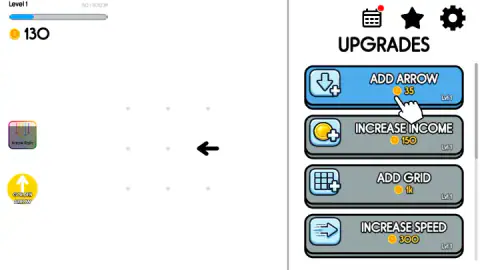
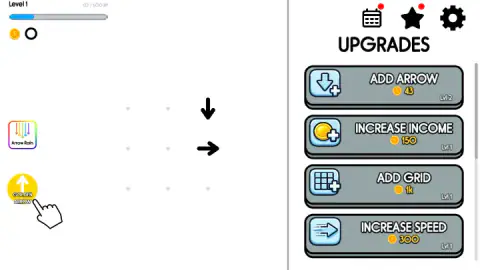
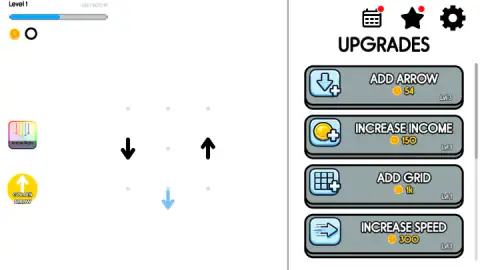
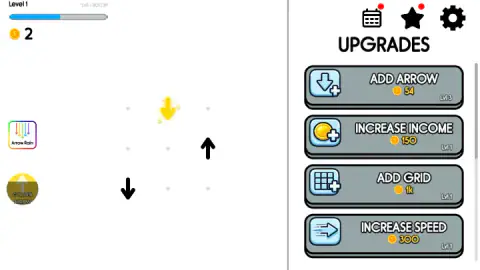
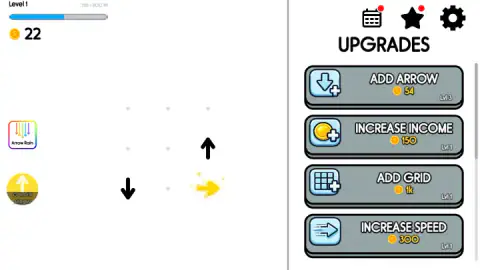
Taken by opening the game ourselves and letting it run — not supplied by the publisher, and not the same picture every other site shows.
How to play Arrows Idle
- Click the arrow. A hand points at it the first few times. The arrow slides off the way it points, a +1 floats up, and another arrow appears on a dot.
- Press Arrow Rain whenever it is lit. Coloured arrows drop from the top of the screen and your coins jump. The hand only points at it after your first purchase, but it worked for us before that.
- Buy Add Arrow. A button in the panel turns blue when you can afford it. Each level of this upgrade put one more arrow on the grid: we had one, then two, then three.
- Use Golden Arrow, then click the gold arrow. The button alone pays nothing.
- Keep spending. The bar at the top left fills with experience and moves you up a level.
Tips from our run:
- Ignore the keyboard. The arrow keys did nothing, however much the arrows on screen invite them.
- Do not click the dots. Empty dots do not respond. Only the arrows do.
- Watch the skill buttons. A dark band covers each one while it recharges and sinks as it refills. Both were lit again within about a minute.
- Go for the gold arrow straight away. One of ours sat there unclicked, then turned black again and paid nothing.
Controls
| Click a black arrow | It flies off the way it points and pays one coin; another arrow appears on the grid |
|---|---|
| Click Arrow Rain, left side | Coloured arrows fall from the top and pay over a hundred coins; the button then recharges |
| Click Golden Arrow, left side | Turns one arrow gold; you still have to click that arrow to collect |
| Click a blue button in the UPGRADES panel | Buys that upgrade; blue means you can afford it, grey means you cannot |
| Keyboard arrow keys | Nothing, in our session |
Features
- A white screen with a 3x3 grid of grey dots, and an upgrades panel that stays open on the right
- Each arrow you click pays one coin at the start; Arrow Rain paid 125 coins the first time
- Golden Arrow paid 20 coins, but only when we clicked the gold arrow before it faded
- A seven-day reward card, from 2k coins on Day 1 to 100k on Day 7
- Four upgrades on show: Add Arrow from 35 coins, Increase Income 150, Increase Speed 300, Add Grid 1k
- Progress survives a reload: coins, level and upgrades were all still there when we came back
Game details
- Developer
- Crazyhead Games
- Release date
- April 2026
- Last updated
- October 29, 2026
- Added here
- February 2026
- Technology
- HTML5
- Platforms
- Browser (desktop), Browser (mobile & tablet, touch)
- Saved progress
- Saving, when available, is managed by this game. Mava cannot confirm your level.
FAQ
How do you play Arrows Idle?
Click the black arrows on the dotted grid. Each one flies off in the direction it points and pays a coin, then another arrow appears. Spend the coins in the upgrades panel on the right, and use the Arrow Rain and Golden Arrow buttons on the left whenever they are lit.
What is the fastest way to earn coins in Arrows Idle?
In our session it was the Arrow Rain button, which paid 125 coins the first time and about 131 the second, against one coin per clicked arrow. It was ready again in under a minute. On a new game the daily reward beats both, because Day 1 alone pays 2k coins.
Does Arrows Idle play itself?
It did not while we played. With no click on an arrow, the arrows stayed where they were and the coin counter did not move for close to a minute. We only bought Increase Speed in our final seconds, and we did not try Increase Income or Add Grid, so a later upgrade could change this. We cannot say.
How does the daily reward work in Arrows Idle?
A card lists seven days: 2k, 5k, 10k, 20k, 35k, 50k and 100k coins. We claimed only Day 1, which took us from Level 1 to Level 4 in one click, because the coins also count as experience. We did not come back on a second day, so we cannot say what happens if you miss one.
How do you close the upgrades panel in Arrows Idle?
You do not. The panel is a fixed part of the screen, and the game runs beside it, not behind it. We lost a long stretch hunting for a way out with clicks and the keyboard. The arrows on the left can be clicked at any time with the panel showing.
Why did my coins drop to zero after buying an upgrade in Arrows Idle?
It happened to us twice on Level 1. We had 132 coins, bought Add Arrow at 35, and the counter read 0; the second purchase did the same. On Level 4, Increase Speed took only its 300-coin price. We do not know the reason, so on Level 1 we would not count on keeping the change.
What does the Golden Arrow do in Arrows Idle?
It turns one arrow on the grid gold, and you then have to click that arrow. Ours paid 20 coins, against one for a normal arrow. When we missed one, it went back to black a little later and paid nothing, while the button carried on recharging.
Can you play Arrows Idle on a phone?
It is listed for mobile, and all it asks of you is a press on an arrow or a button. We played on a computer with a mouse and did not try a touchscreen. The layout is wide, with the panel taking the right side of the screen.