


About Escaping Arrows
Most arrow puzzles forgive a wrong tap with a shake and a second try. Escaping Arrows keeps the evidence. Tap an arrow that cannot get out and it turns bright red, stays exactly where it was, and one of the lightning bolts at the top of the screen goes dark. You get three bolts. We spent all of them twice in four minutes, without leaving level 1.
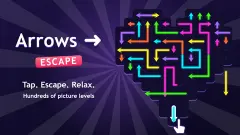
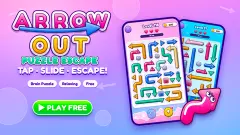
The board could not be plainer. Thin coloured arrows lie on a dark background, on a grid of dots so faint you may not notice it. Some arrows are straight, some bend at right angles. Tap one and it leaves in the direction its head points, as long as no other arrow lies in that line. Clear them all and the level is done.
The game is by MaxDev.app. This one was published in February 2026.
We should say how far we got. We played four minutes in Arrow Mode and entered level 1 three times. Twice we ran out of lives. The third time we stopped with the level still unsolved. We never saw the level finished, and never saw level 2.
Level 1 has six arrows and only two traps
The first board is small enough to read in full, and it is worth doing so before the first tap. It holds six arrows. One is long and winds down the left side like a corridor, ending in a head that points down and out. Next to its tip sits an L-shaped arrow whose head points left. On the right side, a short arrow points down, and another one above it points down as well. One arrow in the middle points right, and one more points straight down.
Two of those are traps. The top-right arrow has to pass through the square where the short arrow under it is standing. We tapped it on our opening attempt. It went red and a bolt went dark. The L-shaped arrow points straight at the tip of the long one, and by the time we looked closely it was red too, with another bolt gone.
Everything else is free from the start. The long arrow, for all its bends, has nothing below its head. The arrow pointing right has an open lane, and so do the two that point down along the bottom.
So the order the board gives is short, and we have to be clear that it is read from the layout, not played to the end:
- The long winding arrow first, then the L-shaped one it was blocking.
- The short arrow at the bottom right, then the one above it.
- The arrow pointing right and the middle one pointing down, whenever you like.
That is two rules for six arrows. It makes level 1 a teaching board. It shows you that the longest piece on the board can be the freest, and that the plainest one, a short straight arrow in a corner, can be the one that costs you.
The colours change, the board does not
Each time we came back to level 1 the arrows wore different colours. The straight arrow in the middle was pale blue on our first entry, purple on the second and orange on the third. The L-shaped one went from yellow to magenta.
The layout under the colours was the same all three times. So colour is not a clue. It does not mark which arrows are free or which belong together. There is one catch worth knowing: a blocked arrow turns bright red, and on some entries an ordinary arrow is red or orange to begin with. Count your bolts before you trust the colours.
The arrow as a sign is younger than it looks
The whole game is drawn with one sign, a line with a triangle at one end, and we read it without thinking. That habit is not very old. According to the history of the symbol collected on Wikipedia, the arrow as a mark for direction does not seem to appear before the 18th century. One early example is a French engineering book of 1737, Bernard Forest de Bélidor's work on hydraulics, where arrows show which way water flows and a wheel turns. Before that, books and signs used a small pointing hand.
Those first arrows were drawn like real ones, with feathers at the back. The feathers were dropped during the 19th century. An English history book published in 1874 carried maps by Emil Reich that showed army movements as lines with solid triangular heads, and that is the form that stuck.
It is also the form on this board. And it explains why the puzzle works at all. An arrow sign tells you where something is going. It says nothing about whether the way is clear. Escaping Arrows is built on that gap: every piece announces its direction, and it is left to you to look along the line.
Skin Mode, Challenge and the buttons we did not press
The menu has three entries. Arrow Mode is the one we played. Skin Mode and Challenge each carry a small clapperboard icon, which we read as a sign that an ad break stands in front of them. We opened neither, so we cannot say what they hold.
Under the board sit three small buttons. One shows a lightbulb and one shows two arrows swapping places, each with a small 2 beside it. The third has three lines. A lightbulb usually means a hint and the 2 looks like a count of uses, but that is our reading of the icons. We did not press them.
On the FAILED card, Revive is tied to an ad break. We pressed it once and were not revived. Home took us back to the menu both times, with an ad break on the way.
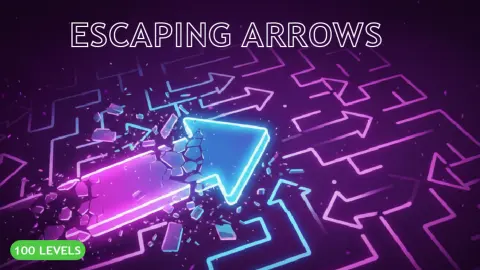
The game's own description speaks of 100 levels with a harder one every fifth level. We cannot confirm any of that from level 1.
Who it suits
Players who like to stop and look before they touch anything. The rule takes one tap to learn, and the three lives turn guessing into a bad plan, so the game rewards reading the board over trying things. If you want arrows that slide with a bit of show, coins to collect or rewards between levels, this is the bare version: a dark screen, thin lines and three bolts.
More arrow puzzles
From the same developer, Solve the maze is a maze puzzle rather than an arrow one. For the same tap-and-leave rule in other clothes, Neon Maze counts your taps on glowing boards, ArrowGami: Arrow Puzzle gives you hearts, hints and a progress bar, and Arrows: Make It Cozy! adds combos and coins. The rest are under puzzle games.
Screenshots
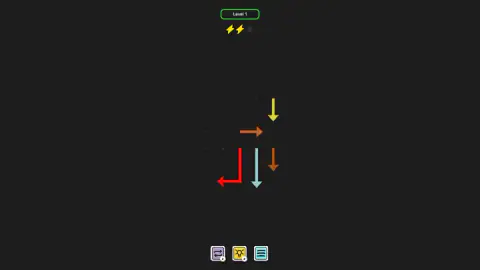
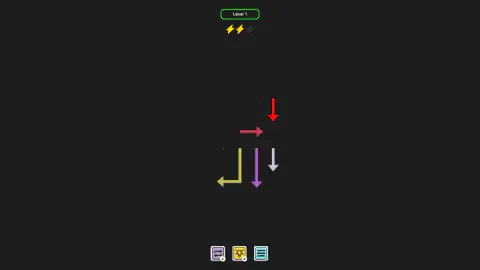
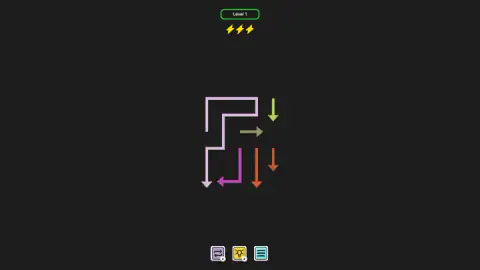
Taken by opening the game ourselves and letting it run — not supplied by the publisher, and not the same picture every other site shows.
How to play Escaping Arrows
- From the menu, pick Arrow Mode. Level 1 opens straight away, with no tutorial text on screen.
- Tap an arrow. If its lane is clear, it leaves the board and nothing else changes.
- If something is in the way, the arrow turns bright red and stays, and a lightning bolt goes dark.
- Send every arrow off before the third bolt goes. If it does go, a FAILED card offers Home or Revive.
What four minutes taught us:
- Look at the head, not the body. An arrow leaves the way its head points. A long arrow with five bends is still only as blocked as the line in front of its tip.
- Do not tap a red arrow again. It is red because it is blocked, and it is still blocked. We lost our last lives on both failed attempts by tapping the same red arrow, hoping it would move.
- A free arrow costs nothing. On our third entry we tapped the arrow pointing right, which had an open lane. It left, and all three bolts stayed lit.
- The keyboard does nothing. We tried the arrow keys and Enter, and nothing on the board answered. This is a pointer game.
- There is no clock and no score. The only things on screen are the level number, the bolts and three small buttons under the board.
Controls
| Click or tap an arrow | Sends it off the board the way its head points, if nothing stands in that line |
|---|---|
| Click or tap a blocked arrow | The arrow turns bright red, stays where it is, and one of the three lightning bolts goes dark |
| Home (on the FAILED card) | Leaves the level and returns to the menu after an ad break |
| Revive (on the FAILED card) | Offered in exchange for an ad break; we did not get a revive out of it |
| Lightbulb button and swap button (bottom of the board) | Two helpers with a 2 on each; we did not press them |
| Three-line button | Menu; we did not open it |
Features
- Thin coloured arrows on a faint dotted grid, straight or bent, each leaving in the direction of its head
- Three lives shown as lightning bolts; a tap on a blocked arrow costs one
- A blocked arrow turns bright red and stays on the board, so your mistakes stay visible
- A first level of six arrows where only two pairs have to go in a set order
- New colours every time you enter the level, on the same layout
- Three entries on the menu, Arrow Mode, Skin Mode and Challenge
- Made by MaxDev.app
Game details
- Developer
- MaxDev.app
- Release date
- February 2026
- Last updated
- August 10, 2026
- Added here
- December 2025
- Technology
- HTML5 (2D)
- Platforms
- Browser (desktop, mouse), Browser (mobile & tablet)
- Classification
- Puzzle
- Saved progress
- Saving, when available, is managed by this game. Mava cannot confirm your level.
FAQ
How do you play Escaping Arrows?
Tap an arrow and it leaves the board in the direction its head points. If another arrow lies anywhere in that line, the arrow stays, turns bright red and you lose one of three lives. The level is about finding an order in which every arrow has a clear way out.
What happens when you lose all three lives in Escaping Arrows?
A FAILED card comes up with two buttons, Home and Revive. Revive is offered in exchange for an ad break. Home took us back to the main menu, and the level started again from the beginning with all three lives when we went back in.
Why did my arrow turn red in Escaping Arrows?
Because its way out was blocked when you tapped it. In our session a red arrow stayed on the board in bright red and one lightning bolt went dark. Tapping the same arrow again while it was still blocked cost us more lives, so clear what is in front of it first.
How do you beat level 1 of Escaping Arrows?
We did not finish it ourselves, so this is a plan read from the board. Send the long winding arrow off before the L-shaped one beside it, and the short arrow at the bottom right before the one above it. The other two arrows have a clear lane from the start and can go at any time.
Who made Escaping Arrows?
Escaping Arrows is by MaxDev.app. It was published in February 2026 and last updated in August 2026.
How many levels does Escaping Arrows have?
The game's own description says 100 levels, with a harder one every fifth level. We cannot confirm that count: we played four minutes and stayed on level 1. The menu also lists a Skin Mode and a Challenge that we did not open.
Is Escaping Arrows free, and does it work on a phone?
It is free in the browser, with no download and no account. Ad breaks came up when we left a failed level, and Revive is tied to one. It is listed for PC, Android and iOS; we played on a computer with the mouse and did not test a phone.