




About OrbaDrone - Robot Escape
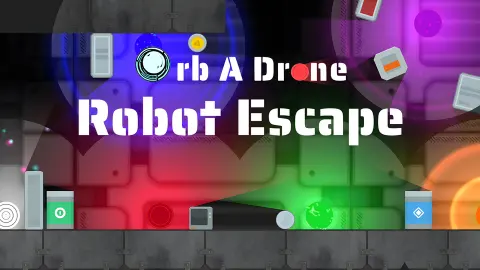
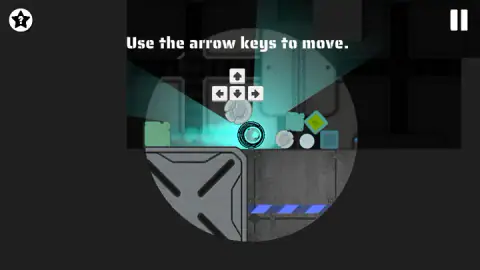
Most of the screen in OrbaDrone - Robot Escape is something you cannot quite see. The level is there, drawn in dark grey shapes, but the only part with colour and detail is a circle of light round the drone. Move, and the circle moves with you. What was a grey outline a second ago turns out to be a pillar, a loose crate or a heavy metal plate.
The drone itself is a small ball that flies. It does not jump and it does not shoot. It has two powers, and they are opposites: attract on the A key and repel on the S key. Everything the game asks of you is meant to be done with those two keys and the four arrows.
The game is credited to Qookie Games. It was published in October 2025.
This page is short because our session was. We played for about four minutes on a desktop computer. We got through the opening screens and into the first level, tried every key, opened the help window, and ended stuck under a metal plate without finishing the level. What follows is what those four minutes showed.
A cyan light that turns orange when you attract
The light is the most useful thing on the screen, and the game does not explain it.
For most of our run the circle round the drone was a pale cyan, with a wider beam of the same colour spilling down a corridor. Then we pressed A under a large metal plate. The whole circle went orange, rings appeared round the drone, and the line «Press S to repel.» came up in the corner. We pressed S. The light returned to cyan and the line went away.
We repeated that several times and it held every time. A, orange, and the prompt. S, cyan, and no prompt. So the light is a status lamp: it tells you which of the two powers you used last.
What we could not work out is what the powers did to the world at that spot. The drone sat under a plate braced with a large X, and neither key moved the plate or the drone in a way we could see. That is where our run ended.
What is lying around in the first level
The level begins on a ledge with a small pile of loose pieces next to the drone: two cracked round discs, a white ball, and square blocks in teal, yellow and blue. The floor panel below carries a band of blue diagonal stripes. Further right there is a grey pillar with a second white ball on the floor beside it, and above that the X-braced plate.
We flew right as far as the pillar, then up to the plate. The camera keeps the drone in the middle of the screen the whole way, so the level scrolls round you.
We did not see anything that hurt the drone. Nothing killed us and nothing reset the level in four minutes. The help shop sells two kinds of immunity, orange and red, which suggests there are dangers of those two colours later on. We did not meet them.
The help window: three helpers, and 100 coins to start with
The star with a question mark in the top left corner opens a window titled «Stuck on this level?». It offers three helpers:
- Hints/Instructions, 50 coins
- Orange Immunity, 30 coins
- Red Immunity, 120 coins
Our wallet showed 100 coins before we had done anything. That is enough for the hint and the orange immunity together, with 20 left over. It is not enough for the red one.
Each helper has a small question-mark bubble next to it, and the window has two buttons, Back and Activate helper. The same screen has Restart in the top left and Resume in the top right. We pressed Back and bought nothing, so we cannot tell you what a hint looks like, how long an immunity lasts or how you earn more coins.
One piece of advice follows from the prices alone. The starting coins cover very little, so it makes sense to keep them until a level really stops you.
What the developer lists that we did not reach
The developer lists 50 levels, three difficulty settings, four mini-games, skins for the drone that come with different abilities, and a way to change the controls. On phones it describes a joystick and two buttons.
We saw none of that. We played part of one level on a desktop keyboard. Take the list as the developer's and the rest of this page as ours.
A slow, dark maze for players who like to poke at things
This is a game for someone who enjoys finding out what a tool does by trying it. The first level gives you two powers and a room full of loose pieces, and it says little about how they go together. Nothing rushed us while we experimented.
It is a poorer fit if you want to be moving within seconds. There is a language screen and a five-page intro before the first level, and the first level itself left us stuck with the tutorial line still on screen. Be ready to spend a few minutes learning what attract and repel act on.
Other robots, balls and mazes
Brazen Ball is the fast version of a similar idea: a robotic ball rolled through traps against the clock. Geometry Arrow is another trip through a cave, flown with a single button. For mazes without the dark, Marble Maze has you roll a marble over every tile of a board, and Neon Maze is a quieter logic game about clearing a tangle of arrows. The rest are under puzzle games.
Screenshots
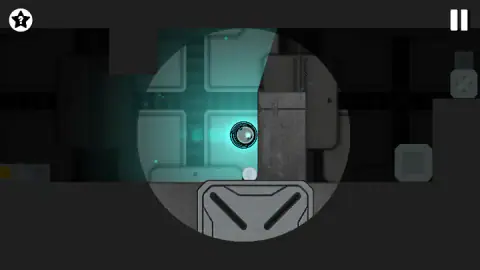
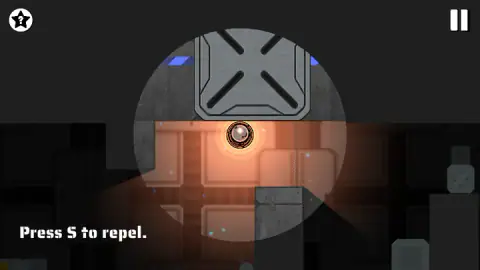
Taken by opening the game ourselves and letting it run — not supplied by the publisher, and not the same picture every other site shows.
How to play OrbaDrone - Robot Escape
- Pick a language. The first screen, «Before you begin», shows seven flags and a Continue button.
- Go through the intro. It is a panel of five pages with Previous and Next buttons and a counter in the middle. The fifth page starts the game.
- Move with the arrow keys. The first level opens with «Use the arrow keys to move.» and a drawing of the four keys above the drone. Up and down work as well as left and right: the drone flies.
- Press A to attract and S to repel. The game introduces repel with its own line, «Press S to repel.», at the bottom left of the screen.
- Find the way out of the level. We did not get that far, so that is as much as we can say about the goal.
Things worth knowing before you start:
- Watch the colour of the light. Cyan is the normal state. After we pressed A it turned orange, and the game asked for S. After S it was cyan again.
- Use the grey shapes as a map. The parts of the level outside the light are dim, not hidden. You can make out walls, blocks and plates before you reach them.
- Tap the powers near something. We pressed A and S several times in open space next to a fixed plate and the drone stayed where it was. Our guess is that they need a loose object or the right kind of surface within reach.
- The star in the corner costs coins. It is a help shop, not a free hint. Read the prices below before you click through it.
- The mouse does not move the drone. Clicking in the middle of the level did nothing for us. On a computer this is a keyboard game.
Controls
| Arrow keys | Fly the drone left, right, up and down |
|---|---|
| A | Attract (the light round the drone turned orange in our run) |
| S | Repel (the light went back to cyan) |
| Click the star with a question mark (top left) | Opens the «Stuck on this level?» window with the three paid helpers |
| Click the pause bars (top right) | Pauses the level |
Features
- A ball-shaped drone that flies in four directions and can attract or repel, each on its own key
- Levels kept in the dark: only a circle of light round the drone shows colour and detail
- A light that works as a status lamp, cyan by default and orange after pressing attract
- A help window with three paid helpers at 30, 50 and 120 coins, and 100 coins in the wallet at the start
- A language screen with seven flags and a five-page intro before the first level
- Made by Qookie Games; the developer lists 50 levels and three difficulties
Game details
- Developer
- Qookie Games
- Release date
- October 2025
- Last updated
- August 10, 2026
- Added here
- August 2025
- Technology
- HTML5 (2D physics)
- Platforms
- Browser (desktop, keyboard), Browser (mobile & tablet, touch)
- Classification
- Puzzle
- Saved progress
- Saving, when available, is managed by this game. Mava cannot confirm your level.
FAQ
How do you play OrbaDrone - Robot Escape?
You fly a small ball-shaped drone through dark metal corridors. The arrow keys move it in four directions, A attracts and S repels. The first level teaches the keys one at a time with a line of text on screen. We did not finish that level, so we cannot describe what the exit looks like.
What are the controls in OrbaDrone - Robot Escape on a computer?
Arrow keys to move, A to attract and S to repel. The mouse is only for the buttons: a star with a question mark in the top left corner opens the help window, and the pause bars are in the top right. The developer says the game also lets you change the controls; we did not open that option.
What does the orange light mean in OrbaDrone?
In our run the light round the drone was cyan while we moved. After we pressed A it turned orange, rings appeared round the drone and the line «Press S to repel.» came up. After S the light went back to cyan and the line disappeared. So the colour tells you which of the two powers was used last.
How much do the helpers cost in OrbaDrone - Robot Escape?
The «Stuck on this level?» window lists three: Hints/Instructions for 50 coins, Orange Immunity for 30 and Red Immunity for 120. We started with 100 coins, enough for the first two together but not for Red Immunity. We bought none of them, so we cannot say what each one does once active.
How many levels does OrbaDrone - Robot Escape have?
The developer lists 50 levels, three difficulty settings and four mini-games. We played only the first level and did not complete it, so we have not seen any of that ourselves.
Can you play OrbaDrone - Robot Escape on a phone?
It is listed for PC, Android and iOS in landscape, and the developer describes a joystick and two buttons for phones. We played on a desktop computer with the keyboard and did not try a phone.
Who made OrbaDrone - Robot Escape?
It is credited to Qookie Games, and the same name is on a logo inside the game's pause screen. It was published in October 2025.