










About Geometry Arrow
Most games let you warm up. Geometry Arrow does not. We played it for ten minutes, made dozens of attempts, and the progress bar at the top of the screen never read more than 4 %. This page is an honest account of those ten minutes: what the game is, how it handles, and what the first obstacle taught us while it was beating us.
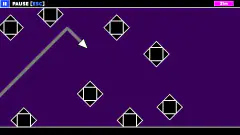
The idea fits in one line. A white arrow flies through a black cave, and you have one input. Hold it and the arrow climbs. Let go and it dives. Both moves are perfectly straight and perfectly diagonal, so the trail it leaves behind is a zigzag of sharp corners, never a curve.
There is no score. A bar fills from 0 % to 100 % as you cross the level, and the game's description says a portal waits at the far end. We did not see it.
The game is credited to a developer who signs as faraonovvit. It was published in October 2024, which tells you plenty of players get further than we did.
The first obstacle, square by square
We know one part of this game well, because we met it every time. A platform hangs in the upper half of the cave: ten outlined squares in a row. A pillar two squares tall stands on each end and reaches the ceiling. Four spikes sit on top, and one more points sideways from each end, like the tip of a spear.
Under it, on the floor, runs a row of ten small spikes. It is exactly as long as the platform.
Put those together and the obstacle reads as a lesson. Slide along the floor and you run into the spikes. Ride the ceiling and you hit the front pillar. The space above the platform is boxed in by the two pillars, so there is no way in. Our reading is that one lane is left: under the platform and over the floor spikes.
That lane is not narrow. The squares of the platform make a handy ruler, and by our count the cave is eight squares tall. The underside of the platform hangs five squares above the floor, and the floor spikes are about half a square high. That leaves a gap of roughly four and a half squares for an arrow about one square long.
So why did we never get through? Because of where the arrow is when the lane begins. It starts half way up, dives at once, and reaches the floor before the platform arrives. From there you have to lift off, level out by zigzagging, and hold a height you cannot actually hold, since the arrow only goes up or down. Most of our attempts ended on that first row of floor spikes. We are telling you this so you know what the first four percent ask of you.
Why the trail is a triangle wave
The line the arrow draws has a name outside games. A zigzag of straight rises and straight falls is a triangle wave, one of the basic shapes of electronics and sound, alongside the smooth sine wave and the boxy square wave. Its mark is that it never bends: it only changes direction.
The 45-degree angle gives it a property worth knowing when you play. On a 45-degree line you gain exactly as much height as the distance you travel. One square forward is one square up. That turns the level into something you can count. To cross the cave from floor to ceiling takes eight squares of travel, no more and no less. To rise half a square over a floor spike takes half a square of holding.
It also explains the flat stretches in our trail. When the arrow reaches the floor or the ceiling it cannot go further, so the peak of the wave is cut off flat. Sound engineers call that clipping, and in audio it is a fault. Here it is a rest: the only time the arrow travels level.
Games with gravity ask you to feel an arc. This one asks you to do sums with squares, fast.
Geometry Arrow unblocked: what that means here
Many people look for this game with the word "unblocked". There is no special version. Geometry Arrow runs inside the browser page, with no download, no installer and no account, and our attempts were over almost as soon as they began.
That means it opens anywhere this page opens. If a school or office filter blocks the page, the game is blocked with it, and nothing on our side changes that.
Black, white and one red label
The screen holds very little. The cave is black, and everything in it is a white outline. The arrow is a small triangle with a round eye. The only colour is a red label in the top left corner that reads 'Esc' - Exit.
The start screen adds two things: a speaker button in the bottom left corner and a small < at the right edge. We pressed neither. The game's description speaks of a menu where you choose a level, and gives two different totals for them, six and thirteen. We never opened that menu, so we cannot tell you which is right, or which level we were on.
No sound reached us in the whole session, so we cannot say whether there is music or whether the level is timed to it.
Now and then an ad break came up between attempts. After it, the game counted down on a black screen before the arrow moved, which at least gives you time to find the space bar again.
A fair warning before you start
This is a game for players who enjoy repeating one short stretch until they get it right. Restarting is instant, the bar tells you exactly how far you got, and the trail shows you the mistake.
It is a poor fit if you want to settle in gently. Nothing we saw eases you in: no tutorial hand, no slow first stretch, no second life. A young child will understand the goal at once and may still not get past the first platform. We did not.
More games of timing and straight lines
The closest relative we have is Geometry Vibes, another hold-to-climb arrow, in colour and scored in metres. Geometry Rash swaps the arrow for a jumping cube and a flying ship across eight levels. ZigZag Snow Mountain keeps the diagonal lines and turns them into a ski run where each click flips your direction. The rest are in the arcade category.
Screenshots
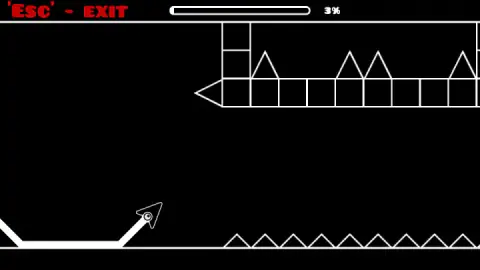
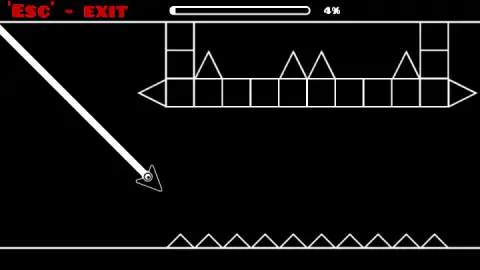
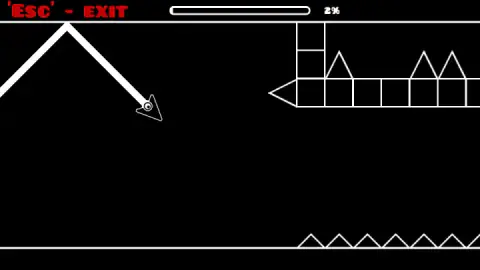
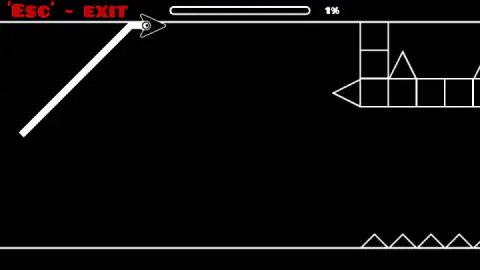
Taken by opening the game ourselves and letting it run — not supplied by the publisher, and not the same picture every other site shows.
How to play Geometry Arrow
- Click the grey start screen. It reads Click to start… with the arrow waiting at the left, half way up. One click and the cave turns black and starts to scroll.
- Hold to climb. The left mouse button and the space bar do the same job. While you hold, the arrow goes up at 45 degrees.
- Let go to dive. The arrow drops at the same angle. There is no level flight in open air: you are always going up or coming down.
- Stay off the spikes. One touch and the arrow bursts into white dots. You are back on the start screen at 0 %, one click from the next attempt.
What ten minutes of failing taught us:
- The arrow starts falling the moment you click. Nothing holds it up while you find the button. Have your finger on Space before you start.
- A quick tap is not a move. Our short clicks did nothing we could see and the arrow kept diving. Our best attempts came when we held Space for half a second or more.
- The floor is not the danger. The arrow can land on the bottom line and slide along it. The same goes for the top line. It is the triangles that kill.
- Watch the percentage, not the arrow. The first floor spikes arrive at 4 %. If the bar says 3 % and you are still sliding, you are late.
Controls
| Click (start screen) | Starts the attempt from the grey "Click to start" screen |
|---|---|
| Hold left mouse button or Space | The arrow climbs in a straight 45-degree line |
| Release | The arrow dives at the same angle |
| Esc | Exit, according to the red label in the top left corner; we did not press it |
| Speaker button (start screen) | Sound switch in the bottom left corner; we left it alone |
Features
- One input with two states, held and released, so the arrow only ever flies up or down at 45 degrees
- A white trail behind the arrow that draws every turn you made, which makes each crash easy to read
- Floor and ceiling lines you can slide along; the spikes are what end an attempt
- A progress bar with a percentage in place of a score, from 0 % at the start to the portal at the end
- Black and white only, with every obstacle drawn as outlined squares and triangles
- An instant restart, one click on the start screen and you are flying again
- Made by faraonovvit
Game details
- Developer
- faraonovvit
- Release date
- October 2024
- Last updated
- August 10, 2026
- Added here
- March 2025
- Technology
- HTML5 (2D)
- Platforms
- Browser (desktop, mouse or keyboard), Browser (mobile & tablet, touch)
- Classification
- Arcade
- Saved progress
- Saving, when available, is managed by this game. Mava cannot confirm your level.
FAQ
How do you play Geometry Arrow?
Click to start, then hold the left mouse button or Space to make the arrow climb and let go to make it dive. It only moves in straight 45-degree lines, and the cave scrolls by itself. Touching a spike ends the attempt and sends you back to the start screen.
Can you touch the floor or the ceiling in Geometry Arrow?
Yes. In our attempts the arrow slid flat along both the floor line and the ceiling line while the progress bar kept moving. What ended every attempt was a spike: the first row sits on the floor at about 4 % of the level.
How many levels does Geometry Arrow have?
The game's own description gives two numbers, six in one sentence and thirteen in the next, and the listing's page says thirteen. We cannot settle it: we never opened the level menu, and all our attempts ended inside the first 4 % of one level.
Is Geometry Arrow 3D?
No. The game we played is flat: a side view of a black cave with white outlines, a white arrow and a white trail. If you are looking for a 3D arrow game, it is a different one.
Is Geometry Arrow unblocked?
There is no separate unblocked version. The game plays inside the browser page with nothing to download and no account to make, so it works wherever this page opens. Where a school or office filter blocks the page, the game is blocked with it.
Is Geometry Arrow the same game as Geometry Vibes?
No. They share the idea, an arrow that climbs while you hold and dives when you let go, but they come from different developers. Geometry Arrow is by faraonovvit, is black and white and measures progress as a percentage of a level.
Who made Geometry Arrow?
It is credited to a developer who signs as faraonovvit. It was published on 21 October 2024 and last updated on 10 August 2026.
Can you play Geometry Arrow on a phone?
It is listed for PC, Android and iOS, and the game's description says touching the screen moves the arrow. We played on a computer with a mouse and the space bar and did not test a phone ourselves.