

About Geometry Vibes 2 Online
Most one-button games hide how unforgiving they are behind a cheerful menu. Geometry Vibes 2 Online does the opposite. Its first level is tagged Very Easy, and in our session we never got past the first tenth of it.
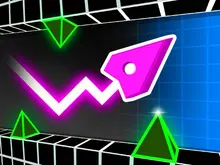
That is not a complaint. It is the whole design. The arrow flies forward by itself. You hold to climb and let go to dive, and it never curves: it moves in straight diagonal lines, like a pen bouncing between two rulers. The levels are cut from the same angles, so every gap is a question of when you switch, not how hard you press.
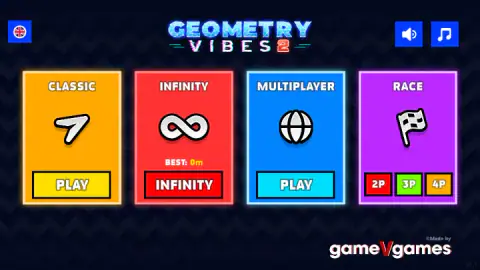
This is the sequel to Geometry Vibes by gameVgames, whose name sits under the main menu. Where the first game was one endless run, this one opens on four game modes: Classic, Infinity, Multiplayer and Race. It was published on 2 November 2026.
What kills you in the first stretch of level 1
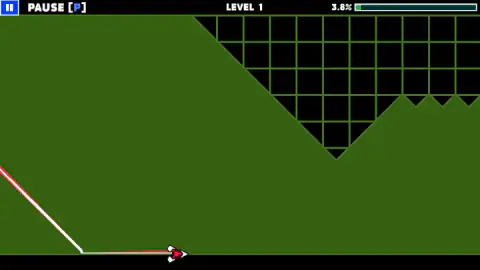
Level 1 opens on a wide green field with a black block hanging from the ceiling. It looks harmless, and it mostly is. The arrow dives, touches the floor line and slides along it with its trail running flat behind.
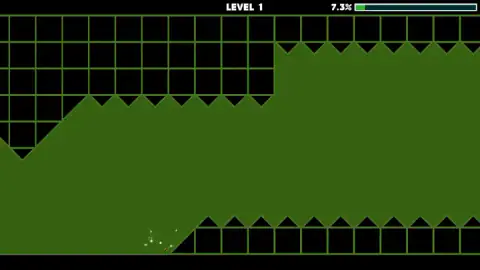
The trap comes a little later. Around 7 percent of the way in, the floor itself rises into a ramp, and the top of that ramp is a row of black teeth. Ahead, the ceiling has its own row hanging down. Between them is the corridor you are meant to fly through.
We crashed at the foot of that ramp over and over, at 7.2 and 7.3 percent, always the same way: still sliding along the floor when the floor turned into a wall. The fix is to start climbing before the ramp, at around 6 percent, and enter the corridor at mid-height. Release too late and the upper teeth catch you; climb too late and the ramp does.
That one spot is the whole first lesson of the game. The floor is a resting place, not a road.
A crash costs six seconds, not a life
There are no lives in Classic mode. When the arrow touches a block, it bursts into white sparks and the level starts again from the very beginning. The progress bar drops back to where the arrow waits at the start, and a big 3, 2, 1 counts down before it moves.
We saw no checkpoint in the part of level 1 we reached, and no revive screen between a crash and the next countdown. Each attempt in our session took about six seconds: three of countdown, roughly three of flight. That is quick enough to keep trying without thinking about it, which is how this kind of level is learned: by memory, one more attempt at a time.
Only the very first countdown shows the controls hint, a small mouse and a Space bar next to your arrow, marked P1. After that, the countdown appears alone.
Pausing is free. The button in the top-left corner, labeled PAUSE [P], opens a Paused screen with one button, Continue. When we pressed it, a new countdown ran and the arrow picked up exactly where it had stopped, at 4.2 and 5.3 percent. So if you need to stop, pause instead of crashing out. Just keep mouse clicks away from that corner, because that is where we paused by accident.
Four modes and twenty levels
The main menu has four cards:
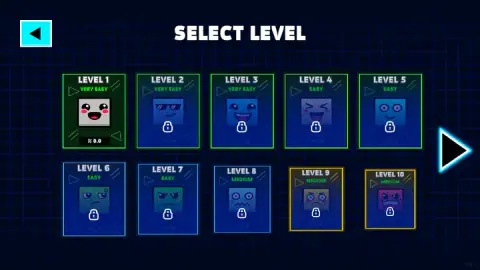
- Classic: the level-by-level mode. Twenty levels on two pages of the level select, each with a face and a difficulty tag. The tags climb from Very Easy through Easy and Medium on the first page to Hard on the second. Only level 1 was open for us; the rest carry padlocks.
- Infinity: the endless mode, with no finish line. The card shows your best distance in metres, which was zero for us because we did not play it.
- Multiplayer: marked with a globe. We did not play it.
- Race: buttons for 2P, 3P and 4P. According to the game's description, everyone shares one keyboard, each player on a single key: the mouse or Space, the Up Arrow, H and L. We did not try it.
Between the level select and the level you pass through a shop with three tabs: arrows, trails and colours. There are 24 arrows, and four of them are open from the start. The rest have padlocks and are paid for with coins. We had none, so the four free arrows were our only choice.
What changed from the first Geometry Vibes
The first Geometry Vibes is a single endless run on a purple field: you fly as far as you can, and the metres are your score. The controls are the same, and so is the rule that the floor is safe.
The sequel turns that into a game with an end. Classic gives every level a percentage, so you know exactly how far you are from the finish and where you keep dying. The endless run lives on as Infinity, next to a mode for friends on the same keyboard.
What we played, and what we did not
We played one session of about ten minutes on a computer, all of it on Classic level 1, with one of the four free arrows. We made around thirty attempts. Our best was 7.3 percent of the level, and every attempt ended at the same spiked ramp.
We did not finish level 1, so we have not seen levels 2 to 20. We did not play Infinity, Multiplayer or Race, buy anything, try the trails or colours, or press the P key. We did not play on a phone, though the game is listed for mobile.
Who it is for
It suits players who like short, repeatable attempts and learning a level by heart. A failed try costs six seconds, and you always know how far you got.
It is a fast-paced game, not a relaxed one. Very Easy here means the gaps are wide, not that you will get through them on the first go. If you want something to play with friends, Race is the mode to look at, since it needs only one keyboard.
If you came looking for Geometry Vibes unblocked, this one needs no download, plugin or login. It runs inside this page, so whether it opens at school depends only on whether the network lets this site through.
More arrow games
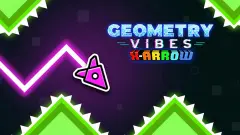
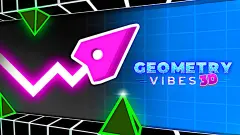
The series has more, and going by their descriptions they are separate games: Geometry Vibes X-Arrow builds on the arrows and their customisation, and Geometry Vibes 3D takes the idea into three dimensions. We have not played either yet. Geometry Arrow, by another studio, sends a similar arrow through a cave towards a portal.
More one-button games where timing is everything in our arcade games.
Screenshots
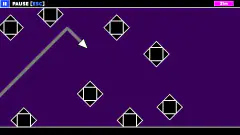
Taken by opening the game ourselves and letting it run — not supplied by the publisher, and not the same picture every other site shows.
How to play Geometry Vibes 2 Online
- On the main menu, pick Classic and press Play. The level select opens with only Level 1 unlocked.
- Pick your arrow in the shop and press Start. A 3-2-1 countdown runs before the arrow moves.
- Hold the left mouse button or Space to climb. Let go to dive.
- Watch the percentage at the top right and avoid obstacles: reach the end without touching a black block or its teeth.
Tips from our runs:
- The floor is a safe place to wait. We slid the arrow along the bottom line for long stretches without a scratch. Only the black blocks kill.
- Leave the floor early in level 1. The floor stops being safe a few percent in. More on that below.
- Click in the middle of the screen. The pause button lives in the top-left corner, and a click there stops the run.
- Short taps for small steps. Because the arrow only goes up or down at one angle, a quick tap lifts it a little and a long hold takes it across the screen.
Controls
| Left mouse button or Space (hold) | The arrow climbs at a steady diagonal |
|---|---|
| Release | The arrow dives at the same diagonal |
| Pause button (top left, labeled PAUSE [P]) | Pauses; Continue resumes the run from the same spot after a 3-2-1 countdown |
| Up Arrow, H, L | Players 2, 3 and 4 in Race mode, according to the game's description (we did not try them) |
Features
- Four modes on the main menu: Classic, Infinity, Multiplayer and Race for two, three or four players
- Twenty Classic levels on two pages, tagged from Very Easy to Hard, with only level 1 open at the start
- One button: hold to climb, release to dive, always in straight diagonal lines
- The flat floor is safe to slide along; the black blocks and their teeth are not
- A crash sends you back to the start of the level after a 3-2-1 countdown, with no checkpoint
- A shop between the level select and the level, with 24 arrows, four of them free from the start
Game details
- Developer
- gameVgames
- Release date
- November 2026
- Added here
- November 2026
- Technology
- HTML5
- Platforms
- Browser (desktop), Browser (mobile & tablet, touch)
- Classification
- Arcade , Multiplayer
- Saved progress
- Saving, when available, is managed by this game. Mava cannot confirm your level.
FAQ
How do you play Geometry Vibes 2 Online?
Hold the left mouse button or Space to make the arrow climb, and let go to make it dive. The arrow moves forward on its own in straight diagonal lines. In Classic mode you have to reach the end of each level without touching the black blocks or their spikes.
What happens when you crash in Geometry Vibes 2?
In our runs of level 1, every crash sent the arrow back to the start of the level, with a 3-2-1 countdown before it moved again. There was no checkpoint and no revive screen, so each attempt took about six seconds from countdown to crash.
Can you touch the floor in Geometry Vibes 2?
Yes. The arrow can slide flat along the floor line without crashing. What kills it is the black blocks with their sawtooth edges. In level 1 the floor itself turns into a rising ramp with spikes a few percent in, so you have to leave the floor before it.
How many levels does Geometry Vibes 2 have?
Classic mode has 20 levels on two pages of the level select. Each card carries a difficulty tag, from Very Easy on the first three to Hard on the second page, and only level 1 is open at the start. Infinity mode has no levels: it records your best distance in metres.
Can you play Geometry Vibes 2 with friends?
Yes. The main menu has a Multiplayer mode with a globe icon and a Race mode with buttons for two, three or four players. According to the game's description, Race players share one keyboard: mouse or Space, Up Arrow, H and L. We only played Classic alone.
What is the difference between Geometry Vibes and Geometry Vibes 2?
Both are one-button arrow games by gameVgames. The sequel adds a main menu with four modes, twenty Classic levels with a progress bar instead of an endless distance run and a Race mode for up to four players.
How do you pause Geometry Vibes 2?
Click the pause button in the top-left corner, labeled PAUSE [P]. Pressing Continue gives you a new 3-2-1 countdown and then picks up from the same spot, so pausing costs no progress. If you play with the mouse, click away from that corner, or you will pause by accident.
Who made Geometry Vibes 2 Online?
gameVgames, the studio behind the original Geometry Vibes. Its name is on the main menu, and FRVR and the game's listing list it as the developer. The game was published on 2 November 2026.