





About Jiffy
Most platform games let you stand still for as long as you like. You look at the gap, you count the spikes, you jump when you are ready. Jiffy takes that away. A counter sits in the middle of the top bar and it starts falling the moment the level appears, even while you are still reading how to jump.
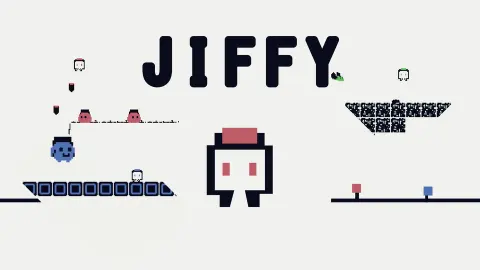
The rest is as plain as a platformer gets. A small white square with a red cap runs to the right over a thin line of ground, drawn in near-black on an off-white screen with red for anything that matters. You have a run, a jump and, according to the developer, a shot that comes out when you press jump a second time. There is no fire key.
The game is credited to redsnowdev. It was published in March 2025.
Now the honest part. We played about four minutes and never left level 1. The clock beat us at least twice, and most of the first attempt went on a mistake described below. So this page can tell you exactly how the first screen and a half works, and what the developer says comes after. It cannot tell you what a boss looks like.
What the top bar is telling you
There are five things up there, and only one of them is labelled.
On the left is a pause mark, two upright bars. We did not press it. Next to it is a red heart with a number: ×4 at the start of each attempt. When the clock ran out, the same counter read ×0, so by our reading a time-out costs every heart at once and not just one.
Then comes a bar of eight red segments between two brackets. It was full in every screenshot we took, including the one that says TIME'S UP. The developer's description says every jump counts, and the shot is tied to the jump key, so it may be a supply of shots or jumps. That is a guess. We never saw a segment go out.
The number in the middle is the clock. The highest reading we caught was 99, and it fell about once a second, which gives a level roughly a minute and a half. On the right, the bar simply says LEVEL 1.
A minute and a half, a pit and a figure in a hat
Here is everything we can vouch for in level 1, in the order you meet it.
Behind you, on the left, is a wall of red-ringed blocks. That way is shut. In front is the control board on its dark post, and past it two dark, scribbled blocks hang in the air at about jumping height. We do not know whether they can be broken; the developer's description mentions destructible blocks, and these look different from the red ones.
Then the ground ends. Two red blocks stand on top of each other at the very edge, like a doorstep twice your height, and on the far side of them the floor falls away into a pit with spikes along the bottom. The ground picks up again on the other side.
Beyond the pit, a row of four dark blocks floats in the air, and in the one screenshot where it is in view a round pink figure in a dark hat stands on top of it. It is bigger than our character. We take it for the first enemy. We were never close enough to find out, and the clock ran out with it still standing there.
That is the whole of our evidence: one board, one doorstep, one pit and one stranger. For a game whose description promises more than 25 levels, it is a small sample, and you should read it as one.
The jump button that also shoots has a famous relative
A platformer where the jump key is also the gun sounds odd until you remember Downwell. Made by Ojiro Fumoto under the name Moppin and published by Devolver Digital in October 2015, it is a game about falling down a well with guns strapped to your boots. According to its Wikipedia article, you move left and right and jump, and pressing the jump button in mid-air fires the boots. They reload when you touch a surface.
The appeal of that design is that it removes a decision. With one key for both, you cannot shoot without first leaving the ground, so every shot is also a commitment to being in the air. Downwell even looks like a cousin: the same article describes a palette of black and white with red as the highlight for enemies and other things that matter.
Jiffy turns the idea on its side. Downwell falls; Jiffy runs to the right, on a pale screen, with a clock instead of a well. But the board at the start draws the same deal: jump, and jump again for something to come out underneath you. If the eight-segment bar turns out to be a supply that refills, the family resemblance would be closer still. We did not see enough to say.
Who it is for
It suits players who like short, strict platformers and do not mind repeating a level. An attempt lasts a minute and a half at most, and nothing is explained in words, so there is nothing to read and nothing to skip.
It is a poor fit for anyone who likes to explore. The clock punishes looking around, and the left side of the first screen is a wall. Very young players may also find the lack of any text confusing: the game never says in a sentence what the number at the top means.
More platformers in few colours
One Bit is another platformer built around a tiny character and checkpoints. Pixel Path and Mini Switcher replace the jump with a gravity flip, which asks for the same timing with a different key. Super Onion Boy is the traditional kind, in full colour, with monsters to beat and a princess to rescue. The rest are under action games.
Screenshots
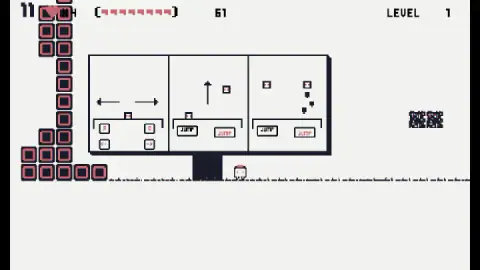
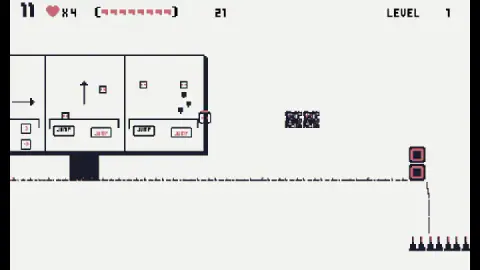
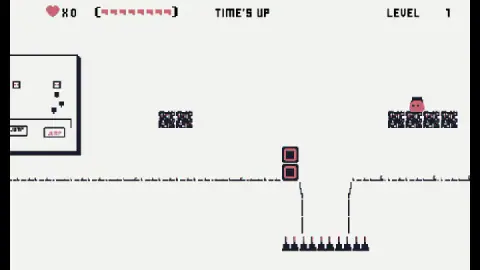
Taken by opening the game ourselves and letting it run — not supplied by the publisher, and not the same picture every other site shows.
How to play Jiffy
- Start running at once. Level 1 opens next to a large board with three drawings. It is a signpost, not a menu, and the counter is already falling.
- Move with A and D or the arrow keys. The first drawing shows both pairs. Holding the right arrow is what moved us along.
- Jump with the spacebar. The second drawing is an arrow pointing up over a button marked JUMP.
- Press jump again in the air to shoot. That is the third drawing, and it matches the developer's instructions. We did not get a shot off.
- Reach the end before the counter hits zero. If it does, the screen reads TIME'S UP and the level begins again.
What our run taught us:
- Do not click the board. We clicked its JUMP buttons, its arrows and the space around them, again and again. Nothing on it is a real button. By the time we stopped, the first clock was nearly gone.
- The counter is not a score. It is easy to read a number at the top of a platformer as points. Here it only goes down.
- The first real obstacle is a pit, not an enemy. Two red blocks are stacked at the edge of the ground, and right behind them the floor drops into a row of spikes.
- Time out and you keep nothing. After TIME'S UP we were back beside the board with a full clock.
Controls
| A / D or Left / Right arrows | Run left or right; the right arrow is what carried us through the level |
|---|---|
| Spacebar | Jump |
| Spacebar again in the air | Shoot, according to the board at the start of level 1 and the developer's instructions; we did not fire a shot |
| Mouse | Not used in play; clicking the control board at the start does nothing |
Features
- A side-scrolling platformer drawn in three colours, near-black lines and red details on an off-white screen
- A counter that starts at 99 and falls about once a second; at zero the screen reads TIME'S UP and the level starts again
- Four hearts at the start of every attempt, shown next to a bar of eight red segments
- A drawn board at the start of level 1 that teaches the three controls without a word of text beyond JUMP
- Spike pits, stacked red blocks and floating dark blocks within the first screen and a half
- More than 25 levels, bosses and endless and battle modes according to the developer; we saw only the start of level 1
- Made by redsnowdev
Game details
- Developer
- redsnowdev
- Release date
- March 2025
- Last updated
- August 10, 2026
- Added here
- May 2025
- Technology
- HTML5 (Godot, 2D)
- Platforms
- Browser (desktop, keyboard), Browser (mobile & tablet)
- Classification
- Arcade
- Saved progress
- Saving, when available, is managed by this game. Mava cannot confirm your level.
FAQ
How do you play Jiffy?
Run with A and D or the arrow keys and jump with the spacebar. The developer's instructions say that pressing the spacebar again in the air fires a shot. The aim is to reach the end of each level before the counter at the top of the screen reaches zero.
How do you shoot in Jiffy?
There is no separate fire key. The board at the start of level 1 and the developer's instructions both say the same thing: press jump more than once. The drawing shows the character in the air with small shapes falling below it, so by our reading the shots go downwards. We did not fire one ourselves.
Why does Jiffy say TIME'S UP?
Because the counter in the middle of the top bar reached zero. In our run it started at 99 and fell about once a second. When it ran out, the heart counter dropped to zero and level 1 started again from the control board with four hearts and a full clock.
Does the clock in Jiffy stop during the tutorial?
No. The board that shows the controls is part of the level, not a pause screen, and the counter keeps falling while you read it. We lost most of our first attempt clicking on it. Look at it once and start running.
How many levels does Jiffy have?
The developer's description says more than 25 levels, plus bosses, an endless mode and a battle mode. We cannot confirm any of that: we played about four minutes and did not finish level 1.
Who made Jiffy?
It is credited to redsnowdev. It was published on 9 March 2025 and last updated on 10 August 2026.
Can you play Jiffy on a phone?
It is listed for PC, Android and iOS in landscape, and the developer's instructions mention on-screen buttons for moving and jumping. We played on a desktop with a keyboard and did not test a phone or tablet.