







About One Bit
Most platformers decide for you where you come back after a mistake. One Bit hands that decision to you, once. Press C and the game remembers the spot where you are standing; press it again and nothing happens, because the button has already turned into a padlock. Everything else in the game follows from that single save.
The rest is deliberately plain. A small white figure walks across a black screen drawn in thick white pixels, finds a key and carries it to a door. That is a level. There are twenty of them, they open one at a time, and the maps get longer as you go: the first two fit on one screen, the last three stretch to nearly four, with water, enemies and a ladder climb added along the way.
One Bit was made by hexapp, whose name is on the listing's publisher record, in the game's own author tag and in its package name. It is built in Construct 3 and was published on 7 November 2023. It is not the Steam game of the same name, which is a 2015 platformer by a different developer. No major portal lists a rating for this one, so there is no player score to quote.
One checkpoint, and you choose where it goes
Automatic checkpoints make a game gentler but also flatter, because every stretch between two flags feels the same. One Bit swaps them for a budget of one. When you hit C, your character flashes green and the position is stored. The game then uses that spot, instead of the start, to put you back after a failure.
The rules around it are what make it interesting. The button only works when you are standing still on the ground, so you cannot save in mid-air over a pit or while running past an enemy. And once it is spent, the padlock stays, even while you stand still. So each level turns into a small question you answer while you play: is the part I just survived hard enough to protect, or is something worse still ahead?
On the early levels the answer barely matters. By the time the maps are three screens long and patrolled by several enemies, where you pressed C is most of the difference between a retry that takes a few seconds and one that takes a minute.
What 1-bit graphics means, and how One Bit uses it
1-bit describes an image in which every pixel is stored as a single bit, a one or a zero. A pixel can only be on or off, so the whole picture has two colours, almost always black and white. It was not a style at first but a limit: the original Macintosh, launched in January 1984, had a nine-inch black-and-white screen that worked exactly this way, at 512 by 342 pixels.
Today developers choose the look on purpose. The best-known recent example is Minit, the black-and-white adventure published by Devolver Digital in 2018. The appeal is readability. With no colour to separate things, every object has to be recognisable from its outline alone, so designers draw fewer, clearer shapes.
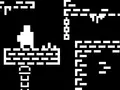
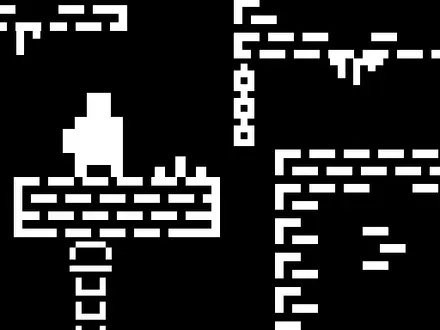
One Bit follows that idea closely. The character, the floor, the hanging chains, the key and the door are all white on black, and you can tell a key from a door from a patrolling enemy at a glance. It is not strict 1-bit, and it is worth being honest about that. The buttons have dark grey fills, locked levels are grey, and one colour breaks the rule entirely: the green flash when you save a checkpoint. That exception is well chosen. In a black-and-white game, the one coloured moment is the one you are meant to notice.
How the twenty levels grow
The game teaches one idea at a time, and you can see the plan in its level list.
- Levels 1 and 2 fit on a single screen: a key, a door and a few jumps.
- From level 3 the map is wider than the screen and the camera follows you.
- Level 4 adds water, which appears in most of the later levels and fills much more of the map by level 18.
- Level 6 brings the first enemy. Each enemy waits until you come close, then patrols a stretch bounded by walls.
- Levels 9, 13 and 15 each add a new enemy type, so by level 15 there are four kinds on one map.
- Level 17 is the only one with ladders.
- Level 20 adds the fifth enemy type and is one of the three widest maps in the game.
Finish it and a congratulations screen closes the game. There is no score or timer that we found, so the only thing to improve is how cleanly you get from key to door.
More games by hexapp
The game is credited to hexapp with the two-player duel Duel of Builders; elsewhere on the shelf, Brazen Ball is a timed platformer where a robot ball rolls through eight stages of saws and crushing gates, and Ship & Fish is a top-down dodge through shoals that never stop speeding up. If you want another pixel platformer, Mini Switcher replaces the jump with a gravity flip, and Super Onion Boy is a retro platformer about rescuing a princess past a line of monsters. More exploration games are in our adventure category.
Screenshots
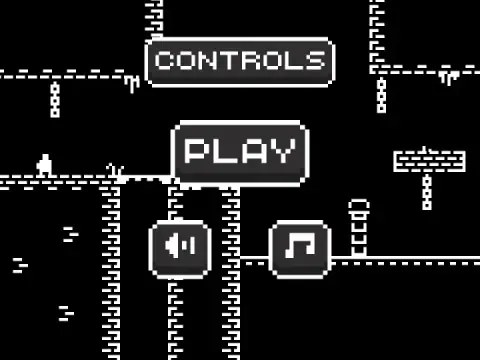
Taken by opening the game ourselves and letting it run — not supplied by the publisher, and not the same picture every other site shows.
How to play One Bit
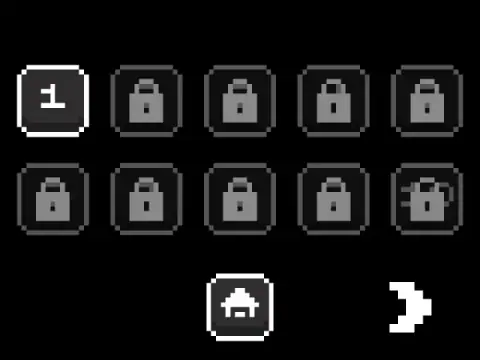
- Press PLAY, then pick level 1. Locked levels show a padlock until you finish the one before.
- Walk with A and D or the arrow keys, and jump with W or the up arrow.
- Touch the key. It disappears and the door at the other end of the level changes shape: it is open now.
- Reach the door to finish the level. Along the way, stand still and press C to save your one checkpoint.
Tips
- Watch the C button, not the key. While you move, the button in the top-left corner shows a padlock. Stop on solid ground and the letter C comes back. That is your cue.
- Spend the checkpoint after the hard part, not before it. You only get one. Saving at the start of a tricky jump sequence makes you repeat it anyway.
- A miss costs the whole level. In our run, one short jump sent the character back to the start with the key back in its place. On a one-screen level that is ten seconds; on a four-screen level it is the reason C exists.
- The first five levels have no enemies. Use them to learn exactly how far a jump carries. The first enemy arrives in level 6.
- Level 17 is the odd one. It is the only level with ladders, so it asks for a different rhythm from the rest.
Controls
| W / ↑ | Jump |
|---|---|
| A / ← | Walk left |
| D / → | Walk right |
| C | Save a checkpoint where you stand — only while standing still on the ground, and only once |
| Touch | On-screen left, right and jump buttons plus a checkpoint button (not tested on a phone) |
| Mouse | Menus only — Play, Controls, level select, pause, sound and music |
Features
- 20 levels unlocked in order, each built around one key and one locked door
- A single checkpoint, placed by you with C, and only when your character is standing still
- Maps grow from one screen in the first two levels to nearly four screens wide in the last three
- Five enemy types, introduced one at a time in levels 6, 9, 13, 15 and 20
- Water from level 4 onwards and ladders in level 17
- White pixel art on a black screen, in the tradition of 1-bit graphics
- Made by hexapp in Construct 3 and published in November 2023
Game details
- Developer
- hexapp
- Release date
- November 2023
- Added here
- January 2023
- Technology
- HTML5 (Construct 3, 800×600 landscape)
- Platforms
- Browser (desktop), Browser (mobile & tablet, touch)
- Download size
- 1.3 MB
- Ad requests
- 6 (some)
- Has a save
- Yes
- Saved progress
- Saving, when available, is managed by this game. Mava cannot confirm your level.
Measured by opening the game ourselves on 2026-09-10, not taken from the feed. Twelve seconds on a phone-sized screen, with ad requests counted and blocked rather than loaded.
FAQ
How do you play One Bit?
Walk with A and D or the arrow keys, jump with W or the up arrow, grab the key in each level and reach the door it unlocks. Press C while standing still to save one checkpoint. There are 20 levels, unlocked one after another.
What does the C key do in One Bit?
C saves a checkpoint at the spot where you are standing. It only works while your character is still and on the ground, the button shows a padlock while you move, and once you have used it the padlock stays even when you stop again.
How many levels does One Bit have?
Twenty, spread over two level-select pages of ten. They open in order, starting with level 1, and finishing the last one leads to a congratulations screen.
Why did One Bit send me back to the start?
A failed jump restarts the level, with the key back in its place. A checkpoint saved with C replaces the start as the place you return to, which is why it pays to save right after a hard section.
Is One Bit the same game as One Bit on Steam?
No. The browser One Bit is a 2023 Construct game by hexapp. One Bit on Steam is a different 2015 platformer by Veibyn about a character hunting a stolen pixel.
What does 1-bit mean in games?
A 1-bit image stores each pixel as a single bit, so it can only be on or off, which gives two colours, usually black and white. The original 1984 Macintosh had a 1-bit screen, and modern games such as Minit use the look on purpose.
Can I play One Bit on a phone?
It is listed as mobile-ready, and the game includes on-screen buttons for left, right, jump and the checkpoint. We have only tested it with a keyboard, so we cannot vouch for how the touch layout feels.
Who made One Bit?
hexapp, the name on the listing's Company field, in the game's author tag and in its package name. The same distributor credits hexapp with Duel of Builders, Challenging Track and Pacific Ocean Adventure.