

About Retro Run
Most runners hand you a pair of feet and a list of things to dodge. Retro Run hands you a ball as well, and the ball is the whole problem. You throw it to smash a way through the tunnel, you have to get it back, and the number of balls you still own is the only thing keeping the run alive.
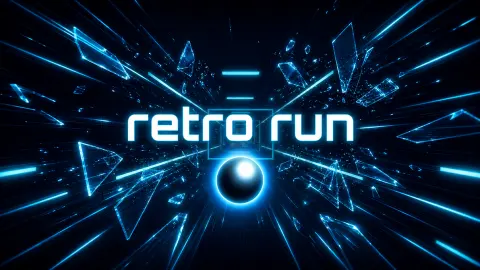
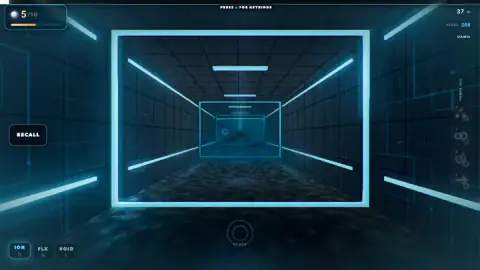
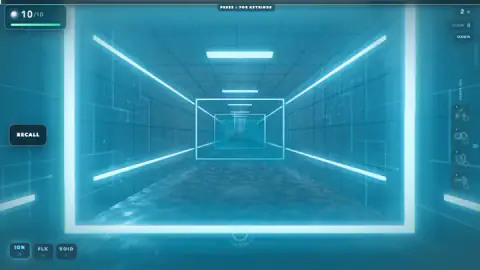
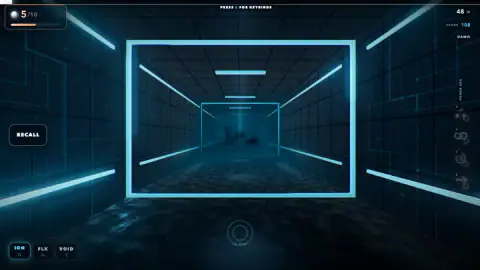
You see it all from inside: a first-person corridor of blue neon, with glowing square frames hanging in the air one after another until they blur into the distance. The orbs are the white spheres you throw down it. There are ten at the start of every run, the counter in the top left corner shows how many are left, and when it reaches zero the run ends with a screen that says OUT OF ORBS.
Retro Run is credited to Naythan & Yohan, and it was published in August 2026. We played six runs of the first real level, Dawn. None of them got far, and that turned out to be the most useful thing we learned.
The orb counter is your life bar
There is no health bar in Retro Run and no lives in the usual sense. The orb counter is both. It starts at 10 out of 10 and drops as orbs are lost.
It drops faster than you expect. In our runs the counter was already down to four before the 50-metre mark, and every run ended the same way, out of orbs, long before the end of the level.
Our furthest point was about 175 metres down the corridor.
The game's description says there are two ways to refill it. The recall key brings a thrown orb back before it is lost, and special crystals along the route restore orbs when you smash them. We never reached a crystal. In the run that went furthest, the counter still showed five at the 175-metre mark, so a careful run keeps half its orbs for a long way.
Score is not distance
The top right corner shows two numbers, metres and SCORE, and it is easy to assume they rise together. They do not.
In two of our runs, at almost the same point in the tunnel, around 50 metres, one score read 60 and the other 182. Three metres cannot explain a gap like that, so the points must come mostly from what you hit along the way. That changes what a good run looks like: a run that ends early with a lot smashed can beat a longer, more careful one.
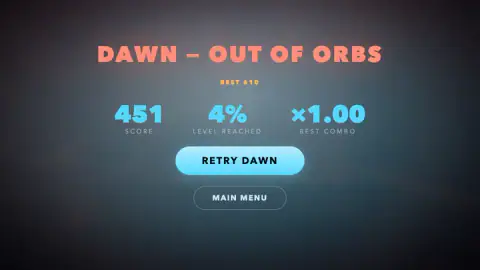
The end screen agrees. It reports three things: the score, LEVEL REACHED as a percentage of the whole level, and BEST COMBO. Our best run reached 11 per cent of Dawn and scored 610, the best score on our card.
The combo is the hardest of the three to move. It stayed at x1.00 in all but one of our runs, where it reached x1.25.
There is also a ring at the bottom centre of the screen with a beats-per-minute figure under it. In one run it read 85 BPM, with the word PERFECT above it. We cannot tell you exactly what the ring measures from six short runs, but a game that prints a tempo on screen and then grades you is telling you that timing counts.
Six levels, opened one at a time
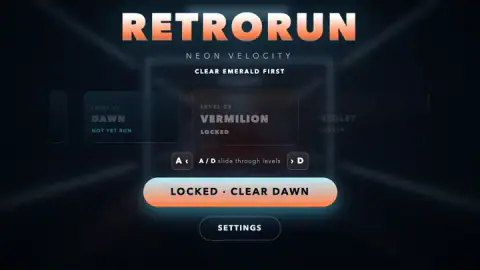
The menu, under the title RETRO RUN and the subtitle NEON VELOCITY, shows the levels as a row of cards:
| Level | Name | How it opens |
|---|---|---|
| 00 | Tutorial | Optional, open from the start |
| 01 | Dawn | Open from the start |
| 02 | Vermilion | Clear Dawn |
| 03 | Violet | Clear Vermilion |
| 04 | Emerald | Clear Violet |
| 05 | Midnight | Clear Emerald |
A locked card turns the big button into a message, such as LOCKED · CLEAR DAWN, so you always know what stands between you and the next level. Once you have played a level, its card shows your best score instead of NOT YET RUN.
A small detail we liked: the title on the menu takes the colour of the level you have selected. It is blue on Dawn, orange on Vermilion and green on Emerald, so each level seems to have a colour of its own. We only ever saw Dawn's blue tunnel from the inside.
What we did not see
We played Dawn six times and never finished it, so everything past it is a locked card to us. We did not play the tutorial. We did not use a power-up, reach a crystal or see what FLX and VOID do differently from ION, which was selected in every run. The power-up column on the right has four slots, and each one shows an F tag, which matches the instructions.
One more honest note on the controls. The game's instructions say the colours switch with 1, 2 and 3. The buttons on screen say Q, W and E. We did not test which set works, so try both.
Who it is for
Retro Run suits players who like a short, sharp attempt that they can repeat straight away, and who enjoy getting slightly better each time. The first level is harder than it looks, and the percentage on the end screen makes progress easy to measure.
It is a computer game first. Everything it shows you is a key or a mouse click, and that is how we played it. If you want a runner that is mostly about dodging, this is not it: here losing your orbs ends the run.
More games like Retro Run
Slope City 2 keeps the neon and the speed, with a ball rolling down a track instead of being thrown. Geometry Rash is another run split into levels that you clear one at a time. If the throwing is what you liked, Knife Smash is about aim and timing against spinning targets, and Yeti Run is an endless downhill run built around passing through gates. Every other quick-reflex game we carry is in the arcade category.
Screenshots
Taken by opening the game ourselves and letting it run — not supplied by the publisher, and not the same picture every other site shows.
How to play Retro Run
- On the menu, use A and D to slide through the level cards. Only the tutorial and Dawn are open at first; pick Dawn and press PLAY DAWN.
- Move left and right with A and D to line yourself up, according to the game's instructions, as the tunnel comes at you.
- Left-click to throw your orb at whatever stands in the way.
- Press Space or the RECALL button to call it back before you lose it.
- Switch orb colour with the ION, FLX and VOID buttons, and use a power-up from the column on the right with F.
Tips from our runs:
- Do the tutorial first. We skipped Level 00 and went straight into Dawn, and it showed: all six runs ended before a tenth of the level was behind us.
- Watch the counter, not the distance. In one run we were down to five orbs after only 37 metres. Recall early rather than waiting to see where a throw lands.
- Look for the key list. A line at the very top of the screen tells you which key opens the full list of keybinds. It is worth a look before your first run, because the written instructions and the on-screen buttons do not agree on the colour keys.
- Retry is instant. The end screen puts RETRY DAWN right under your score, so a bad run costs you seconds, not a trip through the menu.
Controls
| A and D | Slide through the level cards in the menu; the game's instructions say they also move you left and right in a run |
|---|---|
| Left click | Throw your orb, according to the game's instructions |
| Space or the RECALL button | Call the orb back, according to the game's instructions |
| Q, W, E | Switch between the ION, FLX and VOID orb colours, as labelled on the buttons in the bottom left corner (the written instructions say 1, 2 and 3) |
| F | Use a power-up from the column on the right, where every slot carries an F tag |
Features
- A first-person run down a neon corridor, through glowing square frames that keep coming at you
- Ten orbs at the start of every run, shown in the top left corner; lose them all and the run is over
- Three orb colours, ION, FLX and VOID, on their own buttons in the bottom left corner
- A power-up column on the right with four slots
- Six levels on the menu, from an optional tutorial to Midnight, each opened by clearing the one before
- An end screen that reports score, how far through the level you got as a percentage, and your best combo
Game details
- Developer
- Naythan & Yohan
- Release date
- August 2026
- Last updated
- August 12, 2026
- Added here
- June 2026
- Technology
- HTML5 (3D)
- Platforms
- Browser (desktop, keyboard and mouse)
- Classification
- Arcade
- Saved progress
- Saving, when available, is managed by this game. Mava cannot confirm your level.
FAQ
How do you play Retro Run?
Pick a level from the menu and press PLAY. You move forward down a neon tunnel and throw orbs to smash the frames and obstacles in your way, then call them back before you lose them. The run ends when the orb counter in the top left corner reaches zero, with a screen that says OUT OF ORBS.
What are the controls for Retro Run?
The game's instructions list A and D to move, left click to throw your orb, Space to recall it and F for a power-up. The colour buttons on screen show Q, W and E for ION, FLX and VOID, while the written instructions say 1, 2 and 3. In the menu, A and D slide through the levels.
How do you unlock Vermilion and the other levels in Retro Run?
Levels open in order. Vermilion stays locked with the message CLEAR DAWN until you finish Dawn, and Emerald asks you to clear Violet first. The tutorial, Level 00, is marked optional and is open from the start.
What happens when you run out of orbs in Retro Run?
The run stops and a screen titled with the level name and OUT OF ORBS shows your score, the percentage of the level you reached and your best combo. You can press RETRY to start the same level again from the beginning or go back to the main menu. Your best score is kept on the level card.
How do you get orbs back in Retro Run?
The RECALL button on the left, which the game's instructions put on Space, calls a thrown orb back to you. The game's description also mentions special crystals that restore orbs when you smash them. We did not reach one in our runs.
What do ION, FLX and VOID do in Retro Run?
They are the three orb colours, each with its own button in the bottom left corner. ION was the one selected in every run we played, and we did not see what the other two change, so we cannot say yet which obstacles each colour is for.
Can you play Retro Run on a phone?
The game's listing gives phones and tablets among its platforms, but the controls the game shows are all keyboard keys and a mouse click. We played it on a computer, which is where we recommend it.
Who made Retro Run?
Retro Run is credited to Naythan & Yohan. It was published in August 2026.