





About Slope City 2
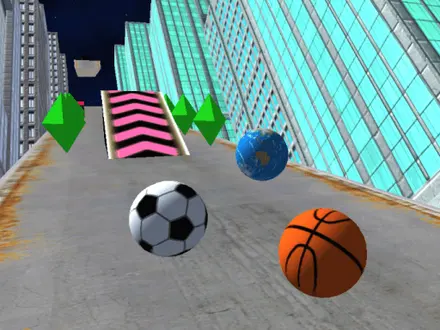
Most ball-rolling games put the track in empty space and let the colours do the work. Slope City 2 puts it on top of a city. The road is grey concrete with rusty edges, it runs between blue glass towers, and there is nothing at its sides. No rail, no wall, no kerb. The ball rolls forward by itself, you steer, and the moment it leaves the road it drops into the street far below.
So every decision is a sideways one. A row of green diamonds sits on the left, a red and black barrier blocks the middle, and you have a fraction of a second to pick a side. It is also fast to restart. We fitted ten runs into four minutes, and most of them ended between 20 and 35 metres, right around the first level sign.
Slope City 2 is by AYN Games, a studio that made a whole family of "Slope" games: a bike, a car, a cyber city. The studio published it on its own site in April 2022, four months after the first Slope City. The menu still carries a button to the studio's site and a poster for Slope Bike 2 marked HOT. We played it with a keyboard and with touch.
What LEVEL 0 and LEVEL 1 mean
The level counter at the top of the screen confuses people, because it never seems to go anywhere. Every run starts at LEVEL 0 and 0 metres. Somewhere in the first 30 metres a sign hangs over the road, a big LEVEL 1 banner fills the screen as you pass under it, and the counter changes. Then the road simply continues. There is no pause, no score screen and no stage select.
On the next run you are back at LEVEL 0. Nothing about the level carries over. What does carry over is shown on the menu between runs: the distance of the run you just finished, your best distance under it, and your diamond total in the top left corner.
That is the real progression in Slope City 2. Your best distance is the score you chase, and your diamonds are the savings you build. The levels are only milestones along the way, useful for knowing that the harder part of the road is about to start.
Where your diamonds go
Diamonds buy two different things, and they sit behind two different buttons on the menu.
UPGRADE sells power-ups. You start with two of each, and more cost:
| Power-up | What it does | Price |
|---|---|---|
| Shield | Protection for a short time; a glow wraps the ball and a timer bar appears | 500 diamonds |
| Magnet | Meant to pull diamonds towards the ball | 300 diamonds |
| x2 | Doubles the diamonds you collect while its bar runs | 200 diamonds |
The order of the prices tells you what the game values. Surviving is worth more than earning, so the shield costs the most. The x2 is cheapest because it only pays off if you are already staying on the road.
SHOP sells balls. You start with a basketball. The arrows below it show the others, locked, with a price underneath: a football for 100 diamonds, a multicoloured ball for 200, and a white and red one for 1,500. The prices do not rise in order as you browse, so look through them all before you spend.
You start with exactly enough for the football. After that, saving is slow. Over our ten runs the counter went from 100 to 139, and in an earlier session a 132-metre run brought in 17. That is roughly one diamond every eight to ten metres, so a new shield means several kilometres of road. Spend the ones you are given, and treat the shop as a long-term goal.
Slope, Crazy Roll 3D and Slope City 2: one idea, three games
If Slope City 2 feels familiar, that is because the idea behind it has a history.
Slope arrived on a big games site in September 2014, and it has been played more than 148 million times there. Its rules are the ones you know: a ball that moves on its own, left and right as the only controls, and a track that gets harder the longer you last.
Crazy Roll 3D, on a popular games portal since 2019 and described there as inspired by Slope, keeps those rules and adds diamonds to collect, plus a shield, a magnet and a double-diamonds boost.
Slope City 2 takes that same set of three power-ups, moves the road into a city, and adds a ball shop and level markers.
None of this makes Slope City 2 a copy of either game. It comes from a different studio, it looks different, and it is not a sequel to Slope. But it explains why the controls feel natural the first time you play: millions of people learned them years earlier.
Slope City 2 on a phone
AYN Games says this version was made lighter than the first Slope City so that it would run in mobile browsers. On a touchscreen, tapping PLAY and START works straight away, and a swipe steers the ball. In an earlier session our touch run reached 132 metres, more than twice our first keyboard attempt and longer than anything we managed later with the arrow keys. On a keyboard, both A and D and the arrows work.
There is nothing to install. It is a 3D game, so give it a few seconds to load the first time.
More ball runs and city runs
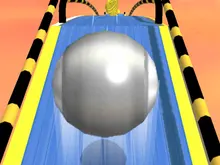
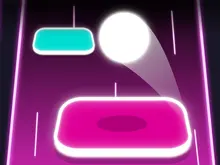
No other AYN Games title is on Mava Games at the moment, so here are games that share the idea. Roll Sky Ball 3D pushes a steel ball along floating tracks in the sky, with its own shop of ball skins. Hop Ball bounces a ball across tiles while you steer, and one missed tile ends the run. For running through a city on wheels instead, Skate Hooligans is a three-lane skate run through streets, a subway and an airport. More quick reflex games are in our arcade games.
Screenshots
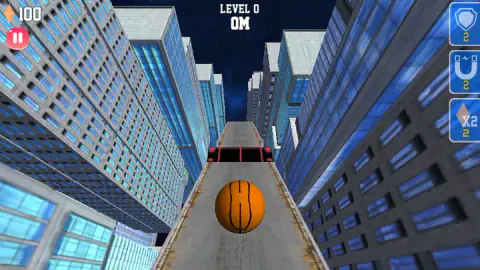
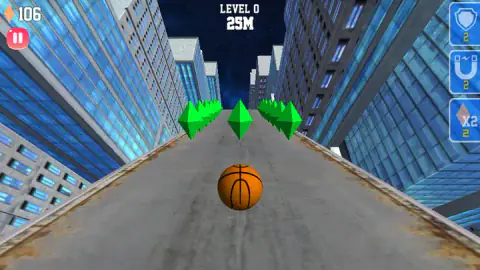
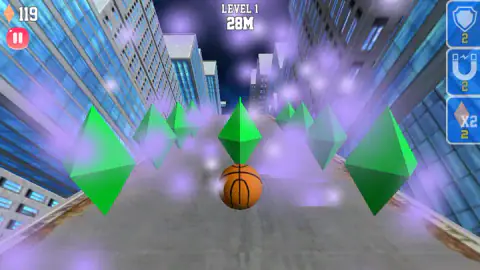
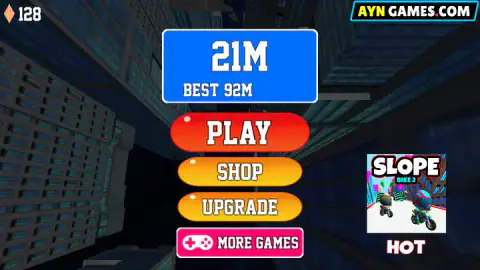
Taken by opening the game ourselves and letting it run — not supplied by the publisher, and not the same picture every other site shows.
How to play Slope City 2
- Press PLAY. A HOW TO PLAY screen shows the keys. Press START to go.
- Steer. A and D or the arrow keys move the ball left and right. On a phone or tablet, swipe.
- Stay on the road. There are no walls. If the ball rolls off the edge, it falls and the run is over.
- Collect the green diamonds. They are your money for power-ups and new balls, and they stay with you between runs.
- Use your power-ups. The three buttons on the right edge fire a shield, a magnet or double diamonds, and each shows how many you have left.
Tips from our runs:
- Steer in short taps. The road is only a few ball-widths wide, and a long press carries you across it. Our longest run, 132 metres, came from small corrections.
- Get past the first 30 metres. The LEVEL 1 sign is where the road starts to fill up: rows of diamonds on both sides, barriers across the middle. Most of our short runs died there, so that is the stretch to learn first.
- Go through the middle of a diamond row. Rows often line both edges with a single diamond in the centre. The centre line collects it and keeps you away from the drop.
- Spend the free power-ups. You start with two of each, and an unused shield at the end of a run is a wasted one.
- Turn on x2 where the diamonds are thick. It lasts a short time, shown by a bar at the top of the screen, so save it for a long row rather than a single gem.
- Look past the ball. Barriers show up well before you reach them. Choosing your side early is safer than dodging at the last second.
Controls
| A / D or Left / Right arrows | Steer the ball |
|---|---|
| Swipe left or right | Steer on a touchscreen |
| Shield, magnet and x2 buttons (right edge) | Use a power-up you own |
| Pause button (top left) | Pause the run |
Features
- The ball rolls forward on its own, so steering is the only thing you control
- No walls at the edges of the road, so one slip off the side ends the run
- Distance counted in metres, with your last run and your best shown on the menu
- Every run starts again at LEVEL 0, and the LEVEL 1 sign comes up within the first 30 metres
- Diamonds carry over between runs, starting from 100 in your pocket
- Three power-ups: shield (500 diamonds), magnet (300) and double diamonds (200), with two of each to start
- A ball shop where the prices we saw ran from 100 to 1,500 diamonds
Game details
- Developer
- AYN Games
- Release date
- April 2022
- Added here
- April 2022
- Technology
- HTML5 (Unity WebGL)
- Platforms
- Browser (desktop), Browser (mobile & tablet, touch)
- Download size
- 8 MB
- Ad requests
- 2 (few)
- Has a save
- Yes
- Saved progress
- Saving, when available, is managed by this game. Mava cannot confirm your level.
Measured by opening the game ourselves on 2026-09-10, not taken from the feed. Twelve seconds on a phone-sized screen, with ad requests counted and blocked rather than loaded.
FAQ
What is Slope City 2?
A free 3D browser game by AYN Games, published in April 2022. A basketball rolls by itself along a concrete road high above city streets, and you steer it left and right to stay on the road and pick up green diamonds. The run ends when the ball falls off the edge.
How do you play Slope City 2?
Press PLAY, then START on the HOW TO PLAY screen. Steer with A and D or the arrow keys, or swipe on a phone or tablet. Keep the ball on the road, collect the diamonds, and use the shield, magnet and x2 buttons on the right edge when you need them.
How do levels work in Slope City 2?
Levels are markers on the road, not separate stages. Every run begins at LEVEL 0, and a LEVEL 1 sign appears over the road within the first 30 metres. The road carries on through it without stopping, and the count goes back to zero on the next run.
What do the power-ups do in Slope City 2?
The shield wraps the ball in a glow for a short time, shown by a timer bar, and x2 doubles the diamonds you collect while its own bar runs. The magnet is meant to pull diamonds towards you. You start with two of each, and more cost 500, 300 and 200 diamonds on the UPGRADE screen.
How do you get new balls in Slope City 2?
Open SHOP from the menu and use the arrows to browse. You start with a basketball, and the others are locked behind diamond prices. The ones we saw ranged from 100 diamonds for a football to 1,500 for a white and red ball.
Is Slope City 2 the same game as Slope?
No. Slope is a different game, online since 2014, with a ball on a neon track. Slope City 2 is by AYN Games and shares the basic idea, a ball you only steer left and right, but adds a city setting, diamonds, power-ups and a ball shop.
What is the difference between Slope City and Slope City 2?
Slope City 2 came out four months after the first Slope City. AYN Games rebuilt the city, added the ball shop and diamonds you spend on power-ups, made the game lighter so it runs in mobile browsers, and changed the music.
Can you play Slope City 2 on a phone?
Yes. Tapping PLAY and START works on a touchscreen, and a swipe steers the ball. In one of our sessions a touch run reached 132 metres, longer than any of our keyboard runs.