



About Grand Escape!
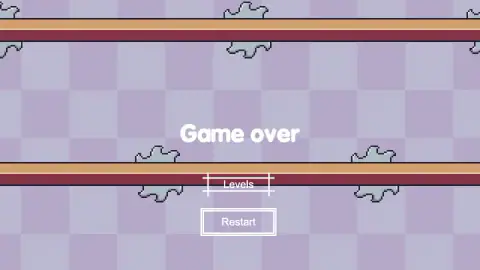
Four minutes with Grand Escape and the Game over screen had come back fifteen times. It is two words in white on a pale purple checkerboard with two buttons under them, Levels and Restart, and no sound at all. This game does not play a noise when you die. One sound played when it opened and that was the entire soundtrack of our session.
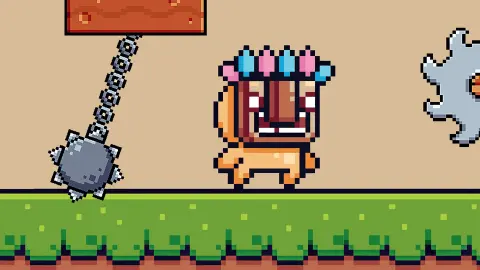
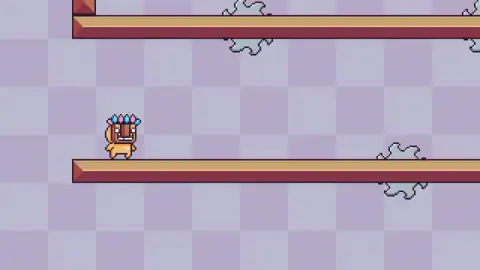
The game itself is as plain as that screen. A small tan four-legged animal, its head hidden behind a carved wooden mask crowned with pink and blue feathers, walks left and right on wooden beams while you press arrow keys. Up jumps. Press up again in the air and you get a second jump. Nothing on screen counts anything: no clock, no lives, no score, no coins, not even the number of the stage you are on.
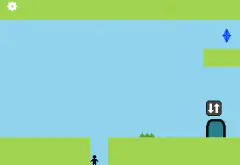
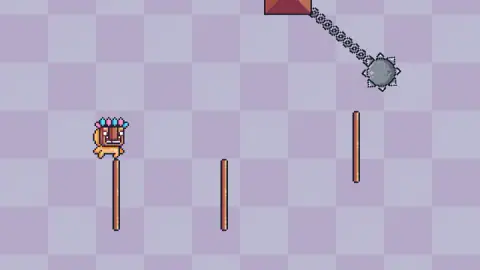
What makes it worth a look is how fast the ground changes. The opening stage is long horizontal beams with a drop between them — the gentlest shape a platformer can take. Click the Levels button on the Game over screen, jump ahead a few stages, and the floor is simply gone: three thin vertical poles standing in empty space, a few pixels of surface each, with a grey stone ball studded with spikes hanging from a chain at the top of the screen and swinging across your route. The same controls, a completely different game.
It was made by a developer listed as WhatAI. Grand Escape went up in December 2024, was last touched in August 2026. It is built with Construct, and it is small enough that the stage appears the moment you finish clicking through the opening screens.
One thing to say plainly before anything else: in four minutes we never finished a level. Most of what follows is about why.
The double jump is forty years old, and on the pole stage it is the whole game
A double jump is physically ridiculous. You are already in the air, with nothing to push against, and you jump again. Every player accepts it without blinking, because it has been in games longer than most of the people playing them.
It arrived in Dragon Buster, a Namco arcade game that reached Japanese arcades around the turn of 1984 into 1985. Its hero, a young swordsman called Clovis, could kick off nothing halfway through a leap, and Guinness World Records lists him as the first character ever to do it. The game is otherwise remembered for a different innovation — it was among the first to draw your health as a bar you could watch drain — but the jump is what every platformer since has borrowed.
Designers kept it for a reason that has nothing to do with physics. A single jump is one irreversible decision: you choose your run-up, you leave the ledge, and from then on you are a projectile. A double jump splits that decision in two. You can leave early and fix it, or leave late and still stretch. The commitment moves from the edge of the platform into the air, which is where you can see what you are doing.
That is exactly what the pole stage is built around. The surfaces are a few pixels wide and there is no floor underneath to catch a bad landing, so the first jump cannot be a guess — and it does not have to be, because the second press is still in your pocket. Save it, and a jump that was going to land short becomes a jump that lands. Spend it at the top of the first arc, which is what holding the key down does, and you fall out of the sky with nothing left.
There is a second thing a double jump gives a designer, and this game uses it: a hazard that moves. The spiked ball swings across the gap on its chain, so the question is not only how far you can reach but when you should be there. With one jump, that would be a timing puzzle with a single correct frame. With two, you can launch early, hang, and take the second jump once the ball has gone by.
Dying costs nothing and teaches nothing
The restart in this game is as fast as a restart gets. You press Restart and you are at the start of the stage — no loading, no fade, no animation, no tally of how many times you have tried. That matters more than it sounds. The whole genre of precision platformers runs on a simple trade: the levels are allowed to be unfair as long as the retry is faster than your irritation.
Grand Escape gets the speed right and leaves out everything else. There is no checkpoint we saw, so a fall ten seconds in costs you those ten seconds from the top. There is no sound to mark the failure, which makes the loop oddly quiet — you do not hear that you died, you read it. And because the Game over screen looks the same whichever way you went, the game never tells you whether the problem was the gap or the ball.
So you have to keep your own notes. Ours, after four minutes, came down to one line: stop holding the key.
What the game says about itself, and what we saw
Its page promises vibrant levels, odd beings and a fascinating realm. What we found was a purple checkerboard, grey cloud shapes, wooden beams and one masked animal — handsome in a plain pixel way, but the decoration is not why you would stay. The same page says the game runs on computer and mobile, while the platform field directly above says PC, and our own listing has it down as a game without touch controls. The controls are arrow keys. We played on a desktop and would not plan a phone session around it.
Where the provider is exactly right is the short technical note: arrow keys, a double jump, K to restart, progress saved by returning to the level menu. That is a real description of a real game, which is more than most blurbs manage. Two of those four we confirmed ourselves; the K key did nothing we could detect, and we never finished a stage, so the save is still its word rather than ours.
More platformers that make you repeat the same ten seconds
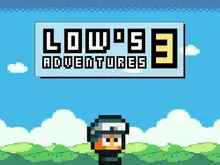
Pixel Path hides spikes, saws and falling blocks along a walk that looks empty until it is not. Low's Adventures 3 is the long, generous opposite — thirty-two levels, an umbrella, wings and progress that actually sticks. One Bit hands you the checkpoint instead, letting you drop your own restart point wherever you decide the hard part begins. The rest live in arcade games.
Screenshots
How to play Grand Escape!
- Click through the opening screens. Ours took five clicks, alternating between the middle of the screen and a point lower down, each one changing what was on it.
- Walk with the left and right arrows. The masked animal turns to face the way it is going, which is the only feedback you get.
- Press up to jump, and press up a second time while you are in the air for the double jump. The game's instructions name it, and it is what gets you across a gap wider than one arc.
- When you fall or get hit, the stage vanishes and Game over appears. Restart puts you back at the start of the same stage; Levels opens the grid, where some stages are still shut.
- Finish a stage and go back to the level-select menu. That, according to the instructions, is the moment your progress is kept.
What we only found out by doing it:
- Holding the up arrow is not a double jump. We held keys down for a second and a half at a time and kept going up and straight back down onto nothing. Two separate taps, with a gap between them, is the move.
- The Levels button is a shortcut and a trap. We used it to skip ahead and landed on the pole stage, which is several difficulty steps above the beams we had been failing on.
- Nothing tells you anything. No timer, no attempt counter, no hint about what killed you. The Game over screen is identical whether you fell or were hit.
- If the game freezes with a dark bar reading "Click to keep playing", it has paused itself. One click in the middle of the screen brings it back. Nothing is broken.
- Hold right while you jump. Jumping straight up from a pole puts you back on the same pole, if you are lucky.
Controls
| Left and right arrows | Walk |
|---|---|
| Up arrow | Jump. Press it a second time in mid-air for the double jump the game's own instructions name |
| K | The instructions say it restarts the level. We pressed it and got nothing we could confirm, so we used the on-screen button |
| Mouse click | Gets you through the opening screens, and brings the game back when it pauses itself with a "Click to keep playing" banner |
| Restart and Levels | The two buttons on the Game over screen. Restart drops you at the start of the same stage; Levels opens the grid of stages |
Features
- Two completely different kinds of ground in one short session: long wooden beams with drops between them, and a stage with no floor at all where you stand on top of thin vertical poles
- A double jump, named in the game's own instructions and the only way we found to leave a pole and still change direction
- A grey spiked ball on a chain swings across the pole stage, and it is the one hazard that moves while you think
- Nothing on screen counts anything: no clock, no lives, no score, no coins, no level number while you play
- Dying is silent. One sound played when the game opened and that was the whole soundtrack of our four minutes
- The Game over screen is two buttons, Levels and Restart, and the retry is instant: no loading, no animation, no penalty
- Progress is saved by going back to the level-select menu after finishing a stage, according to the game's instructions — we never finished one, so that part is its word
Game details
- Developer
- WhatAI
- Release date
- December 2024
- Last updated
- October 23, 2026
- Added here
- April 2025
- Technology
- HTML5 (Construct)
- Platforms
- Browser (desktop)
- Saved progress
- Saving, when available, is managed by this game. Mava cannot confirm your level.
FAQ
How do you play Grand Escape?
You move a small masked animal through a side-on level with the arrow keys: left and right walk, up jumps, and a second press of up in mid-air gives you a double jump. The aim is to reach the end of the stage without falling into a gap or touching a hazard. Touch either and a Game over screen appears with two buttons, Restart and Levels.
What are the controls in Grand Escape?
Arrow keys only. Left and right walk, up jumps, and pressing up again while you are in the air triggers the double jump. The game's instructions also say the K key restarts a level; we pressed it without getting a result we could confirm and restarted from the button on the Game over screen instead.
How does the double jump work in Grand Escape?
It is a second jump you can take after you have already left the ground, so a jump stops being one irreversible decision and becomes two. Holding the up arrow down is not the same thing as two separate taps, which is a mistake we made over and over. On the stage where you stand on bare poles, that second press is the only way to correct your line in mid-air.
Does Grand Escape save your progress?
The game's own instructions say progress is saved when you go back to the level selection menu after completing a level, which means finishing a stage is the act that commits it. We never completed one in our session, so we cannot confirm it from our own play. The Levels button on the Game over screen is what opens that menu.
What happens when you die in Grand Escape?
The level disappears and the words Game over sit in the middle of the screen with two buttons under them: Levels, which opens the stage grid, and Restart, which puts you straight back at the beginning of the same stage. There is no sound, no score and no count of attempts. The retry is instant, with no loading screen between the failure and the next try.
Who made Grand Escape?
A developer listed as WhatAI. Grand Escape went up in December 2024, was last updated in August 2026. It is built with Construct.
Can you play Grand Escape on a phone?
We would not count on it. The controls are arrow keys and a double jump, the listing's platform field for the game says PC, and our own listing has it down as a game without touch controls. The blurb on its page claims it runs on computer and mobile, which contradicts the platform field on that same page, and we played on a desktop so we cannot settle it.
Is Grand Escape hard?
Harder than it looks from the first screen. The opening stage is wide wooden beams with gaps between them, but the stage we reached through the Levels menu has no ground at all — three thin poles to land on and a spiked ball swinging past on a chain. We saw the Game over screen fifteen times in four minutes and never finished a level.