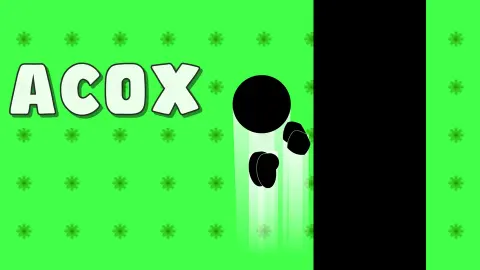










About Acox
Most short platformers make you learn each level by falling into it. Acox draws the answer on the screen before you start. Every level has a row of faded copies of the character painted into it, frozen mid-step, and they show you exactly where to go. The hard part is doing it.
The look is stripped back to almost nothing. A purple background covered in rows of dots, flat black platforms, a small black figure with a round head, and one yellow gem. A counter at the top says which of the 30 levels you are on, and a green button in the top right corner restarts it. There is no score, no timer we could see and no coins to collect.
That leaves one question per level: how do I get from here to the gem without falling? The first level answers it with a walk. The second already asks for a jump across a gap between two pillars, and that is where we spent most of our time.
Acox is made by artupdev. It was published at the end of August 2026.
The faded figures show you the route
The first thing you notice in Acox is that the character seems to have company. Next to it, a line of paler silhouettes stands on the platform, getting darker the further they go.
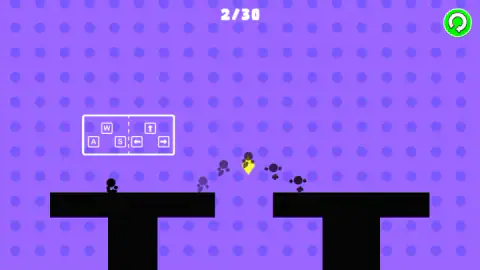
They are not other players and they are not a trail. We compared screens taken at different moments of the same level: the real character had moved, and the faded figures were in exactly the same spots. They are part of the level, a picture of the route.
On level 1 they walk in a straight line along the platform, through the gem. On level 2 they leave the edge of the left pillar, rise in a curve, pass straight through the gem hanging in mid-air, and land on the right pillar. That curve is the whole lesson of the level: the gem is not on the ground, so you can only touch it by jumping at the right moment, and the same jump lands you safely on the other side.
It is a kind way to teach a platformer with no text. The game never tells you to jump. It shows you a body in the air.
Failed, Restart and the Skip button
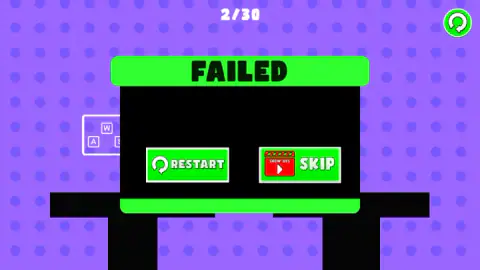
Falling off a platform does not cost you anything we could see: there is no lives counter on screen. The level stops and a big FAILED panel drops over it with two green buttons. Restart puts you back at the start of the same level straight away.
Skip is the other choice, and it is not free. The button carries a red clapperboard badge with the words Show Ads, which means you watch an advert to jump to the next level without beating this one. When we pressed it, no advert was available. The game showed "Oops! No ads available right now" with a Continue playing button, and we were still on level 2.
Adverts also appear without asking. Between the end of level 1 and the start of level 2, the screen went black for an ad break before the next level loaded. If you want to clear the 30 levels without watching any, Restart is the button to use.
What we played and what we did not
Our run lasted about four minutes. We cleared level 1, sat through one ad break, and failed level 2 several times by holding right instead of jumping the gap. We tried Skip once, got the no-ads message, and stopped there.
So we never saw levels 3 to 30. The game's description promises obstacles, and the second level's two pillars are the only one we met. We heard no sound effects, and we did not try the touch controls. What we can say from playing is how Acox teaches: each level is one screen, one gem and one route drawn in shadows, and the challenge is in the timing, not in finding the way.
Who Acox is for
Acox suits players who like tiny, clean levels they can retry in a second, and younger players who are still learning that a platformer is about jumping at the right spot. The shadow route means nobody gets stuck wondering where to go.
It is not a game with a story, upgrades or characters to unlock, at least not in the levels we reached. If you want a platformer that changes the rules as you go, the games below do more.
More games by artupdev
Gravity Speed Run is the same developer's game about flipping gravity to run along the floor or the ceiling of a track. Stickman Jump keeps the jumping but makes the character sprint on its own, so the timing is all yours. Tap tap Swing turns it into a one-touch flying game: hold to hover, let go to fall. Short-level games built on one more try live in the arcade category.
Screenshots
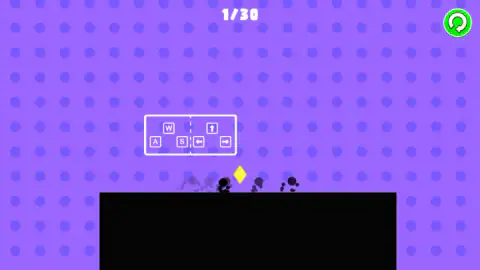
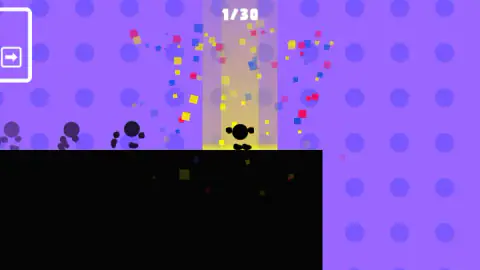
Taken by opening the game ourselves and letting it run — not supplied by the publisher, and not the same picture every other site shows.
How to play Acox
- Click the game once to start. Level 1 opens with a tutorial card showing the keys.
- Move with D or the right arrow, and A or the left arrow. The card shows W and the up arrow as the third key, the one for getting into the air.
- Look at the faded silhouettes before you move. They trace the path to the gem.
- Touch the yellow gem. A column of light and a burst of coloured squares tell you the level is cleared, and an arrow card in the top left corner takes you on.
- If you fall, the FAILED panel gives you Restart or Skip. Skip needs an ad.
Tips from our run:
- Hold the key down. Our first presses did not seem to move anything. On the first level, it was holding D for about a second and a half that carried the character to the gem.
- Copy the shape of the shadows, not just the direction. On level 2 the faded figures rise in an arc over the gap. We kept holding right without jumping, dropped into the gap every time, and saw the FAILED panel again and again.
- The tutorial card is a little odd. It prints W, A and S on one side, where you would expect W, A and D, and up, left and right arrows on the other. D works all the same.
- Use the restart button instead of waiting. The green circle in the top right corner is always there and is quicker than playing out a bad jump.
Controls
| D or Right arrow | Move right; holding D is what carried us to the gem on level 1 |
|---|---|
| A or Left arrow | Move left |
| W or Up arrow | Shown on the tutorial card as the up key, the one for jumping a gap |
| Green circular button (top right) | Restarts the level |
| Touch screen | According to the game's instructions, on-screen touch controls on phones and tablets |
Features
- Thirty levels, numbered at the top of the screen, each one a single screen of black platforms on a purple background
- The goal of every level is a small yellow gem; touching it lights a column of yellow light and a burst of coloured squares
- Faded silhouettes of the character are drawn into each level and never move, tracing the route you are meant to take
- Falling off a platform ends the attempt with a FAILED panel and two choices, Restart or Skip
- Skip is paid for with an ad, marked by a red Show Ads badge on the button
- A restart button in the top right corner resets the level at any moment
- Made by artupdev, the developer behind Gravity Speed Run, Stickman Jump and Tap tap Swing
Game details
- Developer
- artupdev
- Release date
- August 2026
- Last updated
- September 1, 2026
- Added here
- August 2026
- Technology
- HTML5 (2D)
- Platforms
- Browser (desktop, keyboard), Browser (mobile & tablet, touch)
- Classification
- Arcade
- Saved progress
- Saving, when available, is managed by this game. Mava cannot confirm your level.
FAQ
How do you play Acox?
You move a small black silhouette with the keyboard and try to touch the yellow gem in each level. When you reach it, a column of light and a burst of coloured squares mark the level as done and the counter at the top moves on. If you fall off the platforms, the level ends with a FAILED panel.
What are the controls in Acox?
On a computer you move with WASD or the arrow keys, and the tutorial card on screen shows the up key for jumping. The green circular button in the top right corner restarts the level. The game's instructions say phones and tablets get on-screen touch controls.
How many levels does Acox have?
Acox has 30 levels, and the counter at the top of the screen shows where you are, starting at 1/30. Each level unlocks the next one. We cleared the first level and spent the rest of our run on the second.
What are the grey shadow figures in Acox?
They are a route hint. Each level has faded copies of the character drawn into it, and they stay in the same place whatever you do. On the first level they walk straight to the gem; on the second they arc through the air across a gap, which tells you that level needs a jump.
Can you skip a level in Acox?
Yes, but it costs an ad. After a fall, the FAILED panel offers Restart and Skip, and the Skip button carries a red Show Ads badge. In our run no ad was available, the game said so, and we stayed on the same level.
Who made Acox?
Acox is made by artupdev. It was published on 31 August 2026.
Can you play Acox on a phone?
The game's instructions say it has on-screen touch controls for phones and tablets, and it needs no download. We played it with a keyboard, so we cannot say how the touch buttons feel.