







About Buttons
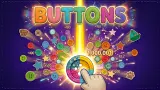
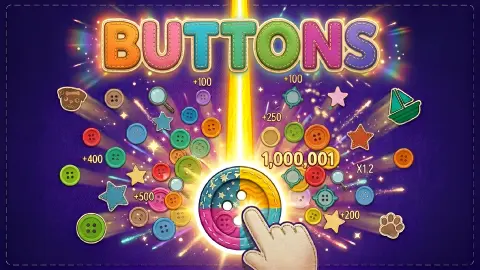
A peg board is normally a machine for luck. Something falls in, the pegs knock it about, and you watch. Buttons keeps the pegs and takes back some of the luck: between levels it hands you cards, and you decide which single peg each card is pinned to.
That choice is the game. Every peg carries a number, and they all start at 1. A card can turn one of them into something else. We pinned a +20 Points card to an ordinary peg and the peg under it read 21.
The rest is a fight with a health bar. A monster sits on a felt patch at the top of the board with a number under it. You have a small stock of sewing buttons and a board of pegs to bring that number down.
An honest note before the rules. We played for about four minutes. We beat the first monster, picked three cards and pinned two of them on level 2. We did not finish level 2, we never lost, and we did not capture a button in flight, so this page does not describe how a button travels.
The game is credited to Ascabyrazygess. It was published in May 2026.
The monster's bar grows faster than the board
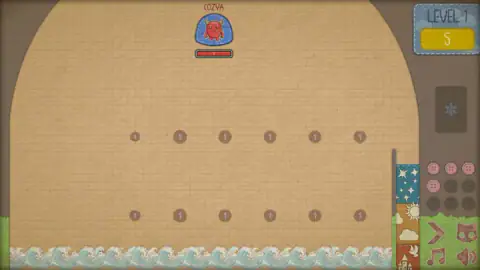
The first level is gentle on purpose. The monster is a red, horned thing named COZYA, and its bar reads 5. Under it are 12 pegs in two rows of six.
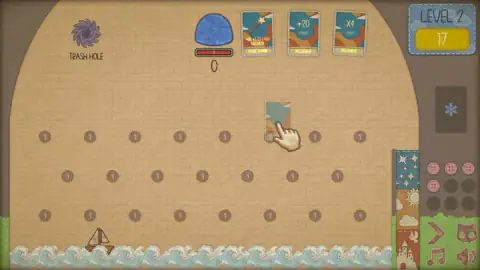
Level 2 is a different sum. The bar read 17, more than three times the first one. The board had grown to 23 pegs in three staggered rows, which is not even double.
Every one of those pegs still read 1. If the number on a peg is what a hit is worth, as the game's description suggests, then the first level asks for fewer than half of the points on its board. The second asks for about three quarters. The margin shrinks, and the cards are how you widen it again.
We cannot tell you what level 3 asks for. We did not get there.
Six cards we were offered, and what two of them did to a peg
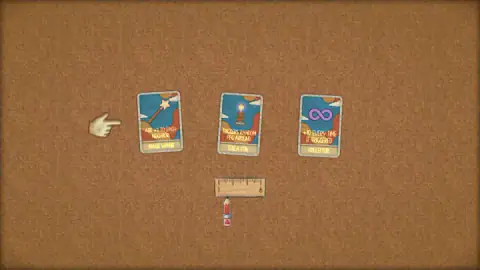
After COZYA went down, the game dealt cards three at a time. The first set was the interesting one:
| Card | What it says |
|---|---|
| Magic Wand | Add +3 to each neighbor |
| Tesla Coil | Triggers random peg around |
| Collector | +10 every time it triggered |
A pointing hand marked Magic Wand, and we took it. The last set was plainer: X2, X3 and X4 Points, each labelled Peg Bonus. The hand marked X4 and we took that too. In between we picked up a +20 Points card with the same Peg Bonus label.
Then level 2 opened and the three cards sat in a row above the board.
Magic Wand went onto the sixth peg of the middle row. The peg changed shape: it became a star with a pink centre. Its number stayed at 1, and so did the numbers on the pegs around it. We take that to mean the wand adds its 3 to the neighbours when the star is hit, not when it is placed. We did not see it fire.
+20 Points went onto a peg in the top row, and this one changed straight away. The peg read 21. That single peg was now marked higher than the monster's whole bar of 17.
X4 Points was still in our hand when we stopped. The obvious question is whether it would have turned the 21 into 84 on the same peg. We do not know if two cards can share a peg, and it is the first thing we would try.
Tesla Coil and Collector we only read. We cannot say how they behave on the board.
Why choosing the peg matters: the Galton board
The peg board is older than any video game. Francis Galton showed one at the Royal Institution in London in 1874, and drew it in his 1889 book Natural Inheritance. Beads fell through rows of pins and piled up in a bell shape at the bottom: many in the middle, few at the edges.
His point was that nobody steers a bead. Each pin sends it left or right, and the pile takes the same shape every time. Plinko and pachinko are built on the same pins.
Buttons leaves the bouncing alone and changes what a pin is worth. On a board where every peg reads 1, the path hardly matters. Once one peg reads 21, it matters a great deal, and you are the one who decided where that peg is. The staggered rows of level 2 are Galton's layout. The 21 is not.
What we could not work out
Several things on screen never explained themselves in four minutes.
- The sailboat. A paper boat sits on the waves under the pegs, in a different place every time we looked. We never saw a button reach it.
- The Trash Hole. A purple swirl with that label appears in the top left corner on level 2. We did not use it.
- The ruler. On the card screen a ruler marked 1 to 6 hangs under the cards, with a red pencil at the 1. It did not move between picks.
- The snowflake slot. A dark slot with a snowflake sits above the button stock. It stayed empty.
- The empty slots. Five of the nine button slots are numbered 5 to 9 and greyed out. We did not find out how they fill.
Who it is for
It suits players who like the planning more than the launch. The quiet minute before level 2, with three cards and 23 pegs to choose from, is where the game asks the most of you.
It is not a reflex game, and there was no gun or crosshair in anything we saw, whatever the shelf it is filed on elsewhere. The look is its own: graph paper, stitched denim labels, felt and cardboard. The screen is laid out wide, and we played it with a mouse on a desktop.
If you want a peg game that explains every icon before you start, this one will test your patience for the first few minutes. It did ours.
More games with pegs, bricks and bounces
Bounce Up! is the closest relative, a pixel-art pachinko where coins from each run buy upgrades for the next. Balls: Ricochet! swaps pegs for numbered blocks that drop a row every turn. Bricks Buster does the same in separate levels. Flippee Ball crosses pinball with basketball. The rest are in the arcade games category.
Screenshots
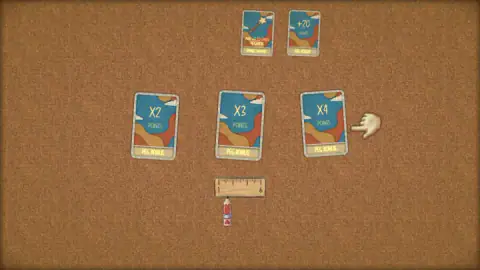
Taken by opening the game ourselves and letting it run — not supplied by the publisher, and not the same picture every other site shows.
How to play Buttons
- Read the monster's bar. The number under the monster is its health, and the yellow box under the level name repeats it.
- Use the left mouse button on the board to play a button from your stock. The game's description says every peg a button strikes takes health off the monster.
- When the monster is beaten, a card screen opens. Click one card from each set of three.
- On the next level your cards wait in a row at the top. Pin each one to a peg. A pointing hand shows the route the first time.
- Play your buttons again, now through a board you have changed.
Tips from our session:
- Pin the cards before anything else. On level 2 the patch at the top stayed empty and the damage counter stayed at 0 while we still held cards. We spent most of our four minutes clicking the cards themselves before we understood they belong on pegs.
- Follow the hand once. It carries a faded copy of the card from the top row down to a peg. Copy that and the card leaves your hand.
- Check the peg after you pin. The change is visible at once. A peg with a new number, or a new shape, has taken its card.
- Count your buttons on the right. The side panel has nine slots. Four held a pink button at the start of both levels we saw.
Controls
| Left mouse button on the board | Plays a button from your stock into the pegs |
|---|---|
| Click a card on the pick screen | Takes that card; a pointing hand marks one of the three |
| Card from the row at the top, onto a peg | Pins the card to that peg and changes it; the pointing hand shows the route the first time |
| Chevron, cat, note and speaker icons (bottom right) | Four small icons beside the board; we did not press them, the last two look like music and sound |
Features
- A peg board drawn as a scrapbook, with graph paper, felt patches, paper waves and a stock of pink sewing buttons
- A monster with a numbered health bar on each level, 5 on the first and 17 on the second in our run
- Three card picks after the first monster, including Magic Wand, Tesla Coil, Collector and X2 to X4 multipliers
- Cards that are pinned to a single peg of your choice instead of applying to the whole board
- A +20 Points card that turned a peg marked 1 into a peg marked 21
- A level 2 board of 23 pegs in three staggered rows, up from 12 pegs on level 1
- A Trash Hole in the corner of the board and a side panel with nine button slots, four of them filled at the start
Game details
- Developer
- Ascabyrazygess
- Release date
- May 2026
- Last updated
- June 22, 2026
- Added here
- March 2026
- Technology
- HTML5 (2D)
- Platforms
- Browser (desktop, mouse), Browser (mobile & tablet)
- Classification
- Arcade
- Saved progress
- Saving, when available, is managed by this game. Mava cannot confirm your level.
FAQ
How do you play Buttons?
You play with the left mouse button. Each level puts a monster with a numbered health bar above a board of pegs, and you send buttons from a small stock into the pegs to bring the bar down to zero. After a win the game offers cards, and on the next level you pin each card to a peg before you play.
What do the cards do in Buttons?
The cards change single pegs. We were offered Magic Wand (adds 3 to each neighbour), Tesla Coil (triggers a random peg nearby), Collector (10 more every time it is triggered), a +20 Points card and multipliers from X2 to X4. When we pinned the +20 card to a peg marked 1, the peg read 21.
How do you place a card on a peg in Buttons?
At the start of the next level your cards sit in a row at the top of the board. A pointing hand shows a card travelling from that row down to a peg, and that is the move the game wants. Our Magic Wand turned its peg into a star and our +20 card raised its peg to 21.
How many levels does Buttons have?
We cannot give a total. We cleared level 1, where the monster had 5 health, and reached level 2, where the bar read 17. A ruler on the card screen is marked from 1 to 6, but nothing we saw confirms that it counts levels.
What happens when you run out of buttons in Buttons?
The game's description says the run is over if you use every button before the monster is beaten. We did not lose a level, so we have not seen that screen. The side panel showed four pink buttons at the start of both levels we played, with five more numbered slots left empty.
What is the Trash Hole in Buttons?
It is a purple swirl labelled Trash Hole in the top left corner of the board, and it appears from level 2, once you are holding cards. The game did not explain it to us and we did not use it, so we will not guess beyond the name.
Is Buttons free, and who made it?
It is free and runs in the browser with nothing to install. The game is credited to Ascabyrazygess. It was published in May 2026.