







About Cut It All 3D
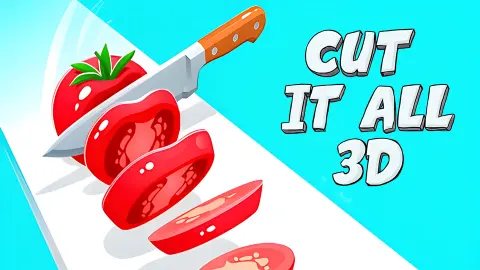
Most knife games make you chase the food. Cut It All 3D does the opposite: the knife stays put and the food comes to it. A broad chef's knife with a dark riveted handle hangs in exactly the same spot on the screen for a whole run, and a narrow white track slides beneath it, loaded with fruit.
That fixed blade is the thing to understand first. You never steer it and you never move it around the screen. Your job is the timing of the cut, while apples, bananas and watermelons keep arriving down the track.
The look is plain and soft. Everything is low-poly, built from flat-shaded facets, and sits on a dusty pink background with nothing else in it. At the start of a run that background is bare. A few cuts later it is speckled with small floating flecks of green, orange and red, hanging in the air where something was sliced.
The game is credited to Foxi Games, the same studio as Cut It 3D. It has been available since August 2025.
We went back for a longer sitting: around ten minutes with a mouse, several runs, a best of 16 points.
What comes down the track, and what is not food
Not everything on the track is something to eat. Between the fruit, the game sets out objects from the same kitchen.
The fruit is apples, bananas and watermelons, all chunky and brightly coloured. The watermelons are the largest and often come in twos and threes, nose to tail. Once cut they do not disappear: they carry on down the track as open halves with the red flesh showing, which is how you can read behind you what you have already done.
The kitchen gear is the part that makes you look twice. A dark wooden chopping board, complete with a handle and a hole punched through it for hanging, lies flat across the track. So do ice-cube trays, some purple, some deep blue, with their square cells facing up. Further down the line there is a layered cake with a swirl on top.
The gems are pale blue and faceted, about the size of an apple, and they are the only thing on the track with a counter of their own, up in the top right corner. Ours moved once, early on, from 0 to 1. It then held at 1 through every screen that followed, including runs that scored nothing at all, so the count is a total you keep rather than something reset each time. We still have not found anything to spend it on.
When a run ends, the game offers you one more
A run does not fade out. Everything stops where it is, your score appears in white above the word BEST and your record, and a white circle with a play triangle lands in the middle of the screen. Under it, in capitals, is the word REVIVE?. Under that sits a smaller dark circle with a curved arrow, which throws away the offer and starts you fresh.
We have two of those end screens from one sitting, and the menu that followed them. On all three, the object sitting directly under the blade is the same dark wooden chopping board. We never caught the instant a run ends, so we cannot tell you the board is what does it. It is the one thing the three have in common, and if your run stops without warning, that is where we would look first.
Stopping on purpose is easier. The pause button in the top left corner replaces the whole screen with a large PAUSED and two round black buttons: a house that takes you out to the menu, and a play triangle that drops you back in. Nothing is lost. The knife, the fruit and the score are exactly where you left them.
A chef's knife, not a cleaver
The blade in Cut It All 3D is shaped like a chef's knife: wide at the heel near the handle, with an edge that curves up towards a point. That curve has a purpose in a real kitchen. It lets a cook rock the blade forward and back on the board, keeping the tip down, so a pile of herbs or an onion is chopped without lifting the knife each time.
A cleaver has a straight edge and a lot of weight, and it is brought down in single heavy chops. The game picked the first shape and asks for the second kind of action, one cut at a time.
There is a quieter joke in the scenery too. In a kitchen, the wooden chopping board is what protects the edge, because wood gives way under the blade instead of blunting it. Here the board is lying in the knife's path, part of the obstacle course rather than underneath the food.
Cut It All 3D or Cut It 3D: two Foxi Games knives
The names are one word apart and both come from Foxi Games, so the two are easy to mix up. They play very differently.
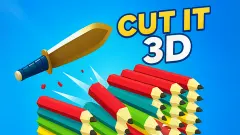
In Cut It 3D you see the course from the side. Each click flips a knife up and forward in a short hop over floating platforms, and stacks of planks wait to be cut. You move the knife; the level stands still.
In Cut It All 3D the camera sits behind the blade and looks down a single track. The knife stays where it is and the level moves. One game is about where you land. This one is about what passes under you and when you cut it.
Who it is for, and what we still cannot tell you
Players who want something to do with one hand for a few minutes. There is no reading needed beyond the numbers, and nothing to learn on the menu except the Play button. It suits children who like the idea of chopping fruit, and it contains nothing more violent than a knife going through a watermelon. Adults chasing a high score have a target: when we looked on 16 October 2026, the top of the distributor's daily leaderboard for this game was 705 points.
It is also not quite the game the listing describes. We saw no puzzles, no rules to follow, no choice of knives and no different ways of slicing. If you want logic, look elsewhere.
And there is still a short list of things we have not reached. We have never seen the level tick over from 1 to 2, even with the bar nearly full. We have not caught what ends a run. We have not spent a gem or found a shop, and the third round button on the menu, the one with a purple layered icon beside Play, is still unopened. No sound reached us during play either, in any run.
More games by Foxi Games, and more slicing
Cut It 3D is the side-on knife flipper from the same studio, and Rolling Balls 3D is another of its floating-track games, with a ball in place of the blade. For a blade that flies along a walkway over the sea, try Slice & Soar, and for fruit and knives on a timing ring, Fruit Chopper. There are more quick, one-button games in arcade games.
Screenshots
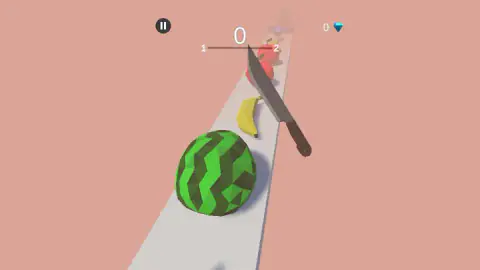
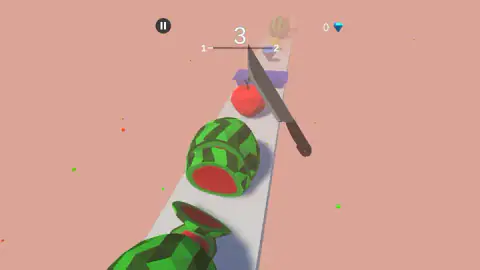
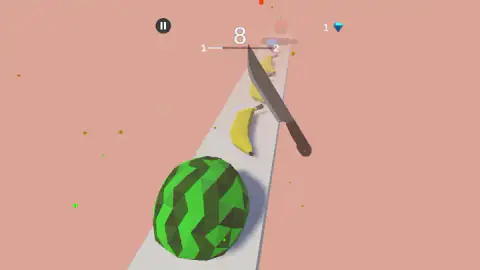
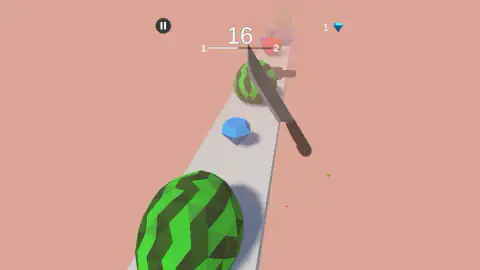
Taken by opening the game ourselves and letting it run — not supplied by the publisher, and not the same picture every other site shows.
How to play Cut It All 3D
- On the menu, the knife hangs over the frozen track with your best score floating above it. Press the round Play button, the middle of the three at the bottom.
- The track starts moving. Click or tap to cut as things pass under the blade.
- Watch the score, in big white numbers at the top of the screen.
- Under the score runs a thin line with a 1 at one end and a 2 at the other. A white stretch inside it grows as you cut, and that is your progress towards the next level.
- When the run ends the track stops dead, your score appears over your BEST, and the game asks REVIVE?.
What our runs taught us:
- Do not aim at the screen. The knife does not follow the pointer. We clicked on bananas, on apples and in empty space, and the blade stayed where it was every time.
- The score moves in jumps. Ours sat at zero for a while, then climbed in uneven steps — 3, 8, 16 — with flat stretches in between. A run that has stalled for a few seconds has not gone wrong.
- A run can end on almost nothing. Two of ours were over at 2 points and at 0. Length is not something you can count on, and the first few seconds matter as much as the rest.
- The gem counter does move. It sat at 0 for the opening points, turned to 1, and then stayed at 1 for the whole sitting, through run ends and restarts alike.
- The first level is not endless. At 16 points the white stretch had almost reached the 2. That is the closest we have come to turning it over, and it is near enough to aim for.
Controls
| Play button (middle of the three round buttons on the menu) | Starts a run from the menu, where your best score floats over the track |
|---|---|
| Left click or tap | The only input the game asks for; we clicked through every run and the score kept rising |
| Pause button, top left | The only button on screen during a run; it brings up the PAUSED sign |
| Play triangle on the PAUSED sign | Drops you back into the run exactly where it stopped; the house button beside it leaves for the menu |
| Play triangle in the circle on the REVIVE? screen | What the game offers after a run ends; the small restart arrow under it begins a new one |
Features
- One large chef's knife that stays in the same spot on screen while a white track slides beneath it
- Low-poly apples, bananas and watermelons on the track, the food you are there to cut
- Wooden chopping boards with a hanging hole, and purple or blue ice-cube trays, mixed in with the fruit
- Blue gems on the track and a gem counter in the top right corner that carries over between runs
- A score in the middle of the screen, over a thin line from 1 to 2 that fills in white as you cut
- A REVIVE? screen at the end of a run, with your score over your BEST and a restart arrow
- A PAUSED screen with a home button and a play button, with the run frozen behind it
Game details
- Developer
- Foxi Games
- Release date
- August 2025
- Added here
- June 2025
- Technology
- HTML5 (WebGL, Unity)
- Platforms
- Browser (desktop)
- Saved progress
- Saving, when available, is managed by this game. Mava cannot confirm your level.
FAQ
What is Cut It All 3D?
It is a one-button 3D slicing game credited to Foxi Games. A large kitchen knife hangs over a narrow white track, and apples, bananas and watermelons pass under it along with chopping boards, ice-cube trays and blue gems. Each cut adds to the score in the middle of the screen.
How do you play Cut It All 3D?
Press the round Play button on the menu, then click or tap to make the knife cut as the track brings things under it. The score at the top climbs as you go, and a line under it, marked 1 at one end and 2 at the other, fills in white as you get closer to the next level.
How long is a run in Cut It All 3D?
It varies a lot. Our best run reached 16 points, and in the same sitting two others were over almost at once, one at 2 points and one at nothing. An earlier sitting had managed 31 in a single go. There is no timer, so a run lasts exactly as long as you keep cutting successfully.
What happens when you lose in Cut It All 3D?
The track stops dead and your score appears in white above the word BEST and your record. A white circle with a play triangle sits in the middle of the screen with REVIVE? written under it, and below that a small dark circle with a curved arrow that starts a fresh run.
What are the gems for in Cut It All 3D?
Blue gems ride along the track with the fruit, and a gem counter sits in the top right corner. Ours moved from 0 to 1 early in a run and then stayed at 1 through every later run, so the count is a running total you keep rather than a per-run score. We never found anything to spend it on.
Is Cut It All 3D the same game as Cut It 3D?
No, although both are credited to Foxi Games and both put a kitchen knife at the centre. In Cut It 3D you click to flip a knife across floating platforms seen from the side. In Cut It All 3D the camera sits behind the blade and the track brings the fruit to it.
Can you play Cut It All 3D on a phone?
It is listed for PC, Android and iOS, in landscape, and the provider's instructions mention tapping the screen. We played on a desktop with a mouse only, so the phone version is the listing's word and not something we tested.
Who made Cut It All 3D?
The game's listing credits Foxi Games, the studio behind Cut It 3D and Rolling Balls 3D. The game was published in August 2025.