


About Cut In Half
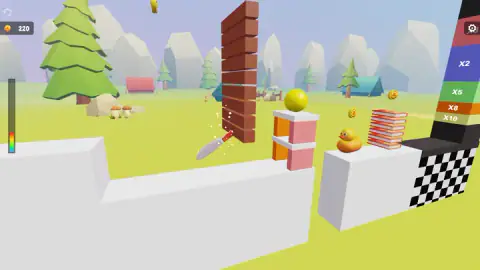
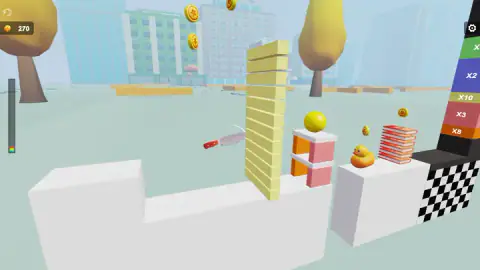
The knife is already in the air before you have decided anything. That is the first surprise in Cut In Half, and it takes a few runs to stop fighting it. The screen says TAP TO START, you tap, and a small kitchen knife sets off across a low-poly campsite on a path you did not pick, going through whatever happens to be standing there — a red brick column, a pile of books, a tower of pale yellow slabs, a rubber duck. You are not the hand holding the blade. You are the person who decided when to let go of it.
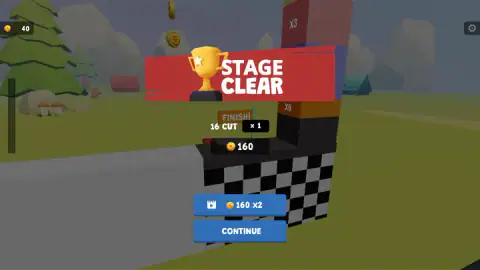
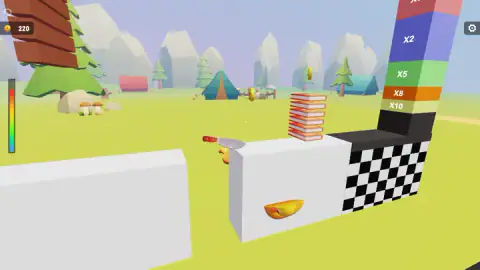
What turns that into a game is the block at the far end. Every run finishes against a checkered tower striped with coloured bands, and the band the knife reaches multiplies everything it cut on the way. Our first stage sliced sixteen things, hit the plain part of the tower for a multiplier of one, and paid 160 coins. The same run landing a few blocks higher would have been worth several times that.
SecGame made it, and it has been available since April 2026. The studio's other browser games are mostly tile-matchers and clickers, which makes this its one piece of cutlery.
We played it on a desktop in October and got as far as stage two. We never lost, we never bought the only upgrade it sells, and we never found a way to aim. All three of those are useful things to know before you start, and the last one is where the Cut In Half game gets genuinely interesting.
Sixteen cuts bought 160 coins. The upgrade costs 800
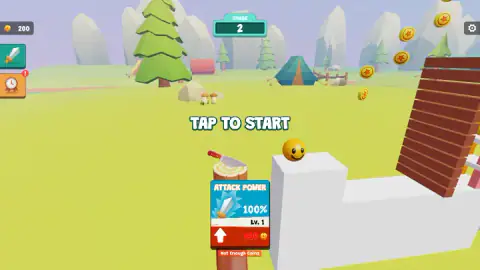
Cut In Half sells exactly one thing. On the start screen of every stage there is a card marked ATTACK POWER, reading 100% and Lv. 1, with a red arrow pointing up and a price under it. The price is 800 coins, and under that, in red, the two words we spent our whole session looking at: Not Enough Coins.
Put the two numbers side by side and the shape of the game appears. A cleared stage paid us 160. At that rate the first upgrade is five clean stages away — which is a long time in a game where a run takes seconds, and exactly long enough to make the two shortcuts look attractive.
Both shortcuts are on the same screen. The first is the video button sitting beside CONTINUE, which offers to double the stage's coins. The second is the tower: a run that lands on a high band is worth several of a run that lands on the plain checkerboard, so the difference between saving for an afternoon and saving for ten minutes is mostly luck about where the bands happen to be.
We never reached 800, which means we cannot tell you what the upgrade actually does — whether it speeds the blade up, lets it reach further, or simply multiplies the money. Anyone who tells you otherwise has not checked either.
The Cut In Half game never asks you to aim
This is the part where the game and its own paperwork part company. The instructions that travel with it describe arrow keys for moving, a spacebar for slicing and a shift key for a boost, plus an on-screen joystick and a slice button for phones. We found one of those five things: the upgrade button.
Everything else, we could not reproduce. The arrow keys did nothing. The spacebar did nothing. Clicking directly on a stack of books, on the duck, on the blade itself did nothing. What worked was a click in the middle of the screen, which starts a run, and Enter, which does the same. After that the knife flies, cuts and lands entirely without us.
That is not a complaint, and it may not even be a flaw. Treated as a one-tap game it holds together perfectly well: your only real decision is when to launch, and the rest is watching a physics toy knock a tower apart. But it is worth knowing before you spend ten minutes hunting for a control that we could not find, which is roughly what we did.
So the honest summary is this. Its description talks about precision. What we played was a slot machine with a very satisfying animation attached.
Why a blade that travels cuts better than a blade that presses
Here is the joke buried in that upgrade card. The one stat the game sells you is power, and power is the thing that matters least when you cut something.
Push a knife straight down into a tomato and you are relying on force alone, spread along the whole length of the edge that touches the skin. Slide the knife at the same time and something changes out of all proportion to the effort. Engineers have put a number on it: the slice-push ratio, the speed of the blade along its own edge divided by its speed into the material. Ian Atkins, Yuan Xu and George Jeronimidis defined it in the Journal of Materials Science in 2004, and their conclusion was blunt — the bigger that ratio, the smaller the force you need, with friction eventually putting a ceiling on the gains.
They did not test it on anything heroic. They rigged up a delicatessen slicer with instruments and ran cheddar cheese and salami through it. That is the whole reason a deli slicer is a spinning wheel rather than a descending blade: nearly all of its motion is along the edge, so the cheese barely has to be pushed at all.
It is also why the thing you are cutting matters. Atkins and his colleagues were specifically interested in thin, floppy layers, and a stack of them is the hardest honest test of a cut, because every layer can slide out of the way instead of parting. Look at what this game lines up for you: stacks of books, columns of bricks, towers of thin slabs. Layer after layer after layer.
And the knife goes through them, because of how it arrives. It is not pressing — it is travelling sideways at speed, which is the condition that makes cutting cheap. The game gives you that for free on every single tap, and then invites you to spend 800 coins on the variable that the cutlery research says does the least work. If you ever want a reason to feel smug while watching a cartoon knife demolish a brick wall, there it is.
More things worth slicing
Cut It All 3D is the same impulse with the aiming put back in: you draw the line and the blade follows it. Knife Slice 3D gives you the throw rather than the launch, and Slice & Soar turns each cut into momentum so the run keeps going as long as you keep connecting. If you want more of SecGame's own shelf, Tile Matcher Triple Fun and Car Collision Master are the two of theirs we would send you to first, and neither one involves a knife. The rest of the one-tap, watch-it-fly sort are in arcade games.
Screenshots
How to play Cut In Half
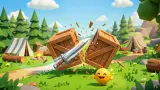
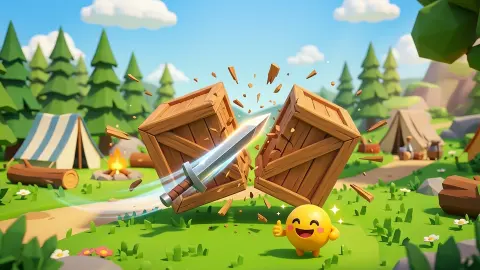
- Get past the title card. Ours showed CUT IN HALF in pink letters over a picture of a knife splitting a wooden crate, with a purple Let's Play! button underneath.
- Wait for TAP TO START, then tap or click anywhere. That one tap launches the blade, and on a desktop the Enter key does the same job.
- Let it travel. Everything in its path comes apart, and each thing it splits adds to the cut count for the run.
- Watch where it stops. The run ends against the banded tower, and the band it reaches is the multiplier applied to all of it.
- Collect, then decide. The end-of-stage panel shows your cuts, your multiplier and your coins, and offers you CONTINUE or a video that doubles the payout.
Things we only found out by playing:
- The bands are shuffled. One run showed x2, x5, x8 and x10 stacked in that order from the top; another showed x2, x10, x3 and x8. Where the high band sits is not something you can learn once.
- You get paid for failing. Coins float around the course and the blade picks them up in passing. Our purse climbed from 200 to 310 across a string of stage-two attempts that cleared nothing at all.
- The payout lands in one lump. The counter read 40 as our stage-clear screen came up, the panel awarded 160, and the next thing we saw was 200.
- The keyboard is mostly decoration. The arrow keys, the spacebar and the A key did nothing we could detect, and clicking on the books or the duck did nothing either.
- Expect a wait between stages. The game stops for a sponsor break when a stage ends, and ours sat there a good while before the Continue button would take us back.
Controls
| Tap or click anywhere | Launch the blade from the TAP TO START screen. That single tap is the whole run; there is nothing to press while the knife is flying |
|---|---|
| Enter | Started a stage for us as well, which is handy on a desktop |
| Arrow keys, spacebar, A | Nothing we could see or hear changed when we pressed them, although the game's own instructions describe them as the desktop controls |
| The ATTACK POWER card on the start screen | The only thing in the game you can buy. The first level costs 800 coins |
| The cog in the top-right corner | The only other button on the playing screen. We left it closed |
Features
- A run is one tap long: the blade sets off by itself and we never found a way to steer it
- Every run ends against a checkered tower striped with multipliers, and the band you hit multiplies everything you cut — our sixteen-cut stage landed on a plain x1
- The order of those bands changes between attempts: we saw x2, x5, x8, x10 from the top down in one run and x2, x10, x3, x8 in another
- One upgrade and one only: ATTACK POWER, starting at 100% and Lv. 1, with the first step priced at 800 coins
- A video button beside CONTINUE offers to double a finished stage's payout; taking it is optional
- Coins float around the course and are collected on the way past, so even an attempt that clears nothing leaves you richer
- Low-poly 3D throughout, with the backdrop changing between runs — a campsite with pines and tents, and a pastel city
- Listed for desktop, mobile and tablet, with its listing declaring it a portrait game
Game details
- Developer
- SecGame
- Release date
- April 2026
- Last updated
- October 23, 2026
- Added here
- February 2026
- Technology
- HTML5 (WebGL 3D)
- Platforms
- Browser (desktop), Browser (mobile & tablet, touch)
- Saved progress
- Saving, when available, is managed by this game. Mava cannot confirm your level.
FAQ
What is the Cut In Half game about?
You launch a knife at a course full of stacked objects — brick columns, piles of books, towers of slabs — and it cuts whatever it passes through. The run ends against a tower striped with multipliers, and the band the blade reaches decides what the whole run paid. Our first stage cut sixteen things and earned 160 coins.
How do you control the knife in Cut In Half?
You do not, as far as we could tell. The screen says TAP TO START, you tap once, and the blade travels on its own. We pressed the arrow keys, the spacebar and the A key, and clicked directly on the objects, and nothing we could see or hear responded. Clicking the middle of the screen and pressing Enter are the two inputs that did anything for us.
What does the multiplier tower at the end of a stage do?
It is the scoreboard. The checkered block at the finish is divided into coloured bands marked x2, x3, x5, x8 and x10, and the band the knife ends in multiplies the run. Landing on the plain part scores x1, which is what happened to us. The bands do not keep the same order from one attempt to the next, so there is no ladder to memorise.
How much does the upgrade in Cut In Half cost?
The only thing for sale is ATTACK POWER, which starts at 100% and level one, and the first step costs 800 coins. A cleared stage paid us 160, so that is roughly five clean stages of saving at the rate we were earning. We never got there, so we cannot tell you what the upgrade changes.
Can you lose in Cut In Half?
We never did. In a full session there was no defeat sound, no game-over screen and no stage that ran out of anything — the worst that happened was a run that cut very little and paid very little. That is not the same as proving there is no way to fail, only that we did not find one.
Are there ads in Cut In Half?
The game pauses for a sponsor break when a stage ends. In our session that pause finished with a card reading that the ad had been skipped, and a Continue playing button, so we never saw an actual advert — another player may well get one. Separately, a video button beside CONTINUE offers to double a stage's coins, and that one is entirely optional.
Who made Cut In Half?
Cut In Half was published in April 2026 and was last updated that August.
Can you play Cut In Half on a phone?
It is listed for desktop, mobile and tablet, and the game's listing mentions it a portrait game, which points at a phone being the shape it was designed for. A single tap is also about as touch-friendly as a control gets. We played with a mouse on a desktop and did not test it on a small screen, so the feel under a finger is its word rather than ours.