






About Slice & Soar
In most fruit-slicing games the fruit does the travelling. It flies up, you swipe, it falls. Slice & Soar turns that round. The fruit stands still on a plank walkway over the sea, and the thing that travels is the blade.
It starts on a rack, on a table, on a small wooden dock. Ahead of it runs a walkway one plank wide, with an apple on a block, bananas standing on end, and at the far end a striped tower with numbers on it. Getting the blade from the rack to the tower is the level.
The game is by Drivix Games, according to the game's listing. It was published in September 2025.
We played four minutes on a desktop with a mouse. That was enough for the whole Tutorial course and the first stretch of Level 1, and not enough to tell you everything. Where we do not know, we say so.
The course is a straight line with fruit on it
There is no steering to do. The walkway runs straight out to sea, with a beach and green hills along one side, and the view follows the blade.
The Tutorial lays its fruit out in order of size. First a single apple on a raised block. Then one banana standing on end. Then a step up, a steep ramp, and a row of about ten bananas side by side on top of it.
We know the blade cuts them because of what it left behind. After the single banana there was a piece of it lying on the boards next to us, and it stayed there the whole time we were held up at the ramp.
That ramp is where the course stopped being easy. Four of our screenshots, more than a minute apart from first to last, show the same view: the ramp in front, the row of bananas above, the blade no further on. Then it went over, and the tower was the next thing in view. We cannot tell you which of our presses did it.
The tower at the end is a prize table
Close up, the tower is a stack of coloured bands with a number on each. Blue at the top and bottom, marked 10. Green next, then yellow, then orange, and the numbers climb as the bands close in on the middle, up to 100.
Between the two orange bands is a thin red stripe marked JACKPOT. It is much narrower than anything else on the tower.
So the last move of a level looks like a question of height: where on the tower the blade arrives. Our run ended in front of a blue band, and the result screen showed 32 coins and the words New Best. How the 32 was added up, between the fruit and the tower, is not shown on that screen and we did not work it out.
500 coins before you cut anything
The counter at the top right read 500 when the Tutorial opened. After the tower it read 532.
The result screen then offers to multiply what you just won. A half dial with a pointer is split into x2, x3 and x4, and the button under it has a film icon on it, which means a video. When we looked, the button read 96, which is three times our 32.
Below it is NO THANKS. We pressed that. The counter kept its 532 and Level 1 opened.
Level 1 starts with two things the Tutorial did not have. A purple badge next to the blade reads +10 FREE and carries a video icon. A yellow button with three blades on it sits at the right edge of the screen. We pressed neither, so what the ten is ten of, and what the button opens, we cannot say.
What we did not see
A failed run. Our blade never went into the water and nothing sent us back to the start, so we do not know what losing looks like or what it costs.
Level 1 finished, or anything after it. We saw its first stretch: the same kind of walkway, and further on a yellow shape with a jagged top edge that the Tutorial did not have. We did not get close enough to learn what it does.
The same goes for a tall brown post that hangs down over the walkway near the Tutorial's apple. We passed it without finding out whether it matters.
And we played in a landscape window with a mouse. The game is listed as a portrait game for phones as well, and we did not try it that way.
Who it is for
Someone who wants a short course with one job. There is no map, no character and no story, whatever category you find it filed under. It is a blade, a line of fruit and a tower.
It is not for players who want to be told the rules. Nothing on screen explained the controls to us, and the first minutes went on finding them.
More blades and more fruit
Fruit Chopper is by the same studio and stricter: fruit circles above a blender, you throw one knife up through it, and a throw that cuts nothing ends the run. Knife Smash has you stick knives into a spinning target without touching the ones already there. Knife Tower points the knives at a tall tower of blocks instead of landing on one. The rest are in the arcade games category.
Screenshots
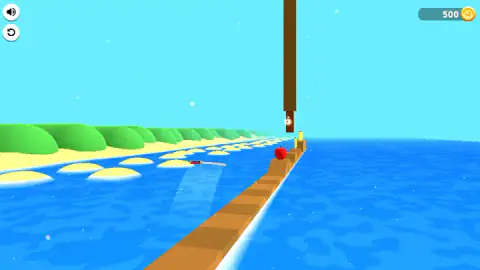
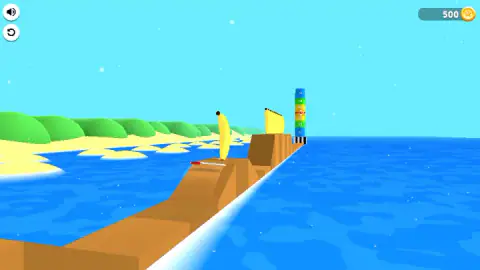
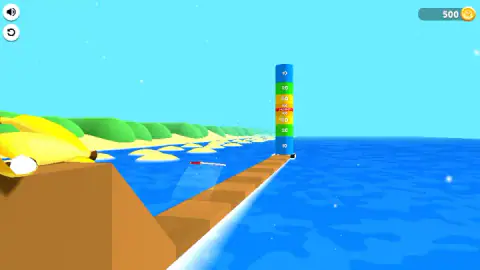
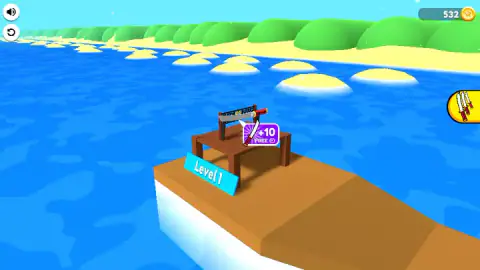
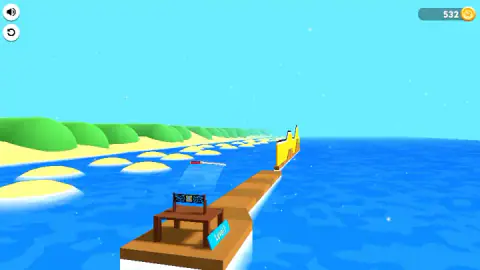
Taken by opening the game ourselves and letting it run — not supplied by the publisher, and not the same picture every other site shows.
How to play Slice & Soar
- Look down the walkway before you touch anything. The blade is on its rack and nothing moves until you do.
- Press and drag with the mouse. Both times our blade left the rack, that is what we had just done.
- Keep sending it forward. From then on the blade stayed in the air in front of us, with a pale trail under it showing where it was over the planks.
- Reach the tower at the end. The course stops there and a result screen pays out coins.
- Press NO THANKS unless you want the video bonus. The next level loads with your coins already counted.
Tips from our session:
- Do not count on the keyboard. We tried the arrow keys, Space and Enter and saw nothing we could put down to them.
- A plain click may not be enough. Our first clicks left the blade sitting on the rack. It went once we dragged.
- Expect the ramps to cost you time. We were at the foot of one for over a minute before the blade got on top.
- You can ignore both video offers. We took neither and lost nothing we had earned.
Controls
| Press and drag with the mouse | What we did each time the blade left its rack and moved on along the walkway |
|---|---|
| Arrow keys, Space, Enter | Tried; nothing we could put down to them |
| Round arrow icon (top left) | Restart button; not pressed in our session |
| NO THANKS (result screen) | Skips the video bonus and goes to the next level with the coins already earned |
Features
- A blade that starts on a rack on a dock and travels a narrow plank walkway over the sea
- Fruit standing on the walkway, an apple first and then bananas, single and in rows
- A tower at the end of the course with prize bands from 10 up to 100 and a JACKPOT stripe in the middle
- A coin counter that already reads 500 before the first cut
- A Tutorial course first, then numbered levels starting at Level 1
- An optional video bonus on the result screen, with a dial of x2, x3 and x4
Game details
- Developer
- Drivix Games
- Release date
- September 2025
- Last updated
- July 28, 2026
- Added here
- August 2025
- Technology
- HTML5 (3D)
- Platforms
- Browser (desktop, mouse)
- Classification
- Arcade
- Saved progress
- Saving, when available, is managed by this game. Mava cannot confirm your level.
FAQ
How do you play Slice & Soar?
A blade sits on a rack at the start of a long plank walkway over the sea. You send it down the walkway with the mouse, through fruit standing in its path, to a striped tower at the far end. In our session the blade left the rack each time we pressed and dragged. The level ends at the tower with a coin payout.
What is the striped tower at the end of Slice & Soar?
It is the finish and the prize table at once. The bands are numbered, low at the top and bottom and higher toward the middle, with a thin red stripe marked JACKPOT at the centre. Our Tutorial run ended in front of a blue band marked 10 and the result screen gave us 32 coins. We did not reach the stripe.
How many coins do you start with in Slice & Soar?
The counter at the top right read 500 before we had cut anything. After the Tutorial course it read 532. We did not find out what coins are spent on, because we never opened the button with the three blades that appears at the start of Level 1.
Do you have to watch ads in Slice & Soar?
Not for what we played. The result screen offers a video bonus under a dial marked x2, x3 and x4, and a NO THANKS button below it. We pressed NO THANKS and kept the 32 coins we had earned. A second video offer, a badge reading +10 FREE, sits next to the blade at the start of Level 1, and we left that alone too.
How long is a level in Slice & Soar?
The only course we finished was the Tutorial, and it took us about three minutes. More than one of those minutes went at the foot of a single ramp, so a player who knows the controls will be quicker. We only saw the first stretch of Level 1.
Can you play Slice & Soar on a phone?
It is listed for PC, Android and iOS, in portrait orientation. We played in a landscape window on a desktop with a mouse and did not try a phone or a tablet ourselves, so we cannot tell you how it handles by touch.
Who made Slice & Soar?
The game is credited to Drivix Games, the same studio behind Fruit Chopper. It was published in September 2025 and last updated in July 2026.