







About Twist Your Path
Most running games hand you a runner. Twist Your Path never lets you near him. He sets off on his own, at a speed you do not choose, along a narrow beam hanging in an empty blue sky, and nothing you press will slow him down, hurry him up or move him an inch sideways. The only object in the game that answers to you is the beam itself.
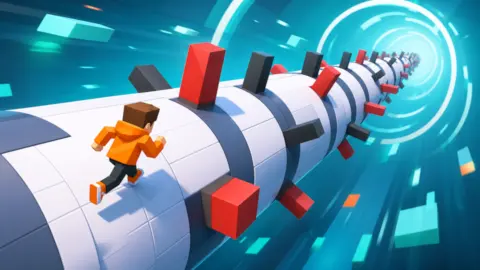
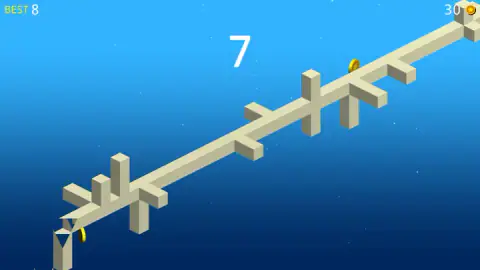
That beam is a long bar with square sides, pale cream, climbing away from you into the distance. Driven straight through it at intervals are more bars of the same colour, crossed, sticking out on either side like pins through a cocktail sausage. One of them is in your runner's way. The others are not, because they are on a different face of the beam.
So a turn is not a dodge. It is a search. You press, the whole beam rolls, and the man standing on top of it is carried round to a side where nothing is in the way. The bars never move. You move the floor.
RandomGames built it, and it was published in July 2026. We should say early what our own session looked like, because it bears on everything below: across a run of several attempts our score reached eight, and eight is also where the record stood when we stopped. This is not a game we conquered. It is a game we kept losing to, in single digits, which taught us more about it than a long run would have.
A third of a second is the part of the turn you cannot train away
Every one-button game is secretly a game about the gap between seeing something and doing something about it, so it is worth knowing how big that gap actually is.
It is bigger than people think. In a 2010 study published in Neuroscience & Medicine, Shelton and Kumar timed a small group of adults pressing a key the moment a shape appeared, and the average visual reaction came in at about 331 milliseconds — a third of a second, for a press the person already knew they were going to make.
Larger samples land in the same neighbourhood: a study of 120 adults in Kathmandu put simple visual reaction at around 299 milliseconds. The quarter of a second people quote online is the optimistic end of that range, not the middle of it.
Then there is the cost of deciding. The Hick-Hyman law, named for the two psychologists who measured it in the early 1950s, says the time you need grows with the number of options in front of you — roughly another 150 milliseconds each time the number of choices doubles, by Hick's own figure. Two buttons are not twice as slow as one, but they are slower.
And this is why Twist Your Path only gives you one. With a single input there is no choosing, so nothing is added to that base third of a second: you see the bar, you press, the beam rolls. The designer's part of the bargain is to put the obstacles far enough up the beam that a human can see them coming, which the game does — in a still frame from one of our runs you can count four separate crossings ahead of the runner at once.
Which means, when you lose, you were almost certainly not too slow. You were early, or you were greedy, or you turned into the thing you were turning away from. That is a different and more annoying kind of mistake, and it is the one this game is built to produce.
Thirty coins, a character you never met, and a six-hour clock
The economy is visible from the first screen and we never got far enough into it to spend a penny.
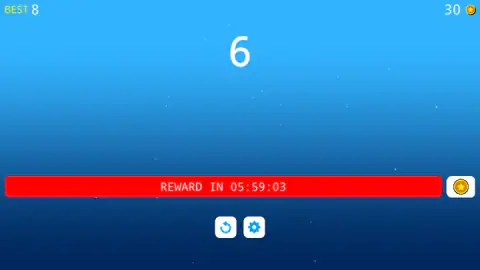
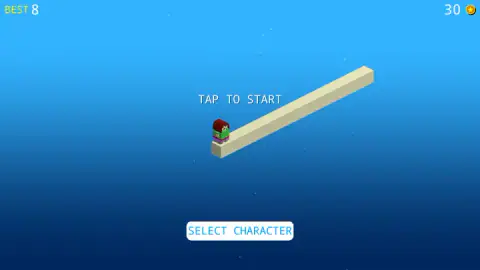
A counter in the top-right corner shows your coins beside a small gold coin icon. Ours read thirty, and it read thirty when we stopped, because a session of short runs does not collect much and we never opened the shop. The shop is the white SELECT CHARACTER button at the foot of the start screen; the game's listing says coins unlock new characters there, which we are passing on as its claim rather than ours. Our own runner stayed as we found him — a blocky little figure, dark red hair, green top, standing patiently on the end of the beam.
The other half of the economy is a thick red bar across the bottom of the screen reading REWARD IN, followed by a clock. Beside it sits a white square button with a gold star-coin on it. When we met that bar the clock read a few seconds under six hours, which tells you the shape of the offer: come back tomorrow, or take the shortcut the button offers.
Between attempts the game earns its keep with ad breaks, and it is unusually open about them. More than once ours came back with a card reading "We skipped the ad this time - enjoy the game!" above a Continue playing button, plus a smaller prompt to click and keep going. A generous line, and also a plain statement about the times it does not skip them.
What eight points looks like
An honest ledger, because a short session is a short session.
We reached the start screen, started runs, ran along the beam, hit bars and went back to the start screen. The score in the middle climbed to six, then seven, then eight. BEST read eight at the beginning of the session and eight at the end, which means every run we managed matched our record at best and never passed it.
We never saw a second beam, so we cannot tell you whether the course changes, whether it speeds up with the score, or whether the bars get denser the further you go — all three would be normal for the genre, and we watched none of them happen. We never opened the character menu, so characters, prices and whether any of them play differently are blanks. We never waited out the reward clock. And we played with a mouse on a desktop, so the touch version is the game's claim and not our experience.
What we can tell you is what the first thirty seconds of this game are like, over and over, which is the part most people will ever see: a beam, a runner who will not stop, bars you can see coming for a comfortable two or three seconds, and a single button that is very easy to press and surprisingly hard to press at the right moment.
More arcade games to lose at
If the one-press rhythm suits you, the nearest neighbours on our shelf are Hop Ball and Bridge Bounce: Jump Challenge. For something with a steering wheel and a longer leash, try Slope City 2, and Stick Master Teleport if you would rather solve the obstacle than outrun it. The whole shelf is under arcade games.
Screenshots
Taken by opening the game ourselves and letting it run — not supplied by the publisher, and not the same picture every other site shows.
How to play Twist Your Path
- Press anywhere on the start screen. The words TAP TO START sit over the beam, your character waits at the near end of it, and he will wait there all day until you click.
- Look along the beam, not at the runner. Every bar that is going to end your run is already drawn on screen, well before it gets anywhere near you.
- Click or tap to roll the beam. That single press is the entire control scheme, in a run and on the menu alike.
- Watch the number in the centre of the screen. It is your score for this run, and the yellow BEST in the top-left corner is the mark you are trying to beat.
- Take the coins that are on your way and leave the ones that are not. They bank into the counter beside the coin icon, top right.
What we only learned by sitting in front of it:
- The coin is sometimes the trap. On the beam we ran, a gold coin stands on the upper face immediately beside a cross of bars. The line that collects it and the line that survives are not the same line, and the game never says so.
- The bars come in clusters. They are not evenly spaced. Stretches of clean beam are followed by two or three crossings close together, which is where a turn that fixed the first one leaves you facing the second from the wrong side.
- A press has no undo. There is no half-turn and no way to hold the beam still. If you roll early you have simply put yourself somewhere else, and somewhere else is where the next bar is.
- The score climbs in ones. Not in tens or hundreds. A score of eight is eight of something, which makes the record on the screen a much flatter, harder number than the inflated totals most runners hand out.
- The restart is a button, not a menu. A small white circle with a curling arrow sits under the red bar at the bottom. It puts you straight back on the beam.
Controls
| Click or tap anywhere | Turns the beam under your runner. This is the whole control scheme, in a run and on the start screen |
|---|---|
| Click the circular arrow, below the red bar | Starts a fresh run |
| Click the gear, beside it | Opens the settings |
| Click SELECT CHARACTER on the start screen | Opens the character menu, which is where the game says your coins are spent |
Features
- You never control the runner: he goes forward at his own speed and the only thing that answers to you is the beam he is standing on
- The obstacles are pale bars driven straight through the beam in a cross, so a turn is a search for the face that has no bar on it
- A score sits large in the middle of the screen and climbs in whole numbers; your record is kept in yellow as BEST, top left
- Gold coins stand on the beam during a run and bank into a counter in the top-right corner
- At least one coin sits right beside a cross of bars, so the greedy line and the safe line part company
- A red bar across the bottom counts down to a free reward, roughly six hours away when we met it
- Nothing to install, nothing to sign up for, and the record survives between runs in the same session
Game details
- Developer
- RandomGames
- Release date
- July 2026
- Last updated
- July 14, 2026
- Added here
- May 2026
- Technology
- HTML5 (3D)
- Platforms
- Browser (desktop), Browser (mobile & tablet, touch)
- Classification
- Arcade
- Download size
- 9.8 MB
- Ad requests
- 5 (some)
- Has a save
- Yes
- Saved progress
- Saving, when available, is managed by this game. Mava cannot confirm your level.
Measured by opening the game ourselves on 2026-09-11, not taken from the feed. Twelve seconds on a phone-sized screen, with ad requests counted and blocked rather than loaded.
FAQ
How do you play Twist Your Path?
You press to start, and your character runs forward along a narrow beam without any further help from you. Pale bars are driven through that beam at intervals, and a click or a tap rotates the beam so that your runner swings round to a face with no bar on it. The score in the middle of the screen climbs the longer you survive, and the run ends when you hit something.
What are the controls in Twist Your Path?
One button, and that is all. A mouse click or a tap anywhere on the screen turns the beam, and the same press starts the run from the TAP TO START screen. There is nothing to hold down, no steering and no jump, because the character's forward movement is not yours to change.
What is the big number in the middle of the screen?
That is your score for the run in progress. It starts at zero and climbs in whole numbers while you keep going, and the yellow BEST in the top-left corner holds the highest you have reached. We never worked out whether one point is one obstacle cleared or one length of beam travelled, because our runs were too short to tell.
What are the coins for in Twist Your Path?
They sit on the beam during a run and bank into the counter in the top-right corner. The game's own listing says they unlock new characters in the selection menu, which is what the SELECT CHARACTER button at the bottom of the start screen opens. We finished our session with thirty coins unspent, so we cannot tell you what a character costs.
What is the red bar at the bottom of the screen?
It is a countdown to a free reward, written as REWARD IN followed by a clock, with a small white button holding a gold coin beside it. When we met it the clock stood a few seconds short of six hours. We did not wait it out, so what it hands over is the game's promise rather than our report.
Is Twist Your Path hard?
The pressing is easy and the timing is not. One button means you never have to work out which control to use, but the bars arrive on a beam that keeps turning under you, and a press one beat early is as fatal as a press one beat late. Our best run through a whole session scored eight.
Can you play Twist Your Path on a phone?
The game is listed for PC, Android and iOS, in both landscape and portrait, and the start screen says TAP TO START rather than click. A one-button game with no keyboard input is about as touch-friendly as a design gets. We played it on a desktop with a mouse, so the touch controls are untested by us.
Who made Twist Your Path?
This one was published in July 2026. It is free, it runs in the browser, and there is nothing to install.