

About Stick Master Teleport
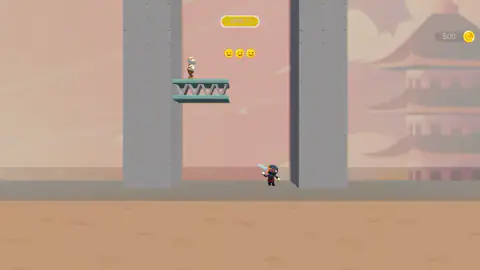
The first thing worth knowing about Stick Master Teleport is what is missing from it. There is no jump button. There is no run key. The four arrow keys got nothing out of it when we tried them, and there is no second control drawn anywhere on the screen. What you have is a small hooded figure standing on a strip of sand at the bottom of a tall shaft, holding a knife, with a guard on a platform somewhere above him and no visible way of getting up there.
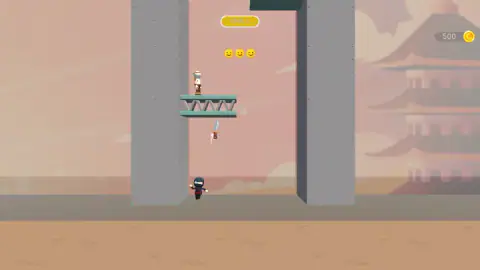
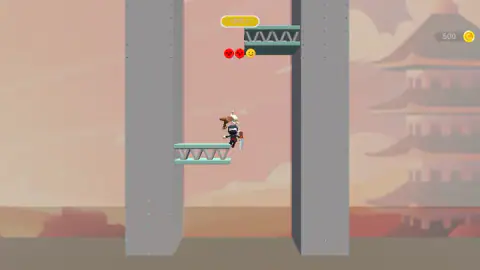
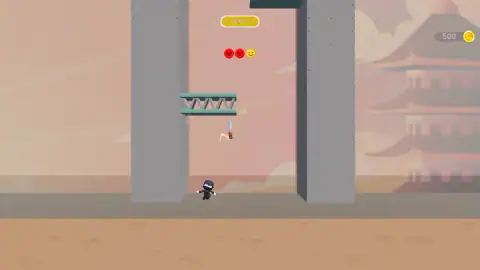
The knife is the way up there. Press and hold, drag to set the line, let go, and it leaves his hand: in one of our pictures he is holding it, in the next his gloves are empty and the blade is in the air below the platform with a white streak behind it. A moment later in our session he was off the sand entirely, hanging at the height of that platform with the knife back in his hand and the guard beside him tumbling through the air. We never saw him cross the gap in between. We only ever saw the before and the after, which is the kind of thing that makes a game worth writing about.
That single idea reorganises everything. In most games the weapon and the legs are separate systems: you walk over there, then you attack. Here they are the same button, so a throw you aim at nothing in particular is not a wasted shot, it is a wasted turn. The guard you want is up and to the left, and so is the only place you can be.
The setting is a pink dusk with pagoda roofs stacked into the distance in flat pale layers, two grey concrete columns running the full height of the screen with little rivets down their faces, and green platforms jutting out from one column and then the other. The guards are not stick figures like you: they wear brown robes and wide cream-coloured hats. The game is credited to ElezthemGames on its listing.
Our own session ran about four minutes and never left the first level. We will be specific about that throughout, because what a game does in its first four minutes is the part anyone can check.
The knife is the jump button
Here is the design idea underneath, and it is worth a minute because once you see it the game reads very differently.
Most action games of this shape hand you two separate verbs. One set of controls moves you, another one attacks, and the skill is in combining them. A long tradition of browser games does the opposite and takes the movement away — endless runners move you whether you like it or not, and you only get to steer. Stick Master Teleport takes a third road: it keeps the attack and deletes the movement, and then quietly makes the attack do both jobs.
The consequence is that there is no such thing as a safe throw. In a game with a jump, a missed attack costs you a little time and you try again from the same ledge. Here, the throw you missed with has already moved you, or failed to, and either way the board has changed. Aiming is not about damage. Aiming is about where you want to be standing next.
It also means the whole game lives on one gesture, which is why it plays identically with a pointer and with a thumb. Press, drag, release.
And it explains the shape of the level. The shaft is tall and narrow, the platforms stick out from alternating columns, and a guard is standing on them. You are not solving a corridor. You are solving a ladder, where every rung is also a target, and the only thing you own is one line drawn across the screen at a time.
The three faces under the badge, and what we will not tell you about them
Three small circles sit directly beneath the yellow LEVEL 1 badge, dead centre at the top of the screen, and they are the only thing on that screen that ever changed for us.
They begin as yellow smileys, all three of them. By the end of our session the two on the left were red circles with their eyes drawn as little crosses, and only the right-hand one was still yellow and still smiling. They fill in from the left, one at a time, and they are small enough that you have to look twice to see that the red ones have faces at all.
Here is what we can prove and what we cannot. They changed in the same stretch in which our figure went from the sand up to a platform with a guard tumbling beside him, and in a later picture the platform that had a guard standing on it earlier is bare. The honest reading is that there are three of them in the level, that each face belongs to one of them, and that a face turns red when that one goes down. It is a reading. We never put the third face red, we never saw the level end, and so nothing in our session proves what happens when all three are in. We are telling you where the counter is and what it did, and leaving the last step to you.
Four minutes on level one
The badge at the top read LEVEL 1 in every picture we took, from the first second to the last. There is a coin counter in the top right corner with a small gold coin beside it, it read 500 when the game opened, and it read 500 four minutes later. We never found out what the coins buy, because we never earned one.
The game was also almost completely silent for us. We heard the sound it makes when it opens and then nothing else: no thud when a guard fell, no chime when a face turned red, no music underneath any of it. That may be a setting we did not find, and we are not going to pretend to know which.
What we can say is that the first level is patient. Nothing is on a clock, nothing came at us, and the shaft sits still while you look at it. Whether that holds further in we cannot tell you, and the listing's promise of many tricky levels is the listing's and not ours.
If the climb is what you came for
The vertical shaft is a browser-game shape with a long history, and we have played a few of them properly. Go Up and Jumper are both climbs where the whole game is deciding when to leave the ledge you are on, and Bounce Up does it with momentum you never quite own. If what caught you here is the blade rather than the height, Cut in Half is about the line you draw and nothing else. The rest of the shelf is in arcade games.
Screenshots
How to play Stick Master Teleport
- Look up before you touch anything. Find the guard, find the platform he is standing on, and notice which of the two columns it comes out of.
- Press and hold anywhere on the play area. On a phone or a tablet, hold a finger on the screen instead. Nothing happens yet.
- Drag to set the line of the throw, then let go. The knife leaves his hand and flies along that line on its own.
- Watch where it goes rather than where it came from. The throw is also your move, so the spot you aimed at is the spot you are about to be standing in.
- Repeat from wherever you land. In our run the knife was back in his hand by the time he arrived, so the next throw was ready immediately.
What we only learned by being there:
- Aim at the man, not at the gap. Our early throws went up the middle of the shaft, which is empty, and the empty middle is exactly where you do not want to end up. The throws that did something were the ones pointed at a guard standing on a platform.
- One arrival looks like enough. The guard we caught in the act was already tumbling through the air the moment our figure got there. We never saw one take a hit and stay standing.
- Short drags were our main mistake. A lot of our first minute was tiny drags near the figure that left him exactly where he was. The gesture wants a line across the screen, not a nudge.
- Nothing is chasing you. There is no timer on the screen and nothing moved on its own while we sat still. You can stop, look at the shaft and plan the throw.
Controls
| Press and hold on the play area, drag, then let go | Throws the knife along the line you dragged. This is the one move we got the game to answer, and the only way we ever got off the ground |
|---|---|
| Touch and drag on a phone or tablet | The same gesture with a finger instead of a pointer |
| Arrow keys | Nothing we could detect. We tried all four and none of them answered. Four keys are not a full test of a keyboard, so take it as what it is |
| Nothing at all | There is no jump button, no run key and no second weapon button on the screen. The knife is the whole of your input |
Features
- No jump and no movement keys: the throw is also the travel, so aiming badly does not just miss, it leaves you on the floor
- A single level is a vertical shaft between two grey columns, with green platforms jutting out from alternating sides and the view climbing with you
- Guards in brown robes and wide cream hats stand on the platforms, and the one we caught in the act went down from a single arrival
- Three faces sit under the level badge and turn from yellow smileys into red ones with crossed-out eyes, filling in from the left
- The knife comes back to your hand: we threw it, saw it fly on its own, and had it in hand again at the top of the climb
- A coin counter reading 500 sits in the corner from the first second, and in four minutes of play it never moved
- Pink-and-grey art with layered pagoda roofs behind the action, and a session that stayed almost completely silent for us
Game details
- Developer
- ElezthemGames
- Release date
- June 2026
- Last updated
- October 24, 2026
- Added here
- May 2026
- Technology
- HTML5
- Platforms
- Browser (desktop), Browser (mobile & tablet, touch)
- Classification
- Shooting
- Saved progress
- Saving, when available, is managed by this game. Mava cannot confirm your level.
FAQ
What kind of game is Stick Master Teleport?
It is a free browser arcade game about a hooded stick figure, a knife and a tall vertical shaft. Guards stand on platforms above you and you have to bring them down. The unusual part is that the knife is also how you move, because the game gives you no jump button and no movement keys at all.
How do you play Stick Master Teleport?
You press and hold anywhere on the play area, drag to set the line you want, and let go to throw. We watched the knife leave the figure's hand and fly on its own, and a moment later the figure was up at platform height with the knife back in his hand and a guard tumbling beside him. That gesture is the whole of the input, on a computer with a pointer or on a phone with a finger.
Is there a jump button in Stick Master Teleport?
No, and that is the point of it. There is no jump, no run key and no second button of any kind on the screen. We tried all four arrow keys and none of them did anything we could detect. The only thing that ever moved our figure off the sand was a thrown knife.
What are the three faces at the top of the screen?
Three small circles sit just under the LEVEL 1 badge. They start as yellow smileys, and in our session the left two turned into red faces with their eyes drawn as crosses, filling in from the left. They changed in the stretch where a guard went down, and in a later picture the platform that had held a guard is empty, so the likely reading is one face per enemy in the level. We never finished the level, so we cannot confirm it.
Do the platforms in Stick Master Teleport hurt you?
We do not know, and we would rather say so. Each green platform has a zig-zag of grey bars slung between its two rails, which looks like a ladder from some angles and like a row of teeth from others. We never touched one in a way that told us either way, so this page does not claim it is a hazard and does not claim it is safe.
How many levels does Stick Master Teleport have?
We cannot tell you. Every single picture we took of our session has the same yellow badge reading LEVEL 1 across the top, so we never saw what the second level looks like, how many there are or whether the setting changes. The listing promises more of them, but a promise is not something we are going to pass on as a fact.
Who made Stick Master Teleport and when did it come out?
It is credited to ElezthemGames. The listing gives June 2026 both for the release and for the most recent update. Only the month is printed anywhere we could find, never a day, which is why this page does not give a precise date.
Is Stick Master Teleport free to play in a browser?
Yes. It runs in a normal browser tab with nothing to install, on a desktop with a pointer or on a phone or tablet with a finger, since the game asks for exactly one gesture and the gesture works the same either way. It took us two clicks to get from the opening screen into the first level.