





About Ninja: Bamboo Assassin
Most browser games with a ninja on the cover are about how fast you can swing. This one draws the enemy's eyesight on the floor and asks you to look at that first. The guard at the top of the path has a pale cone of light fanning out from his feet, and in the four minutes we spent with the game that cone was the only thing on screen that kept moving.
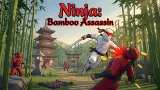
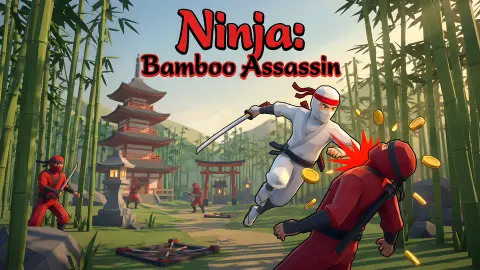
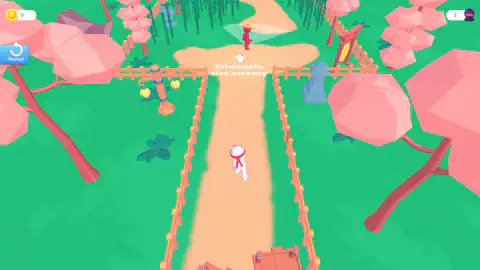
Ninja: Bamboo Assassin is a 3D stealth game seen from above. You are a white figure with a red headband and a sword. Each round opens with one line of text on the ground, Eliminate the enemy, and a white arrow pointing at a red guard in a straw hat. A wooden fence lines the dirt path, cherry trees stand on both sides and a bamboo grove sits behind the target.
It is by EndlessPath Games. It was published in September 2024.
We have to be plain about our own session. We started the opening round three times and did not eliminate the guard once. Our ninja walked as far as the gap in the fence and stayed there. So this page tells you what the game shows before and during a round, and says where our knowledge stops.
The guard's eyesight is drawn on the ground
This is the part worth knowing before you play, because nothing on screen explains it.
The cone is a flat, see-through wedge, widest at its far end. It starts where the guard stands. We saw it in three different directions without the guard leaving his spot, which means he turns on the spot and the cone turns with him.
We read it as his field of view. That fits a game sold as stealth, and it fits the way the round is laid out: you come up a narrow path from below, and the cone was never pointing straight down that path in anything we saw. We did not step into it, so we cannot tell you whether being seen ends the round, starts a fight or only alerts him.
What we can say is where our ninja ended up. He stopped beside the left post of the opening in the fence with his sword raised, a few steps short of the clearing. Earlier we had seen him half way up the path, mid-stride. We could not tell which of our inputs took him from one to the other.
The start screen sells two things before you have a coin
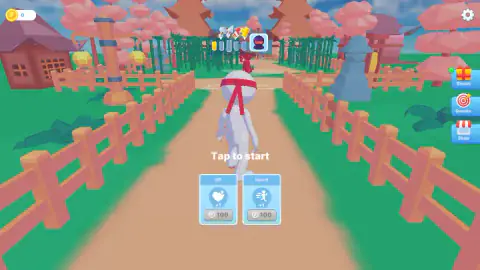
Before every round the game shows the ninja from behind, standing on the path, with two cards under the words Tap to start.
One reads HP +1 and the other Speed +1. Each costs 100 coins. Our counter read 0 from the first second to the last, so both price buttons stayed grey.
The HP card tells you something on its own. A game that sells extra health expects you to get hit and carry on, so a mistake is probably not the end of a round. That is a reading of the card, not something we lived through.
Three more buttons sit on the right edge: Bonus, Quests and Shop. We did not open them.
At the top of the same screen there is a strip of four markers, the first one lit, with a small masked face in a square at its end. We read it as progress through a set of rounds. During play a different counter appears in the top right corner, the number 2 beside a masked head. It read 2 every time and we never saw it change, so we will not guess what it counts.
What we did not see
A guard going down. A coin. A second enemy, a second round or a new place. What the guard does when he spots you. What the shop sells and what the quests ask for.
We also did not try the arrow keys or the space bar, which is the main thing we would do differently. If you sit down with the game, start there.
Who it is for
It suits someone who likes to watch before acting. The round gives you one target, one path and one visible rule, and it does not hurry you: we stood by the fence for a long time and nobody came for us.
It is not a brawler. If you want to mash an attack key through a crowd, the opening of this game will feel slow. And if you want to know everything before you start, be warned that the game itself explains very little. The order on the ground is all the instruction you get.
More games about not being seen
Bob The Robber is the older, flatter version of the same idea, with cameras and guards to slip past in five houses. Schoolboy Escape: Runaway is stealth in first person, inside a house, and Cheat and Don't Get Caught turns the watcher into a teacher. For ninjas with less patience, Ninja vs Ragdolls: Sharp Knife Throw is about aim and Ninja Clash Heroes is a team shooter in a Japanese garden. The rest are in the action games category.
Screenshots
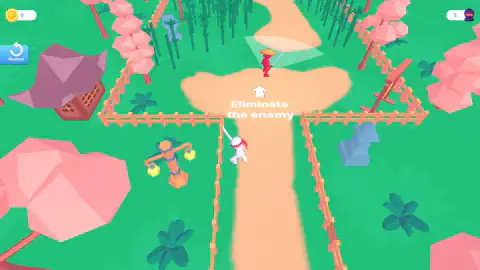
Taken by opening the game ourselves and letting it run — not supplied by the publisher, and not the same picture every other site shows.
How to play Ninja: Bamboo Assassin
- On the start screen, tap or click Tap to start. The camera leaves the ninja's back and lifts above the garden.
- Find the guard. He is the red figure up the path, and the arrow on the ground points at him.
- Look at the pale cone in front of him. It shows where he is facing.
- Move the ninja up the path and attack. The listing's page for the game gives the arrow keys for moving and the space bar for attacking; on a phone, swipes and a tap.
- If the round goes nowhere, press Restart in the top left corner. It puts you back on the start screen.
Tips from our session:
- Do not use WASD out of habit. We tapped and held the A key many times and the ninja did not answer to it. Enter did nothing either. Start with the arrow keys the platform lists.
- A single click is not an attack. We clicked the guard and the middle of the screen. Nothing happened.
- Watch the cone for a few seconds before you move. It was pointing up the path the first time we looked, to the right a little later and to the left after that. There are moments when it faces away from the way you come in.
- The fence has a gap. From the start screen it looks like a closed corridor. From above you can see the path runs through an opening into a wider clearing, and the guard stands in that clearing.
Controls
| Tap or click on the start screen | Begins the round from the "Tap to start" screen |
|---|---|
| Arrow keys | Move the ninja, according to the listing's page for the game; we did not press them |
| Space bar | Attack, according to the same page; we did not press it |
| Swipe and tap (phones) | Move and attack, according to the same page; not tried by us |
| Restart (blue button, top left) | Ends the round and returns to the start screen |
| A, Enter, a single click during play | Did nothing we could see in our session |
Features
- A guard whose gaze is drawn on the ground as a pale cone of light, and the cone turns
- A camera that sits behind the ninja before the round and lifts overhead once it starts
- One written order per round, Eliminate the enemy, with an arrow pointing at the target
- Two upgrade cards on the start screen, HP +1 and Speed +1, at 100 coins each
- Bonus, Quests and Shop buttons on the start screen
- A strip of four markers above the path with a masked face at its end
Game details
- Developer
- EndlessPath Games
- Release date
- September 2024
- Last updated
- June 29, 2026
- Added here
- March 2025
- Technology
- HTML5 (Unity WebGL)
- Platforms
- Browser (desktop, keyboard), Browser (mobile & tablet, touch)
- Classification
- Action
- Saved progress
- Saving, when available, is managed by this game. Mava cannot confirm your level.
FAQ
How do you play Ninja: Bamboo Assassin?
You tap the start screen and the camera rises above a garden path. Your white ninja stands at the bottom and a red guard in a straw hat stands further up, with the order Eliminate the enemy between you. A pale cone of light on the ground shows which way the guard is looking, and it turns.
What are the controls of Ninja: Bamboo Assassin?
The listing's page for the game lists the arrow keys to move and the space bar to attack on a computer, and swipes and taps on a phone. We did not press those keys ourselves. What we did press, the A key, Enter and single clicks on the screen, did nothing we could see.
What is the cone of light in front of the guard?
It is a pale wedge on the ground that starts at the guard's feet. In our session it pointed up the path, then to the right, then to the left, so it follows where he is looking. We read it as his field of view. We were never inside it, so we cannot say what happens if he sees you.
What do the HP and Speed cards do in Ninja: Bamboo Assassin?
They are two upgrades offered on the start screen, each marked +1 and each priced at 100 coins. We had 0 coins the whole session, so both price buttons stayed grey and we bought neither. We did not earn a coin and cannot say how fast they come.
How many levels does Ninja: Bamboo Assassin have?
We cannot give a total. The start screen shows a strip of four markers with the first one lit and a masked face at the end, which we read as four steps towards something bigger. We did not clear the first round, so we never saw the strip move.
Can you play Ninja: Bamboo Assassin on a phone?
It is listed for PC, Android and iOS, in landscape and portrait, with swipe and tap controls. We played on a desktop in a wide window and nothing was cut off. We did not try it on a phone ourselves.
Who made Ninja: Bamboo Assassin?
The game is credited to EndlessPath Games. It was published in September 2024 and last updated in June 2026.