



About Sword Play! Ninja Slice Runner
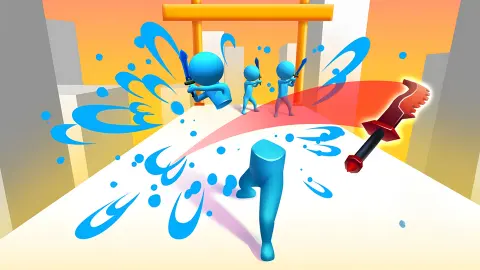
The title promises a ninja. In the levels we played there is none. What runs down the grey stone walkway at the bottom of the screen is a red sword, hilt first, and that sword is you. The enemies are blue stickmen, the scenery is a pale sky full of white tower blocks, and the whole job is to steer the blade through whatever stands between you and a chequered flag.
That small twist changes how you read the screen. You are not swinging at enemies from a distance; you are the sharp edge, so the question in every second is where to put yourself. Drag left or right and the sword slides across the path as it moves forward. Line it up with a stickman and he goes down in a spray of gold coins and yellow slash marks. When the game wants more than a pass, it writes CUT! across the screen and you swipe upwards.
We played Sword Play! Ninja Slice Runner on a desktop with a mouse for about four minutes. We cleared level 2 at the second attempt and then failed level 3 every time we tried it, about four times in a row. Everything below comes from those runs, and we say where they stop.
The game is credited to Azur Games. It was published in December 2024.
You are the blade, not the ninja
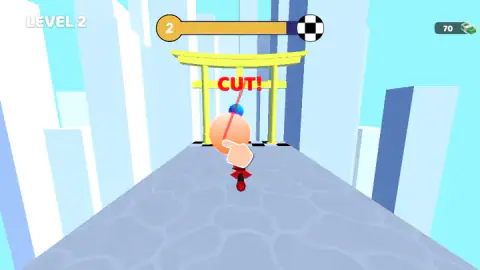
Most sword games give you a fighter and a button to swing with. Here the sword moves on its own, forward, all the time, and you only decide where it goes. That makes positioning the real skill. In our first picture of level 2, a blue stickman with a black sword waits in the middle of the path and two smaller ones stand on a raised grey block behind him. You cannot go around the block; you have to deal with what is on it.
The payoff is satisfying to watch. Later in the same level a giant blue stickman topples sideways as the sword passes through him, with gold coin bits and yellow arcs flying off in every direction. The progress bar at that moment was about three quarters full.
The Skins button on the side of the screen backs up the idea that the sword is the hero: its icon is another blade, a green one. We did not open it, so we cannot list what is inside or what it costs.
The yellow gate is a torii, and it is where you cut
Near the end of level 2 the walkway passes under a yellow gate with two posts and a double crossbar. That shape is a torii, the traditional Japanese gate that stands at the entrance of a Shinto shrine. It marks the passage from the everyday world into a sacred place, and real ones are usually left as bare wood or painted vermilion with a black top beam. The game's is bright yellow, which makes it easy to see against the white towers.
It is also where the game teaches its second move. As the sword approaches the gate, the word CUT! appears in red over it and a tutorial hand swipes upwards along a red line, through a blue figure standing behind. So the gate works as a signpost as well as scenery: when you see it, your next move is a swipe, not a steer.
That was the only torii we passed. The game's listing describes yellow gates at the end of several pathways, so expect to meet it again in later levels.
Level 3, the key and the tower
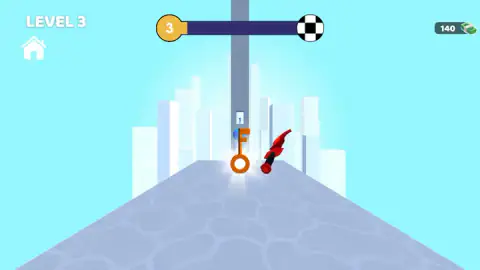
Level 3 opens with a glowing orange key standing upright in the middle of the walkway. Behind it, at the far end, rises a tall grey tower with a doorway, and inside the doorway stands a small blue stickman. The layout suggests that you collect the key and that it matters at the tower, but we never got that far. Every attempt ended on the FAILED! screen, with the sword lying on the ground near a large blue figure.
We do not know what the key opens, how many levels there are, or whether the tower is a boss. The listing talks about a long series of levels and waves of enemies; we can vouch for three.
Cash and what it buys
The counter in the top right corner shows banknotes, not coins. During level 2 it read 70. When we cleared the level it counted up through the break screen and stood at 140 for the next one, so finishing it was worth 70. The coins that fly out of enemies did not move the counter while we were still playing; the money arrived at the end.
We saw nothing to spend it on during the session. The Skins button is the likeliest place, and a Remove Ads button sits on the other side of the screen. We opened neither.
What we did not see
We did not clear level 3, open the Skins menu, try the keyboard beyond one key that got no response, or play on a phone. The game is built around a drag with a finger, as the tutorial hand shows, and Android and iOS is listed as well as PC, but our four minutes were with a mouse. The listing also says the game works offline; we did not test that.
Who it is for
Sword Play! Ninja Slice Runner suits younger players and anyone after short levels with one clear move to learn. The game's listing shows an E10+ rating: enemies are cut down and fly apart, but they are plain blue figures and there is no blood. A level takes well under a minute, and the tutorials explain each new idea on the screen as it appears.
If you want to fight duels or choose combos, this is not that game. You never block, parry or pick a weapon move. You steer, and occasionally you swipe.
More sword and slicing games
For another flying blade on a walkway, Slice & Soar sends a sword over the sea cutting fruit instead of stickmen. Epic Sword Battle! Fight in the Ragdoll Arena! gives you a whole fighter and real sword duels. For a quieter ninja, Ninja: Bamboo Assassin is about sneaking past a guard rather than running through him. The rest are under action games.
Screenshots
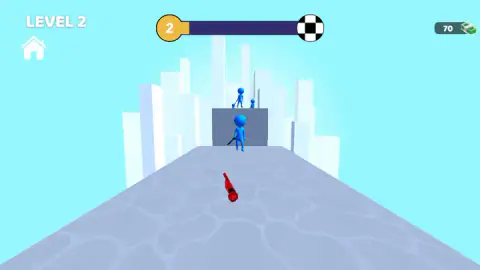
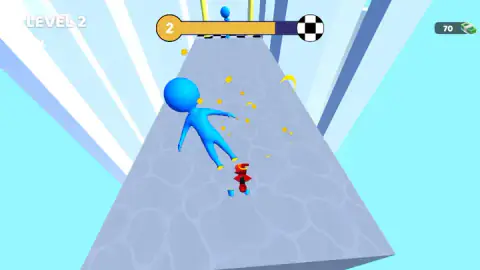
Taken by opening the game ourselves and letting it run — not supplied by the publisher, and not the same picture every other site shows.
How to play Sword Play! Ninja Slice Runner
- Start a level. The number sits in a gold circle at the top, joined to a chequered flag by a progress bar that fills as you go.
- Hold and drag left or right. The tutorial shows it with a hand and a two-way arrow under the words HOLD & DRAG TO MOVE.
- Steer the sword into the blue stickmen on the path. A clean hit knocks them flat and scatters coins.
- When CUT! appears, swipe upwards, the way the tutorial hand does.
- Reach the flag to see LEVEL COMPLETED and a NEXT button. If you fail, press Retry.
What our runs taught us:
- Click before you drag. After a break, a dark banner saying "Click to keep playing" can sit at the top of the screen. Until you click once, dragging does nothing, and we lost a few seconds more than once by not noticing it.
- Small drags. The walkway is narrow and the sword moves forward on its own, so a short sideways pull is enough. Big sweeps carry you past the target.
- Ignore SKIP. The FAILED! screen puts a large green SKIP button in the middle, with a video icon on it: it plays an advert. The free way back in is the smaller Retry text below it.
- Expect a pause between attempts. A new level or a retry can open on a dark full-screen advert slot with a Continue playing button. Press it and the level is waiting.
Controls
| Hold and drag left or right | Steers the sword across the walkway as it runs forward |
|---|---|
| Swipe upwards when CUT! appears | Makes the sword slash, as the tutorial hand shows at the yellow gate |
| Click the "Click to keep playing" banner | Wakes the game up after a break, before dragging works again |
| Retry | Restarts the level you failed, for free, from the FAILED! screen |
Features
- You play as the sword itself, a red blade that runs down a grey stone walkway, not as a ninja holding it
- Blue stickman enemies, some carrying swords, waiting on the path and on raised blocks
- A progress bar at the top that fills from the level number to a chequered flag
- A yellow torii gate where a CUT! prompt and a tutorial hand teach the upward slash
- A glowing orange key standing on the walkway in level 3, in front of a tall tower with a doorway
- Cash in banknotes that rose from 70 to 140 when we cleared level 2, and a Skins button whose icon is another sword
- A FAILED! screen with a free Retry under a larger SKIP button that plays an advert
Game details
- Developer
- Azur Games
- Release date
- December 2024
- Last updated
- August 10, 2026
- Added here
- April 2025
- Technology
- HTML5 (3D)
- Platforms
- Browser (desktop)
- Classification
- Action
- Saved progress
- Saving, when available, is managed by this game. Mava cannot confirm your level.
FAQ
How do you play Sword Play! Ninja Slice Runner?
You control a red sword that moves forward along a stone walkway. Hold and drag left or right to steer it, cut through the blue stickmen in your way, and swipe upwards when the word CUT! appears. Reach the chequered flag at the end of the progress bar to clear the level.
Do you play as a ninja in Sword Play! Ninja Slice Runner?
Not in the levels we played. There is no ninja on screen; you are the blade. The Skins button also shows a sword, which suggests that what you unlock are new blades rather than new characters.
What does CUT! mean in Sword Play! Ninja Slice Runner?
It is the game's cue to slash. In level 2 it appeared at a yellow gate, with a tutorial hand swiping upwards across the screen. Copy that gesture with the mouse or your finger.
How do you skip a level in Sword Play! Ninja Slice Runner?
The FAILED! screen offers a big green SKIP button, but it carries a video icon, which means it plays an advert. The free option is the small Retry text underneath it, which restarts the same level. We always used Retry.
What is the key for in Sword Play! Ninja Slice Runner?
In level 3 a glowing orange key stands on the walkway, in front of a tall tower with a doorway at the far end. We failed level 3 every time before reaching the tower, so we cannot say what the key opens.
Why does Sword Play! Ninja Slice Runner say "Click to keep playing"?
After a break between levels or after a retry, a dark banner with those words can sit at the top of the screen, and dragging does nothing until you click once. One click and the level carries on.
How hard is Sword Play! Ninja Slice Runner?
The first levels are short and come with on-screen tutorials. We cleared level 2 at the second attempt, then failed level 3 about four times in a row in a session of around four minutes.
Who made Sword Play! Ninja Slice Runner?
The game's listing credits Azur Games. It was published in December 2024, last updated in August 2026.