

About Resize Stickman
Most obstacle courses change the obstacle. A gap narrows, a gate drops, a saw swings into the path, and the game asks whether you can time it. Resize Stickman never touches the wall. The blocks are where they are, the hole in the middle of them is the size it is, and it will still be that size in three seconds. The only variable in the whole game is you.
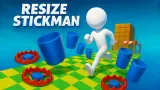
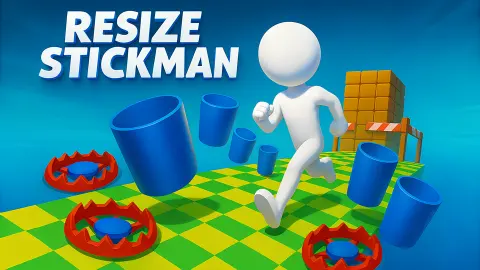
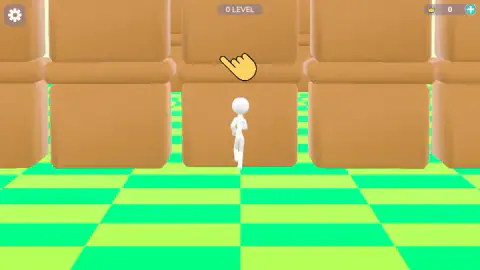
So the question each wall asks is not whether you can get through it. It is whether you currently fit. A white stick figure walks a bright green checkerboard towards a stack of rounded tan cubes with a space left in it, and somewhere between the moment you see the space and the moment you reach it, you have to decide what shape to be. Too small and you stay on the wrong side of the block in front. Too big and your shoulders are in the ceiling.
Everything else has been stripped out. There is no joystick, no arrow keys, no jump button, nothing drawn on the play screen you can press. Three things sit on the edges of the picture — a settings cog in one corner, the level number in the middle, a crown counter in the other corner — and not one of them is a control. You drag up or down on the screen and the stickman changes size. That is the game.
It is credited to SoloAscenderGames. The listing gives November 2025 for the release and August 2026 for the most recent update, and only ever as months, never as days.
Our own session ran about four minutes. We cleared the first level, walked into the second, and got stuck there. That is not very far, and we would rather tell you exactly how far than round it up, because the first four minutes are the part you are about to have.
The camera grows with you, and that is the real difficulty
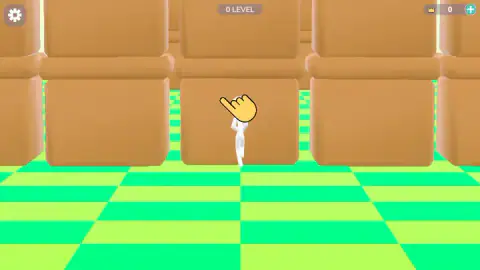
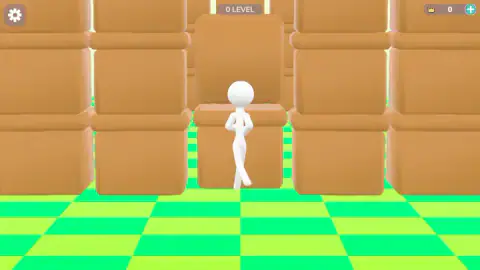
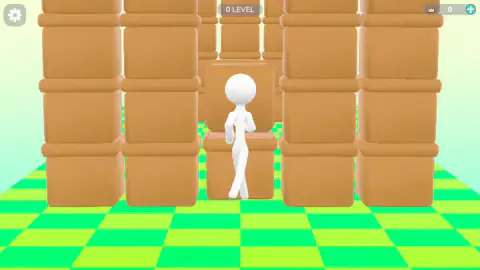
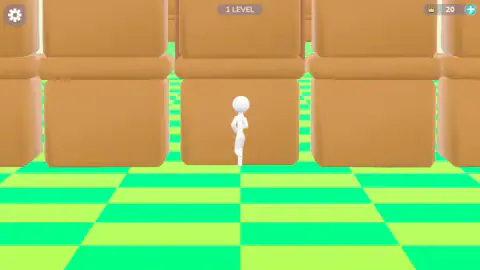
Put our first picture and our fourth side by side and the stickman looks a bit bigger in the second. Measure him against the floor he is standing on and he is about three times the figure he was.
The reason the two readings disagree is that the camera is moving as well. As the character grows the view pulls back to keep him in frame, so the whole world is redrawn smaller at exactly the moment he is getting larger. The two changes work against each other on screen. In our first capture the checkerboard squares along the bottom of the picture are twice the width they are in the fourth. He grew; the floor shrank; the picture stayed calm.
This is good craft and a genuine trap at the same time. It is good craft because a stickman three times the size, drawn at the original zoom, would fill the screen and you would not be able to see the wall you are aiming at. It is a trap because your eye naturally measures the character against the frame, and the frame is the one thing that keeps adjusting itself.
The fix is a habit, and it is the single most useful thing on this page: stop looking at him and look at the gap. The wall is drawn at the same scale as the floor, so the relationship between the opening and the squares underneath it is honest. Once you are reading the hole rather than the hero, the game becomes a straightforward sequence of fit-or-not decisions, which is what it was all along.
Level zero, a finish line and twenty crowns
The header calls the first level 0 LEVEL, and so does the main menu before you have played anything at all. Counting from zero is a small thing, but it tells you where the game thinks you are: the first course is the tutorial, and it is the one with the cartoon hand hovering over the character.
A level ends properly, with a line. The last thing before the result is a strip of black and white squares laid across the ground, a wooden pole and a pair of dark flags — the finish of a running race, dropped into a world made of building blocks. It is the only part of the scenery in our whole session that was not a tan cube or a green square.
Cross it and the crown counter in the corner moves. Ours went from zero to twenty on the first level, and the header flipped to 1 LEVEL. There is a shop and an inventory on the menu, and a round plus button beside the counter, so the crowns clearly buy something; we never opened any of the three, so that is as much as we are prepared to say about them.
The last thing the second level told us is the one that matters for how you play. It started us small. Whatever size we had finished the previous course as — and we finished it as the largest we ever managed — the new one opened with the stickman back at his original height and the camera zoomed back in to match. Nothing carries over. Every wall is a fresh question about what shape you should be, and the game asks it again from scratch each time.
If the one-button obstacle course is what you came for
Nothing else on our shelf resizes its hero, but a few games are built the same way — a single input, a course that keeps coming, and a figure you do not steer so much as adjust. +1 Speed: Escape Prison is the closest in spirit: an obstacle run where the thing you are managing is a number that keeps climbing. Stickboy Epic Swordsman keeps the stick figure and swaps the fitting problem for a fighting one, and Arrow Fever swaps it for an aiming one. If you would rather be the wall than the runner, Playground Ragdoll Sandbox hands you the whole box of physics and no objective at all.
SoloAscenderGames has two more titles on the same platform, an idle game and a timed drone run, neither of which is on our shelf and neither of which we have played, so take that as a signpost and nothing firmer. The rest of the shelf is in action games.
Screenshots
How to play Resize Stickman
- Start from the main menu, where a blue PLAY button sits in the middle and SHOP and INVENTORY sit along the bottom. The level counter is already on screen here, reading zero.
- Watch the wall ahead of you, not the stickman. The gap in it is the whole instruction: a low slot means small, a tall opening means big.
- Drag up or down on the screen to change size. The game's own instructions say up grows him and down shrinks him; that is their word rather than ours, but one vertical drag is the whole of the input either way.
- Get through the course to the chequered strip on the ground with the pole and the black flags. That is the finish line, and reaching it ends the level.
What we only learned by being there:
- Judge the hole, not yourself. This is the advice that actually matters and it is counterintuitive, because you cannot trust how big the character looks. The frame zooms out as he grows, so he always looks roughly the same. Look at the space you have to go through instead.
- The floor is the measuring stick. The checkerboard squares are all the same size in the world, so whenever you want to know how big you have become, compare yourself to one square. It is the only thing on screen that does not lie to you.
- Nothing you do to the wall will help. We spent most of a minute trying to shove blocks around, drag them down, pull them aside. They do not move. Not once, in anything we played, did a single cube shift.
- Being stuck is quiet. There is no buzzer and no failure card when you wedge yourself in the wrong shape. The screen simply stops changing, which is easy to mistake for the game having frozen. If nothing is happening, it is not broken — you are the wrong size.
Controls
| Drag or swipe up and down on the screen | Changes the size of the stickman. This is the only input we found, and the game shows it with a cartoon hand floating over the character at the start of the first level |
|---|---|
| Swipe up / swipe down | The listing's own instructions say up grows him and down shrinks him. We are passing that on as theirs, not ours: our drags went both ways, he changed size several times, and we could not pair a direction to a result |
| Anything that moves him forward | There is nothing. No joystick, no arrows, no jump button, nothing on screen but the cog, the level number and the crown counter |
| PLAY, on the main menu | Starts the run. The menu also carries SHOP, INVENTORY, a gift box with a red badge on it and a medal |
| SHOP, INVENTORY, the gift, the medal, the cog and the teal plus button | Unconfirmed. All six are on screen and we pressed none of them, so we are not going to tell you what is behind them |
| Keyboard | We played the whole session with a pointer. We are not claiming the keyboard does nothing, only that we did not test it properly |
Features
- One idea, carried the whole way: the gap in the wall never changes, so the only thing you can change is how big you are
- The camera pulls back as the stickman grows, which keeps him on screen but hides how much he has grown — the checkerboard floor is the only honest measure
- Between the smallest and the largest we reached, he is about three times the figure he started as, measured against those floor squares
- Levels are numbered from zero: the header reads 0 LEVEL on the first one and the main menu reads 0 LEVEL before you have played anything
- A level ends at a chequered strip on the ground with a wooden pole and black flags, the finish line of a running race
- Finishing the first level moved the crown counter in the top right from 0 to 20, and the next level started us small again
- Three things on the play screen and none of them is a control: a settings cog, the level number and the crown counter
Game details
- Developer
- SoloAscenderGames
- Release date
- November 2025
- Last updated
- October 24, 2026
- Added here
- September 2025
- Technology
- HTML5
- Platforms
- Browser (desktop), Browser (mobile & tablet, touch)
- Classification
- Arcade
- Saved progress
- Saving, when available, is managed by this game. Mava cannot confirm your level.
FAQ
What kind of game is Resize Stickman?
It is a free browser obstacle course in 3D. A white stick figure makes his way through walls of rounded tan blocks on a bright green checkerboard floor, and the gaps in those walls are different shapes and heights. Your one ability is to change how big he is, so the game is a run of fitting problems rather than a test of aim or reflex.
How do you play Resize Stickman?
You drag or swipe up and down on the screen and the stickman changes size. That is the whole of the input, and the game teaches it with a cartoon hand that floats over him at the start of the first level. There is nothing on screen to steer with, so your only decision at each wall is how big to be when you get there.
Which way do you swipe to grow in Resize Stickman?
The listing's own instructions say swipe up to grow and swipe down to shrink, and we are passing that on as their word rather than ours. In our own session the drags went in both directions and the stickman changed size more than once, but we could not match a direction to a result well enough to state it as a finding. Either way, one vertical drag is all the game asks of you.
Why does Resize Stickman look like it is zooming out?
Because it is. The view pulls back as the character grows, so that a big stickman still fits in the frame. The side effect is that he looks as though he has barely changed, when against the world he has changed a lot. The squares of the checkerboard floor are the thing to watch: they shrink while he grows, and the difference between them is his real size.
How many levels does Resize Stickman have?
We do not know, and we would rather say so than guess. We finished the first one and got stuck part way through the second, all inside about four minutes, so nothing on this page describes anything past the second level. What we can tell you is that the counting starts at zero: the first level is labelled 0 LEVEL.
What are the crowns in Resize Stickman for?
They are the game's currency and they sit in a pill in the top right corner, next to a round button with a plus sign. Finishing the first level took the counter from zero to twenty. The main menu has a SHOP and an INVENTORY, which is presumably where they go, but we never opened either one, so we are not going to describe what is in them.
Does your size carry over between levels in Resize Stickman?
No. We finished the first level as the biggest version of the character we had reached all session, and the second level opened with him back at his original small size, in a frame zoomed back in to match. Each level starts you from the same place, so nothing you did to your size on the last one helps you here.
Who made Resize Stickman and when did it come out?
It is credited to SoloAscenderGames, a studio with two other games on the same platform. The listing gives November 2025 for the release and August 2026 for the most recent update. Only the months are printed anywhere we could find, never a day, which is why this page does not claim an exact date.