


About StickerBall
Collecting games normally hand you the collectible. You tap the thing, the thing is yours, a number goes up. StickerBall will not let you near one. It gives you a single ring, parks it on a closed arena drawn from directly above, and leaves the stickers lying on the floor where your finger cannot reach them. Everything you ever collect, you collect by making that ring go there.
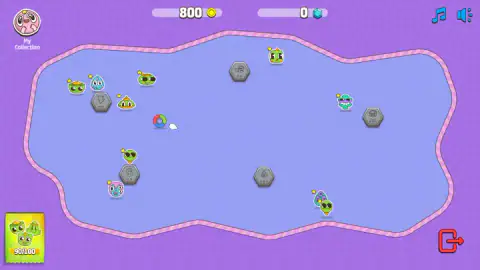
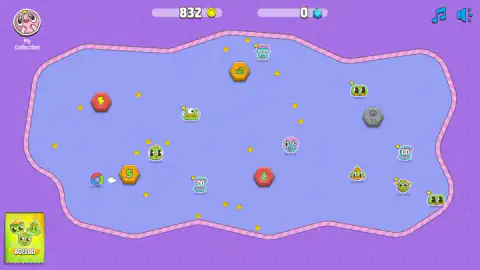
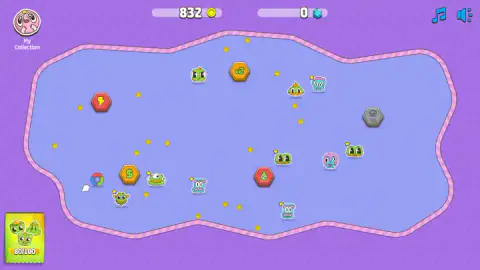
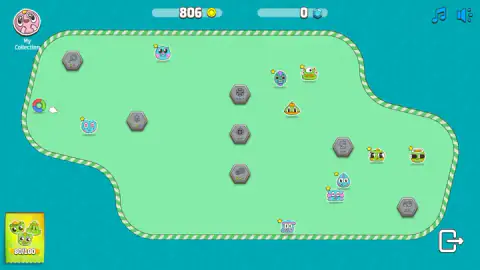
What you are pushing is not really a ball. It is a hollow disc quartered in red, green and blue, and in two of our captures there were two of them loose on the field at once. The floor around it carries three kinds of thing: creature stickers with oversized googly eyes, loose gold coins — not all worth the same, each one stamped with its own value — and hexagonal tiles that sit grey and dead until something wakes them up. You aim, you release, and after that you are a spectator.
What turns that into a game is the arithmetic along the top and in the corners. Coins arrive in lumps, not in a trickle. Twice in our second session a banner slid diagonally across the field naming a multiplier and a payout — Combo ×4.25, +242 coins once, Combo ×3.5, +129 coins later. A single careful pickup is worth three or four. One good stroke is worth two hundred. That ratio is the whole strategy, and it is written on the screen for anyone who stops to read it.
StickerBall is by FoldPLay. It was published in June 2025. We have now played it twice. The first session produced almost nothing and we said so; the second produced this page, and the reason the first one failed is still the most useful sentence here.
The card in the corner is not your album
This is the thing we got wrong the first time round.
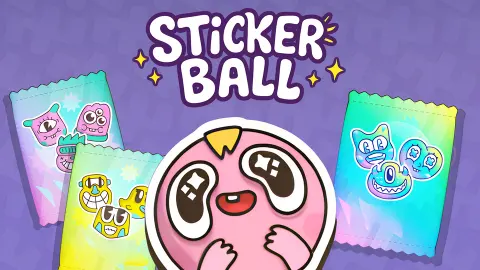
The yellow card in the bottom-left is a foil sticker packet, with three creatures on the front and a fraction on an orange band. We assumed it was a progress bar. It is not, and the giveaway is that the number only ever goes down, in steps of ten: ninety, eighty, seventy, sixty, fifty across our two sessions. That is a supply you are spending, not a score you are building. Each time it drops, a fresh scatter of stickers appears on the floor.
The real album is behind the round badge at the top left, and it is far larger than the card suggests. Open it and you get three tabs — Stickers, Holo and Balls — and under Stickers a grid of 180 slots arranged in four coloured bands. We counted them one by one: 72 Common, 54 Rare, 36 Epic, 18 Legendary. Four, three, two, one. Everything you do not own shows as a flat silhouette, so the shape of the hill is visible from the first time you open the thing.
We held seventeen. Fourteen Common, three Rare, and two entire bands with nothing in them at all. The Holo and Balls tabs we never opened — though Balls at least explains the object you have been pushing around, which turns out to be a collectible in its own right.
Why the last ten stickers cost more than the first ninety
Put a fraction on screen and you have invoked one of the oldest results in probability, one that anyone who ever collected football stickers knows in their stomach without having seen the arithmetic.
Suppose an album has a hundred stickers and every one you are handed is equally likely to be any of them. At the start everything is new, because you cannot duplicate what you do not own. As the album fills the odds turn, and by the time one slot is empty almost everything you are handed is waste. The exact answer is harsher than it feels. Filling that album takes about 520 stickers on average, and the first ninety slots account for only 226 of them. The last ten cost the other 293, and the final empty space, on its own, averages a hundred stickers before something fills it.
That is why a game built around an album never runs out of pull, and it is why StickerBall sorts its 180 slots into rarity bands instead of one long list. The bands make the curve legible. You can fill Common by accident; you will not fill Legendary by accident, and the eighteen gold silhouettes sitting at the bottom of the screen are there to tell you so on day one.
The grey tiles are charging, not sleeping
Look closely at a grey hexagon and there is a row of small pips under the icon, some of them lit yellow. One tile showed three pips with two filled. Another showed five with one. The coloured tiles — the magnet, the lightning bolt, the pointing hand, the pair of yellow balls, the snail, the ghost — carry no pips at all.
So the tiles are not scattered rewards waiting to be picked up. They are meters. Something you do on the field feeds them, and when a meter fills the tile turns colour and goes live. That reframes the arena completely: it is not a floor of loot, it is a floor of part-built machines, and a stroke that runs past a tile sitting on its last pip is worth more than one that runs past a tile on its first.
We never collected one, so we will not tell you what a ghost or a magnet does when it fires. What we can tell you is that a grey tile is not a dud, and that the pips are the only thing on screen telling you which ones are nearly ready.
What we still did not see
We never saw a turn, a level or a session end. We never watched a stroke travel — we saw where the ring started and where it finished, never the line between — so we cannot tell you whether it bounces off that dashed rim or stops dead at it. We do not know what fills a tile's pips, what any tile does when it fires, what coins buy, or what is behind the Holo and Balls tabs. Beyond the three arenas we have seen, we have no idea how many there are.
And the sentence that cost us an entire session the first time: the stickers are not buttons and the keyboard is not connected. If you have opened StickerBall and sat there clicking at a sticker wondering why the game appears to be broken, it is not. Pull back from the ring instead.
More balls, and the studio's other game
Pocket Universe is FoldPLay's only other game on the platform, and it is the opposite temperament: gathering wood and stone to open up new land, with nothing to aim. Bounce Up! is the closest mechanical cousin we have — you launch a ball into a field and then surrender control, which is the same bargain StickerBall asks you to make. Balls: Ricochet! keeps the enclosed arena and the rebounding, and plays it straight. And if it was the word sticker that brought you here rather than the ball, Sticker Art Book Puzzle is about placing them rather than chasing them. The rest are in arcade games.
Screenshots
How to play StickerBall
- Pull back from the ring and let go. This is a cue stroke, not a button press. It is the only input that has ever moved anything for us, in either session.
- Do not click on the stickers. This is the trap. Our coin counter sat on the same number across nine consecutive captures while we clicked directly on sticker after sticker. The two pull-and-release strokes that came next took it from 946 to 1306.
- Forget the keyboard. We held each arrow key, and A, for a full second. Nothing moved and nothing sounded. The pointer is the only control.
- Aim across the crowd, not at a target. There is no steering once the ring is moving, so the line you choose is the whole decision, and combos pay for length rather than accuracy.
- Use the badge, not the card. The round badge at the top left opens the album; the red cross at its top right closes it and drops you back on the field exactly where you were. The arrow in the bottom-right corner of the field is a door out.
What two sessions taught us:
- If nothing is happening, pull slower and further. A tap registers as nothing here. The difference between a tap and a deliberate drag is the difference between playing this game and staring at it.
- The grey tiles are not broken. They are charging. More on that below.
- The field is not the same twice. We have now seen three arenas: a lavender blob on purple, a green one on teal, and a turquoise one shaped like a bone, pinched at the waist. The outline changes, not just the colour.
- Gems are not what an ordinary turn pays. That counter sat on zero for every second of both sessions.
- Nothing ends. No defeat sound, no reward jingle, no results screen — not in four minutes and not in ten.
Controls
| Pull back from the ring and release | The shot, and the only input that has ever moved anything for us. It is a cue stroke, not a button press |
|---|---|
| Short click | Nothing. Our coin counter sat on the same number across nine captures in a row while we clicked sticker after sticker |
| Arrow keys and A | Nothing. Each was held for a full second across two sessions, with no response on screen and no sound |
| My Collection, top left | Opens the album: three tabs, four rarity bands, 180 sticker slots |
| Red cross, top right of the album | Closes the album and puts you back on the field exactly where you were |
| Music note and speaker, top right | Two separate toggles, one for the music and one for the sound effects |
| Arrow icon, bottom right of the field | Leaves the field. It is a door, not a next-level button, so do not reach for it mid-turn |
Features
- A closed arena drawn from directly above, bounded by a striped dashed rim like the edge of a cut-out sticker
- One ring and no steering: you aim, you release, and from then on you only watch
- An album of 180 sticker slots split into four rarity bands — 72 Common, 54 Rare, 36 Epic, 18 Legendary
- Hexagonal tiles that sit grey and inert until a row of pips underneath them fills, then turn colour
- Combo payouts announced on screen with their multiplier: ours reached ×4.25 for 242 coins in one stroke
- Loose coins that are not all worth the same, each one labelled with its own value
- At least three different arenas, which change outline and not just colour
- Made by FoldPLay
Game details
- Developer
- FoldPLay
- Release date
- June 2025
- Last updated
- August 10, 2026
- Added here
- June 2025
- Technology
- HTML5 (Defold)
- Platforms
- Browser (desktop), Browser (mobile & tablet, touch)
- Classification
- Arcade
- Saved progress
- Saving, when available, is managed by this game. Mava cannot confirm your level.
FAQ
What is StickerBall?
It is a free browser collecting game in which you never touch a sticker directly. The stickers lie on the floor of a closed arena seen from above, and the only thing you control is a small quartered ring at the edge of it. You pull the ring back, let go, and it sweeps up whatever it crosses — stickers, coins and hexagonal tiles — while an album behind a badge in the corner fills up slot by slot.
How do you launch the ball in StickerBall?
You pull back from it and let go, the way you would line up a pool cue. That is the only input that has moved anything for us across two sessions. In the second one our coin counter sat on 946 through nine captures in a row of clicking directly on stickers, and then climbed to 1306 across the two pull-and-release strokes that came next. A short click does nothing at all.
What is the number in the corner of the screen in StickerBall?
The yellow card in the bottom-left is a foil sticker packet, not your album. Its fraction only ever falls, and it falls in tens: we watched it go ninety, eighty, seventy, sixty, fifty across two sessions. Treat it as a supply you are spending rather than a score you are building. The real album is behind the My Collection badge at the top left.
How many stickers are there in StickerBall?
The Stickers tab of the album holds 180 slots, laid out in four coloured bands by rarity. We counted 72 Common, 54 Rare, 36 Epic and 18 Legendary — a clean four, three, two, one ladder. By the end of our session we owned seventeen of them: fourteen Common, three Rare and nothing at all in the two rarest bands.
What are the grey hexagons in StickerBall?
They are the same tiles as the coloured ones, but not ready yet. Under the icon on a grey tile sits a short row of pips that fill in yellow one at a time; a tile showing three pips with two lit is two-thirds of the way there. The coloured tiles carry no pips. We never collected one, so we will not tell you what a magnet, a ghost or a lightning bolt actually does.
How do combos work in StickerBall?
A banner slides across the field naming a multiplier and a payout. We read two of them directly off our own captures: a ×4.25 worth 242 coins, and a ×3.5 worth 129. Since one stroke can earn several hundred coins and a careful single pickup earns three or four, the shot worth taking is the long one that crosses the most things, not the accurate one that reaches a particular sticker.
Who made StickerBall and when?
FoldPLay, published in June 2025 and revised in August 2026. The studio's other game is Pocket Universe, a resource-gathering game that could hardly be less alike.
Can you play StickerBall on a phone, and does it cost anything?
It is free, and it is listed as playing on desktop, mobile and tablet. A pull-and-release stroke is a gesture that suits a thumb better than a mouse, so in principle it should travel well. Both our sessions were on a desktop, so we cannot tell you how precise the aim feels on a touchscreen.