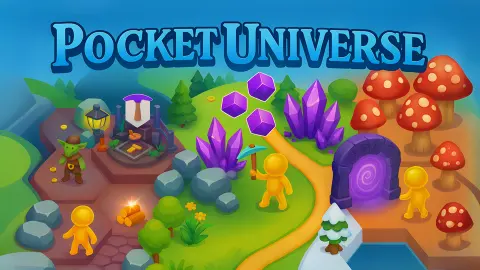






About Pocket Universe
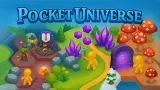
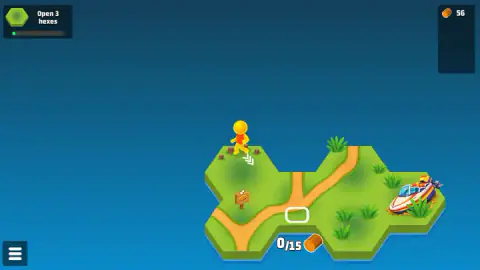
Most building games start you with a menu of things to build. Pocket Universe starts you with five hexagons of grass floating in an empty blue sea, a little grove of trees, a signpost and a speedboat. There is no build menu at all. There is a white outline drawn on the coast, and a price written under it.
That outline is the whole idea. You walk your small yellow figure to the trees, chop them, carry the wood to the outline, and the outline turns into land. A new hexagon slots onto the island, a new outline appears somewhere else, and the price goes up. The island grows tile by tile, and every tile is one you paid for.
The game is by FoldPlay, a small developer whose only other game is the sticker-collecting StickerBall. Pocket Universe was published in September 2025 and last updated in June 2026.
We played the first island for about ten minutes, opened one new tile and had the wood for the next. This page sticks to what we saw on screen.
Five hexes, a grove and a price tag
The opening island looks almost empty, and that is on purpose. There is one source of wood, one signpost and one place to spend it. You cannot get lost because there is nowhere to go yet.
The grove is the engine. Walk up to it and your character starts chopping. Logs burst out of the trees and stream towards the counter, which climbed from 0 to 2 while we watched the first one fall. By the time the stumps were bare, we had 56.
Then the grove came back. Not long after we had stripped it to stumps, all the trees were standing again. On this first island, wood does not run out. Time is the only cost: the question is never whether you can afford the next tile, but how long you are willing to stand by the trees.
That is what makes the outlines matter. The first one asked for 15 wood. We had plenty, walked onto it, and a card came up: CONGRATULATIONS, New tile opened, with the new hexagon drawn on it under a red NEW ribbon.
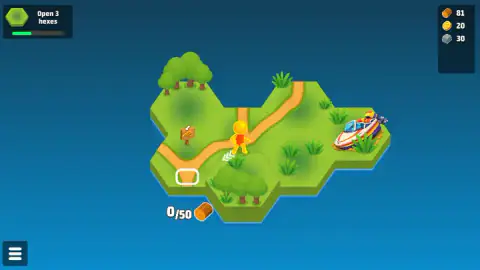
The bonus was 20 coins, 30 stone and 40 wood. Coins and stone had not existed for us until then.
The arithmetic tells you how the game is tuned. We paid 15 wood, got 40 back, and ended with 81. The first purchase is a gift. It also hands you two new materials before you know what they are for.
Why the land comes in hexagons
There is a reason so many tile-based games use hexagons rather than squares, and it shows up the moment your island starts to grow.
A square on a grid touches four neighbours along a full side and four more only at a corner. A hexagon touches six, and every one of them shares a whole edge, with its centre at the same distance as the others. Amit Patel's widely used guide to hex grids at Red Blob Games makes this point first: on a hex grid, every neighbour is a real neighbour.
In Pocket Universe that is why any new tile joins the island cleanly. Wherever the outline sits on the coast, the new hexagon fits against a full side of the land already there, so the dirt paths can run straight on into it. Our new tile slotted in under the character, with a second grove on it, and the island simply got wider.
Bees build in hexagons for a related reason. Of all the ways to split a flat surface into cells of equal size, the hexagon uses the least wall for the space it encloses. Mathematicians had suspected this for centuries; Thomas Hales finally proved it in 1999. A game about growing a world from almost nothing is built from the most economical tile there is.
The next two slots ask for more
After the first tile, the task card switched to Open 3 hexes and its green bar filled about a third of the way. Two new price tags appeared.
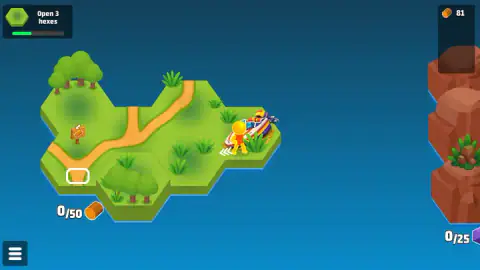
The first was on the island itself, at the bottom left corner: 50 wood, more than three times the first one. With the grove regrowing, that is a matter of a few more trips to the trees.
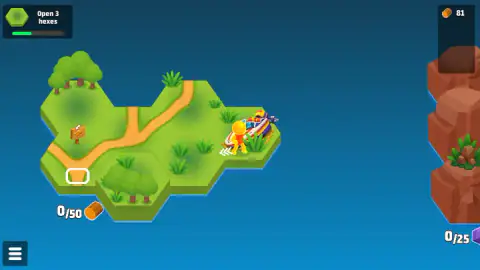
The second was not on our island at all. When the view slid to the right, a cliff of red rock rose out of the sea, with a bush growing on top and an outline in front of it that read 0/25 next to a purple crystal. We had no crystals, and nothing on our island looked like it would give us any. That outline is the first sign that the world changes material as it grows, from grass and timber to rock and crystal.
The game's own description promises more: tool upgrades, colder and hotter lands, and enemies guarding new ground. We saw none of that on the first island. We are telling you what is there, not what is promised.
How far we got
Our session lasted just over ten minutes. We cleared the grove, opened one tile, earned the bonus, and stood with 81 wood. Then we spent most of the remaining time near the speedboat on the far side of the island, never reaching the slot in the other corner.
We also reloaded the game twice. Both times it came back where we had left it: same island, same new tile, same 81 wood, same slot waiting. The coin and stone lines were missing from the panel after the reload, and we cannot tell you whether they were saved and hidden or lost.
So we have not seen a second new tile, a crystal, a tool upgrade, an enemy or what the speedboat is for. The menu button in the bottom left stayed shut.
More games like Pocket Universe
StickerBall is FoldPlay's other game, a ball game about collecting stickers. For more resource hunting, King Dungeon has you mining your way through a cave, and Deep Drill turns digging into a game that keeps paying out while you watch. Animal Evolution Simulator is another slow-growth adventure, from worm to predator. The rest are under adventure games.
Screenshots
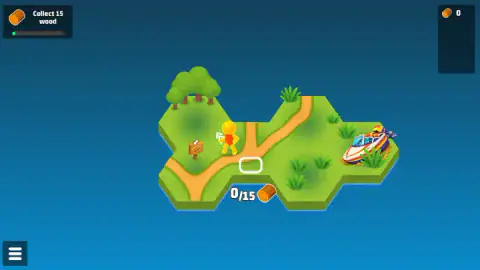
Taken by opening the game ourselves and letting it run — not supplied by the publisher, and not the same picture every other site shows.
How to play Pocket Universe
- Walk with the arrow keys. On a phone, the game's instructions say you use an on-screen joystick.
- Stand next to a tree. Your character chops it without being told, and the logs fly into the counter at the top right.
- Read the task card in the top left. Ours said Collect 15 wood, then Open 3 hexes.
- Find the white outline on the coast. The number under it, such as 0/15 next to a log, is what that tile costs.
- Walk onto the outline with enough wood. The tile rises, a congratulations card hands you a bonus, and the next outline appears.
Tips from our run:
- Clear the whole grove before you pay. The first trees gave us 56 wood, almost four times the price of the first tile, and they stood up again within a quarter of a minute.
- Do not worry about overspending. The first tile cost 15 wood and its bonus gave back 40, so we came out of the deal richer than we went in.
- The next outline moves. After our first tile, the new slot was on the opposite corner of the island. We lost most of the session standing by the boat with 81 wood in hand, when 50 was all the next slot needed.
- Close the bonus card, then look around. After it, a screen said it had skipped an ad that time. One click on Continue playing took us straight back to the island.
Controls
| Arrow keys | Walk the character along the island (what we used) |
|---|---|
| On-screen joystick | Moves the character on touch screens, according to the game's instructions |
| Stand next to a tree | Chops it on its own; the logs fly into your stock |
| Walk onto an outlined slot | Pays the wood on its label and opens a new hexagon of land |
Features
- You start on an island of five grass hexagons with a small grove, a signpost and a speedboat moored on the far side
- There is no chop button; standing next to the trees is enough, and the logs fly into the counter on their own
- Each white outline on the coast is a tile for sale, with its price in wood written under it
- The first new tile costs 15 wood and pays back a bonus of 20 coins, 30 stone and 40 wood
- The grove grows back after you clear it, so wood never runs out on the first island
- The second slot costs 50 wood, and a third slot on a red rock island further out asks for 25 crystals
- Your island and your wood are still there after a reload
Game details
- Developer
- FoldPlay
- Release date
- September 2025
- Last updated
- June 17, 2026
- Added here
- July 2025
- Technology
- HTML5 (3D, isometric)
- Platforms
- Browser (desktop, keyboard), Browser (mobile & tablet, touch)
- Saved progress
- Saving, when available, is managed by this game. Mava cannot confirm your level.
FAQ
What is the Pocket Universe game?
Pocket Universe is a free browser game by FoldPlay about growing a tiny island one hexagon at a time. You walk a small yellow figure around, chop trees for wood, and spend that wood on outlined slots at the edge of the island. Each slot you pay for becomes a new tile of land.
How do you collect wood in Pocket Universe?
Walk up to a tree and stand next to it. There is no button to press: the character chops on its own and the logs fly into the wood counter in the top right corner. In our game the first grove gave us 56 wood, and it grew back shortly after.
How do you open a new hex in Pocket Universe?
Look for the white outline at the edge of the island. The number under it is its price, for example 0/15 with a log icon means 15 wood. Walk onto the outline with enough wood and the tile rises, followed by a congratulations card with a bonus.
How much does each tile cost in Pocket Universe?
The first tile costs 15 wood. The next one on the starting island asks for 50 wood, and a slot on the red rock island beside it asks for 25 crystals instead. The prices we saw went up with each tile, and the material changes as you reach new ground.
What is the bonus after opening a tile?
After our first new tile, a card reading CONGRATULATIONS and New tile opened gave us 20 coins, 30 stone and 40 wood. The wood bonus was bigger than the price of the tile, so opening it left us with more wood than before.
Does Pocket Universe save your progress?
It kept ours. We reloaded the game twice during our session, and both times the island came back with the new tile, our 81 wood and the next slot still waiting. The coin and stone lines were not shown in the panel after the reload, so we cannot confirm those were kept.
What are the missions in Pocket Universe?
A card in the top left gives you one task at a time. Ours started with Collect 15 wood, then changed to Open 3 hexes, with a green bar that filled about a third of the way after our first tile. Completing the task is what moves you on to the next one.
Can you play Pocket Universe on a phone?
It is listed for phones and tablets, and the game's own instructions say you move with an on-screen joystick. We played it on a computer, walking with the arrow keys, and did not test it on a touch screen ourselves.